

Video Schema Requirements for Rich Results
- January 20, 2025
- Schema and Structured Data, Technical SEO
AI Summary
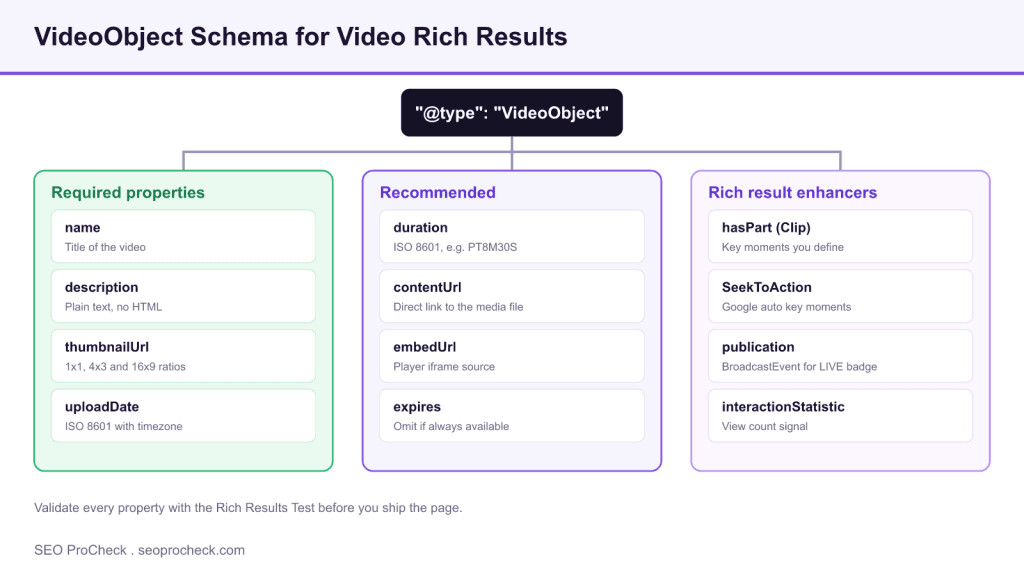
To earn a video rich result, Google needs VideoObject markup with four required properties present and accurate: name, description, thumbnailUrl, and uploadDate. Recommended properties like duration, contentUrl, and embedUrl improve eligibility, while hasPart clips, SeekToAction key moments, and BroadcastEvent unlock enhanced treatments such as chapter links and the LIVE badge.
- Required: name, description, thumbnailUrl (1x1, 4x3, 16x9), and uploadDate in ISO 8601.
- thumbnailUrl images must be crawlable, at least 60x30 pixels, and in a supported format.
- Key moments come from either manual Clip markup with hasPart or automatic SeekToAction.
- Validate with the Rich Results Test and confirm indexing in the Search Console Video enhancement report.
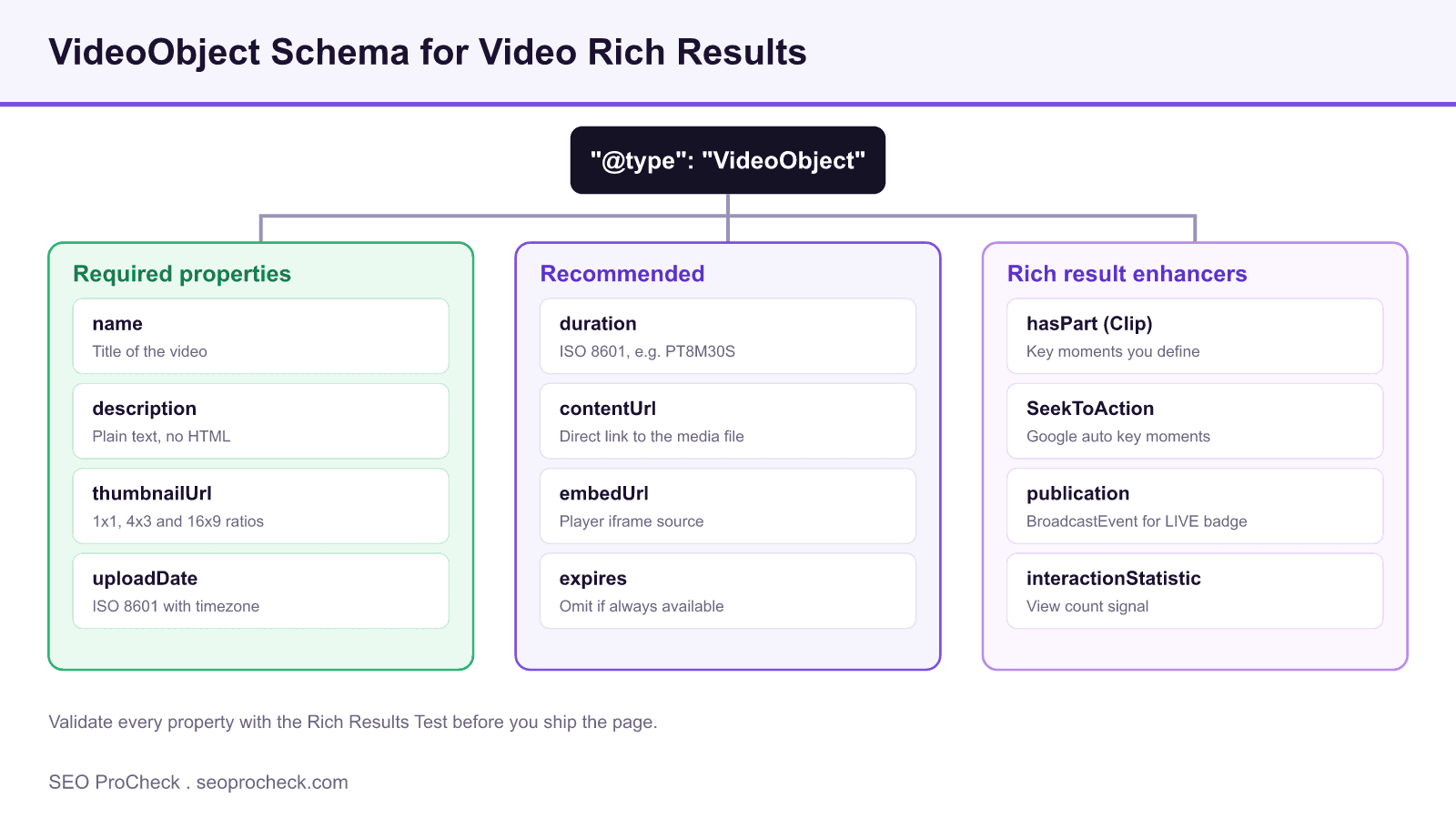
What a video rich result actually requires
A video rich result is the thumbnail, duration, and upload date that Google attaches to a search listing, plus the key moments carousel that can appear beneath it. None of that renders unless Google finds valid VideoObject structured data on the page that hosts the video. The markup does not replace the video file or a visible player; it describes the video so the crawler can associate the page with a specific piece of media. Get the four required properties right first, then layer on the extras that unlock richer treatments.
The four properties Google treats as mandatory are name, description, thumbnailUrl, and uploadDate. Miss any one and the item is ineligible, which the Rich Results Test flags as a required field error rather than a warning. Everything else is either recommended, meaning it strengthens eligibility, or an enhancer that opens a specific feature.
The required four, done correctly
name is the video title as plain text. description is a plain text summary with no HTML tags; if you inject markup here the value can be rejected or truncated. thumbnailUrl is the property people get wrong most often: Google wants crawlable image URLs, ideally supplied at multiple aspect ratios so it can pick the right crop for each surface. uploadDate must be a full ISO 8601 timestamp including a timezone offset, not just a calendar date, because Google uses it to order and freshness rank video results.
<script type="application/ld+json">
{
  "@context": "https://schema.org",
  "@type": "VideoObject",
  "name": "How to Tune Core Web Vitals",
  "description": "A walkthrough of fixing LCP, INP and CLS on a live site.",
  "thumbnailUrl": [
    "https://example.com/thumbs/cwv-1x1.jpg",
    "https://example.com/thumbs/cwv-4x3.jpg",
    "https://example.com/thumbs/cwv-16x9.jpg"
  ],
  "uploadDate": "2026-07-14T09:00:00+00:00",
  "duration": "PT8M30S",
  "contentUrl": "https://example.com/video/cwv.mp4",
  "embedUrl": "https://example.com/embed/cwv"
}
</script>
Two formatting rules trip people up. duration uses ISO 8601 duration syntax, so eight minutes thirty seconds is PT8M30S, not 8:30. Provide contentUrl or embedUrl, ideally both: contentUrl points at the raw media file, embedUrl points at the player page or iframe source. Google needs at least one to reach the video, and pages that supply neither frequently fail to generate a rich result even when the required four are present.
thumbnailUrl is where most eligibility is lost
The thumbnail must be a real, crawlable URL that is not blocked by robots.txt and returns a supported image format such as JPG, PNG, or WebP. The minimum accepted size is 60 by 30 pixels, but that is a floor, not a target; supply a large, sharp image. Providing an array of ratios (1x1 square, 4x3, and 16x9 wide) lets Google choose the best crop for mobile, desktop, and the Discover feed rather than stretching a single asset. If the thumbnail is served from a CDN behind a bot filter, Google cannot fetch it and the video silently drops out of eligibility.
Enhancers that unlock extra features
Beyond the basics, three enhancers change how the result looks. Key moments break a long video into labelled, deep linkable chapters. You get them two ways, summarized below.
| Feature | Property | Who controls the labels | Best for |
|---|---|---|---|
| Manual key moments | hasPart with Clip | You define startOffset, endOffset, name, url | Tutorials with clear chapters |
| Automatic key moments | potentialAction SeekToAction | Google identifies moments from your URL pattern | Large libraries, hands off |
| LIVE badge | publication with BroadcastEvent | You set isLiveBroadcast, startDate, endDate | Streams and premieres |
| View count | interactionStatistic | You supply WatchAction and userInteractionCount | Popular hero videos |
Use hasPart Clip when you know your chapters and want control over the labels. Each Clip needs a name, a startOffset and endOffset in seconds, and a url with a time fragment such as ?t=120. Use SeekToAction when you have thousands of videos and want Google to find the moments itself, which requires that your player accepts a timestamp in the URL. For live streams, wrap a BroadcastEvent in the publication property and set isLiveBroadcast to true so the LIVE badge appears while the stream is active.
Placement, indexing, and common failures
Put the VideoObject on the same page as the visible player, not on a hub or sitemap page, because Google associates the rich result with the URL that carries the markup. A video will not appear in results until that page is crawled and indexed, so submit a video sitemap or confirm indexing through the URL Inspection tool. The most common reasons a valid looking VideoObject produces nothing are a thumbnail that Google cannot fetch, an uploadDate missing its timezone, a description that contains HTML, and a page that blocks the crawler from the media file. Work through those four before assuming the problem is algorithmic.
Structured data is a claim, and Google verifies claims. If the markup says the video is eight minutes but the file is thirty seconds, or the thumbnail does not depict the video, you risk losing the rich result and, in repeated cases, a manual action for structured data spam. Keep the markup honest and matched to what a user sees on the page.
Validate before and after you ship
Test the markup in Google's Rich Results Test to catch required field errors and warnings before publishing. After the page is live, watch the Video enhancement report in Search Console for valid items, warnings, and errors at scale, since that report reflects what Google actually parsed on your live URLs rather than a single test run. For the broader debugging workflow, see our guide to validating and debugging structured data for rich results and the checklist of schema markup types every site needs. If the Rich Results Test reports your item as invalid, our note on what to do when a rich result is invalid and the dedicated VideoObject schema guide walk through the fixes property by property.
Frequently asked questions
What are the required properties for VideoObject rich results?
Google requires four properties: name, description, thumbnailUrl, and uploadDate. All four must be present and accurate or the item is ineligible. The Rich Results Test reports a missing one of these as a required field error rather than a warning.
What format should uploadDate use?
uploadDate must be a full ISO 8601 timestamp that includes a timezone offset, for example 2026-07-14T09:00:00+00:00. A bare calendar date without a time and offset can cause the item to fail validation, and Google uses the timestamp for freshness ranking.
Why is my video not showing a rich result even though the markup validates?
The most common causes are a thumbnail Google cannot crawl, a missing contentUrl or embedUrl, or a page that is not yet indexed. The Rich Results Test only checks syntax, so a clean test does not guarantee a live result until the page is crawled and the media is reachable.
How do I get key moments or chapters in the search result?
Use hasPart with Clip objects to define chapters manually, giving each a name, a startOffset and endOffset in seconds, and a url with a time fragment. Alternatively, use SeekToAction so Google identifies moments automatically, which requires that your player accepts a timestamp in the URL.
Do I need both contentUrl and embedUrl?
You need at least one, and supplying both is safest. contentUrl points to the raw media file and embedUrl points to the player or iframe source. Pages that provide neither often fail to generate a rich result even when the four required properties are present.
Where should the VideoObject markup live?
Place it on the same page as the visible player, not on a category or sitemap page. Google ties the rich result to the URL that carries the markup, so putting it on a hub page means the individual video page stays ineligible.
Take this with you
The assistant links open with a question about this page already written.
Claude Vincent is a technical SEO consultant focused on crawlability, rendering, and AI-search visibility. He writes the field guides and case studies at SEO ProCheck, with a bias toward the durable, unglamorous work that decides whether search engines and AI answer engines can actually read and cite a site.
About SEO ProCheck
Technical SEO consulting and GEO strategy with 20 years of enterprise experience. Case studies, resources, and tools for search and AI visibility.
Work With Me
Technical SEO audits, GEO strategy, site migrations, and international SEO. Hourly consulting for teams who need hands-on support, not just reports.
Subscribe to our newsletter!








Recent Posts
- Google August 2026 Spam Update: Dates, Duration and How to Read Your Data November 2, 2026
- Google Algorithm Updates: The Dated List Since 2003, and What to Do After Each October 31, 2026
- AI Readiness: The Checklist, the Research and the Free Tools October 28, 2026