

AI Summary
An assisted conversion is any channel that touched a converting visitor before the final click that got the credit. Universal Analytics had a dedicated Assisted Conversions report; GA4 moved the concept into attribution and conversion paths as early and mid touchpoints, so the menu name is gone but the idea is not.
- Last-click credit overpays Direct and Brand and starves discovery channels.
- In GA4, read Advertising, then Attribution, then Conversion paths for early and mid touchpoints.
- GA4 splits one conversion into fractions; UA counted a whole conversion per assist, so the numbers never match.
- Set the lookback window to your real sales cycle before you trust any split.
What Assisted Conversions Means
An assisted conversion is any channel that touched a converting visitor somewhere before the final click that got credit. It's Google Analytics' way of saying "this channel didn't close the deal, but the deal doesn't happen without it", and if you only look at last-click reports, you'll gut the exact channels quietly feeding your revenue.
Here's the honest wrinkle nobody flags for you: the phrase "assisted conversions" is a Universal Analytics artifact. UA had a dedicated Multi-Channel Funnels section with an "Assisted Conversions" report. GA4 killed that report name. The concept survives, but it moved into attribution and conversion paths, and the numbers behave differently. If you're chasing a menu item that no longer exists, that's why.
A real example
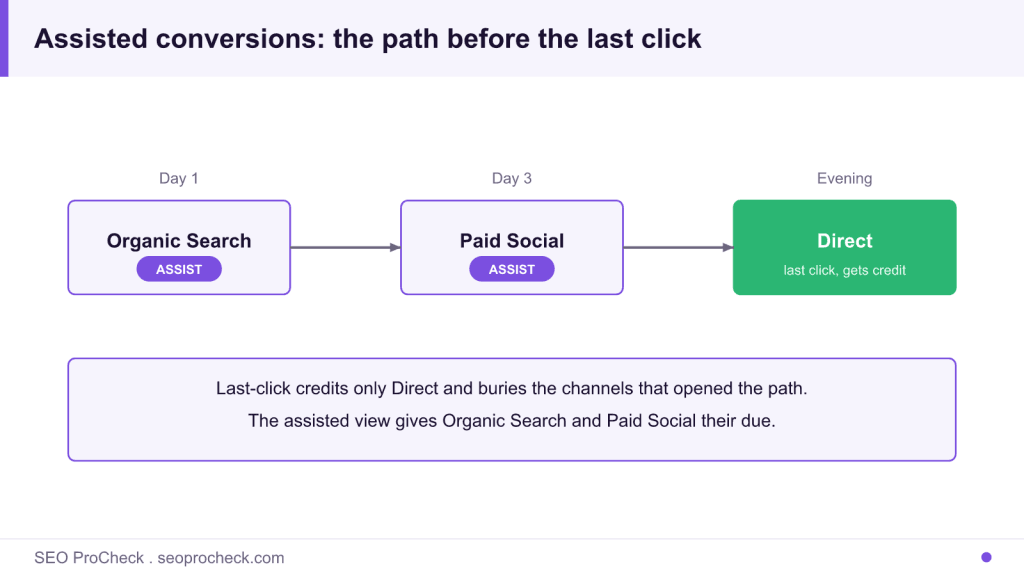
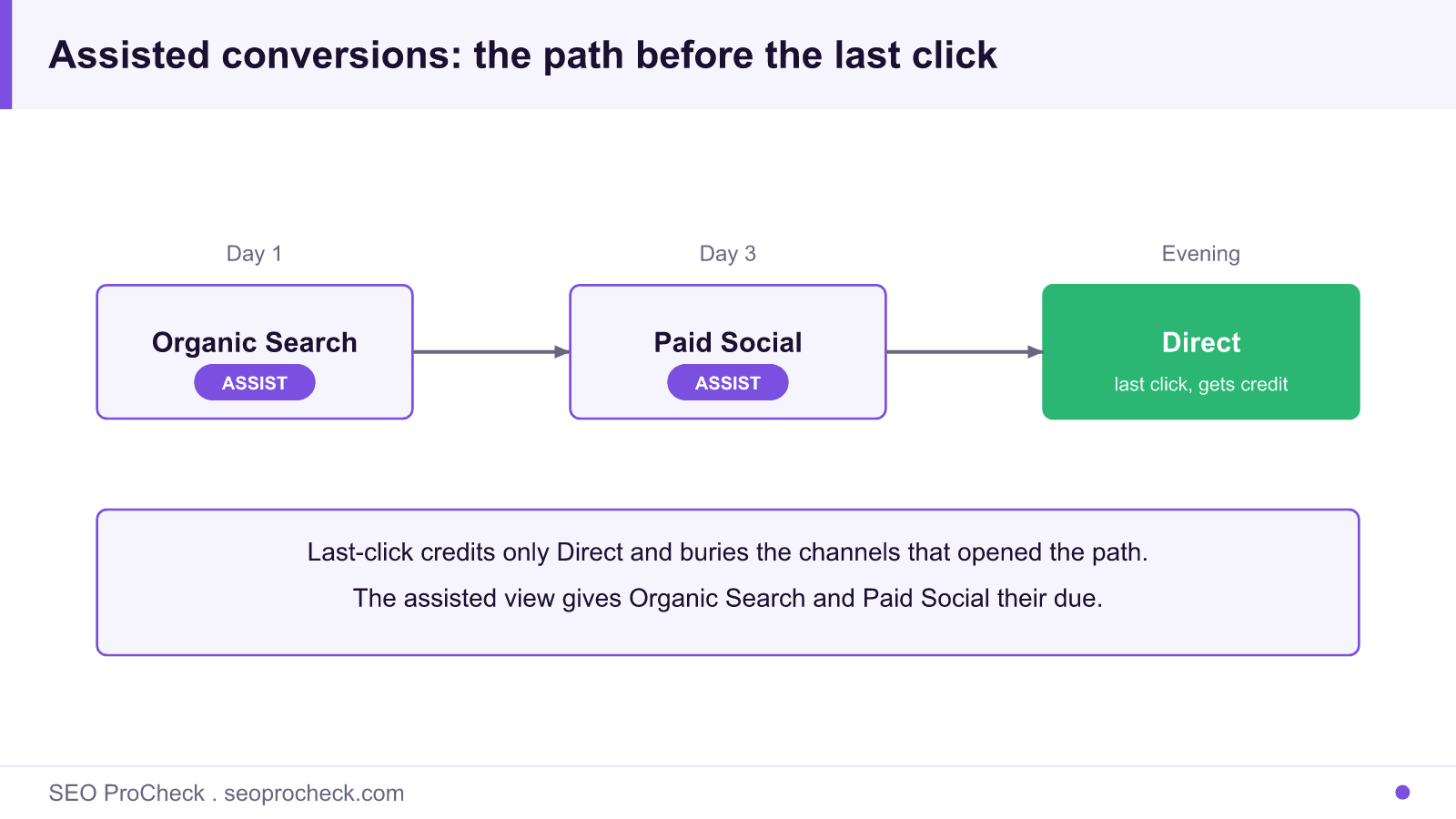
Say someone finds you through an organic search for "best cold brew concentrate," reads a post, and leaves. Three days later they see a Facebook ad, click, and browse. That evening they type your brand name straight into Google and buy. In a last-click report, Organic Search and Paid Social both show a fat zero and Direct takes 100% of the credit. In the assisted view, organic and paid social each get an assist. Cut your blog because "organic converts nothing" and you've just amputated the top of that funnel.
UA vs. GA4: where the concept actually lives now
| Aspect | Universal Analytics (retired) | GA4 (current) |
|---|---|---|
| Report name | Conversions > Multi-Channel Funnels > Assisted Conversions | Advertising > Attribution > Conversion paths |
| Core metric | Assisted Conversions; Assisted/Last-Click ratio | Early / Mid / Late touchpoint distribution across the path |
| Default model | Last non-direct click | Data-driven attribution (DDA) |
| Lookback window | Fixed reporting window | Configurable (up to 90 days for acquisition, 30 for other events) |
| Credit split | Whole-conversion counts per assist | Fractional credit spread across touchpoints |
| What "assist" means | Any non-final interaction on the path | Any early/mid touchpoint that DDA weighted below the closing one |
The takeaway: don't expect a GA4 number to match an old UA screenshot. UA counted a whole conversion for every assisting channel, so assists always inflated. GA4 splits one conversion into fractions, so the totals reconcile to your actual conversion count. Different math, same instinct, give upstream channels their due.
How to check it on your own site
- Open GA4 and go to Advertising > Attribution > Conversion paths.
- Set the event selector at the top to the conversion you actually care about (a purchase, a qualified lead form), not "All events," or the report is noise.
- Read the Early / Mid / Late touchpoints summary bar. Early and mid are your assist channels. That's the top-of-funnel work last-click hides.
- Switch to Advertising > Attribution > Model comparison. Put "Last click" in one column and "Data-driven" in the other. Channels that gain credit under DDA are your undervalued assisters.
- Cross-check against organic. In GA4's Traffic acquisition report, filter to Organic Search and note conversions; then compare with what the path report shows organic assisting. The gap is the revenue your last-click view was writing off.
- For search-side context on how those sessions started, pull queries and impressions from Google Search Console and line them up against GA4 landing pages.
Common mistakes and how to fix them
- Judging channels on last-click alone. It systematically overpays Direct and Brand while starving discovery channels. Fix: always sit the assist/path view next to your last-click view before making a budget call.
- Hunting for the old "Assisted Conversions" menu in GA4. It's not there. Fix: use Conversion paths and Model comparison instead, and mentally translate "assist" to "early/mid touchpoint."
- Comparing UA assist counts to GA4 numbers. UA gave whole credit per assist; GA4 gives fractions. Fix: never benchmark one against the other, treat the UA era as a closed book.
- Ignoring the lookback window. A 7-day window buries long consideration cycles where assists matter most. Fix: set the window to match your real sales cycle before trusting the split.
- Treating Direct as a true source. A big chunk of Direct is untagged or stripped-referrer traffic that some earlier channel actually earned. Fix: tag campaigns with UTMs so assists get attributed to the channel that did the work.
What changed when Universal Analytics shut down
Universal Analytics stopped processing data on 1 July 2023 and the properties were removed the following year, which is why the old Multi-Channel Funnels section and its Assisted Conversions report no longer exist for anyone to open. If a tutorial still tells you to click Conversions, then Multi-Channel Funnels, it predates the switch and you can stop hunting for that menu. The practical move is to translate the vocabulary rather than look for the old screen. Where UA said assisted conversion, GA4 says an early or mid touchpoint on a conversion path. Where UA gave every assisting channel whole credit, GA4 spreads fractional credit under data-driven attribution, so a channel that used to show a round assist count now shows a decimal share.
Two habits keep the analysis honest today. Sit the Model comparison report (last-click versus data-driven) side by side before any budget decision, and tag every campaign with UTMs so traffic that would otherwise fall into Direct is attributed to the channel that earned it. Direct is not a real source; a large slice of it is stripped-referrer or untagged visits that some upstream channel actually created, which is exactly the credit an assisted view is built to recover.
FAQ
Is "assisted conversions" still a thing in GA4?
The concept is; the report name isn't. GA4 folds it into attribution and conversion paths under the Advertising section. You're looking for early and mid touchpoints, not a menu literally called "Assisted Conversions."
Why do my assisted numbers look smaller in GA4 than they did in UA?
Because GA4 hands out fractional credit instead of counting a full conversion for every assisting channel. UA's assist totals were inflated by design. Smaller GA4 figures aren't a data loss, they're honest arithmetic.
Does organic search usually show up as an assist or a closer?
Both, and that's the point. Organic often opens the relationship (an early touchpoint) and also closes brand-name searches (a late one). Look at where it lands in the path, not just whether it got last-click credit.
How is this different from attribution?
Attribution is the whole framework for splitting credit across a path; "assisted conversions" is one lens inside it, the part that highlights non-final touches. See our attribution entry for the full model breakdown.
Can Search Console show me assisted conversions?
No. GSC has no conversion data at all, it reports impressions, clicks, and queries. You connect the two worlds by joining GA4 and Search Console so query-level demand lines up with on-site conversion paths.
Take this with you
The assistant links open with a question about this page already written. Nothing is sent until you press enter.
Claude Vincent is a technical SEO consultant focused on crawlability, rendering, and AI-search visibility. He writes the field guides and case studies at SEO ProCheck, with a bias toward the durable, unglamorous work that decides whether search engines and AI answer engines can actually read and cite a site.
About SEO ProCheck
Technical SEO consulting and GEO strategy with 20 years of enterprise experience. Case studies, resources, and tools for search and AI visibility.
Work With Me
Technical SEO audits, GEO strategy, site migrations, and international SEO. Hourly consulting for teams who need hands-on support, not just reports.
Subscribe to our newsletter!






Recent Posts
- AI Readiness: The Checklist, the Research and the Free Tools October 28, 2026
- AI Readiness Checklist (2026): 50 Checks, Each With Its Source October 28, 2026
- Most Top Sites Never Say Who They Are in Structured Data October 14, 2026