

AI Summary
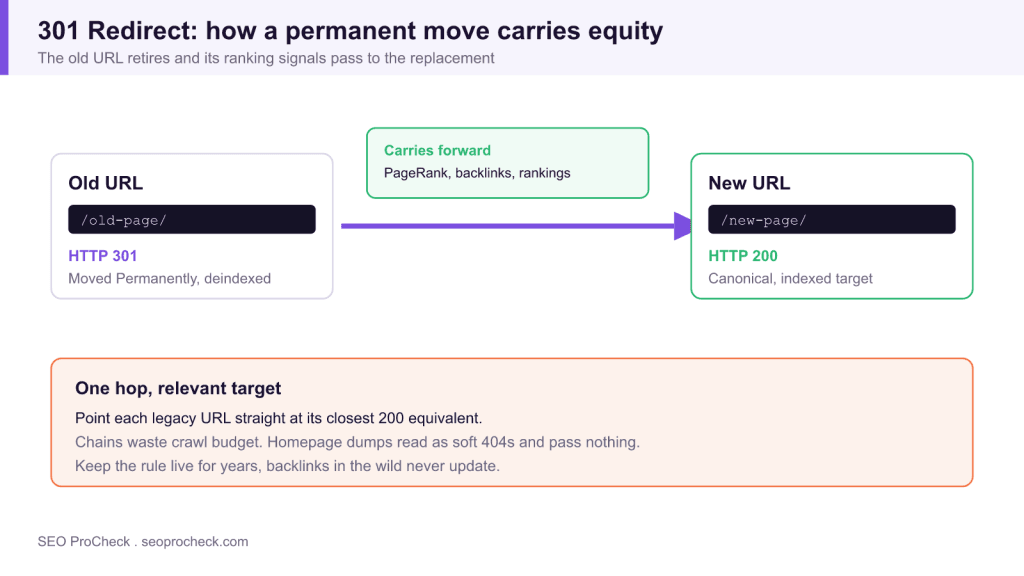
A 301 redirect is a permanent server signal that a URL has moved, so crawlers retire the old address and pass its ranking signals to the replacement. Get the mapping right and a migration is a non event, point everything at the homepage and Google reads it as a mass removal.
- A 301 passes PageRank, backlinks, and rankings only when the destination is a genuine equivalent, not the homepage.
- Collapse every redirect chain so each legacy URL lands on its final 200 destination in one hop.
- An irrelevant 301 target gets reclassified as a soft 404 and passes nothing.
- Keep migration redirects live for years because external backlinks never update themselves.
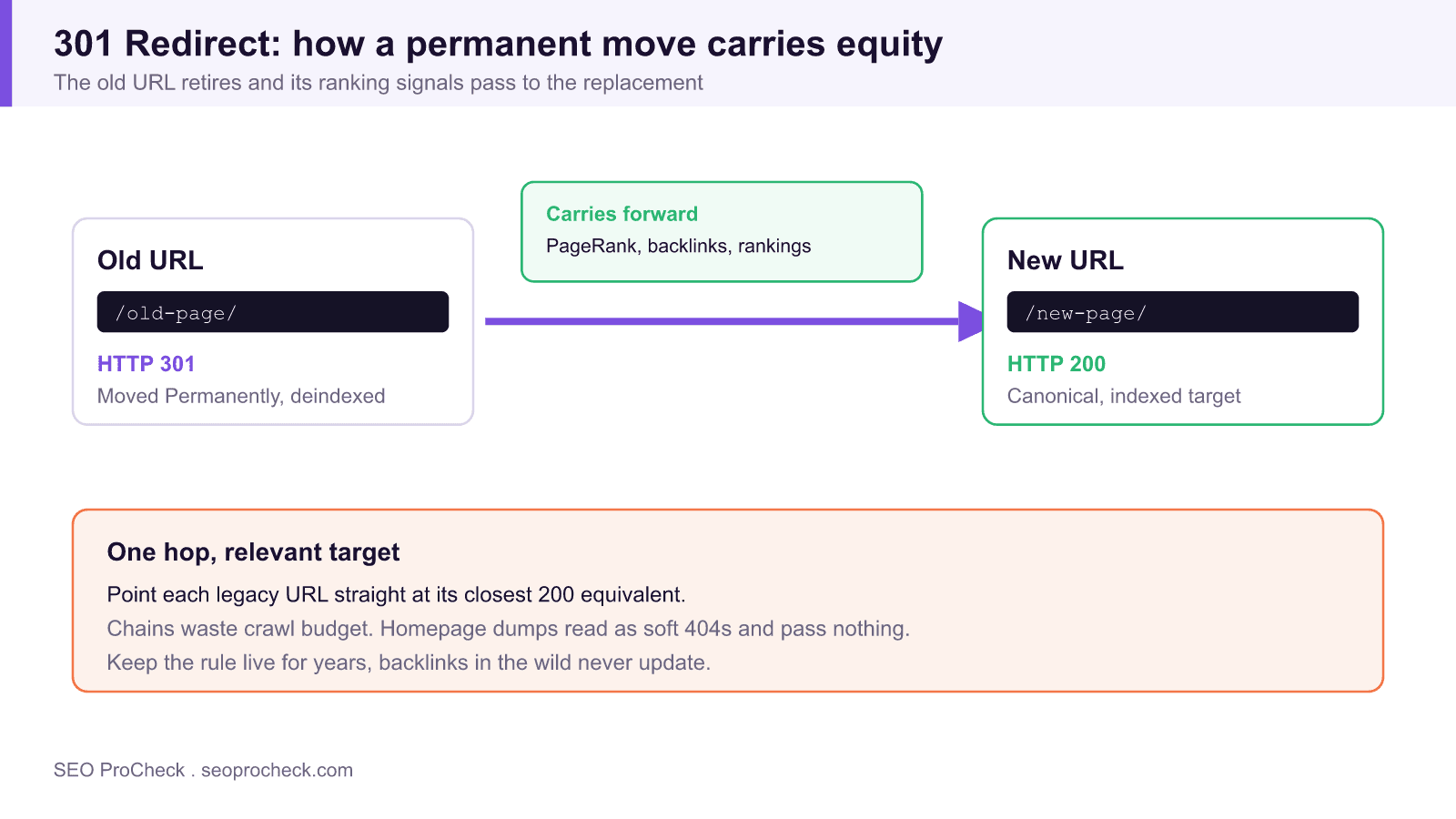
A 301 redirect is a server response that says a URL has moved permanently: stop requesting the old address, go to the new one, and update your records. It's the mechanism that carries ranking signals from an old URL to its replacement, which makes it the single most consequential status code in any migration.
Get 301s right and a domain move or URL restructure is a non-event. Get them wrong and you can vaporize years of accumulated equity in a week, rankings transfer to nothing, backlinks point at dead ends, and revenue pages start from zero. I've watched a mid-six-figure-session site lose a third of its organic traffic because the dev team shipped redirects that all pointed at the homepage. Google didn't treat those as moves; it treated them as removals.
Seeing a 301 in the wild
The fastest way to inspect any redirect is curl -I, which shows you exactly what a crawler receives:
curl -I https://example.com/old-page/

HTTP/2 301
location: https://example.com/new-page/
cache-control: max-age=3600
Setting one up on Apache, in .htaccess:
# Single URL
Redirect 301 /old-page/ https://example.com/new-page/

# Pattern-based, e.g. folder rename
RewriteEngine On
RewriteRule ^blog/(.*)$ /articles/$1 [R=301,L]
And the nginx equivalent, which I prefer for bulk moves because return is cheaper than a rewrite:
location = /old-page/ {
    return 301 https://example.com/new-page/;
}
For anything bigger than a handful of URLs, build a proper old-to-new mapping first, the redirect map generator exists for exactly that step, and the full setup guide walks through platform-specific implementations.
Redirect types side by side: when each one is the right call
| Type | Meaning | Signals transfer | Browser caching | Use it when |
|---|---|---|---|---|
| 301 | Moved permanently | Yes, old URL deindexed, target inherits | Aggressive, often indefinite | Slug changes, domain moves, HTTP→HTTPS, merging duplicates |
| 308 | Moved permanently, method preserved | Same as 301 for SEO | Aggressive | APIs and form endpoints where POST must stay POST |
| 302 | Moved temporarily | No, original stays canonical (initially) | Usually not cached | Genuinely short-lived moves; see the 302 entry |
| 307 | Temporary, method preserved | Same as 302 | Not cached | Temporary moves involving POST; also what browsers show for HSTS |
| Meta refresh (0s) | Client-side "redirect" | Treated roughly like a 301, but slower and uglier | n/a | Last resort when you have zero server access |
| JS redirect | Client-side, needs rendering | Eventually, maybe | n/a | Never by choice, Google must render the page first |
How to check it on your own site
- Crawl your URL list with Screaming Frog in list mode (paste in the old URLs from your migration map), then run Reports → Redirects → All Redirects. You want every old URL returning exactly one 301 to a 200 destination.
- Hunt chains and loops: Reports → Redirects → Redirect Chains. Each extra hop wastes crawl effort, adds latency, and Google gives up after around ten. Collapse every chain so hop one lands on the final URL.
- Verify relevance, not just status. A 301 to a page about something else gets reclassified by Google as a soft 404 and passes nothing, I documented the proof of that here.
- In Search Console, check Indexing → Pages → "Page with redirect" to confirm old URLs are moving into that bucket, and inspect a few destinations to confirm they're indexed and canonical.
- Re-run the list-mode crawl at 1 week, 1 month, and 3 months post-migration. Redirects rot: someone edits the server config, a CMS update clobbers the rules, and nobody notices without a scheduled re-check.
Common mistakes
- Redirecting everything to the homepage. The lazy migration. Google treats irrelevant-target redirects as soft 404s, so equity evaporates. Fix: map each old URL to its closest equivalent, and let true orphans return a real 404.
- Leaving internal links pointed at redirected URLs. The redirect catches users, but you're forcing every crawler through an extra hop thousands of times a day. Fix: after any migration, update internal hrefs to the final destination, crawl for "internal URLs redirecting" and clean the list.
- Shipping chains. old-page → old-page/ → https version → new-page is four requests to serve one document. Fix: every legacy URL points directly at the final 200.
- Removing redirects too early. "It's been six months, Google's got it." Backlinks out in the wild never update. Fix: treat migration redirects as effectively permanent; keep them for years, minimum one.
- Assuming a 301 is always the answer. Sometimes it isn't, I've had a migration where the right move was reverting the redirects entirely. That case study is here, and there's a companion piece on the measurable negative impact badly-planned 301s caused.
FAQ
Does a 301 lose PageRank?
Google's position since 2016 is that no PageRank is lost by any 30x redirect. In practice, transfer depends on the destination being genuinely equivalent, redirect to an irrelevant page and you lose everything, not a percentage.
How long until rankings transfer to the new URL?
Individual URLs can swap within days; full-domain migrations typically settle over weeks to a few months, scaling with site size and crawl frequency. Expect some turbulence in the interim and resist the urge to change anything else while it settles.
How long should I keep 301s in place?
Google has suggested at least a year so signals fully consolidate. My rule: keep them as long as the referring links exist, which usually means forever. Redirect rules are cheap; recovered-then-lost equity is not.
301 or canonical tag, which one do I want?
If the old URL has no reason to remain reachable, 301. A canonical leaves both URLs live and is only a suggestion Google can ignore. Canonicals are for pages that must stay accessible (tracking parameters, print views); redirects are for actual moves.
Can I 301 a page to a totally different topic?
You can, and Google will quietly ignore it, irrelevant redirects get treated as soft 404s. If there's no equivalent destination, an honest 404 or 410 is the better outcome for crawl efficiency and for users.
Take this with you
The assistant links open with a question about this page already written. Nothing is sent until you press enter.
Claude Vincent is a technical SEO consultant focused on crawlability, rendering, and AI-search visibility. He writes the field guides and case studies at SEO ProCheck, with a bias toward the durable, unglamorous work that decides whether search engines and AI answer engines can actually read and cite a site.
About SEO ProCheck
Technical SEO consulting and GEO strategy with 20 years of enterprise experience. Case studies, resources, and tools for search and AI visibility.
Work With Me
Technical SEO audits, GEO strategy, site migrations, and international SEO. Hourly consulting for teams who need hands-on support, not just reports.
Subscribe to our newsletter!








Recent Posts
- Most Top Sites Never Say Who They Are in Structured Data October 14, 2026
- Homepage Titles Are Mostly Too Short, Not Too Long October 8, 2026
- Who Actually Serves an llms.txt? 184 Top Sites Measured September 29, 2026