

SEO Case Study: Site Architecture and Internal Linking - SL Development
- March 15, 2019
- Website Architecture
AI Summary
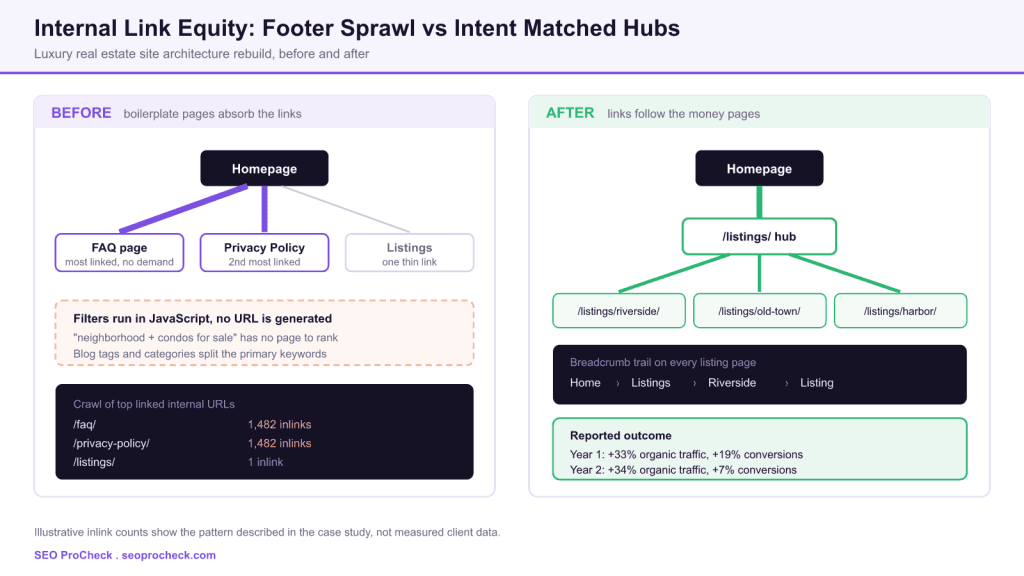
A luxury real estate site was losing organic visibility because its internal links pointed at the wrong pages: footer links made the FAQ and privacy policy the most linked URLs on the domain, while the listings page ran its filters in JavaScript and produced no indexable neighborhood URLs. Rebuilding the architecture around crawlable neighborhood landing pages, breadcrumbs and a disciplined footer produced a reported 33% organic traffic gain in year one and a further 34% in year two.
- The most linked internal pages, after the homepage, were the FAQ and privacy policy, both fed by a site wide footer.
- Dynamic filters changed results without changing the URL, so neighborhood queries had no page to rank.
- Fixes included dedicated neighborhood listing pages, breadcrumb navigation in HTML and JSON, a rewritten footer, metadata templates and listing structured data.
- Reported outcome: year one +33% organic traffic and +19% conversions, year two +34% organic traffic and +7% conversions.
Internal linking is not a volume exercise, it is an allocation exercise. This site had plenty of internal links; they were simply pointed at pages nobody searches for. The two failures worth stealing from this case study are diagnostic ones. First, crawl your site and sort internal URLs by inlink count: if the privacy policy sits second behind the homepage, your global footer is the loudest signal on your site and it is voting for boilerplate. Second, click every filter on your category or listings template and watch the address bar: if the URL never changes, none of those filtered views can rank, no matter how good the inventory behind them is.
Most internal linking advice stops at "add more internal links." This case study is useful because it shows the opposite failure mode: a site with a dense internal link graph that was quietly routing almost all of it into pages with zero commercial value. It is a pattern that shows up on a large share of template driven sites, and it is invisible until you actually count.
What the case study covers
The published work documents a luxury real estate company competing for high end property listings in a single competitive city market, running on a Node.js stack with a content management system behind it. The engagement was an architecture and internal linking rebuild rather than a content or link acquisition program, which is what makes it a clean illustration of structural SEO.
Two structural problems were identified. The listings page offered filtering, but the filters were dynamic and produced no corresponding URLs or parameters, so neighborhood level searches had no dedicated page to compete with. Separately, low quality blog categories and tags created confusion around the primary keywords, and the FAQ and privacy policy pages ended up as the most linked to pages other than the homepage because footer links appeared across a large number of thin pages.
The two failures, and how to detect each one
Both problems are cheap to diagnose once you know what to look at. The table below turns each one into a repeatable check you can run on any site this week.
| Failure | What it looks like | How to detect it | Structural fix |
|---|---|---|---|
| Footer sprawl | Utility pages rank as your most linked internal URLs | Crawl the site, sort internal URLs by inlinks descending, look at positions two through five | Cut the global footer down to genuine navigation, move legal links into a single compact row |
| Uncrawlable filters | Selecting a neighborhood or facet changes results but not the address bar | Click each filter with the URL bar visible; also check whether filtered views appear in your XML sitemap | Give every filter combination with real search demand a static, server rendered, linkable URL |
| Archive dilution | Blog tags and categories target the same phrases as your money pages | Export all archive URLs, then check which ones compete with a commercial page for the same query | Consolidate or remove thin archives, keep archives that are genuine browsing paths |
| Flat hierarchy | Commercial pages carry one incidental inlink each | Sort internal URLs by inlinks ascending and filter to your revenue templates | Introduce a hub page and breadcrumbs so depth and relationships are explicit |
A four check diagnostic pass derived from the failures documented in the source case study.
Running the diagnostic yourself
The whole audit fits inside a standard crawl. In Screaming Frog, run the crawl with JavaScript rendering enabled so you see the site the way Googlebot does, then work through three reports.
Open the Internal tab and sort by the Inlinks column, highest first. The homepage should top the list. Whatever sits in positions two through five is what your templates are actually promoting. If those slots hold the FAQ, the privacy policy, the terms page or a login screen, you have reproduced the exact finding in this case study.
Next, open Reports then Crawl Overview to see how many URLs sit at each depth. Commercial templates buried at depth four or deeper are being told, structurally, that they are unimportant. Finally use Bulk Export then Links then All Inlinks to get a row per link, which lets you group by source template and prove which template is generating the sprawl.
Cross reference the result with Search Console. In the Performance report, filter queries by neighborhood or facet terms and look at which URL Google is choosing to serve. When a generic listings page is being returned for a dozen distinct neighborhood queries, that is the demand signal telling you which dedicated pages to build first. See our complete internal linking guide for the full crawl to fix workflow.
Building crawlable neighborhood pages
The core fix was creating dedicated neighborhood property listing pages that matched search intent. The principle generalises well beyond real estate: any filter that has genuine, repeated search demand deserves a real URL, and any filter that does not should stay as a JavaScript refinement.
A workable URL pattern keeps the hub in the path so the hierarchy is self describing:
/listings/                        hub, links to every neighborhood
/listings/riverside/              neighborhood landing page, indexable
/listings/riverside/condos/       second level facet, only if demand exists
/listings/riverside/?sort=price   refinement only, canonical to the parent
The last line matters as much as the first three. Sort orders, pagination states and price sliders multiply combinatorially and will generate an unbounded crawl space if you let them into the index. Keep them out of the XML sitemap, keep them out of internal links, and point their canonical at the clean parent. Our reference on faceted navigation covers where to draw that line.
Breadcrumbs in HTML and in JSON
The case study notes that breadcrumb navigation was added in both JSON and HTML. That pairing is deliberate and worth copying: the visible trail gives users and crawlers a real link path, and the markup makes the hierarchy explicit for rich results. Shipping only the markup, with no visible breadcrumb, is a common implementation error and it passes no link equity at all.
<nav aria-label="Breadcrumb">
  <ol>
    <li><a href="/">Home</a></li>
    <li><a href="/listings/">Listings</a></li>
    <li><a href="/listings/riverside/">Riverside</a></li>
    <li aria-current="page">12 Harbour Street</li>
  </ol>
</nav>
The matching structured data mirrors that trail item for item. Position values must be sequential and the final item is conventionally left without a URL because it is the current page.
{
  "@context": "https://schema.org",
  "@type": "BreadcrumbList",
  "itemListElement": [
    {"@type":"ListItem","position":1,"name":"Home","item":"https://example.com/"},
    {"@type":"ListItem","position":2,"name":"Listings","item":"https://example.com/listings/"},
    {"@type":"ListItem","position":3,"name":"Riverside","item":"https://example.com/listings/riverside/"},
    {"@type":"ListItem","position":4,"name":"12 Harbour Street"}
  ]
}
Full property level implementation notes are in our breadcrumb schema guide.
Footer discipline
Revising the footer to prioritise internal linking to top pages is the least glamorous item on the fix list and probably the highest leverage one. A global footer is the single most repeated block on a website, so every link in it is multiplied by your total page count. Treat those slots as scarce.
The practical rule: legal and utility links belong in one compact row, ideally as a short list rather than a column of equals. The remaining footer space should point at the hub pages and the top commercial categories you actually want to rank. Anchor text should describe the destination rather than repeat a single head term across every slot, which is covered in our footer link strategy notes.
The rest of the change set
Architecture was the headline, but the engagement shipped several other changes at the same time, and being honest about that matters when you read the results. Alongside the neighborhood pages and the footer rewrite, the team eliminated the problematic blog categories and tags, rewrote metadata using dynamic templates, added structured data for property listings and open house events, updated the sitemaps and implemented Cloudflare caching.
Dynamic metadata templates deserve a note. On an inventory site with hundreds of listings that change weekly, hand written titles are not maintainable. A template that assembles the title from stable fields, such as bedroom count, property type, neighborhood and brand, gives you unique metadata at scale without creating an editorial backlog. Open house event markup is the same idea applied to a time bound opportunity: it only pays off if the dates are generated from the same source of truth the site uses, because stale event data is worse than none.
Reported results
The case study reports outcomes across two years.
| Period | Organic search traffic | Conversions |
|---|---|---|
| Year 1 | +33% | +19% |
| Year 2 | +34% | +7% |
Figures as reported by SL Development in the source case study linked below. SEO ProCheck has not independently verified the underlying analytics.
Read the second year carefully. Traffic growth held steady while conversion growth fell from 19% to 7%. That shape is typical when an architecture fix first captures high intent queries that were previously unservable, then continues expanding into broader, less transactional terms. It is a reminder to keep reporting traffic and conversions side by side rather than celebrating a single line.
What to copy, and what not to
- Copy the diagnostic. The inlink sort takes ten minutes and finds the problem or rules it out.
- Copy the demand test before building pages. Build neighborhood or facet pages only where Search Console and keyword data show repeated demand. Generating one page per filter value regardless of demand is how sites end up with doorway page problems.
- Do not copy the percentages as a forecast. A single client result on a Node.js real estate site in one city is not a benchmark for your site, your market or your starting authority.
- Do not treat archive removal as free. Before deleting tags and categories, check whether any of them earn traffic or hold backlinks, and redirect rather than delete where they do.
- Watch for orphans after the rebuild. Restructuring navigation frequently strands old URLs. Recrawl and check for orphan pages once the new templates are live.
FAQ
Because they sat in the site wide footer, and the footer rendered on every thin blog tag and category archive the site had generated. Internal link counts are a function of template placement multiplied by page count, so a link in a global footer inherits the volume of the largest template on the site. Nothing was wrong with linking to those pages, the problem was that they outranked the commercial templates in link volume.
Filters that change results without changing the URL leave nothing for a search engine to index. Googlebot renders JavaScript but it indexes URLs, so if selecting a neighborhood does not produce a crawlable address, there is no document that can rank for that neighborhood query. The fix is to give each filter combination worth ranking a real, linkable, server rendered URL.
Not automatically. Delete or consolidate them when they duplicate your primary commercial keywords or when they produce archives with one or two posts. Keep them when they represent a genuine browsing path with enough content to justify a page. The test is whether the archive would satisfy someone who landed on it from search.
There is no fixed number. What matters is that the page is reachable from the homepage in a small number of clicks, that it is linked from the main navigation or a hub page rather than only from a sitemap, and that the anchor text describes the destination. A page with a single incidental inlink is treated as a low priority page.
No, and the case study does not claim it did. The published work bundled architecture changes with metadata templates, structured data, sitemap fixes and caching. That is normal in client SEO and it is why you should read the outcome as the result of a program rather than of any single tactic.
Crawl the site, then sort the internal URL list by inlink count descending. If utility pages such as the privacy policy, terms page or login page occupy the top slots below the homepage, your templates are misallocating equity. Then sort ascending to surface commercial pages that carry only one or two inlinks.
Are your internal links pointing at your privacy policy?
A structural audit counts where your link equity actually goes and which commercial pages are being starved.
Source: https://www.sldev.io/real-estate-site-structure-internal-linking/
Take this with you
The assistant links open with a question about this page already written.
Claude Vincent is a technical SEO consultant focused on crawlability, rendering, and AI-search visibility. He writes the field guides and case studies at SEO ProCheck, with a bias toward the durable, unglamorous work that decides whether search engines and AI answer engines can actually read and cite a site.
About SEO ProCheck
Technical SEO consulting and GEO strategy with 20 years of enterprise experience. Case studies, resources, and tools for search and AI visibility.
Work With Me
Technical SEO audits, GEO strategy, site migrations, and international SEO. Hourly consulting for teams who need hands-on support, not just reports.
Subscribe to our newsletter!








Recent Posts
- Google Algorithm Updates: The Dated List Since 2003, and What to Do After Each October 31, 2026
- AI Readiness: The Checklist, the Research and the Free Tools October 28, 2026
- AI Readiness Checklist (2026): 51 Checks, Each With Its Source October 28, 2026