

AI Summary
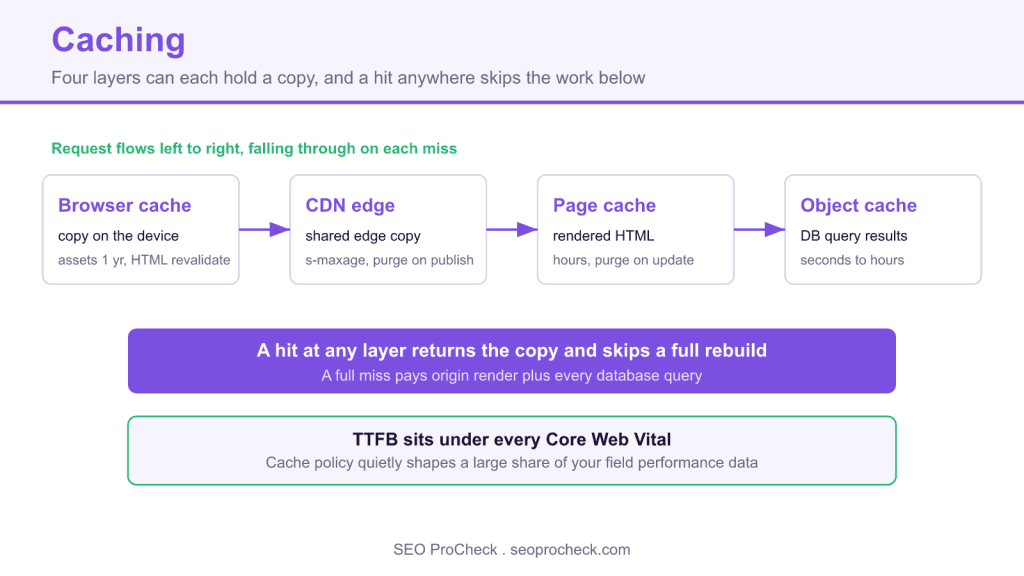
Caching stores a copy of a response, a page, a stylesheet, or a query result, so the next request serves the copy instead of rebuilding everything. It is the cheapest speed you can buy, and because TTFB sits under every Core Web Vital, cache policy quietly decides a large share of your field performance data.
- Caching is a stack of four layers: browser, CDN edge, page cache, and object cache, and an SEO problem can hide in any one.
- HTML gets
max-age=0with revalidation; put long TTLs ins-maxagewhere you can purge them. - Fingerprint static asset filenames, then cache them for a year with
immutable. - Serve correct
304 Not Modifiedresponses so Googlebot rechecks pages cheaply and stretches crawl budget.
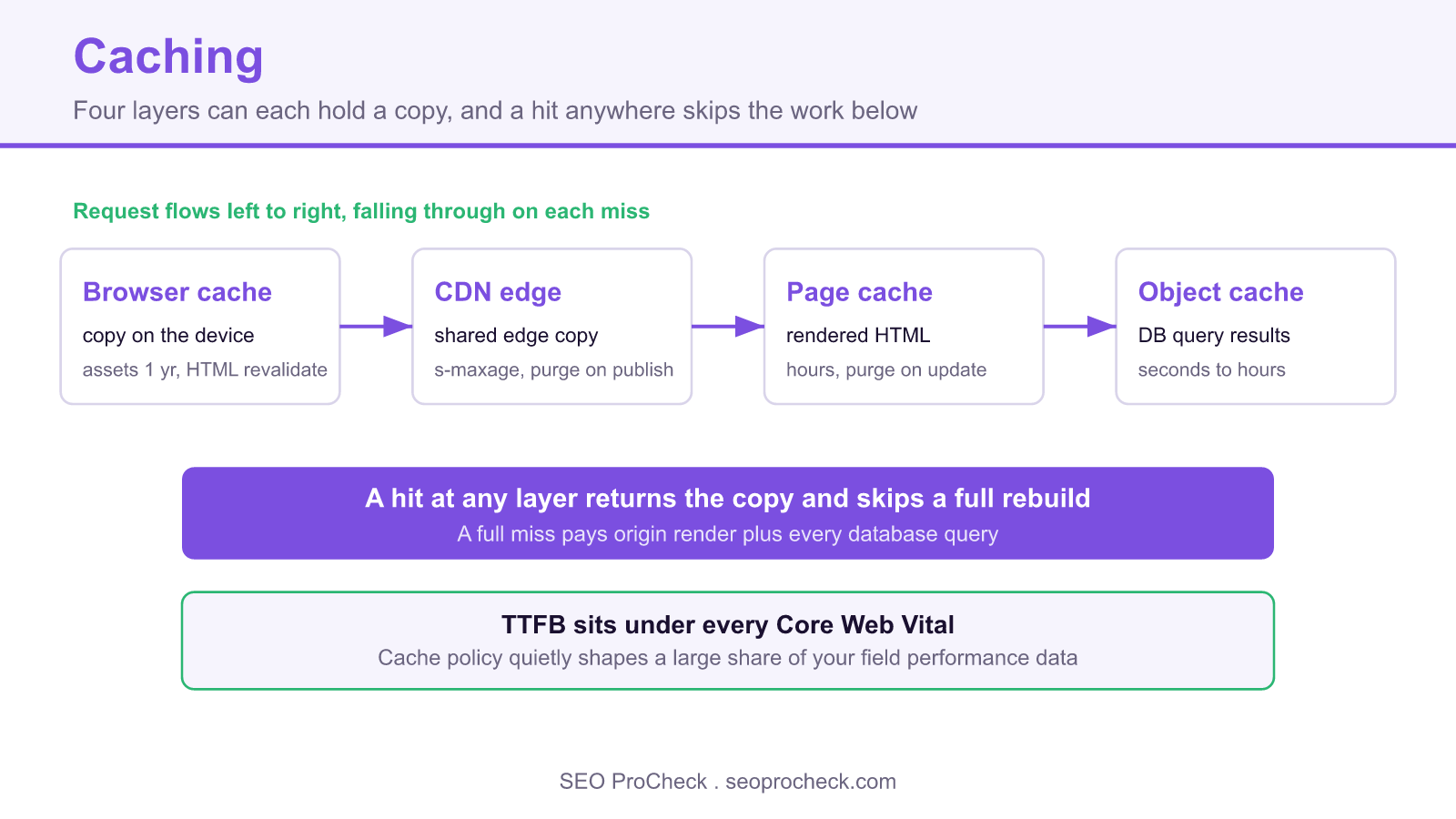
Caching is storing a copy of a response, a page, a stylesheet, a database query result, so the next request gets the copy instead of rebuilding everything from scratch. It is the cheapest speed you will ever buy: no code rewrite, no new hardware, just headers and policy. And because TTFB sits underneath every Core Web Vital, cache policy quietly decides a large share of your field performance data.
The catch is that caching is a stack, not a switch. Four different layers can each hold a copy of your content, each with its own rules, and an SEO problem can hide in any of them.
The headers that run the show
Nearly all cache behavior is negotiated through HTTP headers. Here is a well-configured response for a page that changes occasionally:
HTTP/2 200
cache-control: public, max-age=0, s-maxage=3600, stale-while-revalidate=60
etag: "a1b2c3d4e5f6"
vary: Accept-Encoding
Reading it: max-age=0 tells browsers to revalidate every time (so users never see stale HTML), while s-maxage=3600 lets shared caches, your CDN, hold it for an hour. stale-while-revalidate=60 permits serving the stale copy for up to a minute while a fresh one is fetched in the background. The etag is a content fingerprint: on revalidation the client sends If-None-Match: "a1b2c3d4e5f6", and if nothing changed the server answers 304 Not Modified with an empty body, a huge saving when Googlebot rechecks pages it already has. For static assets the pattern flips: fingerprint the filename (app.9f8e7d.css) and cache it effectively forever with max-age=31536000, immutable.
The four cache layers and how long to hold things
| Layer | What it stores | Controlled by | Sane TTL guidance |
|---|---|---|---|
| Browser cache | Assets (and pages) on the visitor's device | Cache-Control: max-age, ETag, immutable | Fingerprinted assets: 1 year + immutable. HTML: max-age=0 with revalidation, never long-cache HTML in browsers, you can't purge them. |
| CDN / shared cache | Assets and (ideally) full HTML at edge locations | s-maxage, provider rules, purge APIs | Assets: days to weeks. HTML: minutes to hours with purge-on-publish wired up; without purging, keep it short. |
| Server / page cache | Fully rendered HTML at the origin (e.g. LiteSpeed, Varnish, WP page cache) | Cache plugin/server config, purge hooks | Hours to a day for stable pages; must invalidate on content update, comment, price change. |
| Object / application cache | Database query results, compiled fragments, sessions (Redis, Memcached, opcode cache) | Application code, plugin settings | Seconds to hours per object type. Invisible to HTTP but decides how expensive every cache MISS above it is. |
The layers compound: a request that misses the CDN but hits the page cache is still fast; one that misses everything pays full price, origin render, database and all. That full-price path is what Googlebot experiences on rarely-visited long-tail pages, which is why sites with huge archives and no page cache show miserable crawl-stats response times even when the homepage feels instant. Where those edge copies physically live, and what the distributed layer does beyond obeying your headers, is the CDN page's territory, this page is about the policy: what gets stored, for how long, and how it gets invalidated.
How to check it on your own site
- Read your HTML's cache headers:
curl -sI https://yoursite.com/some-page/ | grep -iE 'cache-control|etag|age|expires|vary'. NoCache-Controlat all means every intermediary is guessing. - Test revalidation actually works: take the ETag from step 1 and replay it,
curl -sI -H 'If-None-Match: "<etag>"' <url>. You want a304. A200with a full body means conditional requests are broken and every recrawl pays full freight. - Watch a repeat view in DevTools. Network panel, load the page twice: the Size column should say "(disk cache)" or "(memory cache)" for assets on view two. Assets re-downloading on every view = browser caching broken.
- Check crawl-side response times. GSC → Settings → Crawl Stats → average response time. A page-cache rollout should visibly bend this line down within weeks; if it didn't, Googlebot is missing your cache.
- Audit the Vary header:
curl -sI <url> | grep -i vary.Vary: Accept-Encodingis normal;Vary: User-AgentorVary: Cookieon HTML fragments your cache into near-uselessness, the Vary header deep-dive covers why.
Common mistakes
- Long-caching HTML in the browser.
max-age=86400on pages means users (and embedded crawler fetches) can hold yesterday's title, price, or noindex for a day and you have no purge button for their devices. Fix: HTML getsmax-age=0+ revalidation; put the long TTLs ins-maxagewhere you can purge. - Unfingerprinted assets cached for a year.
style.csscached 365 days, then edited in place, returning visitors run new HTML against ancient CSS. Fix: content-hashed filenames, then the year-long TTL is safe. - No purge hook on publish. Content team updates a page, edge and page cache keep serving the old one, Googlebot re-indexes the stale copy. Fix: CMS publish/update actions must trigger targeted purges at every layer that stores HTML.
- Caching pages with the wrong status. A transient 500 or a soft-404 template gets cached and served happily for hours, to every visitor and crawler. Fix: cache 200s only; explicit no-store on error responses.
- Logged-in state leaking into the shared cache. A page cached with one user's cart count or name baked in, served to everyone (and indexed). Fix: bypass page cache on session cookies, every serious cache plugin has this rule; verify it's on.
Frequently asked questions
Through two doors: field Core Web Vitals (real users hitting warm caches score better) and crawl efficiency (fast, 304-friendly responses let Google crawl more with the same budget). There's no "cache header ranking factor" beyond that.
Yes, Google supports conditional requests with ETag and Last-Modified and recommends them. Serving correct 304s is a legitimate crawl-budget lever on large sites.
max-age applies to any cache including the browser; s-maxage applies only to shared caches (CDN, proxies) and overrides max-age there. The split lets you keep browsers on a short leash while the purgeable CDN holds pages longer.
Both work for conditional requests; ETag is more precise (content hash vs timestamp). Serve either consistently. Beware load-balanced origins generating different ETags per server for identical content, that silently kills 304s.
Page cache first, rendering PHP per request is the biggest cost, then browser-cache headers for assets, then object cache if the site is database-heavy. The practical order of operations is laid out in speed up WordPress.
Claude Vincent is a technical SEO consultant focused on crawlability, rendering, and AI-search visibility. He writes the field guides and case studies at SEO ProCheck, with a bias toward the durable, unglamorous work that decides whether search engines and AI answer engines can actually read and cite a site.
About SEO ProCheck
Technical SEO consulting and GEO strategy with 20 years of enterprise experience. Case studies, resources, and tools for search and AI visibility.
Work With Me
Technical SEO audits, GEO strategy, site migrations, and international SEO. Hourly consulting for teams who need hands-on support, not just reports.
Subscribe to our newsletter!







Recent Posts
- Can AI Crawlers Actually Read Your Site? I Measured 400 of the Biggest September 5, 2026
- The Pre-Publish Quality Gate for AI-Assisted Content August 6, 2026
- AGENTS.md vs llms.txt vs llms-full.txt: Which Agent File Does What July 18, 2026