

AI Summary
Hydration is the step where JavaScript in the browser attaches event handlers to HTML that was already rendered on the server or at build time, turning a static looking page into a working application. Search crawlers read the pre hydration HTML, so hydration is a performance and Interaction to Next Paint concern rather than an indexing one, as long as your content sits in the served markup.
- Crawlers see the server rendered HTML, so keep ranking content there, not behind hydration.
- Full hydration is the most expensive option; island and progressive hydration ship less JavaScript.
- The dead window is the gap between first paint and attached handlers, felt most on slow devices.
- Judge hydration by INP and interactivity, not by SEO, since it adds nothing a crawler can read.
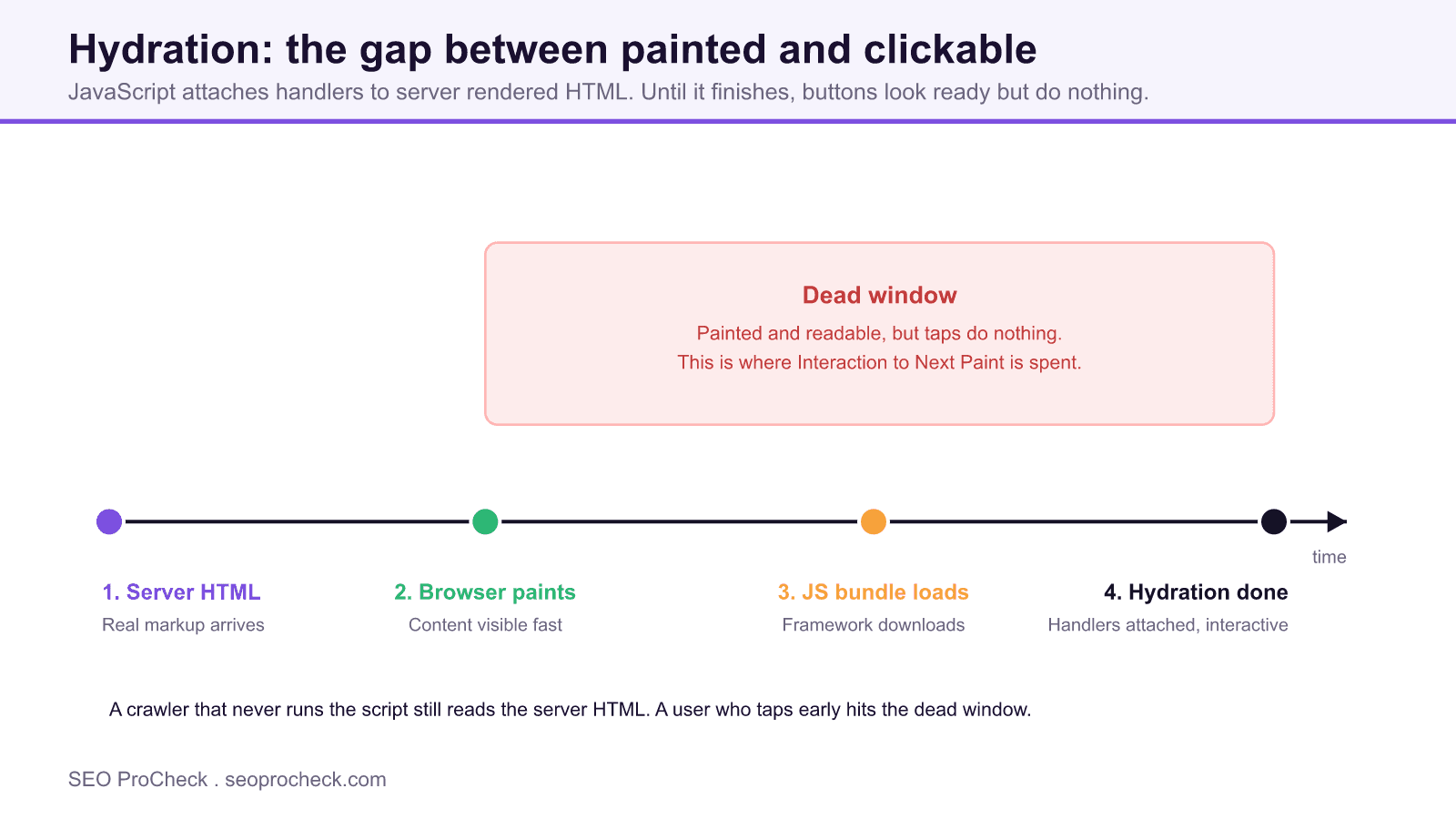
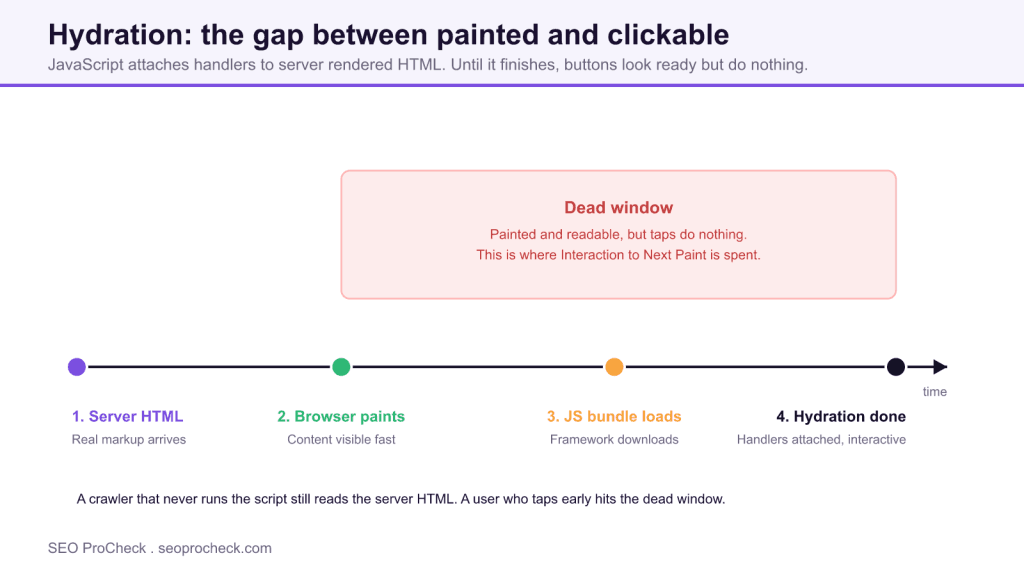
Hydration is the step where JavaScript running in the browser attaches event handlers to already-rendered HTML, turning a static-looking page into a working application. It gets its own glossary entry because the gap between "looks ready" and "actually responds to a tap" is where slow, janky pages live, and where a chunk of your Interaction to Next Paint budget quietly disappears.
The framework ships HTML that was produced on the server or at build time (see pre-rendering), the browser paints it fast, and then the framework loads its bundle, walks the existing markup, matches it to its component tree, and wires up the click handlers. Until that finishes, the buttons are painted but dead. That is the whole story, and also the whole problem.
What hydration actually does, step by step
Here is a stripped-down React example. The server sends real HTML for the counter, then hydrateRoot adopts that markup instead of throwing it away and rebuilding:
// Server sent this HTML already:
// <div id="root"><button>Liked 0 times</button></div>

import { hydrateRoot } from 'react-dom/client';
import App from './App';

// Do NOT use createRoot here, that would discard the
// server HTML and re-render from scratch (flash + wasted work).
hydrateRoot(document.getElementById('root'), <App />);
Before that line runs, the button is visible and readable. A crawler that never runs the script still sees "Liked 0 times." A human who taps it before hydration finishes gets nothing, then a delayed reaction once the handler attaches. Multiply that by a heavy bundle on a mid-range Android phone and you understand why hydration is a performance topic, not a trivia topic.
Full hydration vs. the alternatives
"Just hydrate the whole page" is the default, and it is also the most expensive option. The strategies below trade complexity for a smaller JavaScript-on-main-thread bill.
| Strategy | What gets hydrated | JS shipped | Best for | Watch out for |
|---|---|---|---|---|
| Full hydration | Entire page tree at once | All of it, up front | Small, highly interactive apps | Long INP on content-heavy pages |
| Partial / island hydration | Only the interactive "islands" (cart, search) | Per-island bundles | Mostly-static pages with a few widgets | Shared state across islands is awkward |
| Progressive hydration | Components as they scroll into view / idle | Deferred, in chunks | Long pages, below-the-fold widgets | Handlers not ready if a user taps early |
| Resumability (Qwik) | Nothing re-executed; state resumed from HTML | Near zero on load | Aggressively fast first interaction | Newer model, smaller ecosystem |
| No hydration (server-only) | None; static HTML only | Zero | Content pages, docs, articles | No client interactivity at all |
How to check hydration on your own site
- View the raw HTML first. Run
curl -sL https://yoursite.com/page | grep -o "your headline text". If your main content shows up, it survived without JavaScript. If the body is an empty<div id="root"></div>, hydration is delivering content, not just interactivity, and crawlers may miss it. - Use the URL Inspection tool in Search Console. Look at the rendered HTML and screenshot. If Google's Web Rendering Service shows your content, the second wave caught it, but you are relying on the render queue.
- Throttle the CPU in Chrome DevTools. Performance panel, set CPU to 4x or 6x slowdown, reload, and record. The gap between First Contentful Paint and the moment handlers respond is your hydration cost.
- Measure INP with real users. Pull the field data from CrUX or a RUM tool. A p75 above 200ms on interactive pages usually points at hydration blocking the main thread.
- Tap something the instant it paints. On a real phone, reload and mash a button immediately. If nothing happens for a beat, that dead window is exactly what your slowest users feel.
Common mistakes and how to fix them
- Content that only exists after hydration. If the served HTML is empty and the text appears only once React/Vue mounts, you have handed indexing over to the render queue. Fix: server-render or pre-render the actual content so it is in the HTML on arrival.
- Hydration mismatch warnings ignored. When server HTML and client render disagree (a date rendered with the server's timezone, say), the framework may throw away the markup and re-render, doubling the work. Fix: read the console warning, make server and client output identical, gate client-only values behind a mount effect.
- One giant bundle hydrating everything. A blog post does not need the checkout widget's JavaScript. Fix: code-split and move to island or progressive hydration so static content ships zero JS.
- Blocking hydration on third-party scripts. Chat widgets and tag managers fighting for the main thread stretch the dead window. Fix: defer non-critical third parties and load them after interaction is ready.
- Assuming hydration helps SEO. It does not add anything for crawlers; the pre-hydration HTML is what they read. Fix: judge hydration purely on interactivity and INP, and put your SEO effort into what is in the served markup.
Frequently asked questions
Not directly. Google reads the HTML that exists before hydration, and if your content is in that HTML you are fine without any script execution. Hydration only matters for SEO indirectly, through the Core Web Vitals it can drag down, and by tempting teams to render content client-side instead of putting it in the served markup.
Rendering produces the HTML (on a server, at build time, or in the browser). Hydration is what happens after that HTML lands: attaching JavaScript behavior to it. You can render without hydrating (a plain static page) but you cannot hydrate without something already rendered to attach to.
That is the hydration gap. The HTML painted, but the JavaScript that wires up the click handlers has not finished loading and executing. A big bundle, a slow device, or a blocked main thread all widen that window. Shrinking the bundle and deferring non-critical work is the usual fix.
On a page that is mostly content with a couple of interactive widgets, yes, it often is. Shipping JavaScript only for the cart or search box instead of the whole page can cut your main-thread work dramatically. On a small app that is interactive edge to edge, the bookkeeping may not pay off.
No. SSR gives you HTML fast, but if you want that HTML to be interactive in a client framework, you still hydrate. The only way to skip hydration is to ship no client interactivity, or to use a resumable framework like Qwik that reconstructs state from the HTML instead of re-executing components.
Related reading: JavaScript SEO: How Search Engines and AI Crawlers Render Your Pages, SSR vs CSR: Why Rendering Decides Whether AI Can Read Your Site, INP: Interaction to Next Paint.
Take this with you
The assistant links open with a question about this page already written. Nothing is sent until you press enter.
Claude Vincent is a technical SEO consultant focused on crawlability, rendering, and AI-search visibility. He writes the field guides and case studies at SEO ProCheck, with a bias toward the durable, unglamorous work that decides whether search engines and AI answer engines can actually read and cite a site.
About SEO ProCheck
Technical SEO consulting and GEO strategy with 20 years of enterprise experience. Case studies, resources, and tools for search and AI visibility.
Work With Me
Technical SEO audits, GEO strategy, site migrations, and international SEO. Hourly consulting for teams who need hands-on support, not just reports.
Subscribe to our newsletter!






Recent Posts
- AI Readiness: The Checklist, the Research and the Free Tools October 28, 2026
- AI Readiness Checklist (2026): 50 Checks, Each With Its Source October 28, 2026
- Most Top Sites Never Say Who They Are in Structured Data October 14, 2026