

AI Summary
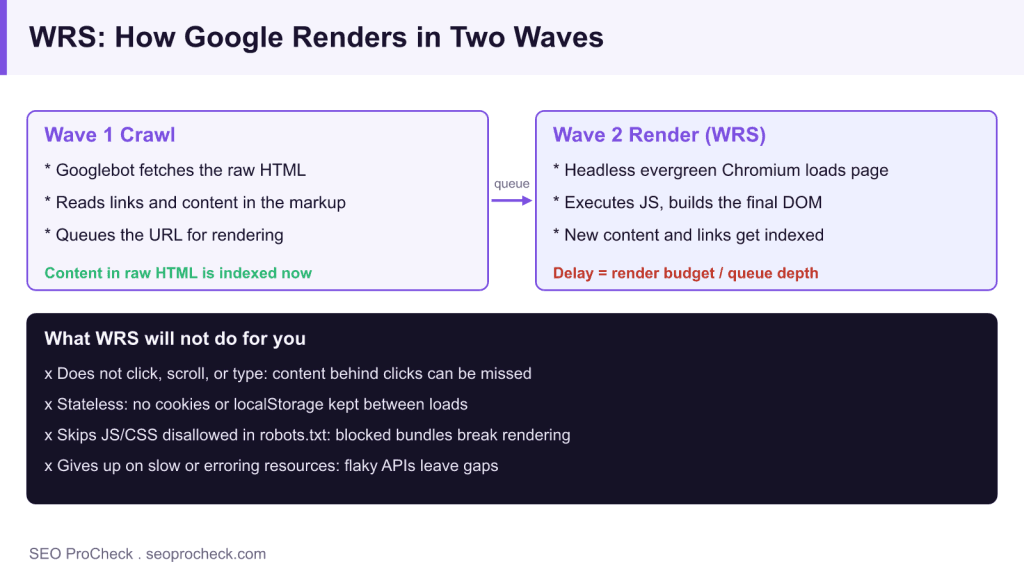
The Web Rendering Service is the part of Google's pipeline that runs headless evergreen Chromium to execute your JavaScript and build the DOM Google indexes. Google indexes in two waves: Googlebot crawls the raw HTML first, then WRS renders the page later on its own schedule, so content that only appears after JavaScript can index slowly.
- Wave one indexes raw HTML; wave two renders JavaScript when render budget allows.
- WRS does not click, scroll, type, or keep cookies and localStorage between loads.
- Blocking JS or CSS in robots.txt can stop the page rendering entirely.
- Use URL Inspection to compare rendered HTML against your raw curl output.
The Web Rendering Service (WRS) is the part of Google's pipeline that runs a headless, evergreen version of Chromium to execute your page's JavaScript and build the DOM Google actually indexes. It matters because if your content only appears after JavaScript runs, WRS is the gatekeeper deciding whether Google ever sees it, and it does that work on its own schedule, not yours.
Google indexes in two waves. First, Googlebot crawls the raw HTML. Then, when resources free up, WRS renders the page with JavaScript and Google re-processes the result. That second wave can be near-instant or take noticeably longer depending on the render queue, which is the single most important thing to understand about JavaScript SEO.
How the two waves actually work
Think of it as a relay, not a single pass:
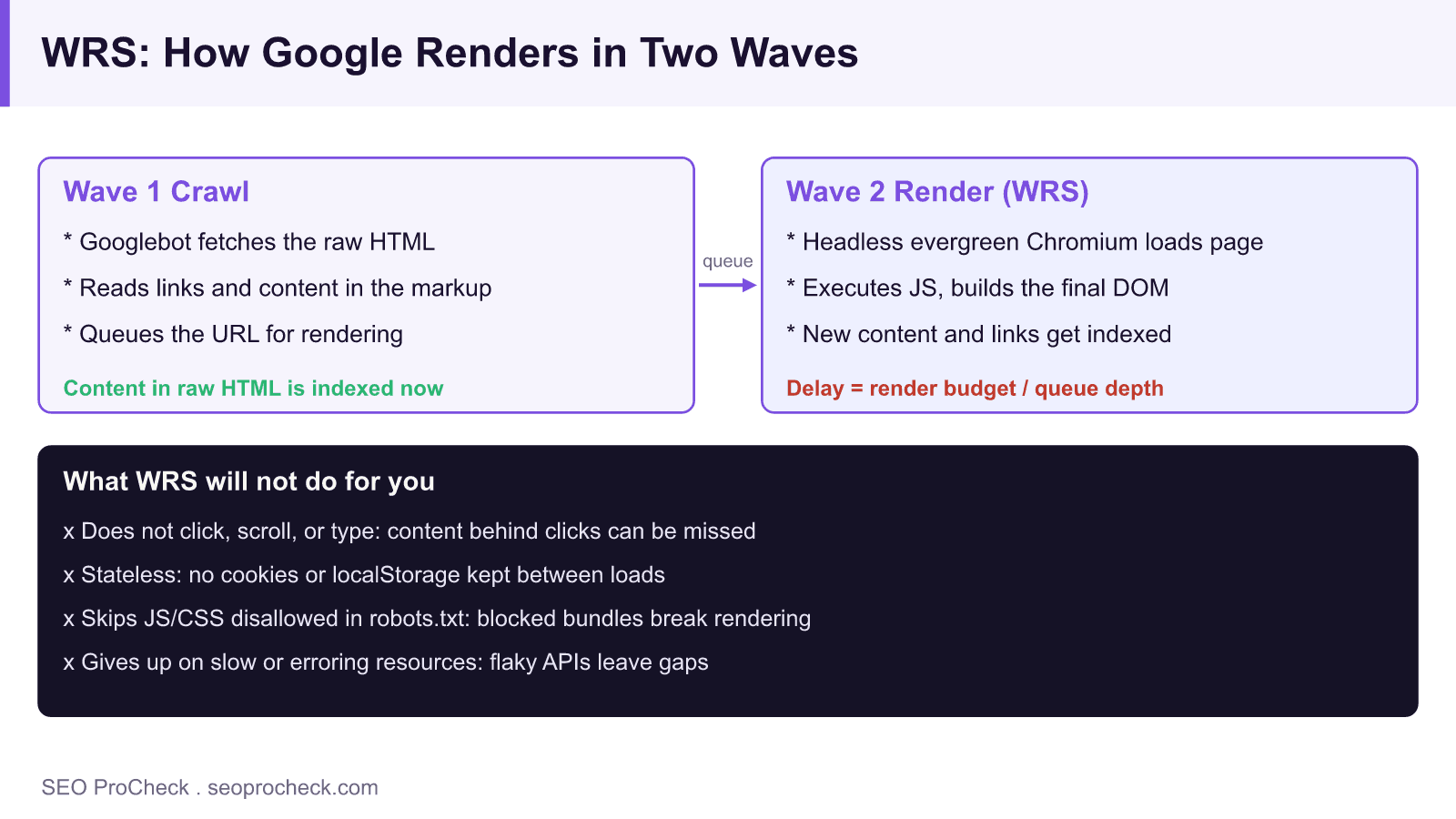
Wave 1  Crawl
        Googlebot fetches raw HTML
        Reads links + content already in the markup
        Queues the URL for rendering

Wave 2  Render (WRS)
        Headless evergreen Chromium loads the page
        Executes JS, builds the final DOM
        Newly-discovered content + links get indexed
        (delay = render budget / queue depth)
If a link to a deep product page exists only after JavaScript runs, Google cannot discover that URL until wave two renders the page. On a large site with a deep render queue, that lag compounds. Content that is in the raw HTML skips the wait entirely, which is the whole argument for pre-rendering or server-side rendering.
What WRS can and cannot be counted on to do
| Behavior | What WRS does | What it means for you |
|---|---|---|
| Chromium version | Evergreen; tracks recent stable Chrome | Modern JS features generally work; still test |
| Timing | Renders later, when resources allow | JS-only content can index slowly |
| User interaction | Does not click, scroll, or type | Content behind clicks/tabs may be missed |
| State | Stateless; no cookies or localStorage kept | Do not gate content on stored state |
| Blocked resources | Skips JS/CSS disallowed in robots.txt | Blocking your bundle can break rendering |
| Timeouts / failed requests | Gives up on slow or erroring resources | Flaky APIs can leave content unrendered |
How to check what WRS renders on your own site
- Run URL Inspection in Search Console. Use "Test Live URL," then "View Tested Page." The rendered HTML and screenshot are the closest look you get at what WRS produced.
- Diff raw HTML against rendered HTML. Compare
curl -sL https://yoursite.com/page(raw) with the rendered HTML from URL Inspection. Anything present only in the rendered version depends on WRS and the render queue. - Check the "More info" resource list. In the inspection result, look for resources Google could not load. Blocked or failed JS/CSS there is a direct cause of missing content.
- Confirm robots.txt is not blocking your bundle. Make sure
Disallowrules do not cover the JavaScript and CSS files the page needs to render. - Test rendering without interaction. Load the page, do nothing, and see what appears. If key content needs a click or scroll to exist in the DOM, WRS will not trigger it.
Common mistakes and how to fix them
- Assuming rendering is instant. Teams ship JS-only content and wonder why it is not indexed for days. Fix: put critical content and links in the raw HTML so wave one catches them, and treat wave two as a bonus.
- Blocking JS or CSS in robots.txt. If WRS cannot fetch the bundle, it cannot render the page. Fix: allow the render-critical resources and re-test with URL Inspection.
- Content that needs interaction. Tabs, accordions, and "load more" buttons that only populate on click hide content from WRS. Fix: render that content in the initial DOM, or at least on load without a user action.
- Depending on stored state. Personalization keyed to cookies or localStorage produces an empty page for a stateless renderer. Fix: serve a sensible default that does not rely on prior state.
- Slow or flaky data fetches. If an API times out during render, the content never lands in the DOM. Fix: fast, reliable endpoints, and server-render the critical data so it does not depend on a client fetch at all.
Frequently asked questions
Is WRS the same as Googlebot?
No, though they work together. Googlebot is the crawler that fetches URLs and raw HTML. WRS is the rendering service that later executes JavaScript in headless Chromium to build the final DOM. Crawl is wave one; render is wave two.
How long does WRS take to render a page?
There is no fixed number. It depends on the render queue and available resources; it can be minutes or considerably longer. That variability is exactly why you should not rely on WRS for content you need indexed quickly, put that content in the HTML.
Does WRS use an up-to-date version of Chrome?
Yes. Since 2019 WRS has been evergreen, tracking recent stable Chromium rather than an old fixed version. Modern JavaScript features generally work, but you should still test rather than assume any given API renders correctly.
Why does Search Console show content my raw HTML does not have?
Because URL Inspection shows the rendered result after WRS executed your JavaScript. If content appears there but not in curl output, it is JavaScript-dependent, and its indexing is subject to the render queue rather than being immediate.
Do other search engines and AI crawlers render like WRS?
Not reliably. Some execute little or no JavaScript, so content that depends on client-side rendering can be invisible to them even when Google eventually catches it. Server-rendered or pre-rendered HTML is the safe path across all of them.
Related reading: Rendering, JavaScript SEO: Complete Technical Guide, Disallowed JavaScript File: Why Blocking JS Can Break Rendering.
Take this with you
The assistant links open with a question about this page already written. Nothing is sent until you press enter.
Claude Vincent is a technical SEO consultant focused on crawlability, rendering, and AI-search visibility. He writes the field guides and case studies at SEO ProCheck, with a bias toward the durable, unglamorous work that decides whether search engines and AI answer engines can actually read and cite a site.
About SEO ProCheck
Technical SEO consulting and GEO strategy with 20 years of enterprise experience. Case studies, resources, and tools for search and AI visibility.
Work With Me
Technical SEO audits, GEO strategy, site migrations, and international SEO. Hourly consulting for teams who need hands-on support, not just reports.
Subscribe to our newsletter!








Recent Posts
- Most Top Sites Never Say Who They Are in Structured Data October 14, 2026
- Homepage Titles Are Mostly Too Short, Not Too Long October 8, 2026
- Who Actually Serves an llms.txt? 184 Top Sites Measured September 29, 2026