

AI Summary
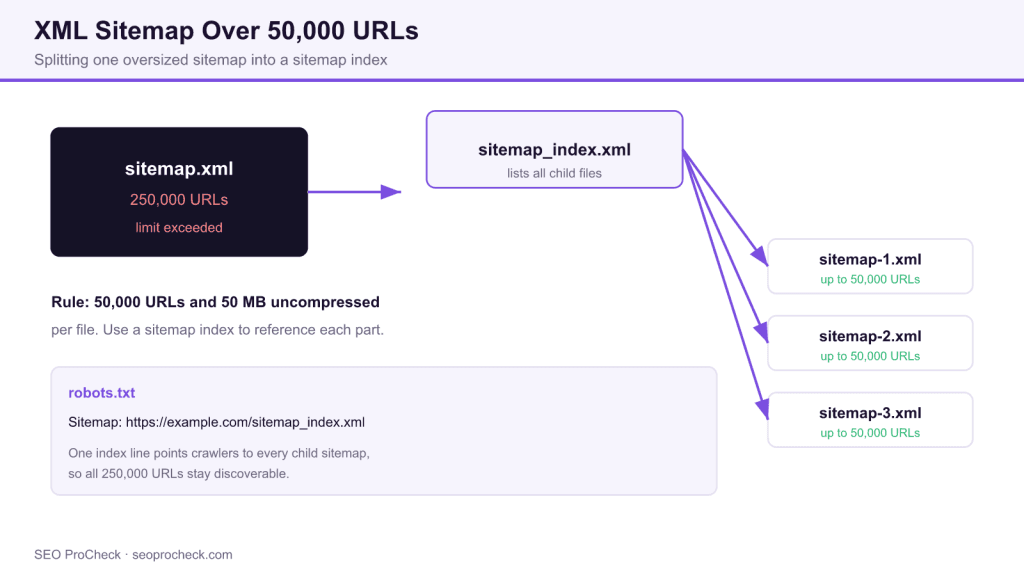
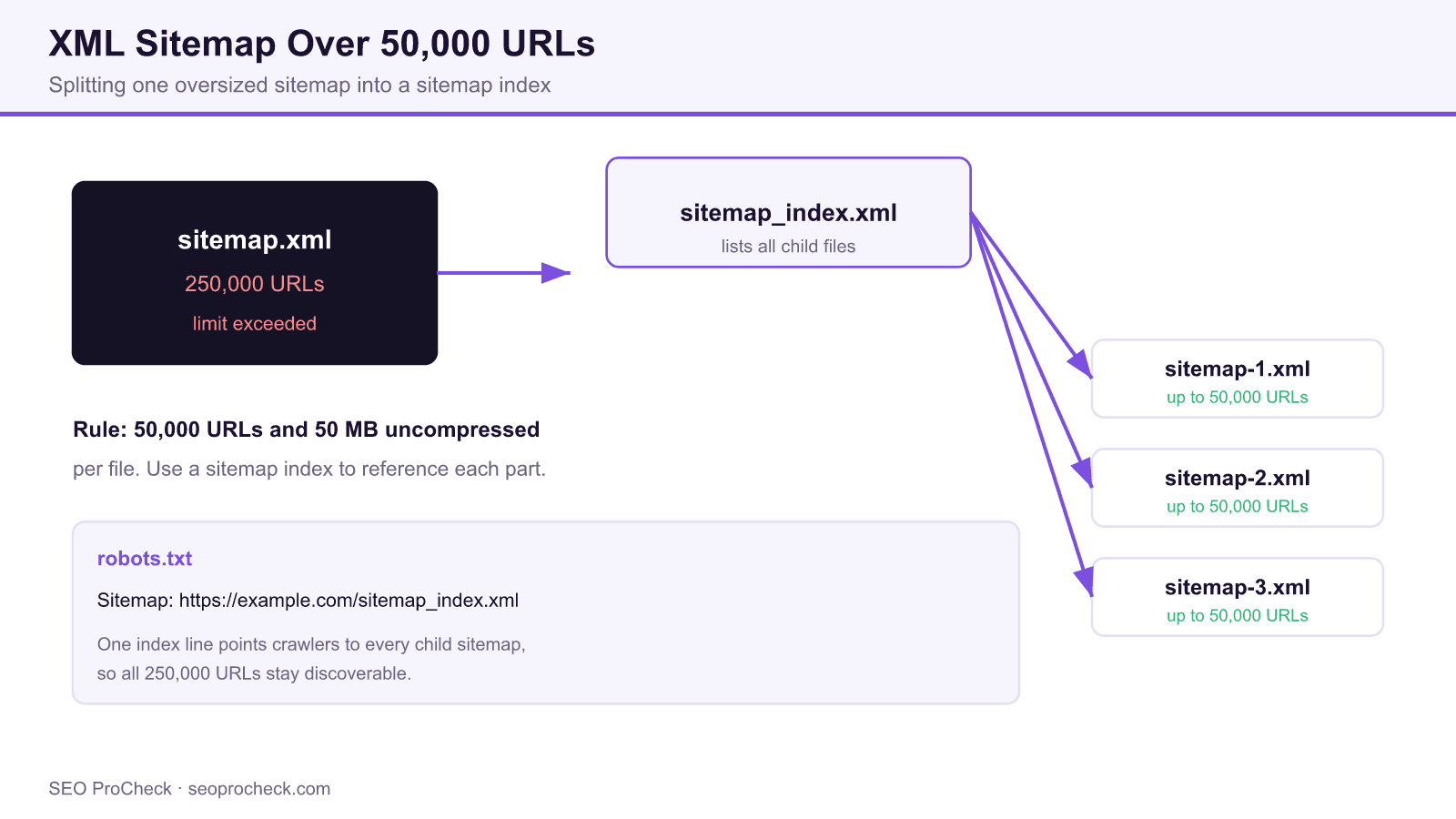
An XML sitemap file is capped at 50,000 URLs and 50 MB uncompressed. When your site exceeds that, split the URLs across several sitemap files and list them all in a single sitemap index file that you submit to Search Console and reference in robots.txt.
- The 50,000 URL and 50 MB limits are per sitemap file, set by the sitemaps.org protocol.
- A sitemap index (
<sitemapindex>) can itself reference up to 50,000 child sitemaps. - Most SEO plugins and platforms paginate automatically, so a manual split is only needed on custom setups.
- Submit the index URL, not the child files, and keep the reference line in robots.txt.
Quick Reference
Element Code: XM-012
Issue: Sitemap contains more than 50,000 URLs
Impact: Exceeds sitemap URL limit, some URLs ignored
Fix: Split into multiple sitemaps with sitemap index
Detection: URL count, Screaming Frog
What Is This Issue?
XML sitemaps are limited to 50,000 URLs per file. Any URLs beyond this limit will not be discovered via the sitemap.
Why This Matters for Your Website
The 50k limit is strict. URLs after the limit are invisible to search engines through the sitemap.
How to Fix This Issue
- Split by count: Keep under 50k per file
- Use sitemap index: Reference all sitemaps
- Automate: Most CMS tools handle this automatically
Tools for Detection
- Screaming Frog: Counts URLs per sitemap
TL;DR (The Simple Version)
Your sitemap has over 50,000 URLs, exceeding the limit. Split it into multiple sitemaps using a sitemap index.
What the 50,000 URL limit really means
The sitemaps.org protocol that Google and Bing both follow sets two hard ceilings on a single sitemap file: a maximum of 50,000 URLs and a maximum uncompressed size of 50 MB. Hit either ceiling and the crawler stops reading at the limit, so every URL past it is invisible through that sitemap. The file can be gzip compressed on the wire, but the 50 MB test is measured on the uncompressed document, which is the limit teams forget most often on sites with long URLs and many optional tags.
The fix is a two level structure. You keep each individual sitemap under both ceilings, then you create a sitemap index file, the one that opens with a <sitemapindex> root element, that points to each child file. The index itself can list up to 50,000 sitemaps, which gives you a theoretical ceiling of 2.5 billion URLs before you need a second index. In practice you will paginate long before that for crawl and reporting reasons.
A worked example
Say an ecommerce catalog has 250,000 product URLs. You divide them into five files of 50,000 (or, more comfortably, eight files of about 31,000 each so you have headroom to grow). Each file is a normal urlset. The index then ties them together:
<?xml version="1.0" encoding="UTF-8"?>
<sitemapindex xmlns="http://www.sitemaps.org/schemas/sitemap/0.9">
  <sitemap>
    <loc>https://example.com/sitemap-products-1.xml</loc>
    <lastmod>2026-07-22</lastmod>
  </sitemap>
  <sitemap>
    <loc>https://example.com/sitemap-products-2.xml</loc>
  </sitemap>
</sitemapindex>
Then you add one line to robots.txt so any crawler can discover the whole tree without a manual submission: Sitemap: https://example.com/sitemap_index.xml. In Search Console you submit only the index URL. Google expands it and reports coverage per child file, which is exactly why splitting by content type (products, categories, blog) makes debugging far easier than an arbitrary numeric split.
How platforms handle this for you
On WordPress, Yoast and Rank Math both paginate at 1,000 URLs per file by default and emit an index automatically, so you rarely touch this by hand. Shopify caps its generated sitemaps at 50,000 URLs and shards them for you. The manual work almost always appears on custom or headless builds where an engineer wrote the sitemap route and never anticipated the catalog growing past 50,000 rows. That is the case this check is designed to catch.
| Element | Per file limit | What breaks past it | Where to verify |
|---|---|---|---|
| URLs in one sitemap | 50,000 | URLs after 50,000 are ignored | Screaming Frog URL count |
| Uncompressed size | 50 MB | File rejected or truncated | Server response size |
| Sitemaps in one index | 50,000 | Extra child files not read | Index file line count |
| Index files | No fixed cap | Rarely reached in practice | Search Console sitemaps report |
How to detect the problem
- Count with Screaming Frog. In list mode, load your sitemap URL under Configuration then Spider then Crawl Linked XML Sitemaps. The crawl summary shows URLs per file.
- Read the Search Console sitemaps report. A discovered count that plateaus at exactly 50,000 while your catalog is larger is the classic fingerprint.
- Check the raw file size. Download the sitemap and confirm the uncompressed document is under 50 MB, not just the gzip.
If your crawl budget is already tight, an oversized sitemap compounds the problem because it hides the very URLs you most want discovered. Our guides on crawl budget and index bloat cover the discovery side, and the Screaming Frog advanced usage guide walks through counting sitemap URLs at scale. For the full family of sitemap checks, see the XML sitemaps hub.
Frequently asked questions
Is the 50,000 limit per sitemap or per website?
It is per individual sitemap file. A single site can have unlimited URLs overall by splitting them across many sitemaps and listing those files in a sitemap index.
What is the size limit for an XML sitemap?
50 MB uncompressed per file. You may gzip the file for transfer, but the 50 MB test applies to the uncompressed document, so long URLs and many optional tags can trip it before the URL count does.
How many sitemaps can a sitemap index reference?
Up to 50,000 child sitemaps per index file. Combined with 50,000 URLs per child, one index can cover 2.5 billion URLs, and you can nest additional indexes above that if you ever need to.
Do I submit the index or each child sitemap to Google?
Submit only the index URL in Search Console and reference it in robots.txt. Google reads the index and fetches every child file, then reports coverage for each one.
Will exceeding the limit cause a penalty?
No, it is not a penalty. The crawler simply stops reading at the limit, so any URLs beyond it are not discovered through the sitemap, which can slow indexing of new pages.
How should I split a large sitemap?
Split by content type where possible (products, categories, articles) rather than arbitrary numbers. Grouping makes the Search Console Page indexing report, which you can filter by sitemap, far easier to diagnose when one section has indexing issues.
Take this with you
The assistant links open with a question about this page already written. Nothing is sent until you press enter.
Claude Vincent is a technical SEO consultant focused on crawlability, rendering, and AI-search visibility. He writes the field guides and case studies at SEO ProCheck, with a bias toward the durable, unglamorous work that decides whether search engines and AI answer engines can actually read and cite a site.
About SEO ProCheck
Technical SEO consulting and GEO strategy with 20 years of enterprise experience. Case studies, resources, and tools for search and AI visibility.
Work With Me
Technical SEO audits, GEO strategy, site migrations, and international SEO. Hourly consulting for teams who need hands-on support, not just reports.
Subscribe to our newsletter!








Recent Posts
- Most Top Sites Never Say Who They Are in Structured Data October 14, 2026
- Homepage Titles Are Mostly Too Short, Not Too Long October 8, 2026
- Who Actually Serves an llms.txt? 184 Top Sites Measured September 29, 2026