

Sitelinks: How to Influence the Links Google Shows Under Your Brand
- March 12, 2023
- Technical SEO

AI Summary
You cannot set or submit Google sitelinks, they are generated algorithmically and the old Search Console demote tool was retired years ago. What you control is the candidate pool: a flat architecture, consistent descriptive anchor text, strong internal linking to the pages you want surfaced, and clean indexable targets.
- There is no markup that generates the sitelinks block, and no setting in Search Console that forces one.
- Keep priority pages 1-2 clicks from the homepage, buried or orphaned pages are not candidates.
- Google often builds the label from your anchor text and the leading words of the target page
<title>, so keep both literal and consistent. - To push a link out, weaken its internal links and strengthen a better candidate, then expect days to weeks for the reassessment cycle.
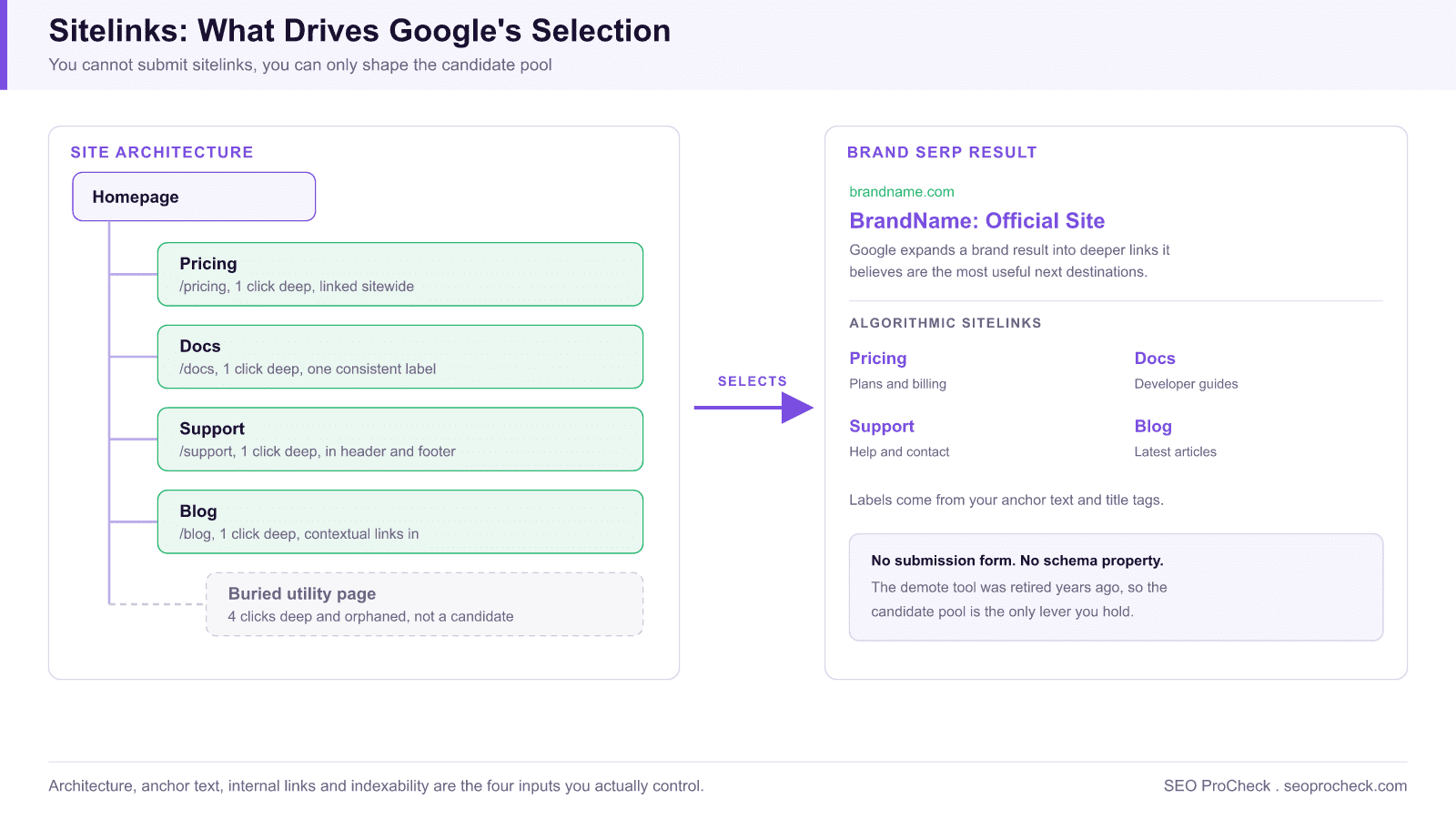
When someone searches your brand name, Google often expands your homepage result into a block of additional links pointing deeper into your site. These are sitelinks, and they're entirely algorithmic: there's no submission form, no schema property, and no setting in Search Console that forces a specific set. What you can do is engineer the site so Google's selection logic has clean, obvious signals to draw from. This guide covers exactly which signals matter and how to strengthen them.
How Google sitelinks actually get generated
Google generates sitelinks by analyzing your site's link structure, page importance, and how users navigate. It picks pages it believes are the most useful next destinations for a given query, then validates them against engagement and crawlability. The classic full sitelinks block (the large two-column layout under a homepage) appears mostly for navigational, brand-dominant queries where Google is confident the searcher wants your site specifically. Smaller inline sitelinks can appear on any result.
The practical consequence: you cannot pick the links, but you heavily influence the candidate pool. Google can only promote pages that are crawlable, internally well-linked, clearly labeled, and genuinely visited. Fix those four inputs and the output improves.
Every sitelink factor and where your control ends
This table maps each selection input to what Google actually reads and the lever you hold over it:
| Factor | What Google uses | What you control |
|---|---|---|
| Site architecture | Click depth from the homepage; position in the internal link graph | Keep priority pages 1-2 clicks deep; stable top-level URL paths like /pricing |
| Anchor text | The words in internal links pointing at each candidate page | One consistent, literal label per destination, sitewide |
| Page titles | The leading words of the target page's <title>, often truncated for the label | Front-load the distinguishing term; keep titles unique per page |
| Internal link volume | How many pages across the site link to the candidate, and from where | Header/footer links for priorities; contextual links from high-traffic content |
| Indexability | Whether the page is indexed, canonical, and cleanly crawlable | No noindex, no robots block, no canonical elsewhere, single resolving URL |
| User engagement | Which destinations searchers and visitors actually use | Indirectly: make the genuinely useful pages the prominent ones |
| Query context | Whether the query is navigational and brand-dominant | Almost nothing; brand demand grows from marketing, not markup |
Build a flat, intentional site architecture
Sitelinks favor pages that sit close to the homepage in your link graph. If your most important destinations are buried four clicks deep, they're poor candidates regardless of how good they are.
- Keep key pages within 1, 2 clicks of the homepage. Your primary categories, pricing, login, and flagship content should be reachable directly from the main navigation.
- Use a stable, logical URL hierarchy. Paths like
/pricing,/docs,/blogreinforce that these are top-level sections. Deep, parameter-heavy URLs signal the opposite. - Limit primary navigation to a focused set. A nav with 30 items dilutes importance across all of them. A nav with 6, 8 clear sections tells Google which destinations actually matter.
- Don't orphan your important pages. Every sitelink candidate needs multiple internal links pointing to it. A page reachable only from the sitemap is unlikely to be promoted.
Label navigation and links the way you want them to appear
Google frequently uses your anchor text and page titles to generate the sitelink label. Vague or clever labels produce vague sitelinks; precise labels produce precise ones.
- Name nav items literally. Use
Pricing, notPlans & Possibilities. UseSupport, notWe've Got You. The label that converts in your UI is usually the label that performs in search. - Keep anchor text consistent across the site. If one page links to "Documentation," another to "Docs," and a third to "Developer Guide," you split the signal. Pick one phrase and use it everywhere.
- Write descriptive, front-loaded title tags. Google often shortens a sitelink to the leading words of the target page's title, so put the distinguishing term first:
Pricing, BrandName, notBrandName, Affordable Plans for Everyone. - Avoid icon-only or ambiguous links. A nav item that's just an icon, or a "Learn more" that repeats across pages, gives Google nothing useful to label.
Use internal linking to vote for your candidates
Internal links are the strongest lever you control. Pages that receive many internal links from across your site read as important, and importance is the core input to sitelink selection.
- Link to priority pages from your global header and footer. Sitewide links are weighted heavily because they appear on every page.
- Add contextual links from high-traffic content. If your blog drives most of your sessions, links from those posts to your product or category pages carry real weight.
- Prune competing links you don't want surfaced. If a low-value page is getting promoted as a sitelink, reduce the internal links pointing to it and strengthen links to the page you'd rather see in its place.
- Keep a consistent global nav across the whole site. Inconsistent navigation between sections confuses Google about which pages are canonical destinations.
Make sure candidate pages are clean and indexable
Google won't promote a page it can't fully trust. Before a page can be a sitelink, it has to be crawlable, indexable, and self-consistent.
- No
noindex, no robots block, no canonical pointing elsewhere. Any of these disqualifies the page instantly. - Resolve to a single canonical URL. Redirect chains, trailing-slash duplicates, and HTTP/HTTPS splits fragment the signal.
- Give each page a unique, accurate title and meta description. Near-duplicate titles make pages interchangeable in Google's eyes and weaken all of them as candidates.
- Ensure the page loads fast and renders its main content server-side or quickly. Pages Google struggles to render are poor candidates.
How to monitor your sitelinks
There is no sitelinks report in Search Console, so monitoring is manual but quick:
- Search your exact brand name in an incognito window (and again with
&gl=usor your target country appended to the results URL) and screenshot the block. Sitelinks vary by locale, so check each market you care about. - In Search Console, open Performance > Search results, filter Query to your brand term, then switch to the Pages tab. The deep URLs collecting impressions and clicks on a pure brand query are, in practice, your sitelinks; watch that list month over month.
- Verify each candidate with URL Inspection. A page you want in the block must show "URL is on Google" with your intended canonical selected. Anything else disqualifies it.
Demote a sitelink you don't want
Google retired the old "demote sitelink" tool in Search Console years ago, so there is no direct off switch anymore. To push an unwanted link out of the block, you work the same levers in reverse:
- Reduce internal links to the unwanted page and increase links to its intended replacement.
- Improve the title and content of the page you'd prefer Google to surface so it becomes the stronger candidate.
- If the page genuinely shouldn't be indexed at all (a thank-you page, a thin utility page), apply
noindex, but only if you're certain it has no search value.
Changes here are not instant. Sitelinks update on Google's recrawl and reassessment cycle, so expect days to weeks before edits take effect.
Common mistakes
- Expecting a quick fix. Sitelinks reflect months of structural signals, not a single edit. Consistency over time is what moves them.
- Treating schema as a sitelinks control. There is no markup that generates the main sitelinks block. (The legacy Sitelinks Searchbox markup only affected a search box, and Google has wound that feature down.)
- Stuffing the nav to "give Google options." More navigation items dilute importance. Fewer, clearer items concentrate it.
- Inconsistent labeling. Mixing "Login," "Sign in," and "Account" for the same destination splits the signal three ways.
- Ignoring engagement. Pages nobody clicks rarely get promoted. The links Google surfaces tend to be the ones real users actually use.
FAQ
Why doesn't my site show full sitelinks at all? The large block typically appears only for brands with strong, unambiguous navigational demand and a clear architecture. New, small, or thinly linked sites often get one or two inline links, or none, until authority and structure mature.
How do I remove or change a sitelink in Search Console? You can't; the demote tool was removed and nothing replaced it. Your options are indirect: weaken the unwanted page's internal links, strengthen a better candidate, or noindex the page if it truly has no search value. The Removals tool is not for this; it hides a URL from all results, not just the sitelinks block.
How long does it take for sitelinks to change after I fix my site? Expect days to weeks, not hours. Google has to recrawl the affected pages, reprocess your link graph, and rerun its selection, and the full block on brand queries tends to be the slowest surface to update.
Can I control sitelinks for non-homepage results? Inline sitelinks on deeper results follow the same logic: clear internal linking, descriptive titles, and indexable subpages. You influence them the same way.
Do sitelinks affect rankings? They don't change your ranking position, but they expand your real estate and give users more entry points, which usually lifts overall click-through on brand queries.
Why are my sitelinks different in different countries? Selection runs per locale, using the engagement and query patterns of each market. If your German users head straight for support while US users head for pricing, the blocks will differ, and that's working as intended rather than something to fix.
Want this handled properly on your site?
It is exactly the kind of work an advanced technical SEO audit covers. See how an advanced SEO audit works →
Take this with you
The assistant links open with a question about this page already written. Nothing is sent until you press enter.
Claude Vincent is a technical SEO consultant focused on crawlability, rendering, and AI-search visibility. He writes the field guides and case studies at SEO ProCheck, with a bias toward the durable, unglamorous work that decides whether search engines and AI answer engines can actually read and cite a site.
About SEO ProCheck
Technical SEO consulting and GEO strategy with 20 years of enterprise experience. Case studies, resources, and tools for search and AI visibility.
Work With Me
Technical SEO audits, GEO strategy, site migrations, and international SEO. Hourly consulting for teams who need hands-on support, not just reports.
Subscribe to our newsletter!








Recent Posts
- Most Top Sites Never Say Who They Are in Structured Data October 14, 2026
- Homepage Titles Are Mostly Too Short, Not Too Long October 8, 2026
- Who Actually Serves an llms.txt? 184 Top Sites Measured September 29, 2026