

AI Summary
A missing alt attribute means an <img> tag has no alt text, so screen readers and search engines have no text alternative describing what the image shows. You fix it by adding a concise, specific alt attribute to every informative image, using an empty alt="" for purely decorative images, and describing the destination for linked images.
- The
altattribute is required on every<img>element for accessibility and image search. - Informative images get descriptive alt text, decorative images get
alt="", and functional images describe the action or destination. - WCAG success criterion 1.1.1 requires a text alternative for non-text content.
- Audit at scale with Screaming Frog, Google Lighthouse, or the WordPress Media Library, then write the missing alt text.
What the alt attribute is
The alt attribute, short for alternative text, is a piece of text attached to an image that describes what the image shows. It lives inside the image tag, and the correct syntax looks like this:
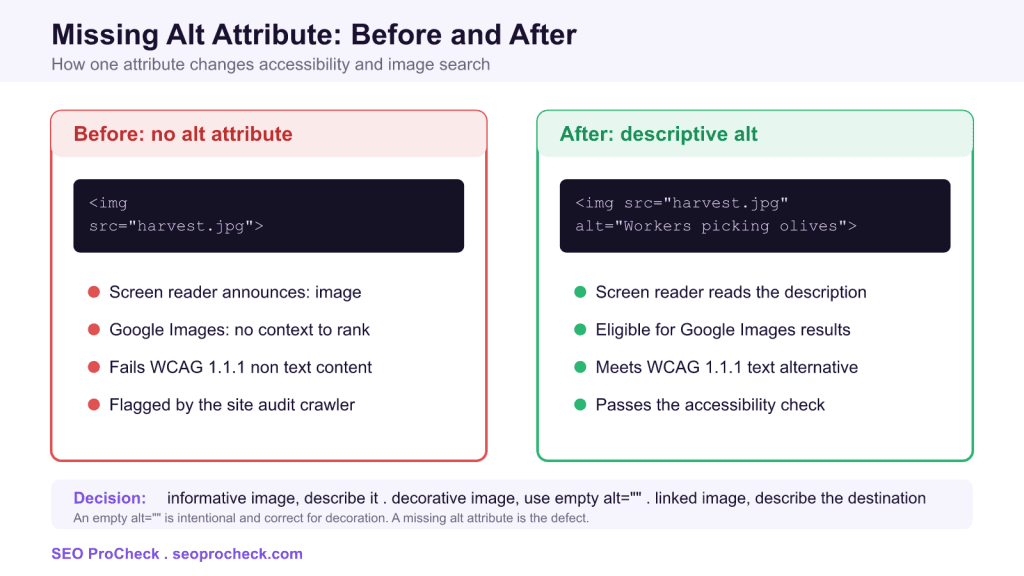
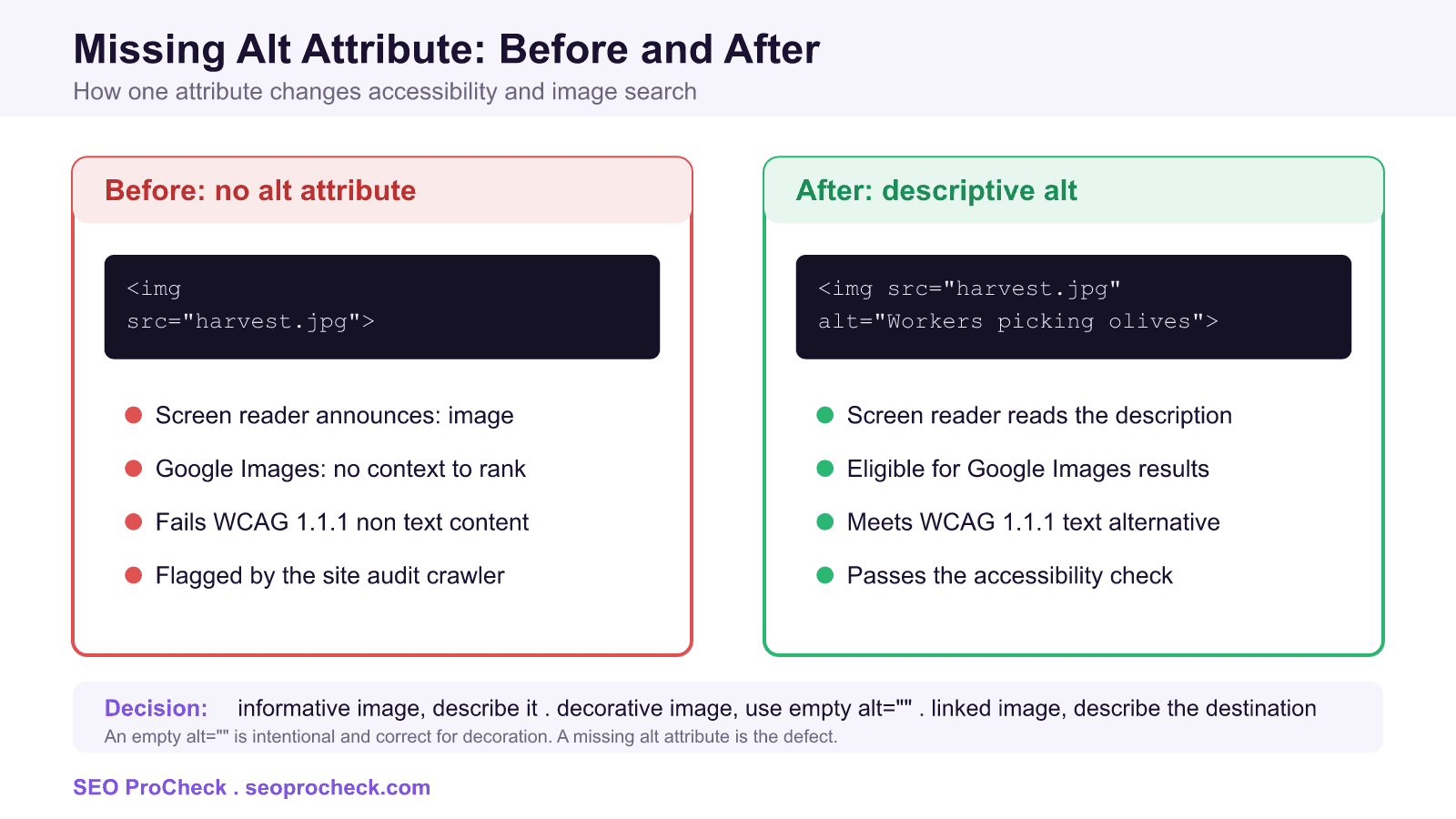
<img src="olive-harvest.jpg" alt="Workers hand picking ripe olives into baskets">When an audit flags "images with missing alt attribute", it means one or more <img> elements on the page have no alt attribute at all. That is different from an image that carries an empty alt="", which is a deliberate and valid choice for decoration. The defect is the total absence of the attribute, because it leaves assistive technology and search engines with nothing to work from.
Why the alt attribute matters
Two distinct audiences depend on alt text. The first is people who use screen readers. A screen reader cannot interpret pixels, so it reads the alt value aloud in place of the image. When the attribute is missing, many screen readers fall back to announcing the file name or simply saying "image", which tells the listener nothing about the content. When the attribute is present and well written, the same user hears a clear description and understands the page the way a sighted visitor would.
The second audience is search engines. Google Images relies heavily on alt text to understand what a picture depicts, because the surrounding code gives limited signals on its own. A photo with descriptive alt text becomes eligible to appear for relevant image searches, while a photo with no alt text gives Google no textual context to match against a query. Good alt text also reinforces the topic of the surrounding page for regular web search.
WCAG 1.1.1 and the legal angle
Alt text is not just a nicety. Web Content Accessibility Guidelines success criterion 1.1.1, titled Non-text Content, requires that all non-text content has a text alternative that serves an equivalent purpose. Missing alt attributes are one of the most common failures against this criterion, and accessibility audits, including automated tools such as Google Lighthouse, flag them immediately. For organizations subject to accessibility regulations, unresolved missing alt attributes can contribute to compliance risk.
Three types of images, three correct approaches
Not every image should be described the same way. Deciding what to write starts with the role the image plays on the page.
- Informative images carry meaning: a product photo, a chart, a diagram, a screenshot. Describe what they show, concisely and specifically.
- Decorative images add visual polish but no information: a background flourish, a divider, a spacer. Give them an empty
alt=""so screen readers skip them cleanly. This empty value is correct and is not the same as a missing attribute. - Functional images act as a control, most often an image used as a link or a button. Describe the destination or the action rather than the picture, for example
alt="Download the price sheet"rather thanalt="PDF icon".
Alt text approaches by image type
| Image type | Correct alt approach | Example |
|---|---|---|
| Informative photo | Describe the subject and key detail | alt="Ripe green olives on a branch in sunlight" |
| Chart or graph | Summarize the data point or trend | alt="Bar chart showing olive oil exports rising each year from 2019 to 2024" |
| Decorative graphic | Empty alt so it is skipped | alt="" |
| Linked or button image | Describe destination or action | alt="View the full olive variety guide" |
| Logo | Name the brand, add "logo" if it links home | alt="SEO ProCheck logo" |
CSS background images have no alt
Images placed through CSS, such as background-image, cannot carry an alt attribute at all, so screen readers ignore them entirely. That is acceptable for genuine decoration, but any image that conveys real content, a hero photo that shows the product, an infographic, a map, should be a real <img> element in the HTML with proper alt text rather than a CSS background. If a crawler cannot find your important imagery as <img> tags, neither the assistive technology nor Google Images can benefit from it.
Use figure and figcaption for context
For images that deserve a visible caption, wrap them in a <figure> with a <figcaption>. The caption and the alt text play different roles: the caption is visible to everyone and can add context or credit, while the alt text is the direct textual replacement for the image. They should complement each other rather than repeat word for word.
How to audit missing alt attributes at scale
Finding every offending image by hand does not scale past a few pages. Use tooling instead.
- Screaming Frog SEO Spider: crawl the site, open the Images tab, and use the "Missing Alt Text" and "Missing Alt Attribute" filters. "Missing Alt Attribute" lists images with no attribute present, while "Missing Alt Text" lists images where the attribute exists but is empty. Use Bulk Export to pull a spreadsheet of every image URL and the page it sits on.
- Google Lighthouse: run the Accessibility audit in Chrome DevTools. The "Image elements do not have [alt] attributes" check lists each failing element so you can fix them page by page.
- WordPress Media Library: each attachment has an Alternative Text field. Open an image in the library and fill in the alt field, or set it in the block editor image settings. This populates the alt attribute wherever the image is used going forward.
- Per image in wp-admin: when placing an image in a post or page, the editor exposes an alt text box in the image block sidebar, so you can write context specific alt text for that placement.
Prioritize the fixes: informative images in your main content and linked images matter most, template level images such as logos and icons are quick wins because one fix propagates everywhere, and confirmed decorative images just need an empty alt="".
Writing good alt text
Once you know which images need alt text, the quality of what you write decides whether it helps. A few practical rules:
- Be concise and specific. Aim for a short, meaningful phrase rather than a paragraph. Most alt text works well under roughly 125 characters.
- Do not start with "image of" or "picture of". The screen reader already announces that it is an image, so those words waste the listener's time.
- Include relevant context and keywords naturally, matching the subject of the page, but never stuff keywords. Alt text that reads like a keyword list hurts both users and credibility.
- Describe what matters for the page. The same photo can warrant different alt text depending on why it is used.
Alt versus title
The alt attribute and the title attribute are not interchangeable. The alt attribute is the required text alternative that screen readers announce and search engines read. The title attribute produces a tooltip on mouse hover, is inconsistently exposed to assistive technology, and is not a substitute for alt. Always set alt. Treat title as optional and never rely on it to satisfy an accessibility requirement.
A before and after worked example
Here is a linked product thumbnail as an audit would first find it, with no alt attribute:
<a href="/products/olive-oil">
  <img src="bottle.jpg">
</a>
A screen reader user hears little more than "link, image", and Google gets no context. Because the image is functional, the alt text should describe the destination, not merely the picture:
<a href="/products/olive-oil">
  <img src="bottle.jpg" alt="Shop our cold pressed olive oil">
</a>
Now the link announces its purpose, the image becomes eligible for image search, and the page passes both the WCAG 1.1.1 check and the site audit rule that flagged it.
Related reading
Missing alt attributes usually surface alongside other on page issues in a technical crawl. If your audit also reports a missing meta description, treat both as part of the same content completeness pass. Platform specific guidance also helps: see our notes on the Drupal SEO module setup and on Gatsby SEO best practices, and browse the full library of guides on the SEO ProCheck home page.
Frequently asked questions
What does images with missing alt attribute mean?
It means one or more image tags on the page have no alt attribute at all, so there is no text alternative describing the image. Screen readers and search engines are left with no way to understand or convey what the image shows. You resolve it by adding an appropriate alt attribute to each affected image.
Is an empty alt the same as a missing alt?
No. An empty alt, written as alt="", is a deliberate signal that the image is decorative and should be skipped by screen readers, which is valid and correct. A missing alt attribute is the absence of the attribute entirely, which is the defect the audit flags. Decorative images should have an empty alt, not no alt.
How long should alt text be?
Keep it concise and specific, typically a short phrase that captures the meaningful content of the image. As a rule of thumb, staying under roughly 125 characters keeps it useful and avoids overwhelming screen reader users. Describe what matters for the page rather than every visual detail.
Does alt text help SEO?
Yes. Alt text is a primary signal Google Images uses to understand and rank a picture, so descriptive alt text makes your images eligible for image search. It also reinforces the topic of the surrounding page. Write it for users first and let natural, relevant wording carry the keyword value, without stuffing.
How do I find all images missing alt text on my site?
Crawl the site with Screaming Frog and use the Images tab filters for Missing Alt Attribute and Missing Alt Text, then bulk export the list. Google Lighthouse also flags failing images in its accessibility audit, and in WordPress you can set alt text in the Media Library. Fix informative and linked images first.
What is the difference between the alt attribute and the title attribute?
The alt attribute is the required text alternative that screen readers announce and search engines read. The title attribute only produces a hover tooltip, is inconsistently exposed to assistive technology, and does not satisfy accessibility requirements. Always set alt, and treat title as optional.
Take this with you
The assistant links open with a question about this page already written. Nothing is sent until you press enter.
Claude Vincent is a technical SEO consultant focused on crawlability, rendering, and AI-search visibility. He writes the field guides and case studies at SEO ProCheck, with a bias toward the durable, unglamorous work that decides whether search engines and AI answer engines can actually read and cite a site.
About SEO ProCheck
Technical SEO consulting and GEO strategy with 20 years of enterprise experience. Case studies, resources, and tools for search and AI visibility.
Work With Me
Technical SEO audits, GEO strategy, site migrations, and international SEO. Hourly consulting for teams who need hands-on support, not just reports.
Subscribe to our newsletter!








Recent Posts
- Most Top Sites Never Say Who They Are in Structured Data October 14, 2026
- Homepage Titles Are Mostly Too Short, Not Too Long October 8, 2026
- Who Actually Serves an llms.txt? 184 Top Sites Measured September 29, 2026