

AI Summary
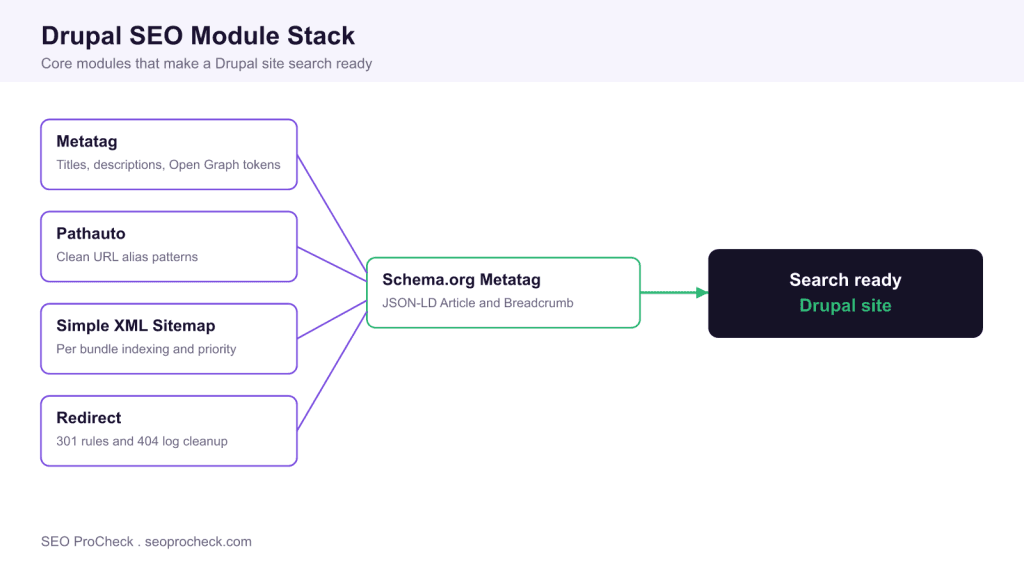
Drupal ships without on-page SEO controls in core, so a search ready site is assembled from a small set of contributed modules: Metatag for titles and social tags, Pathauto for clean URLs, Simple XML Sitemap for indexing, Redirect for link equity, and a Schema.org module for structured data. Install these, set global and per bundle defaults using token patterns, and Drupal outputs the same signals a purpose built SEO CMS would.
- Metatag manages meta titles, descriptions, canonical tags and Open Graph or Twitter cards through token defaults.
- Pathauto generates human readable URL aliases from patterns such as [node:content-type]/[node:title].
- Simple XML Sitemap builds an XML sitemap with per bundle priority and changefreq control.
- Redirect handles 301 rules and logs 404s so broken links can be repaired quickly.

Unlike some platforms that bundle SEO features into core, Drupal keeps the content model lean and expects you to add optimization through contributed modules. That design is a strength: you choose exactly which signals to emit, and you configure them centrally with tokens so a rule you set once applies to thousands of nodes. This guide walks through the modules a practitioner installs on almost every Drupal build, the admin paths where they live, and a concrete worked example so you can reproduce the setup.
Metatag: titles, descriptions and social tags
The Metatag module is the foundation of on-page SEO in Drupal. After enabling it you configure defaults at admin/config/search/metatag. Metatag works with the Token system, so instead of hardcoding text you build patterns that resolve per node. A sensible global default for the meta title is [node:title] | [site:name], and for the description you can pull the trimmed body or a dedicated summary field. Metatag applies settings in a cascade: a Global default is overridden by a content type (bundle) default, which is in turn overridden by any value entered on the individual node. This means you set broad rules once and only touch exceptions.
Metatag also carries submodules you enable as needed. The Open Graph submodule outputs og:title, og:description and og:image so pages render correctly when shared on Facebook or LinkedIn, and the Twitter Cards submodule does the same for X. The Metatag canonical and basic tags submodule controls the canonical URL and robots directives such as noindex on a per bundle basis, which is how you keep faceted or paginated pages out of the index without editing template code.
Pathauto: clean, keyword friendly URLs
By default Drupal serves content at system paths like /node/123. Pathauto, which depends on the Token and Ctools modules, replaces those with readable aliases. You define patterns at admin/config/search/path/patterns. A common article pattern is [node:content-type]/[node:title], which yields URLs such as /article/drupal-seo-module-guide. Pathauto transliterates accented characters and strips punctuation so the alias stays clean, and you can maintain a list of stop words to drop from the slug. When you install Pathauto on an existing site, use the bulk generate tool at admin/config/search/path/update_bulk to create aliases for content that predates the module, and pair it with the Redirect module so old paths keep resolving.
Simple XML Sitemap: telling search engines what to crawl
Simple XML Sitemap is the current standard for sitemap generation, configured at admin/config/search/simplesitemap. You enable indexing per entity bundle, so you might include Articles and Basic pages while excluding internal content types. For each bundle you set a priority value and a changefreq hint, and the module regenerates the sitemap on cron or on demand. It supports sitemap variants, chunking for very large sites, and can ping search engines when the sitemap updates. Because it reads the same alias data Pathauto produces, the URLs in your sitemap match your public URLs automatically.
Redirect: protecting link equity and fixing 404s
The Redirect module manages 301 redirects from the UI at admin/config/search/redirect. Whenever you change a URL alias, Drupal can create a redirect from the old path so inbound links and rankings are preserved. Redirect also ships the redirect_404 submodule, which logs every 404 the site serves at admin/reports/redirect_404. That log is a practical SEO worklist: sort by count, and for each frequently hit broken URL you add a redirect to the correct destination in a few clicks. This turns lost crawl budget and dead backlinks into working, indexable pages.
Structured data: Schema.org Metatag and Schema.org Blueprints
Rich results depend on JSON-LD, and two modules cover it. Schema.org Metatag extends Metatag to emit JSON-LD for types such as Article, BreadcrumbList and Organization using the same token driven defaults. For larger or more editorial sites, Schema.org Blueprints takes a model driven approach, mapping entity types and fields to Schema.org types so the structured data stays in sync with your content model. Either way the output is standards compliant JSON-LD that Google can parse for breadcrumbs, article metadata and sitelinks.
Canonical, hreflang and robots handling
Canonical URLs are handled by Metatag, which sets a self referencing canonical by default and lets you override it per node to consolidate duplicates. For multilingual sites, enable core Content Translation and Configuration Translation, then use Metatag to emit hreflang alternate tags for each translation so Google serves the right language variant. Robots control has two layers: Metatag governs the per page robots meta tag and X-Robots directives, while the RobotsTxt module lets you manage the robots.txt file from the admin UI, which is essential on a multisite install where a single physical file cannot serve different rules per site.
Content analysis: Real-time SEO and Yoast
To coach editors while they write, the Real-time SEO module (historically packaged as Yoast SEO for Drupal) adds a focus keyword field and live readability and optimization scoring to the node edit form. It nudges authors toward a keyword in the title, an adequate meta description length and reasonable paragraph structure. It does not change output on its own, but paired with Metatag it closes the loop between technical configuration and day to day editorial quality.
A worked configuration example
Suppose you launch a blog on the Article content type. First, at admin/config/search/metatag, edit the Article override and set the title to [node:title] | [site:name] and the description to [node:summary] with a body fallback. Next, at admin/config/search/path/patterns, create a pattern for Article of blog/[node:title] so every post lives under /blog. Then, at admin/config/search/simplesitemap, enable indexing for Article and leave priority and changefreq at their defaults, since Google ignores both values; make sure lastmod is accurate instead. Enable the Redirect module so alias changes auto create 301s, and turn on the redirect_404 log. Finally enable Schema.org Metatag and map Article to the Article schema type. Run cron, and each new post now ships with an optimized title tag, a clean URL, a sitemap entry, redirect protection and valid JSON-LD, with zero per node manual work.
If you are auditing the result, the same fundamentals apply that we cover in the missing meta description and missing image alt attribute checks. The module driven approach here mirrors how static frameworks handle the same problems, as in our Gatsby SEO best practices guide, where metadata and sitemaps are wired in at the framework level rather than the CMS.
Drupal SEO module reference
| Module | Primary purpose | Key config path |
|---|---|---|
| Metatag | Meta titles, descriptions, canonical, Open Graph and Twitter tags | admin/config/search/metatag |
| Pathauto | Automatic clean URL aliases from token patterns | admin/config/search/path/patterns |
| Simple XML Sitemap | XML sitemap with per bundle priority and changefreq | admin/config/search/simplesitemap |
| Redirect | 301 redirects and 404 logging | admin/config/search/redirect |
| Schema.org Metatag | JSON-LD structured data for Article and BreadcrumbList | admin/config/search/metatag |
| RobotsTxt | Editable robots.txt, needed for multisite | admin/config/search/robotstxt |
Frequently asked questions
Does Drupal have SEO features built into core?
No. Drupal core keeps the content model deliberately lean and does not manage meta tags, URL aliases or sitemaps on its own. You add these capabilities through contributed modules such as Metatag, Pathauto and Simple XML Sitemap, which gives you precise control over every signal your site emits.
What is the minimum module set for a search ready Drupal site?
For most sites the core four are Metatag, Pathauto, Simple XML Sitemap and Redirect. Add a Schema.org module for structured data and, on multilingual or multisite builds, the RobotsTxt module and core Content Translation. That combination covers titles, URLs, indexing, redirects and rich results.
How do Metatag tokens work?
Tokens are placeholders that resolve per node at render time. Instead of typing a title for every page, you set a pattern such as [node:title] | [site:name] once, and Metatag substitutes the real values. Defaults cascade from global to content type to the individual node, so you configure broadly and override only exceptions.
Do I need both Pathauto and Redirect?
Yes, they work as a pair. Pathauto generates the clean aliases, and Redirect preserves link equity by creating a 301 whenever an alias changes. Without Redirect, updating a URL would orphan inbound links and lose rankings, so most practitioners enable both together.
How does Drupal output structured data for rich results?
Structured data comes from a module rather than core. Schema.org Metatag emits JSON-LD for types like Article and BreadcrumbList using the same token defaults as Metatag, while Schema.org Blueprints offers a model driven mapping for complex sites. Both produce standards compliant JSON-LD that Google can use for rich results.
Can I manage robots.txt from the Drupal admin on a multisite?
Yes, with the RobotsTxt module. A standard multisite shares one physical robots.txt file, which cannot serve different rules per site. RobotsTxt moves that content into the database so each site in the install can define its own crawl directives from the admin UI.
Take this with you
The assistant links open with a question about this page already written. Nothing is sent until you press enter.
Claude Vincent is a technical SEO consultant focused on crawlability, rendering, and AI-search visibility. He writes the field guides and case studies at SEO ProCheck, with a bias toward the durable, unglamorous work that decides whether search engines and AI answer engines can actually read and cite a site.
About SEO ProCheck
Technical SEO consulting and GEO strategy with 20 years of enterprise experience. Case studies, resources, and tools for search and AI visibility.
Work With Me
Technical SEO audits, GEO strategy, site migrations, and international SEO. Hourly consulting for teams who need hands-on support, not just reports.
Subscribe to our newsletter!








Recent Posts
- Most Top Sites Never Say Who They Are in Structured Data October 14, 2026
- Homepage Titles Are Mostly Too Short, Not Too Long October 8, 2026
- Who Actually Serves an llms.txt? 184 Top Sites Measured September 29, 2026