

AI Summary
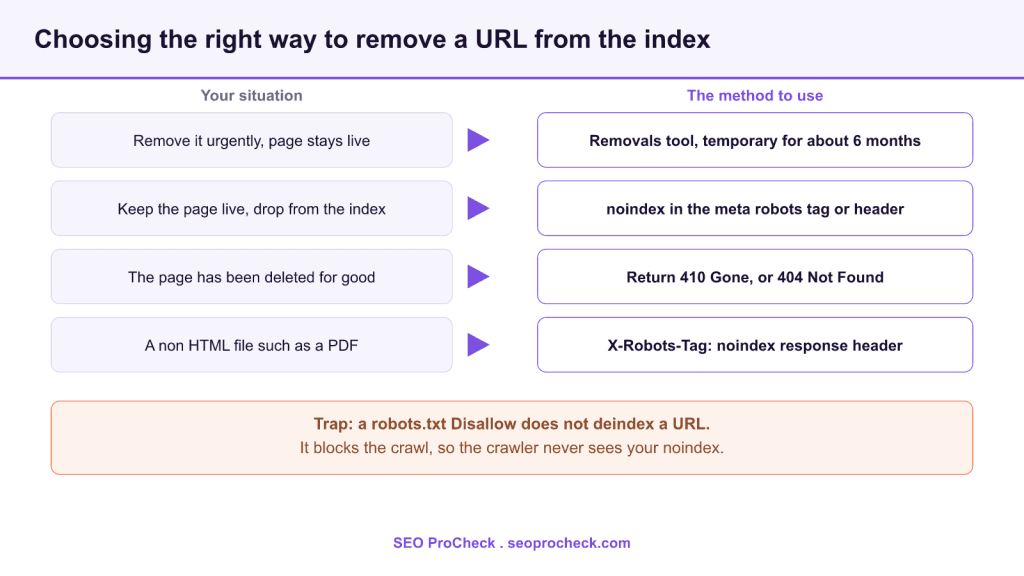
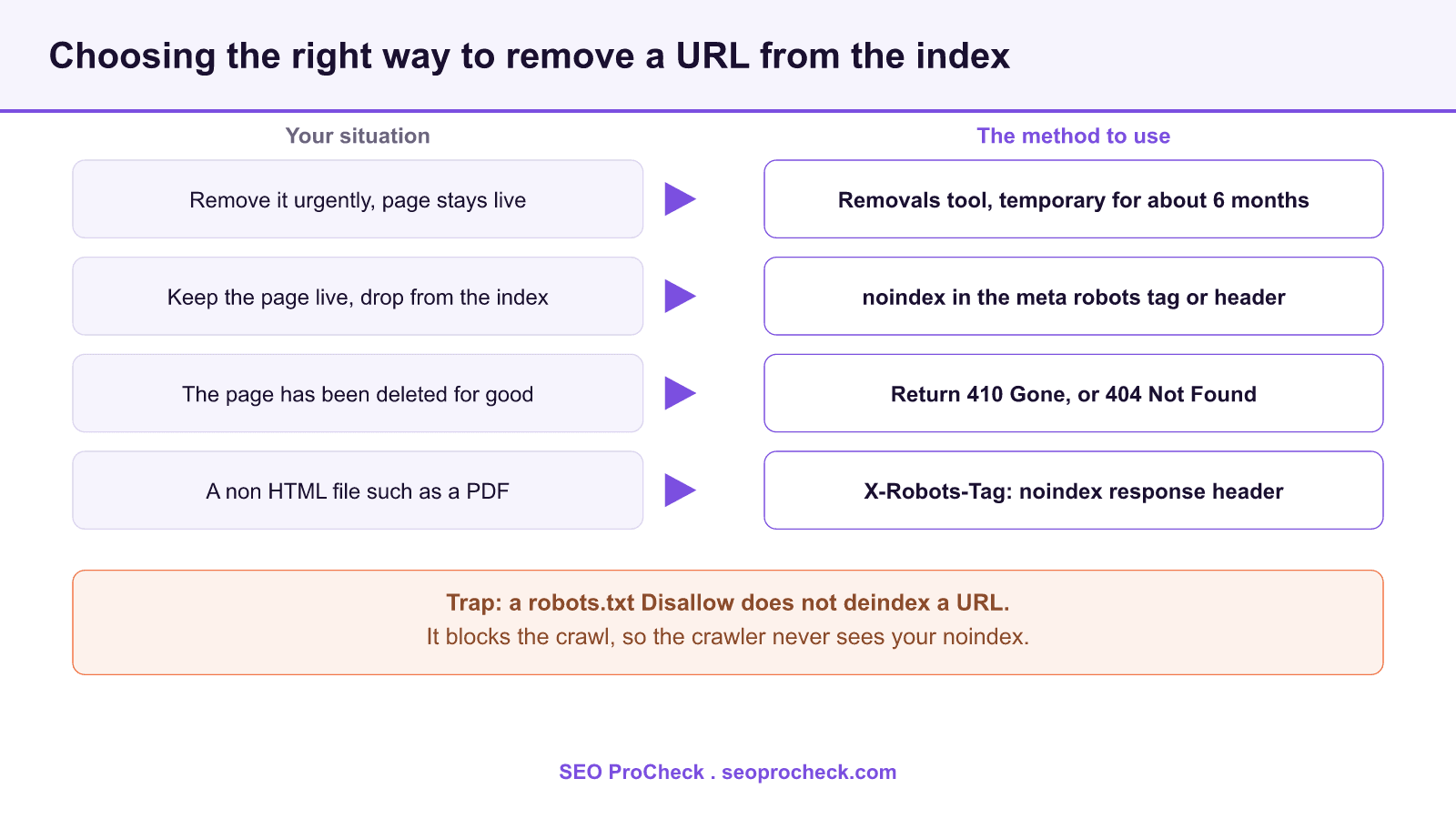
To deindex a URL you tell the crawler to drop it after it fetches the page, using a noindex directive in the meta robots tag or the X-Robots-Tag header, or by returning a 410 or 404 when the page is gone. The most common mistake is blocking the URL in robots.txt, which prevents the crawler from ever reading the noindex, so the page can stay indexed. The source below covers an additional, less obvious route to the same outcome.
- Use noindex (meta tag or X-Robots-Tag) to remove a page that stays live and crawlable.
- Use a 410 Gone or 404 Not Found response when the page has actually been deleted.
- Use the Search Console Removals tool for an urgent, temporary hide of about six months.
- Never block a URL in robots.txt if you also want it deindexed, because the block hides the noindex.
Getting a URL out of a search index is simple once you separate two ideas that people constantly conflate: crawling (whether a bot may fetch the URL) and indexing (whether the fetched content is stored and shown). Every reliable removal method works at the indexing stage, which means the crawler has to be allowed to fetch the page first. The write up linked as the source explores another way to reach a deindex outcome; the practitioner toolkit below is the full set of methods it fits into.
The methods that actually remove a URL
- Robots meta noindex: add
<meta name="robots" content="noindex">to the HTML head. The engine drops the page at the next crawl. Keep the page crawlable so the tag is seen. - X-Robots-Tag header: send
X-Robots-Tag: noindexin the HTTP response. This is the only way to noindex non HTML files such as PDFs, images, and feeds, and it lets you set rules server wide. - 410 Gone or 404 Not Found: when a page is genuinely removed, return a 410 (or 404). Google treats 410 as a slightly stronger signal that the resource is gone for good, so it tends to drop from the index a little faster.
- Removals tool in Search Console: under Indexing, Removals, request a temporary removal. It hides the URL from results for roughly six months while you apply a permanent fix.
- Authentication (401 or 403): putting content behind a login removes it, because the crawler cannot access it.
The one method that does not deindex
Blocking a URL with Disallow in robots.txt does not remove it from the index. It stops the crawler from fetching the page, which means the crawler cannot read any noindex you placed there. A disallowed URL that already has links pointing to it can even keep showing in results as a bare link with no description. The rule to memorize: to deindex, allow the crawl and add noindex; to save crawl budget on pages that are already out of the index, then consider robots.txt. Never use both on the same URL at the same time.
Worked configuration examples
Meta tag, placed in the HTML head of the page you want removed:
<meta name="robots" content="noindex, follow">X-Robots-Tag on Apache, added to the site config or an .htaccess file to noindex every PDF:
<FilesMatch "\.pdf$">
  Header set X-Robots-Tag "noindex, noarchive"
</FilesMatch>
X-Robots-Tag on Nginx, inside a location block:
location ~* \.pdf$ {
  add_header X-Robots-Tag "noindex, noarchive";
}
How long removal takes and how to speed it up
A noindex or a 410 only takes effect after the engine recrawls the URL, which can be days to weeks depending on how often that page is visited. To force the timeline for a single important URL, submit it in the URL Inspection tool and request indexing so it is recrawled sooner, and use the Removals tool for anything urgent while the permanent signal propagates. For a large batch, make sure the affected URLs are still reachable in your sitemap or internal links so the crawler returns to them and reads the new directive.
Match the method to the situation
| Situation | Recommended method | Page stays live? | Typical speed |
|---|---|---|---|
| Live page to drop from results | Robots meta noindex | Yes | Next recrawl |
| Non HTML file (PDF, image) | X-Robots-Tag header | Yes | Next recrawl |
| Page permanently deleted | Return 410 Gone | No | Slightly faster than 404 |
| Urgent, sensitive content | Removals tool plus noindex | Optional | Hours, temporary |
| Private area | Require login (401 or 403) | Behind auth | Next recrawl |
For the full directive reference, see our meta robots and X-Robots-Tag reference and the noindex definition. When removal is part of trimming a bloated index, read our guide to index bloat, and if pages you want gone keep showing as discovered, currently not indexed, that status explains why a crawl may be delayed.
Frequently asked questions
Add a noindex directive to the page (meta robots tag or X-Robots-Tag header) and keep the page crawlable so the directive is read. If the page is deleted, return a 410 Gone instead. Both take effect at the next recrawl.
No. A robots.txt Disallow blocks crawling, not indexing, and it actually prevents the crawler from seeing any noindex on the page. A URL blocked in robots.txt can still appear in results as a bare link.
Both eventually remove a deleted page. A 410 Gone states the resource is permanently gone, which Google treats as a slightly stronger signal, so it can drop from the index a little faster than a 404 Not Found.
It hides a URL from results within hours, but only temporarily, for about six months. Pair it with a permanent method such as noindex or a 410 so the page does not return when the temporary removal expires.
Yes, but not with a meta tag, since those files have no HTML head. Send an X-Robots-Tag: noindex HTTP header for the file, which you can configure server wide in Apache or Nginx.
Request indexing for it in the URL Inspection tool so it is recrawled sooner, keep it reachable in your sitemap and internal links, and use the Removals tool for an immediate temporary hide while the permanent noindex or 410 propagates.
Case study summary and source
This SEO case study documents a successful optimization initiative, providing actionable insights for practitioners. The documented approach demonstrates how strategic SEO implementation drives measurable results.
Initial Situation
Understanding the starting point is essential context for evaluating any case study. This documentation covers the initial challenges, competitive position, and business objectives that shaped the SEO strategy.
Strategy and Approach
The strategic approach combined multiple SEO disciplines to address identified opportunities. Key decisions around prioritization and resource allocation provide a template for similar initiatives.
Implementation
Moving from strategy to execution required specific technical implementations, content development, and process changes. This case study documents the practical steps that translated strategy into action.
Results and Learnings
The outcomes demonstrate effectiveness through measurable improvements in rankings, traffic, and business metrics. Analysis of successes and challenges provides learning value for practitioners.
Case studies like this contribute to the SEO knowledge base, helping practitioners learn from documented real-world experiences.
Source: https://ohgm.co.uk/another-way-to-deindex-urls/
Take this with you
The assistant links open with a question about this page already written. Nothing is sent until you press enter.
Claude Vincent is a technical SEO consultant focused on crawlability, rendering, and AI-search visibility. He writes the field guides and case studies at SEO ProCheck, with a bias toward the durable, unglamorous work that decides whether search engines and AI answer engines can actually read and cite a site.
About SEO ProCheck
Technical SEO consulting and GEO strategy with 20 years of enterprise experience. Case studies, resources, and tools for search and AI visibility.
Work With Me
Technical SEO audits, GEO strategy, site migrations, and international SEO. Hourly consulting for teams who need hands-on support, not just reports.
Subscribe to our newsletter!








Recent Posts
- Most Top Sites Never Say Who They Are in Structured Data October 14, 2026
- Homepage Titles Are Mostly Too Short, Not Too Long October 8, 2026
- Who Actually Serves an llms.txt? 184 Top Sites Measured September 29, 2026