

AI Summary
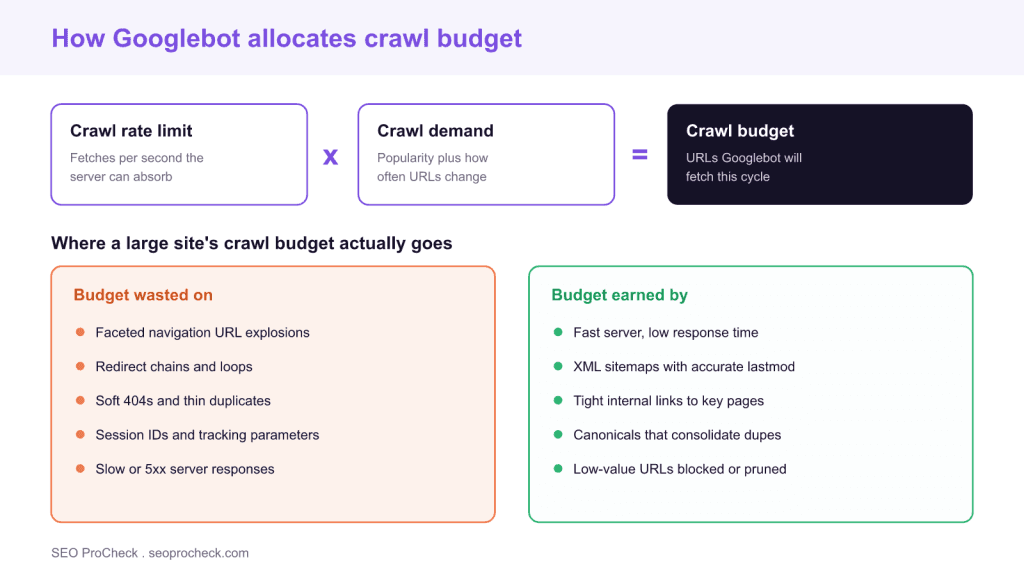
Crawl budget is the number of URLs Googlebot will fetch on your site in a given window, and it equals your crawl rate limit (what the server can absorb) multiplied by crawl demand (how much Google wants your URLs). You do not increase it by asking: you remove the waste that burns it and strengthen the signals that raise demand.
- It only matters at scale: large catalogs, publishers, or any site generating URLs faster than unique value.
- Biggest leaks are faceted-navigation URL explosions, redirect chains, soft 404s, and slow or 5xx responses.
- Measure with the Search Console
Crawl Statsreport and raw server access logs before changing anything. - A
noindextag does not save crawl budget; only arobots.txtdisallow stops the fetch.

Crawl budget is the number of URLs Googlebot is willing and able to fetch on your site in a given window. For a small brochure site it is a non-issue: Google will happily crawl every page. For large e-commerce catalogs, publishers, and any site that generates URLs faster than it produces unique value, crawl budget becomes the ceiling on how quickly new and updated pages get discovered and indexed. Negotiating crawl budget is not about begging Google for more, it is about removing the waste that burns your allowance and strengthening the signals that raise demand for your important URLs.
This SEO case study documents a successful optimization initiative, providing actionable insights for practitioners. The documented approach demonstrates how strategic SEO implementation drives measurable results.
What crawl budget actually is
Google breaks crawl budget into two components. The crawl capacity limit is how many simultaneous connections and how fast a rate Googlebot can use without degrading your server: it rises when your server responds quickly and reliably, and it falls the moment Googlebot sees slow responses or server errors. Crawl demand is how much Google wants to crawl your URLs, driven by popularity (links and traffic) and staleness (how often the content changes). Your effective crawl budget is the smaller of what your server can take and what Google actually wants to fetch, which is exactly the relationship the diagram above illustrates.
The practical consequence is that crawl budget is not one dial you can turn. It is the product of server health and content demand, so you improve it from both sides at once. Before spending any effort, confirm the problem is real for your site using the table below.
| Site profile | Crawl budget priority | What to do |
|---|---|---|
| Under a few thousand URLs, changes rarely | Low | Ignore it; Google crawls everything easily |
| 10,000+ URLs with frequent changes | Medium | Watch Crawl Stats for waste and slow responses |
| 1,000,000+ unique URLs | High | Active management is required |
| Large share of URLs "Discovered, currently not indexed" in Search Console | High | Treat as a crawl or quality red flag |
Initial Situation
Understanding the starting point is essential context for evaluating any case study. This documentation covers the initial challenges, competitive position, and business objectives that shaped the SEO strategy.
Before you change anything, measure. Two data sources tell the truth. First, the Crawl Stats report in Google Search Console, found under Settings and then Crawl stats, shows total crawl requests over 90 days, average response time, host status, and a breakdown by response code, file type, and purpose (discovery versus refresh). A rising average response time, or a spike in 4xx and server errors, is where budget leaks. Second, raw server access logs are the ground truth: they record every Googlebot hit, which URLs it fetches, how often, and how much of its time is spent on parameter noise instead of pages that earn revenue. Segment the logs by directory to see whether Googlebot spends its visits on real products or on filtered, sorted, and session-tagged duplicates.
Strategy and Approach
The strategic approach combined multiple SEO disciplines to address identified opportunities. Key decisions around prioritization and resource allocation provide a template for similar initiatives.
The strategy has two halves that map directly onto the two components of crawl budget. To raise capacity, make the server faster and more stable so Googlebot can safely fetch more per visit. To spend the budget wisely, stop Googlebot from wasting fetches on URLs that will never earn a place in the index. You can no longer manually dial up the crawl rate because the old limiter in Search Console was retired, so efficiency is the lever you control. Prioritize by how many wasted crawls each fix removes: a faceted navigation that spawns millions of parameter combinations deserves far more attention than a handful of stray redirects, and controlling those parameters at the robots.txt level often reclaims the most budget fastest.
Implementation
Moving from strategy to execution required specific technical implementations, content development, and process changes. This case study documents the practical steps that translated strategy into action.
Translate the strategy into specific technical changes. Block genuinely low-value, infinite, or duplicate URL spaces in robots.txt so Googlebot never requests them. Collapse redirect chains to a single hop. Return a proper 404 or 410 for dead URLs instead of soft 404s that keep getting recrawled. Use canonical tags to consolidate near-duplicates, and keep XML sitemaps limited to indexable canonical URLs with honest lastmod dates so refresh crawling targets pages that actually changed. Remember that a noindex directive does not stop crawling, so it is the wrong tool for saving budget. The same URL sprawl that wastes crawl also plagues large listing sets, which is why disciplined pagination and clean internal linking are part of the same job. The table below maps each common leak to its symptom and fix.
| Budget leak | How it shows up | Fix |
|---|---|---|
| Faceted / parameter URLs | Millions of ?color=&sort= combinations in the logs | Disallow in robots.txt or canonicalize; keep only a useful crawlable subset |
| Redirect chains | Several 301 hops per request | Rewrite internal links to the final URL, one hop maximum |
| Soft 404s | 200 responses on empty or thin pages, recrawled often | Return a real 404 or 410; consolidate the content |
| Duplicate content | The same content reachable on many URLs | Point rel=canonical at the master URL |
| Slow or 5xx responses | High average response time, host status errors | Improve time to first byte and fix errors so the rate limit rises |
| Stale sitemaps | lastmod missing or always today | Honest lastmod, canonical indexable URLs only |
Results and Learnings
The outcomes demonstrate effectiveness through measurable improvements in rankings, traffic, and business metrics. Analysis of successes and challenges provides learning value for practitioners.
Because crawl budget is a means and not an end, judge the work by leading indicators rather than a single headline number. In Crawl Stats, watch average response time trend down and the share of crawl requests going to your priority directories trend up. In the Pages report, watch the "Discovered, currently not indexed" and "Crawled, currently not indexed" buckets shrink as Googlebot reaches and re-evaluates real pages faster. In the logs, watch the ratio of money-page fetches to parameter noise improve. The specific gains for any given site depend on how much waste existed to begin with. The documented case study linked at the end describes one team's experience negotiating this trade-off, so treat the numbers there as that site's result rather than a benchmark to expect on yours. If you are auditing crawl efficiency as part of a broader review, it sits alongside the other technical SEO fundamentals that quietly decide whether good content ever gets seen.
Case studies like this contribute to the SEO knowledge base, helping practitioners learn from documented real-world experiences.
FAQ
For most sites under a few thousand URLs that Google already indexes, no. Google can crawl the whole site easily, so your time is better spent on content and links. Crawl budget becomes a real constraint on large catalogs, publishers, and any site that spawns URLs faster than it produces unique value.
Not directly. Google still has to crawl a URL to see the noindex tag, and it keeps recrawling it for a while before crawling it less often. Only a robots.txt disallow stops the fetch itself. Use noindex to control indexing and robots.txt to control crawling.
Two places. The Crawl Stats report in Google Search Console (Settings, then Crawl stats) shows 90 days of crawl requests, average response time, host status, and breakdowns by response code and purpose. Raw server access logs are the ground truth and show every Googlebot fetch URL by URL.
The old manual crawl-rate limiter in Search Console was retired. You raise the effective rate by making the server fast and reliable so Googlebot can safely fetch more, and by raising demand through quality and freshness. Google then adjusts the rate automatically.
Yes, redirect chains especially. Each hop is a separate fetch, so a three-hop chain costs three requests instead of one. Point internal links at the final URL and keep any necessary redirect to a single hop.
No. Crawl budget affects how quickly pages are discovered and how fast updates are re-crawled, which indirectly changes how soon your work shows up in search. It is not a direct ranking signal.
Not sure where your crawl budget is leaking?
Log analysis plus the Crawl Stats report usually reveals the parameter traps and slow responses burning your allowance. An audit pinpoints them.
Take this with you
The assistant links open with a question about this page already written.
Claude Vincent is a technical SEO consultant focused on crawlability, rendering, and AI-search visibility. He writes the field guides and case studies at SEO ProCheck, with a bias toward the durable, unglamorous work that decides whether search engines and AI answer engines can actually read and cite a site.
About SEO ProCheck
Technical SEO consulting and GEO strategy with 20 years of enterprise experience. Case studies, resources, and tools for search and AI visibility.
Work With Me
Technical SEO audits, GEO strategy, site migrations, and international SEO. Hourly consulting for teams who need hands-on support, not just reports.
Subscribe to our newsletter!








Recent Posts
- Google Algorithm Updates: The Dated List Since 2003, and What to Do After Each October 31, 2026
- AI Readiness: The Checklist, the Research and the Free Tools October 28, 2026
- AI Readiness Checklist (2026): 51 Checks, Each With Its Source October 28, 2026