

XML Sitemaps: The Complete Implementation Guide
- July 7, 2022
- Crawlability and Indexation, Technical SEO
AI Summary
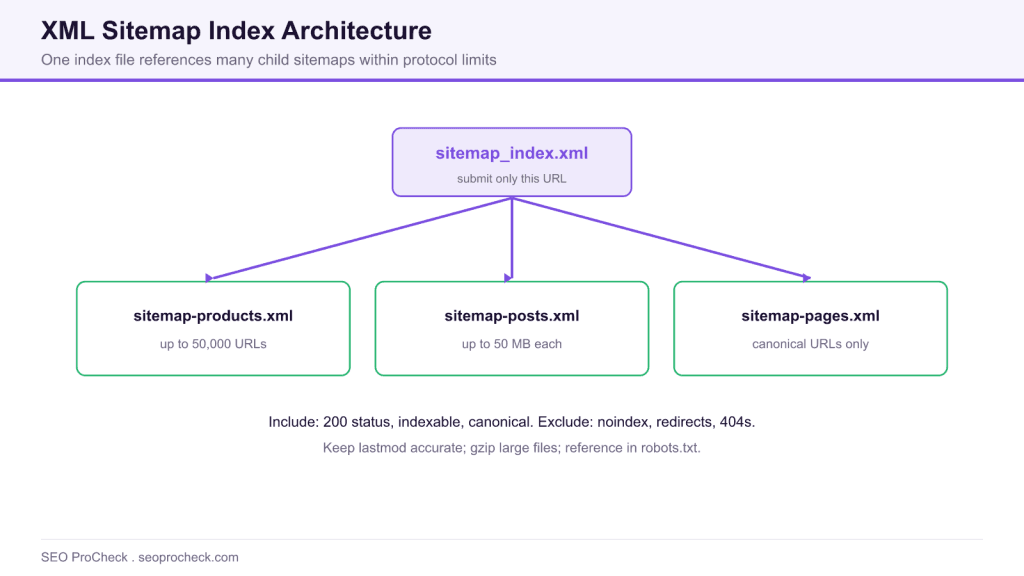
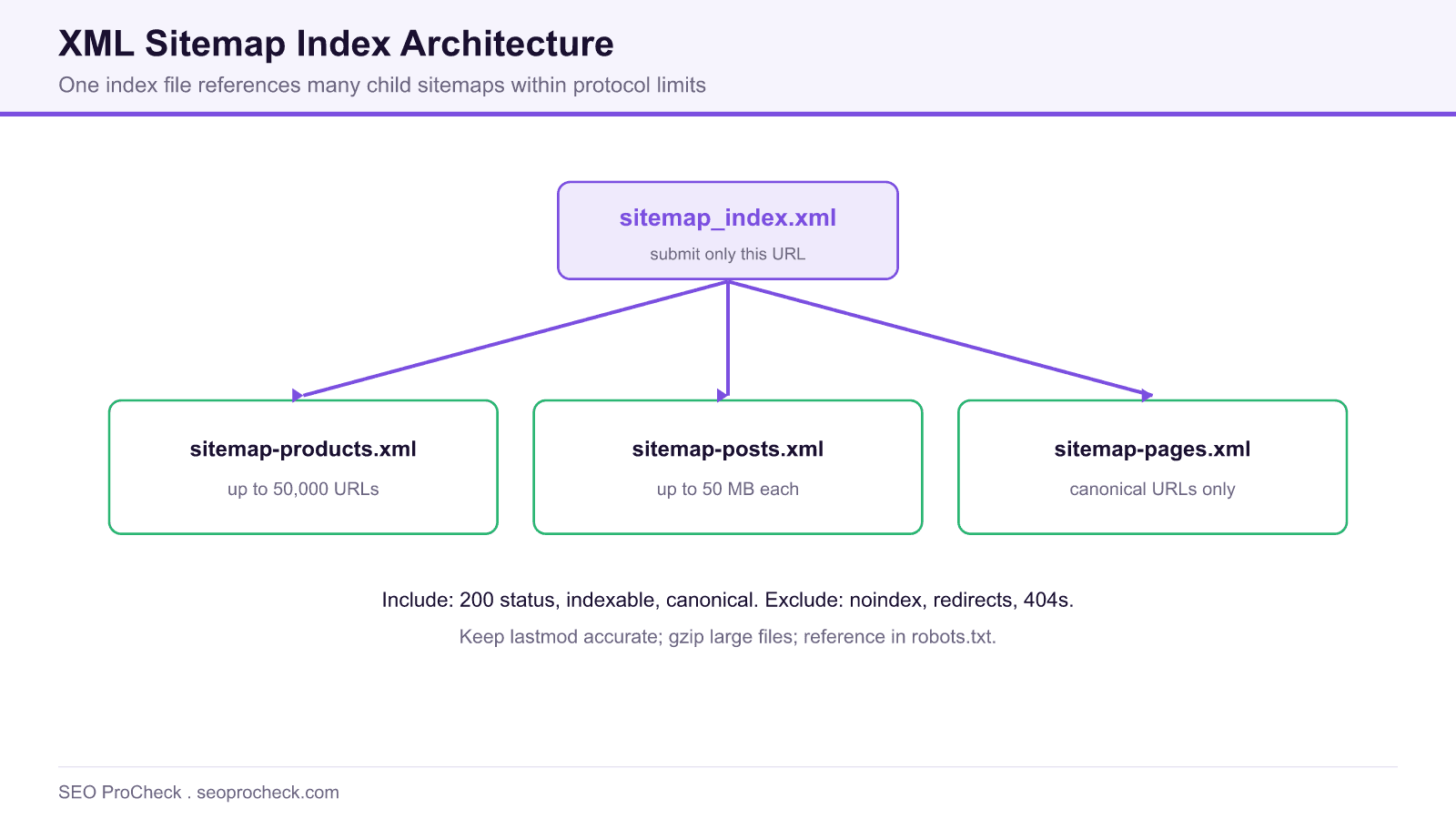
An XML sitemap is a file that lists the canonical, indexable URLs you want search engines to crawl, along with optional metadata like the last modified date. Large sites split URLs across multiple sitemap files referenced by a single sitemap index, staying within the 50,000 URL and 50 MB limits per file.
- Each URL entry supports loc, lastmod, changefreq, and priority; Google relies mainly on loc and lastmod.
- One sitemap file is capped at 50,000 URLs and 50 MB uncompressed; use a sitemap index above that.
- Include only canonical, indexable, status 200 URLs; exclude noindex, redirects, and 404s.
- Submit in Search Console and Bing Webmaster Tools, and reference the sitemap in robots.txt.
Understanding XML Sitemaps
XML sitemaps are files that list your website's important URLs, helping search engines discover and crawl your content efficiently. While search engines can find pages through links, sitemaps provide a direct roadmap to your content, including metadata about when pages were last modified, how often they change, and their relative priority. For large sites, sites with poor internal linking, or new sites, XML sitemaps are essential for comprehensive indexation.
Sitemap Structure and Elements
A standard XML sitemap follows the sitemap protocol at sitemaps.org. Each URL entry can include four elements:
| Element | Required | Description | Best Practice |
|---|---|---|---|
| loc | Yes | Full URL of the page | Use canonical URLs only |
| lastmod | No | Last modification date | Update only when content changes meaningfully |
| changefreq | No | Expected change frequency | Google largely ignores this |
| priority | No | Relative importance (0.0-1.0) | Google largely ignores this |
Sitemap Index Files for Large Sites
Individual sitemaps are limited to 50,000 URLs and 50MB uncompressed. Sites exceeding these limits should use sitemap index files that reference multiple sitemap files. Organize sitemaps logically by content type (products, categories, blog posts) or site section. This organization makes monitoring and troubleshooting easier. Name files descriptively (sitemap-products.xml, sitemap-blog.xml) and reference all in your sitemap index file. Submit only the index file URL to search engines.
Sitemap Best Practices
Include only canonical, indexable URLs in your sitemaps. Exclude pages with noindex tags, redirected URLs, 404 pages, and duplicate content. Keep lastmod dates accurate and only update them when content genuinely changes. Submit sitemaps through Google Search Console and Bing Webmaster Tools. Reference your sitemap in robots.txt using the Sitemap directive. For dynamic sites, generate sitemaps automatically through your CMS or build system. Compress large sitemaps using gzip to reduce bandwidth.
Monitoring Sitemap Health
Regularly audit your sitemaps using Google Search Console's sitemap report, which shows submitted vs indexed URLs. Large gaps between submitted and indexed counts indicate quality or technical issues. Use tools like Screaming Frog to validate sitemap URLs against your live site, checking for status code errors, redirect chains, or noindex conflicts. Monitor sitemap coverage after major site changes like migrations, redesigns, or large content updates.
A Worked Sitemap Index Example
Once a site outgrows a single file, group URLs by content type and reference every child file from one index. The index is the only URL you submit. A minimal index looks like this:
<?xml version="1.0" encoding="UTF-8"?>
<sitemapindex xmlns="http://www.sitemaps.org/schemas/sitemap/0.9">
  <sitemap>
    <loc>https://example.com/sitemap-posts.xml</loc>
    <lastmod>2026-07-21</lastmod>
  </sitemap>
  <sitemap>
    <loc>https://example.com/sitemap-products.xml</loc>
    <lastmod>2026-07-20</lastmod>
  </sitemap>
</sitemapindex>
Each child file uses the standard urlset format. Note that lastmod uses W3C datetime, so a plain date like 2026-07-21 or a full timestamp are both valid.
<url>
  <loc>https://example.com/blog/xml-sitemaps/</loc>
  <lastmod>2026-07-21</lastmod>
</url>
Specialized Sitemaps: Image, Video, and News
Beyond standard page sitemaps, three extensions help specific content types get discovered. The table summarizes when each is worth adding.
| Sitemap type | Use it when | Key detail |
|---|---|---|
| Image sitemap | Images drive meaningful traffic or are hard to discover | Add image entries inside the page URL, up to 1,000 images per page |
| Video sitemap | Video is central to the page and you want video rich results | Include title, description, thumbnail, and content or player URL |
| News sitemap | The site is an approved Google News publisher | Only include articles from the last 2 days |
Common Sitemap Mistakes to Avoid
The fastest wins usually come from removing noise rather than adding URLs. Listing noindex or redirected URLs sends mixed signals and wastes the crawl budget that a sitemap is meant to focus. Stale lastmod values that update on every deploy train search engines to ignore the field, so only change lastmod when the content itself changes. Finally, keep the sitemap and the canonical tags in agreement: a URL in the sitemap should be the same canonical URL you link to internally. For sites where crawl efficiency is the bottleneck, pair sitemap hygiene with the guidance in our crawl budget guide.
For deeper reference material, see our complete XML sitemaps reference and the meta robots and X-Robots-Tag reference for controlling what stays out of the index.
Frequently Asked Questions
How many URLs can one XML sitemap contain?
A single sitemap file is limited to 50,000 URLs and 50 MB uncompressed. If your site exceeds either limit, split URLs across multiple files and reference them from a sitemap index, then submit only the index URL.
Should I include lastmod, changefreq, and priority?
Include an accurate lastmod, since Google uses it as a freshness signal. Google largely ignores changefreq and priority, so they are optional and low value. Never let lastmod update automatically on every deploy.
What URLs should I exclude from my sitemap?
Exclude noindex pages, redirected URLs, 404s, non canonical duplicates, and any URL you do not want indexed. A sitemap should list only canonical, indexable, status 200 URLs so it focuses crawling on pages that matter.
Do I need to submit my sitemap to Google?
Submitting through Search Console and Bing Webmaster Tools speeds discovery and gives you a coverage report. You should also reference the sitemap in robots.txt with a Sitemap directive so any crawler can find it.
How do I fix a large gap between submitted and indexed URLs?
A big gap usually points to quality or technical issues rather than the sitemap itself. Audit the affected URLs for thin content, duplication, noindex conflicts, or crawl errors, and confirm the sitemap only lists canonical pages.
Should I compress my sitemap?
Compressing large sitemaps with gzip reduces bandwidth and is fully supported by search engines. The 50 MB size limit applies to the uncompressed file, so compression helps with transfer, not with the URL count cap.
Take this with you
The assistant links open with a question about this page already written.
Claude Vincent is a technical SEO consultant focused on crawlability, rendering, and AI-search visibility. He writes the field guides and case studies at SEO ProCheck, with a bias toward the durable, unglamorous work that decides whether search engines and AI answer engines can actually read and cite a site.
About SEO ProCheck
Technical SEO consulting and GEO strategy with 20 years of enterprise experience. Case studies, resources, and tools for search and AI visibility.
Work With Me
Technical SEO audits, GEO strategy, site migrations, and international SEO. Hourly consulting for teams who need hands-on support, not just reports.
Subscribe to our newsletter!








Recent Posts
- Google August 2026 Spam Update: Dates, Duration and How to Read Your Data November 2, 2026
- Google Algorithm Updates: The Dated List Since 2003, and What to Do After Each October 31, 2026
- AI Readiness: The Checklist, the Research and the Free Tools October 28, 2026