

AI Summary
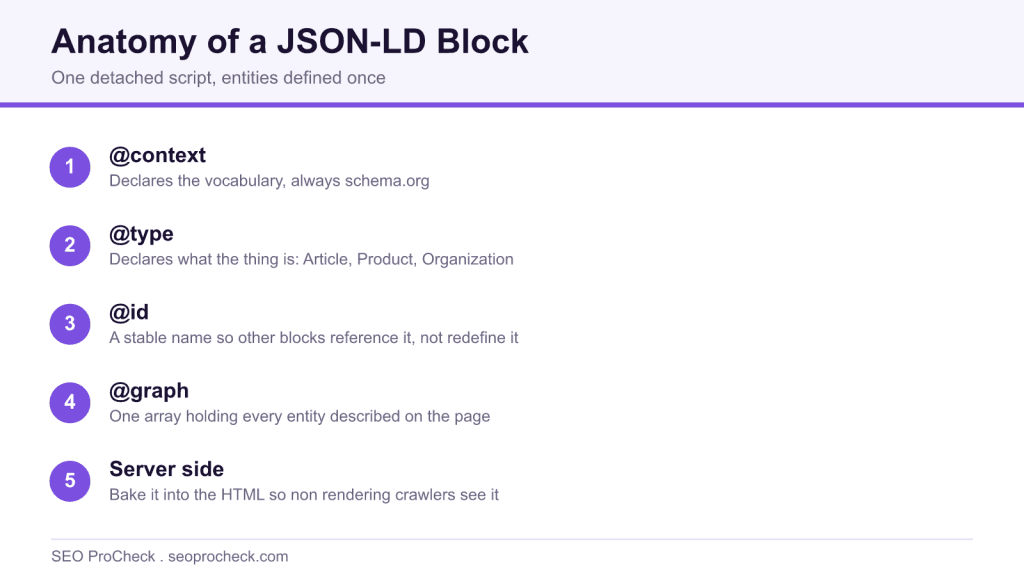
JSON-LD is the script based format for structured data: one script block of plain JSON that describes the page, detached from the visible HTML. Google recommends it over Microdata and RDFa, but a single syntax error silently discards the whole block, so generate it programmatically and keep it in sync with the page.
- The detached block survives template redesigns that break inline markup.
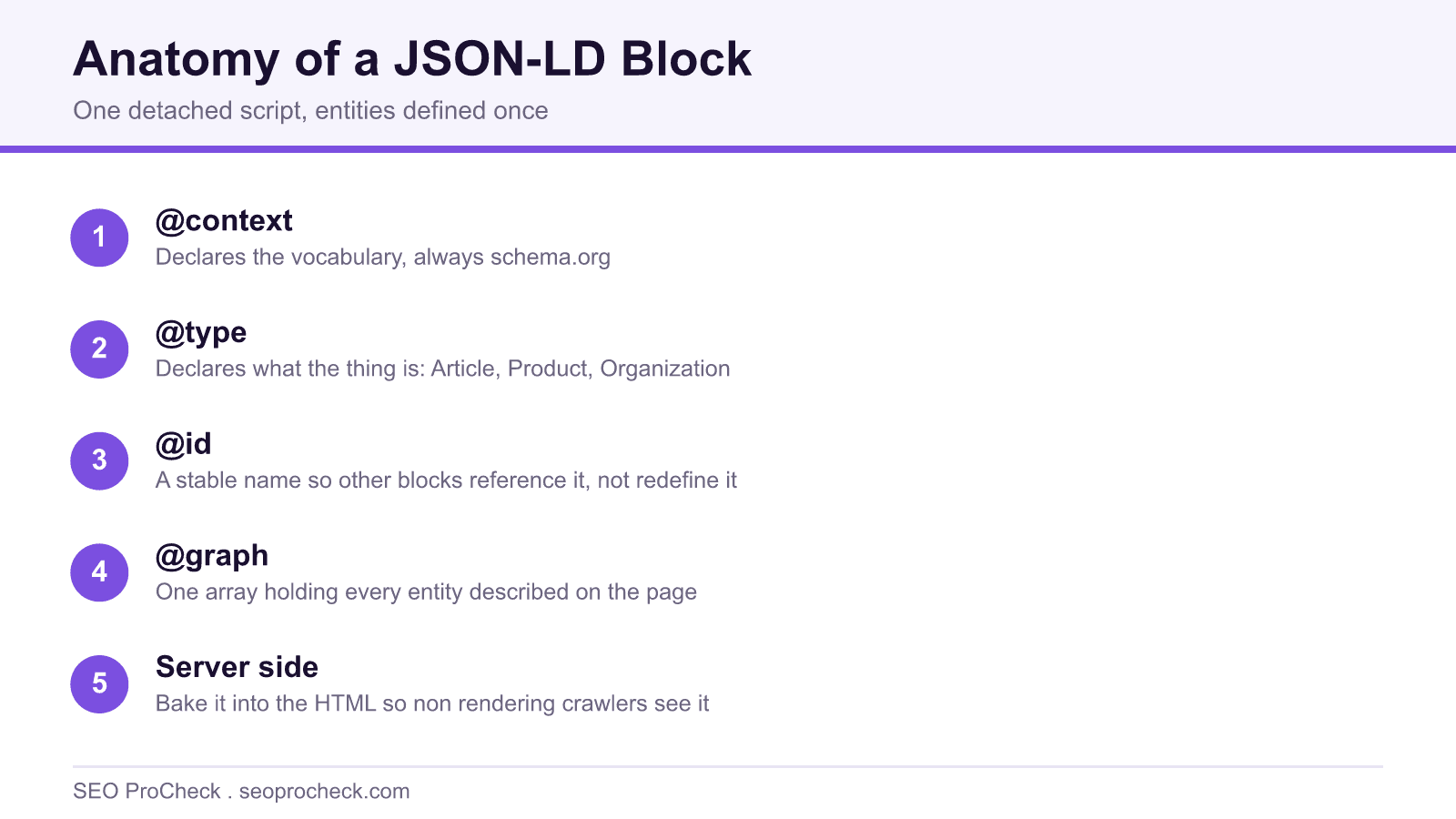
- Use @context, @type, and @id, with one @graph so entities are defined once.
- Bake it into the server HTML so non rendering crawlers and AI bots see it.
- Validators check grammar, not truth: the values must match the visible page.
JSON-LD (JSON for Linking Data) is the script-based format for publishing structured data: one <script type="application/ld+json"> block containing plain JSON that describes the page, completely detached from the visible HTML. Google has recommended it over every alternative for years, and if your JSON-LD is malformed, one trailing comma is enough, the whole block is silently discarded and your rich result eligibility evaporates without a single error in your logs.
Why the detached format won
The older formats, Microdata and RDFa, weave attributes into your visible HTML, itemprop="price" wrapped around the actual price element. That sounds elegant until a designer restructures the template and shreds your markup without knowing it existed. JSON-LD lives in its own block, so it survives redesigns, can be generated from the same database record that renders the page, and can be templated in any CMS or framework without touching layout code. The trade-off is honesty by discipline rather than by construction: because the block is separate from the content, nothing physically stops it drifting out of sync with what the page displays. That drift is on you to prevent.
| JSON-LD | Microdata | RDFa | |
|---|---|---|---|
| Where it lives | Standalone <script> block, head or body | Attributes on visible HTML elements | Attributes on visible HTML elements |
| Google's position | Recommended format | Supported | Supported |
| Survives template redesigns | Yes, decoupled from layout | No, markup breaks when elements move | No, same fragility |
| Templating / CMS generation | Trivial, serialize an object | Painful, logic tangled into views | Painful, plus the steepest learning curve |
| Tag manager injection | Possible (with rendering caveats, below) | Not realistic | Not realistic |
| Risk of contradicting visible content | Higher, nothing ties values to the DOM | Lower, values are the visible content | Lower, same coupling |
| Sane choice for new builds in 2026 | Yes | Legacy only | Almost never |
Anatomy of a block that actually works
Three keywords do the heavy lifting. @context declares the vocabulary (always https://schema.org). @type declares what the thing is. @id gives an entity a stable, addressable name so other blocks can reference it instead of redefining it. That last one is what separates copy-paste markup from a connected entity model:
<script type="application/ld+json">
{
  "@context": "https://schema.org",
  "@graph": [
    {
      "@type": "Organization",
      "@id": "https://example.com/#org",
      "name": "Example Co",
      "url": "https://example.com/",
      "logo": "https://example.com/img/logo.png"
    },
    {
      "@type": "Article",
      "@id": "https://example.com/blog/ttfb-guide/#article",
      "headline": "Cutting TTFB on a Budget VPS",
      "datePublished": "2026-02-11",
      "dateModified": "2026-05-30",
      "author": { "@type": "Person", "name": "Jane Doe" },
      "publisher": { "@id": "https://example.com/#org" }
    }
  ]
}
</script>
Note the publisher line: it points at the Organization by @id rather than repeating it. One @graph array, entities defined once, referenced everywhere, that's the pattern that scales past a single page (there's a full guide to @graph and nesting if you're building this out properly). What you're choosing to describe, which types, which properties, is the vocabulary question covered under schema markup; the payoff in the SERP is covered under rich results. This page is strictly about the container.
Placement and injection
Head or body both work; Google parses either. What matters more is when the block exists. JSON-LD baked into the server response is seen by everything, Googlebot's first crawl pass, Bing, and the growing crowd of AI crawlers that never execute JavaScript. JSON-LD injected by Google Tag Manager or client-side script only exists after rendering, which Google usually handles but other consumers frequently don't. GTM injection is a legitimate stopgap when you can't touch templates; it's a lousy permanent architecture.
How to check it on your own site
- View source (not DevTools Elements, raw source) and search for
ld+json. Count the blocks and note whether they're in the initial HTML or missing until render. - Paste each block's JSON into a linter or run the URL through the Schema Markup Validator (validator.schema.org). This catches syntax errors and vocabulary mistakes for all types.
- Run the Rich Results Test for Google-eligibility specifically. It renders the page, so it also proves whether script-injected blocks make it into what Google sees.
- In Search Console, use URL Inspection → View crawled page and search the rendered HTML for your block, the definitive answer for GTM-injected markup.
- Diff the values in the JSON against what the page visibly shows: price, rating, dates. Validators check grammar, not truth.
Common mistakes
- Invalid JSON killing the whole block. Trailing commas, curly "smart quotes" pasted from a doc, unescaped line breaks inside strings. One character and the parser drops everything. Fix: generate programmatically, never hand-edit in a word processor, lint on deploy.
- Duplicate, contradictory blocks. The SEO plugin outputs Article, the theme outputs Article, and they disagree on the author. Fix: one owner per type, audit which plugin or template emits what, and switch the extras off.
- Dates in the wrong format.
datePublished: "Feb 11, 2026"doesn't parse; ISO 8601 (2026-02-11, with timezone if you include time) does. Same trap with price:"$120"is wrong,"120.00"pluspriceCurrencyis right. - Relying on GTM injection for critical types. Product markup that exists only post-render is invisible to non-rendering crawlers and hostage to your tag container loading. Fix: move revenue-critical markup server-side; keep GTM for experiments.
- Redefining the same entity on every page with slight variations. Three different spellings of your organization across templates fragments the entity. Fix: define once with an
@id, reference everywhere.
FAQ
Does the block go in the head or the body?
Either, Google explicitly accepts both. Pick whichever your template makes reliable and stop worrying about it. Existing in the initial server HTML matters far more than which section it sits in.
Multiple script blocks or one @graph?
Both parse fine. Multiple blocks are easier when different plugins own different types; a single @graph is cleaner when you control the whole stack and want entities referencing each other by @id. Whatever you choose, don't define the same entity twice with different values.
Does Google read JSON-LD injected by Google Tag Manager?
Usually, yes, it appears in the rendered HTML that Google indexes. But rendering is deferred, other crawlers skip it entirely, and you've made your structured data dependent on a marketing container. Fine as a bridge, wrong as a destination.
Should I minify JSON-LD?
You can, whitespace is irrelevant to parsers and the byte savings are trivial. Readable formatting costs you almost nothing and makes debugging in view-source far less miserable. Minify if your build does it automatically; don't spend effort on it.
Can I put JSON-LD for content that lives on a different page?
No. The markup on a URL must describe that URL's visible content. Describing your whole product catalog in the homepage's JSON-LD is a guidelines violation and gets you nothing, eligibility is evaluated page by page.
Take this with you
The assistant links open with a question about this page already written. Nothing is sent until you press enter.
Claude Vincent is a technical SEO consultant focused on crawlability, rendering, and AI-search visibility. He writes the field guides and case studies at SEO ProCheck, with a bias toward the durable, unglamorous work that decides whether search engines and AI answer engines can actually read and cite a site.
About SEO ProCheck
Technical SEO consulting and GEO strategy with 20 years of enterprise experience. Case studies, resources, and tools for search and AI visibility.
Work With Me
Technical SEO audits, GEO strategy, site migrations, and international SEO. Hourly consulting for teams who need hands-on support, not just reports.
Subscribe to our newsletter!








Recent Posts
- Most Top Sites Never Say Who They Are in Structured Data October 14, 2026
- Homepage Titles Are Mostly Too Short, Not Too Long October 8, 2026
- Who Actually Serves an llms.txt? 184 Top Sites Measured September 29, 2026