

Locked Out of Search Console? Verify Again With a New Account
- November 12, 2026
- Analytics & Measurement
TL;DR
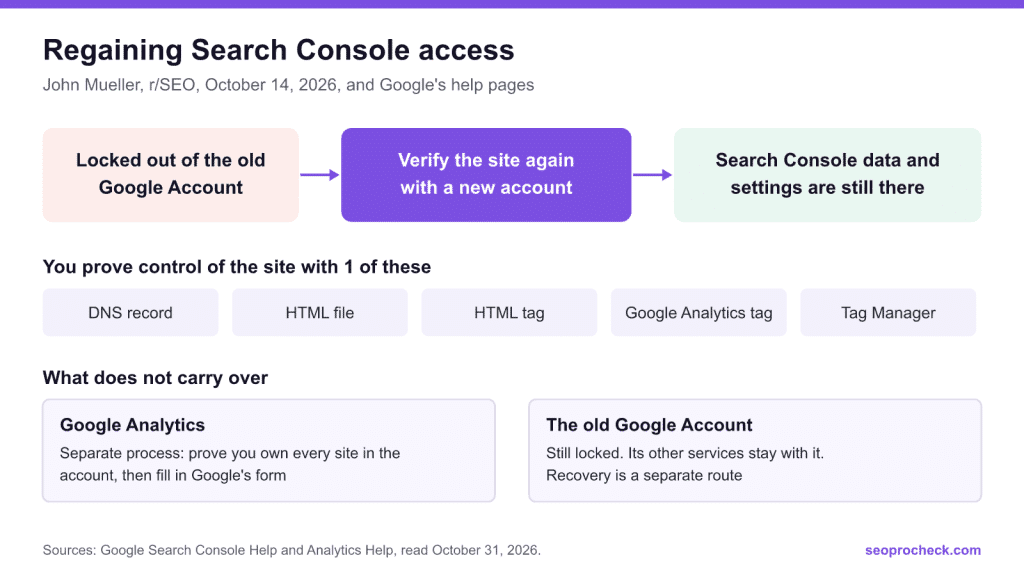
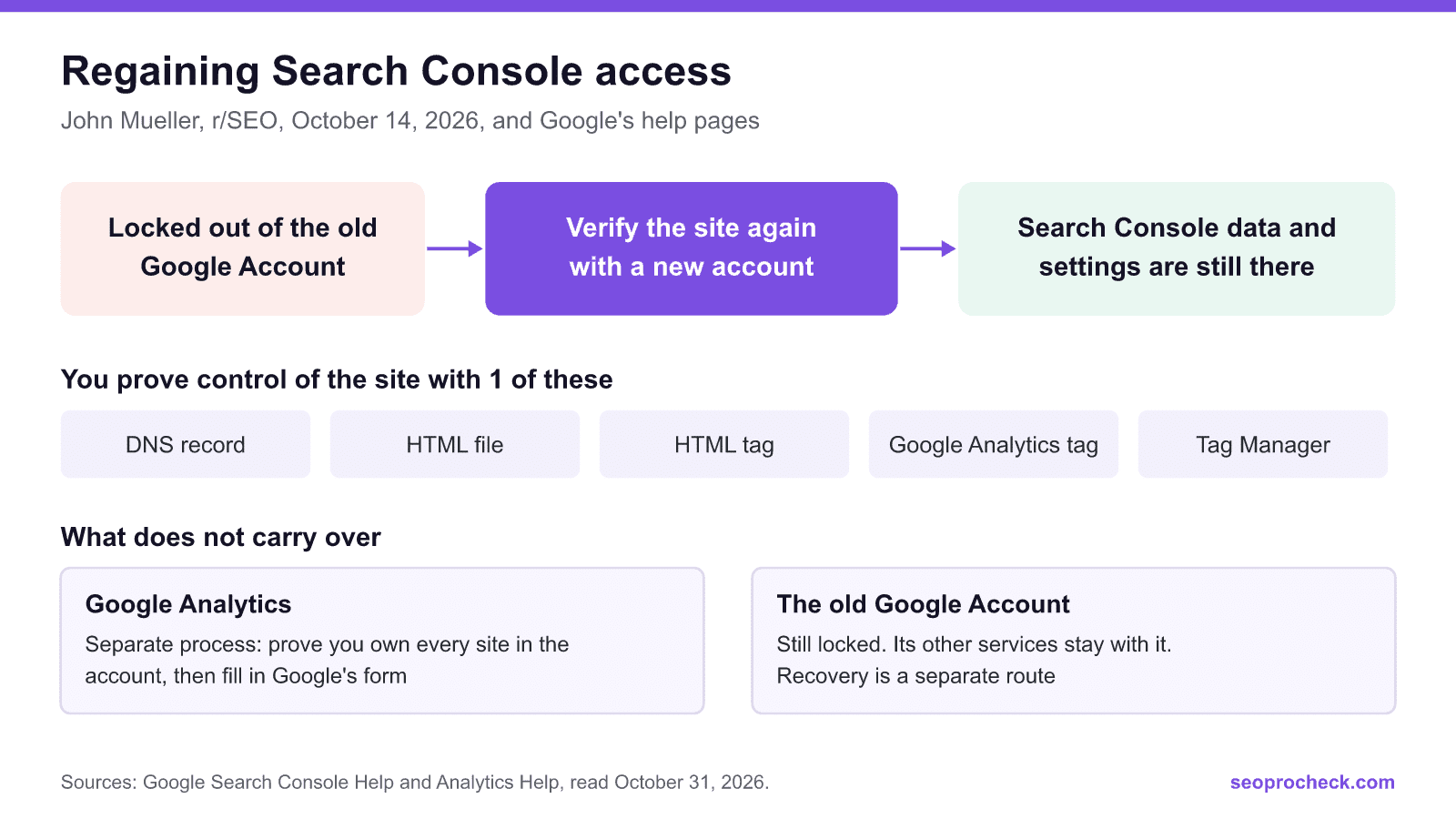
If you cannot get into the Google Account that owned your Search Console property, you probably do not need it. Verify the site again with a new account and the property's data and settings are there. John Mueller of Google confirmed this on r/SEO on October 14, 2026, and added that you can then see the email addresses used before.
- Verifying proves control of the site, so what you need is access to its files, pages, tags or DNS, not the old password.
- Add the same property type and address as before. If you are not sure which it was, add both.
- Google Analytics is a separate problem, with its own proof of ownership process.
- Once you are in, add a second verified owner and a second verification method.
The question that started this
On r/SEO, a small company described a familiar trap: they knew the email and password of their Search Console account, but Google now asked for a code sent to a phone number that no longer existed, and account recovery kept failing. Several replies said the same thing, and Mueller added the part that settles it:
He also said that verifying with a new account lets you see the addresses previously used, and that people often work hard to get into an email address that turns out not to be the Search Console one anyway. He added that Analytics is different.
Why this works
Google's help pages back him up, even though they do not say it in one place. In Verify your site ownership and Managing owners, users, and permissions:
- Multiple people can verify the same property, by the same or different methods.
- If all verified owners are removed, data for the property continues to be collected, and nobody can see it until someone verifies ownership.
- If your only verified owner leaves, Google's advice is simply to verify ownership to regain access.
- A verified owner has the highest level of permissions in Search Console, so you do not need the old owner's blessing once you have proved control.
How to do it
- Use an account your organization controls. A shared mailbox beats a personal address, because this is how the trap gets set in the first place.
- Add the same property. Search Console treats a Domain property (example.com) and a URL-prefix property (https://www.example.com/) as different properties. See the note below.
- Pick a verification method from the table.
- Verify, then look around. Open Settings, then Users and permissions, to see the owners, and check that your history is there.
- Decide about the old owners. Google says you can unverify them by removing their tokens from the site, and it lists them under Unused ownership tokens. If you do not know who they are, find out before you remove anything: it may be your developer.
- Back it up. Add a second verified owner and a second method.
| Method | What you need | Notes |
|---|---|---|
| Domain name provider (DNS record) | Access to the domain's DNS | The only way to verify a Domain property. More complex, unless your provider is listed in the wizard |
| HTML file upload | Ability to put a file in the site's root | URL-prefix properties only |
| HTML tag | Ability to edit the home page's HTML | Must sit in the page's head, exactly as given |
| Google Analytics tag | Edit access to the Analytics property, with the same account | My note: pick another method if Analytics is locked too |
| Google Tag Manager | Publish or Admin permission on the site's container, with the same account | Simple if you already have that access |
If your site runs on a hosted platform, Google says some of these may not be available, and the platform may offer its own way. Google Sites and Blogger have their own recommended method. Read Google's page on October 31, 2026.
One trap: use the same property
Mueller's answer is about switching accounts on a property. Google's verification page also says data is collected for a property as soon as anyone adds it, and that it takes a few days to start to accrue. So my reading is this: add the exact property that already exists, because that is the one with the history. If the old owner used https://www.example.com/ and you add only the Domain property, or the other way round, do not judge your data by what you see in the first days. When unsure, verify both. That caution is mine, not something Google or Mueller said.
What carries over, and what does not
| Thing | After you verify with a new account | Source |
|---|---|---|
| Search Console data | Stays | Mueller. Google's owners page says collection continues |
| Search Console settings | Stay | Mueller |
| The list of earlier owners | Visible to you | Mueller; Google's owners page |
| The old owner's access | Stays until you remove them under Users and permissions and delete their tokens, or until the check fails and a grace period ends | Google's owners page |
| Google Analytics | Does not carry over. Separate process below | Mueller; Google Analytics Help |
| The old Google Account and everything else on it | Unchanged and still locked, as far as I can tell. Nothing I read ties site verification to account recovery, which has its own page | Google Account Help |
Google Analytics is a separate problem
In Analytics, access is granted by people. Per Google's user management page, adding or changing users takes the Administrator role at the account or property level. If someone still has that role, ask them to add you. If nobody does, Google has a page called No one has administrative access. You prove ownership of every site sending data to the account, with an analytics.txt file at the domain's root in the exact wording Google gives, or a meta tag if you cannot upload files. If Ads or AdSense accounts are linked, you must prove those too. Then you fill in the contact form.
Google says that if you cannot prove ownership of all the sites identified in the account, it cannot grant access, and that recovery for Tag Manager and Firebase is not available this way. So start this early if you depend on that history.
Make sure it does not happen again
- Keep at least 2 verified owners. Google warns that if all verified owners lose access, all users lose access to the property.
- Use more than 1 verification method. Google's example: a template change removes the tag your verification relied on.
- Remember that Google rechecks tokens periodically. A token removed by accident means a notice, then a grace period, then lost permissions.
- Use an organization mailbox with current recovery options, and review them when staff change.
- Put Search Console access at the top of any handover or audit. Nothing else can start without it. After that, the Page indexing report is the first place to look, and setting up Bing Webmaster Tools is worth doing at the same time.
FAQ
Do I lose my Search Console data if I verify with a new account?
No. John Mueller of Google said on r/SEO on October 14, 2026 that you do not lose data or settings when you switch accounts. Google's help pages fit that: they say data for a property keeps being collected even when nobody can access it.
What if I do not have access to the website or DNS?
Then you cannot verify, because verifying means proving control of the site. Google's page says to ask a current owner to grant you access, so your job becomes finding whoever controls the site, the hosting or the domain.
Can I see who owned the property before?
Mueller says a newly verified owner can see the email addresses previously used. In Search Console the list is under Settings, then Users and permissions, and Google also lists Unused ownership tokens there.
Does the old owner keep access?
A verified owner keeps access until they are removed under Users and permissions. Delete their tokens from the site too, because Google warns that a leftover token might let them regain access. Its removal flow shows you which tokens to remove.
Does this work for Google Analytics?
No. Mueller said Analytics is different. If nobody has administrator access, Google has a separate process: prove you own every site in the account, with an analytics.txt file or a meta tag, and fill in a form. Google says Tag Manager and Firebase recovery is not available that way.
Can I get into the old Google Account instead?
You can try Google's account recovery page. Its tips page says that if you got a message that Google could not verify the account belongs to you, you can try again. But for Search Console, you may not need to.
Sources I read
- John Mueller on r/SEO. October 14, 2026. Read through the Arctic Shift archive, because reddit.com refuses my reader.
- Google: Verify your site ownership
- Google: Managing owners, users, and permissions
- Google: No one has administrative access
- Google: Add, edit, and delete Analytics users
- Google: Tips to complete account recovery steps
Take this with you
The assistant links open with a question about this page already written.
Claude Vincent is a technical SEO consultant focused on crawlability, rendering, and AI-search visibility. He writes the field guides and case studies at SEO ProCheck, with a bias toward the durable, unglamorous work that decides whether search engines and AI answer engines can actually read and cite a site.
About SEO ProCheck
Technical SEO consulting and GEO strategy with 20 years of enterprise experience. Case studies, resources, and tools for search and AI visibility.
Subscribe to our newsletter!
Recent Posts
- What's Actually Happening With AI Search, and What You Can Honestly Measure November 16, 2026
- Reddit Voice-of-Customer Analysis, Free and Without an API Key November 14, 2026
- Locked Out of Search Console? Verify Again With a New Account November 12, 2026