

AI Summary
Monitoring algorithm updates means catching ranking movement early, confirming whether a real Google update caused it, and diagnosing the impact before you touch anything. Set up traffic annotations and volatility alerts, cross-check the official rollout status, then segment the damage in Search Console and respond only after the rollout finishes.
- Watch three signals: Search Console, a rank tracker, and dated GA4 annotations.
- Confirm a real update with SERP volatility trackers and the official Google Search Status dashboard.
- Segment impact by page, query, and date before deciding it is an update versus your own change.
- Never make big changes mid-rollout; wait for it to complete, then improve content quality.
What monitoring algorithm updates actually involves
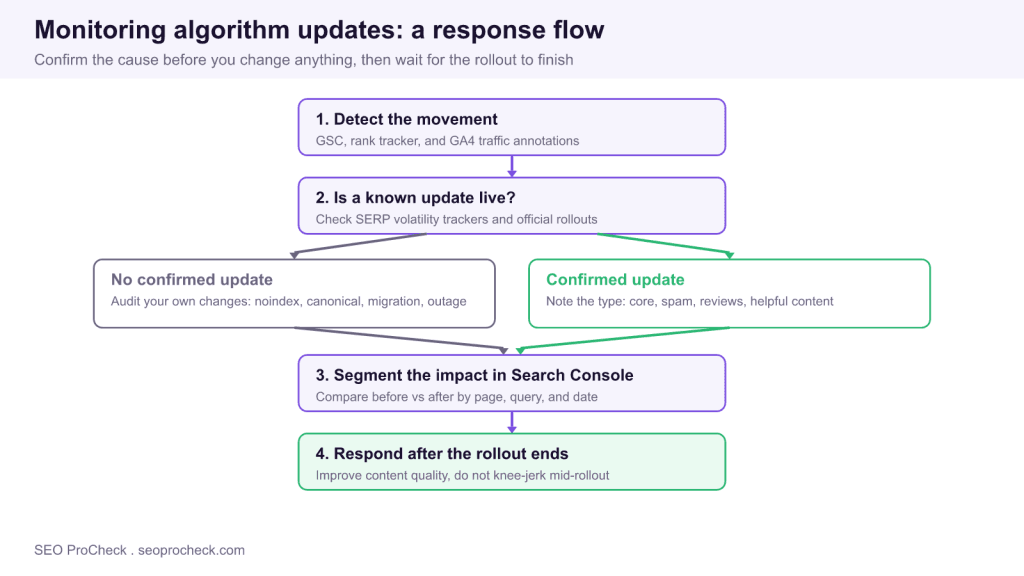
Google ships thousands of ranking changes a year, and a handful of named updates each year are large enough to reshuffle results across whole industries. Monitoring them is not about refreshing SEO news sites; it is a repeatable loop: detect movement in your own data, confirm whether a real update is behind it, diagnose which pages and queries moved, and respond deliberately. The single most common mistake is reacting to a drop that was actually caused by your own site, or panicking mid-rollout and reversing changes that were fine. A calm, evidence-first process avoids both.
Set up the three detection signals
You cannot monitor updates without a baseline, so instrument three data sources before anything happens. First, Google Search Console: the Performance report is your source of truth for impressions, clicks, and average position by page and query. Second, a rank tracker checking your priority keywords daily so you see movement faster than Search Console's two-day lag. Third, GA4 or your analytics with dated annotations, so a traffic change lines up against a known event. The habit that pays off most: annotate every deploy, migration, and content change with a date, because half of all suspected update drops turn out to be self-inflicted.
Confirm whether a real update is live
When rankings move, the first question is whether it is you or Google. Cross-reference two external sources. SERP volatility trackers such as Semrush Sensor, the Mozcast weather report, and similar tools spike when results are churning widely, which suggests a broad update rather than a site-specific issue. Then check the official Google Search Status Dashboard and Google Search Central announcements, which list confirmed rollouts with start and end dates. If volatility is high and a rollout is confirmed, you are likely caught in an update. If trackers are calm, look inward first.
| Update type | What it targets | Right response |
|---|---|---|
| Core update | Broad quality and relevance reassessment | Improve overall content helpfulness, then monitor: gains can show before the next core update |
| Spam update | Link schemes, cloaking, scaled abuse | Audit for policy violations and remove them |
| Reviews system (improved continuously, no announced updates) | Thin, unoriginal review content | Add first-hand testing, evidence, and depth |
| Helpful content signal | Content made for engines, not people | Prune or rewrite unhelpful pages, prove expertise |
Segment the impact before you diagnose
A sitewide traffic number tells you nothing about cause. Open Search Console, set the comparison to the days before versus the days after the suspected start date, and read the Pages and Queries tabs. Ask three questions. Which pages lost the most, and do they share a template, topic, or intent? Which queries dropped, and did you slip a few positions or fall off page one entirely? Did the change start sharply on one date, which points to an update or a technical break, or drift gradually, which points to seasonality or slow decay? Export the comparison to a sheet so you can quantify the loss rather than eyeball it.
Search Console diagnosis checklist
1. Performance report, Compare date range, before vs after
2. Pages tab: sort by clicks difference, find the pattern
3. Queries tab: position drop vs full loss of impressions
4. Coverage and Indexing: any spike in excluded or noindex pages
5. Overlay your deploy and content annotations on the drop date
Rule out self-inflicted causes first
Before blaming Google, clear the obvious own-goals. A stray noindex tag shipped in a release, a canonical pointing at the wrong URL, a robots.txt block, a botched migration with missing redirects, or a server outage during Googlebot crawls will all crater rankings and have nothing to do with an algorithm. This is exactly why dated annotations matter: if the drop lands on a deploy date, investigate the deploy, not the update. Check indexing status, run a live URL inspection on affected pages, and confirm they still return a 200 and render correctly.
Respond after the rollout finishes, not during
Core updates roll out over one to three weeks, and rankings fluctuate the entire time. Making sweeping changes mid-rollout means you cannot tell whether your fix or the ongoing rollout caused any later movement. Wait for Google to mark the rollout complete, then act on what the segmentation told you. For core and helpful content impacts, the work is genuinely improving the pages that lost ground: better first-hand information, clearer expertise, and removing filler. Recovery does not have to wait for the next major core update, since Google also ships smaller core updates it does not announce, so document your changes with dates and keep measuring from the date of each change.
Build a lightweight early-warning system
You do not want to discover a drop a week late by chance. Set thresholds that alert you automatically. Configure your rank tracker to notify you when a priority keyword moves more than three positions in a day, and set a GA4 or Looker Studio alert for organic sessions falling more than a set percentage week over week. Keep a simple changelog, one row per deploy or content change with a date, so that when an alert fires you can immediately overlay your own activity on the timeline. Subscribe to the Google Search Central blog and the Search Status Dashboard so confirmed rollouts land in your inbox rather than needing a manual check. The goal is that the system tells you something moved, and your annotations tell you whether it was you.
Common monitoring mistakes
- Reacting to a single day. Rankings are noisy. Wait for a sustained multi-day trend before treating movement as real.
- Assuming every drop is an update. A large share of suspected update drops are self-inflicted deploys or indexing errors. Always rule those out first.
- Changing things mid-rollout. You lose the ability to attribute cause. Diagnose during, act after the rollout completes.
- No annotations. Without a dated changelog you cannot separate your own changes from Google's, and every drop becomes a guessing game.
Update monitoring is part of a wider measurement discipline, and it connects directly to how you plan and prioritize work. When a core update devalues thin pages, your response flows back into content strategy: see prioritizing SEO tasks to sequence the fixes, creating SEO content briefs to rebuild the weak pages properly, and browse more measurement guides in the analytics and measurement library.
Frequently Asked Questions
How do I know if a Google algorithm update hit my site?
Look for a sharp ranking or traffic change that starts on a specific date, then confirm it externally. If SERP volatility trackers spiked and Google's Search Status Dashboard shows a confirmed rollout on that date, an update is the likely cause. If trackers are calm, the drop is probably from your own site changes.
What tools should I use to monitor algorithm updates?
Use Google Search Console for impressions and position by page and query, a daily rank tracker for early warning, and GA4 with dated annotations for traffic context. Add a SERP volatility tracker such as Semrush Sensor or Mozcast and follow the official Google Search Status Dashboard to confirm rollouts.
Should I make changes during an algorithm rollout?
No. Core updates roll out over one to three weeks and rankings swing the whole time, so changes made mid-rollout cannot be cleanly attributed. Diagnose the impact during the rollout, but wait until Google marks it complete before making substantive changes, then measure against the next update.
How long does it take to recover from a core update?
Recovery is rarely immediate, but you do not necessarily have to wait for a major core update, because Google also ships smaller core updates without announcing them. Improve the affected pages with genuine first-hand value and expertise, document the changes with dates, and keep monitoring, since gains can show before the next rollout and often take weeks to months.
How can I tell an update apart from a technical problem?
Segment the drop in Search Console. An algorithm update tends to hit pages that share a topic, template, or quality profile, while a technical fault often hits pages that share a code path, a template deploy, or an indexing error. Check for stray noindex tags, canonical mistakes, and missing redirects before concluding it was an update.
What is the difference between a core update and a spam update?
A core update is a broad reassessment of content quality and relevance, so the fix is improving overall helpfulness. A spam update targets specific policy violations such as link schemes or scaled content abuse, so the fix is finding and removing the violation. Google's rollout announcements name which type is live, which tells you how to respond.
Take this with you
The assistant links open with a question about this page already written.
Claude Vincent is a technical SEO consultant focused on crawlability, rendering, and AI-search visibility. He writes the field guides and case studies at SEO ProCheck, with a bias toward the durable, unglamorous work that decides whether search engines and AI answer engines can actually read and cite a site.
About SEO ProCheck
Technical SEO consulting and GEO strategy with 20 years of enterprise experience. Case studies, resources, and tools for search and AI visibility.
Work With Me
Technical SEO audits, GEO strategy, site migrations, and international SEO. Hourly consulting for teams who need hands-on support, not just reports.
Subscribe to our newsletter!








Recent Posts
- Google Algorithm Updates: The Dated List Since 2003, and What to Do After Each October 31, 2026
- AI Readiness: The Checklist, the Research and the Free Tools October 28, 2026
- AI Readiness Checklist (2026): 51 Checks, Each With Its Source October 28, 2026