

AI Summary
This entry curates a May 2022 thread from technical SEO Antoine Eripret arguing that SQL is not a superpower for SEOs but a basic efficiency requirement once your data outgrows spreadsheets. The case only got stronger after Search Console data landed natively in BigQuery, where the interface for serious analysis is now a SQL console.
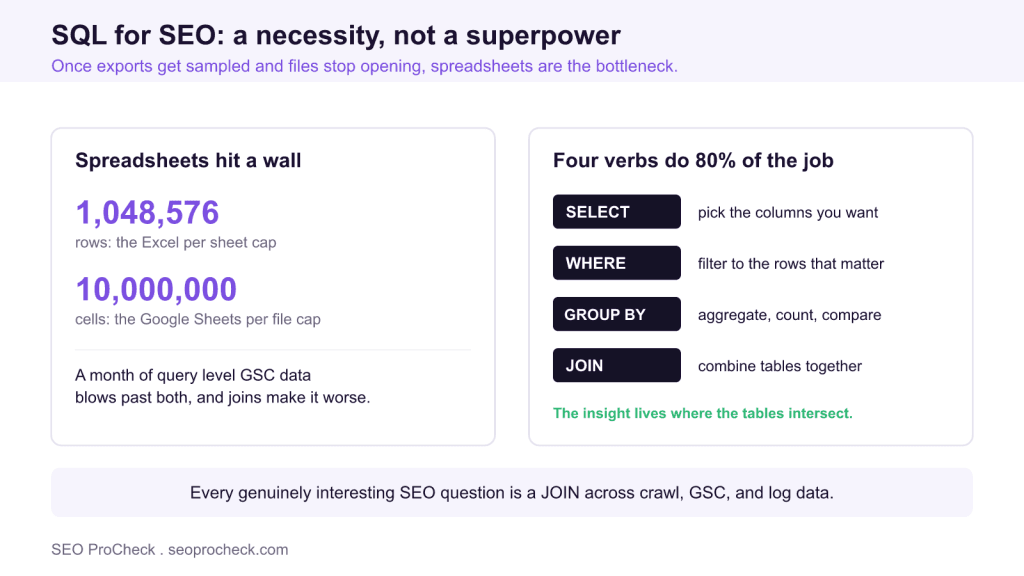
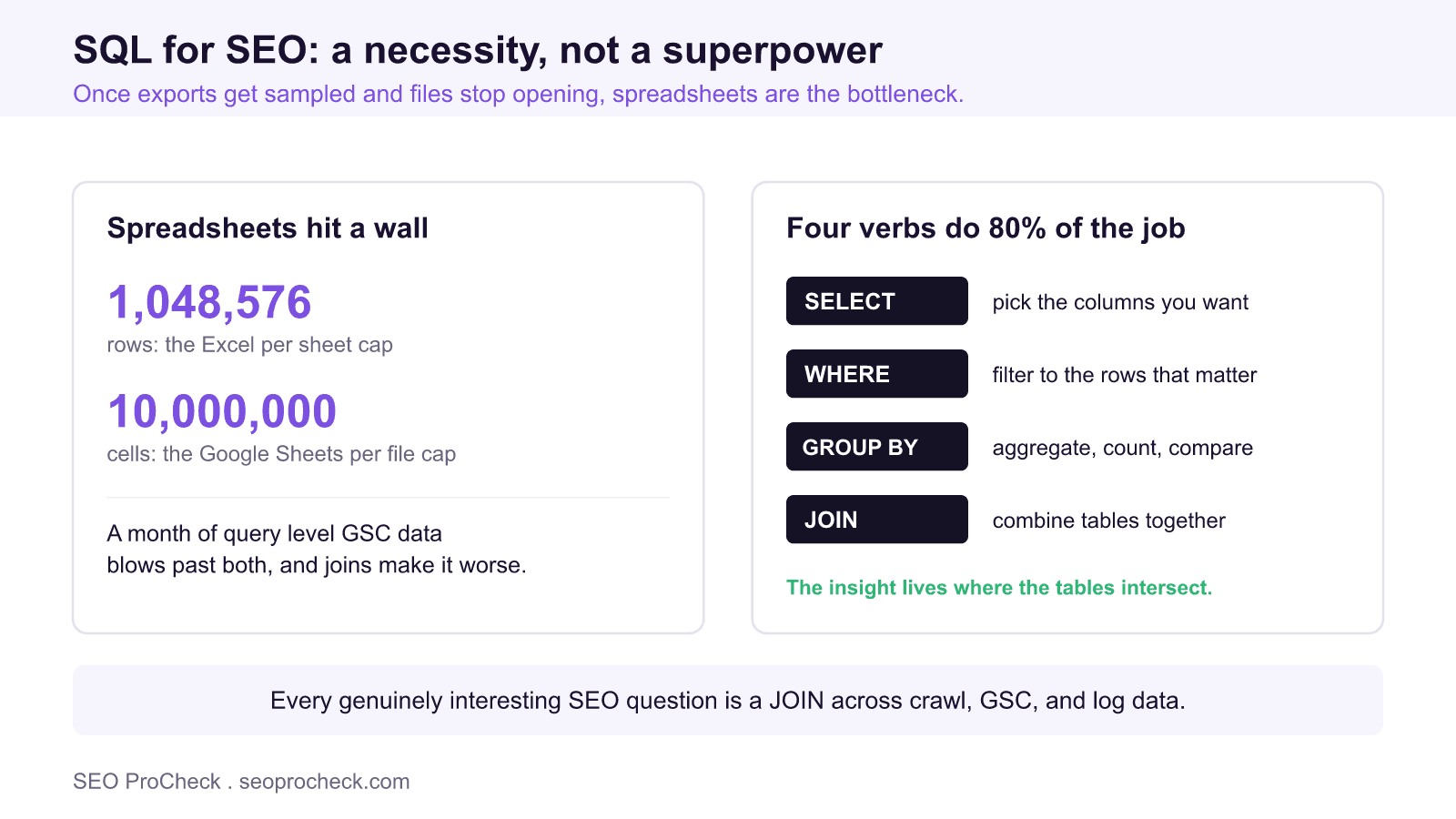
- Excel caps at 1,048,576 rows and Google Sheets at 10 million cells, and a month of query level GSC data blows past that.
- Since February 2023 the GSC bulk export streams unsampled data into BigQuery, so Google assumed you would query it with SQL.
- Learn SELECT, WHERE, GROUP BY, and JOIN first: they cover about 80% of day to day SEO analysis.
- Practice free in the BigQuery sandbox or with DuckDB on your own crawl and Search Console data.
What Antoine actually said
The tweet this entry points to, posted by technical SEO Antoine Eripret on May 10, 2022, opened like this: "SQL for SEO. Since I joined my current employer, I've been using extensively SQL in my daily tasks. A super power? No, a necessity to work efficiently." The thread then walked through what SQL is and how SEOs can start using it.
The framing is the valuable part. For years the industry treated SQL, Python, and anything resembling code as a bonus skill for "technical" SEOs, a nice line on a resume. Antoine's point was blunter: once you work in-house on a site of any real size, the data you need to do your job does not fit in a spreadsheet anymore, and clicking through exports is not a workflow, it is a coping mechanism. I fully agree, and I would put SQL ahead of Python for most SEOs: you will use it more often, and it is easier to learn.
Why spreadsheets stop working
The numbers are not subtle. Excel caps out at 1,048,576 rows per sheet and Google Sheets at 10 million cells per file, per each vendor's own documentation. A month of query-level Search Console data for a mid-size site blows past that. A year of it, joined with crawl data, is not even a conversation. And well before you hit the hard limits, the practical ones bite: VLOOKUPs across 300,000 rows lock your machine, and the Search Console UI itself only shows you a sampled slice (the export is capped at 1,000 rows per table in the interface).
Since February 2023, Google's own answer to that has been the Search Console bulk data export, which streams unsampled performance data directly into BigQuery daily. That launch quietly settled the argument: Google's data team assumed you would query your GSC data with SQL. The interface for serious Search Console analysis is now literally a SQL console.
The SQL that answers real SEO questions
You do not need the whole language. Four constructs cover the bulk of day-to-day SEO analysis, and here is what each one buys you:
| SEO question | SQL concept | Sketch |
|---|---|---|
| Which directories gained or lost clicks this quarter? | GROUP BY + date filter | group clicks by URL path segment, compare periods |
| Which indexable pages get zero impressions? | LEFT JOIN | crawl table LEFT JOIN gsc table, keep NULL matches |
| Do two pages compete for the same query? | GROUP BY + HAVING | queries HAVING count(distinct url) > 1 |
| What is the top query per page? | Window function | ROW_NUMBER() OVER (PARTITION BY url ORDER BY clicks DESC) |
| Does Googlebot crawl our money pages or our junk? | JOIN on logs | log hits joined to crawl data, grouped by template |
Notice the pattern: every genuinely interesting question is a JOIN. Crawl data alone tells you what exists. GSC alone tells you what performs. Logs alone tell you what Googlebot fetches. The insight lives where they intersect, and spreadsheets are miserable at intersections. That was the "efficiency" Antoine meant: not doing the same analysis faster, but doing analyses that were not practical before.
Where to practice without spending anything
The BigQuery sandbox is free and needs no credit card; Google documents the free tier at 10 GB of storage and 1 TB of query processing per month, which for SEO datasets is a lot of runway. Wire up the GSC bulk export on a property you own and you have a live, growing practice dataset of your own site within a day. If you would rather stay local, DuckDB is a free single-file database that queries CSVs directly, meaning any Screaming Frog export becomes a queryable table with one line. Start with your own site's data, not a tutorial's toy dataset: the motivation of answering a question you actually have carries you through the boring parts of the syntax.
- Learn SELECT, WHERE, GROUP BY, JOIN first; that is 80% of the job
- Practice on your own site's GSC and crawl data
- Set up the GSC bulk export early; it only collects data forward from setup
- Save and comment your queries; they become your monitoring suite
- Use DuckDB locally when a full warehouse is overkill
- Start with window functions and CTEs on day one
- SELECT * on large BigQuery tables; you are billed by data scanned
- Treat the GSC interface numbers as the full dataset; they are not
- Rebuild the same one-off analysis monthly instead of saving the query
- Wait until you "have time"; one real question is the whole curriculum
FAQ
Do I really need SQL if I already know Excel and Sheets well?
SQL or Python first for an SEO?
Which SQL dialect should I learn?
Is BigQuery going to cost me money?
Who is Antoine Eripret?
My audits combine crawl data, Search Console exports, and log files into exactly these intersection analyses: pages that exist but never perform, crawl budget going to junk, and cannibalizing templates.
Source: https://twitter.com/antoineripret/status/1523953430238220288
Claude Vincent is a technical SEO consultant focused on crawlability, rendering, and AI-search visibility. He writes the field guides and case studies at SEO ProCheck, with a bias toward the durable, unglamorous work that decides whether search engines and AI answer engines can actually read and cite a site.
About SEO ProCheck
Technical SEO consulting and GEO strategy with 20 years of enterprise experience. Case studies, resources, and tools for search and AI visibility.
Work With Me
Technical SEO audits, GEO strategy, site migrations, and international SEO. Hourly consulting for teams who need hands-on support, not just reports.
Subscribe to our newsletter!







Recent Posts
- Can AI Crawlers Actually Read Your Site? I Measured 400 of the Biggest September 5, 2026
- The Pre-Publish Quality Gate for AI-Assisted Content August 6, 2026
- AGENTS.md vs llms.txt vs llms-full.txt: Which Agent File Does What July 18, 2026