

AI Summary
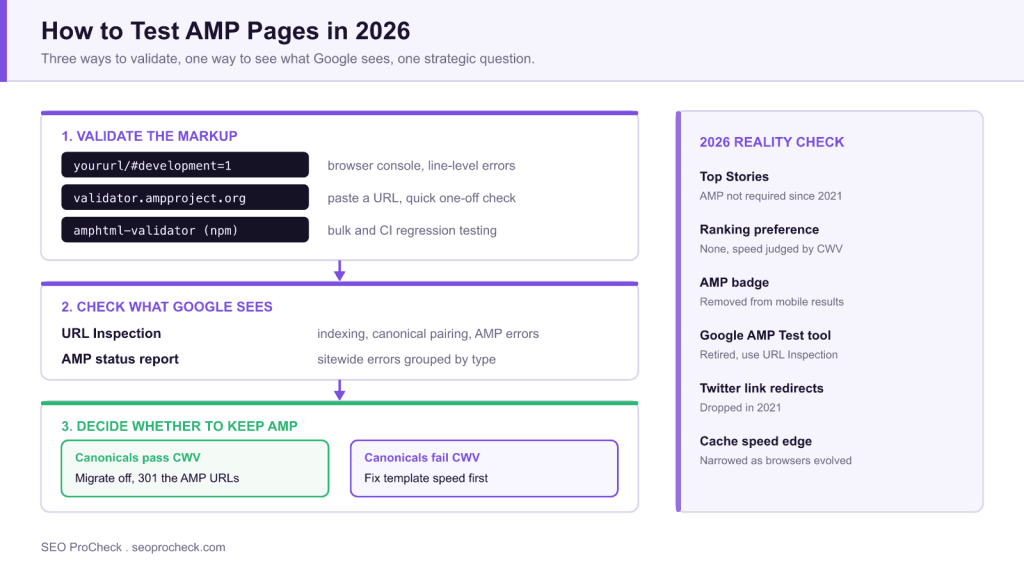
Test AMP pages by validating the markup (append #development=1 to the URL and read the browser console, or use validator.ampproject.org), then confirming what Google sees with the URL Inspection tool in Search Console. In 2026 the prior question is whether you still need AMP at all: Google no longer requires it for Top Stories and gives it no ranking preference.
- Three validators cover every case:
#development=1for debugging, the web validator for one-off checks,amphtml-validatorfor CI. - The standalone Google AMP Test tool is retired: URL Inspection replaced it.
- Broken
rel="amphtml"andrel="canonical"pairing is the most common silent failure after a theme or plugin update. - If your canonical pages pass Core Web Vitals, AMP is duplicated maintenance with no search upside.
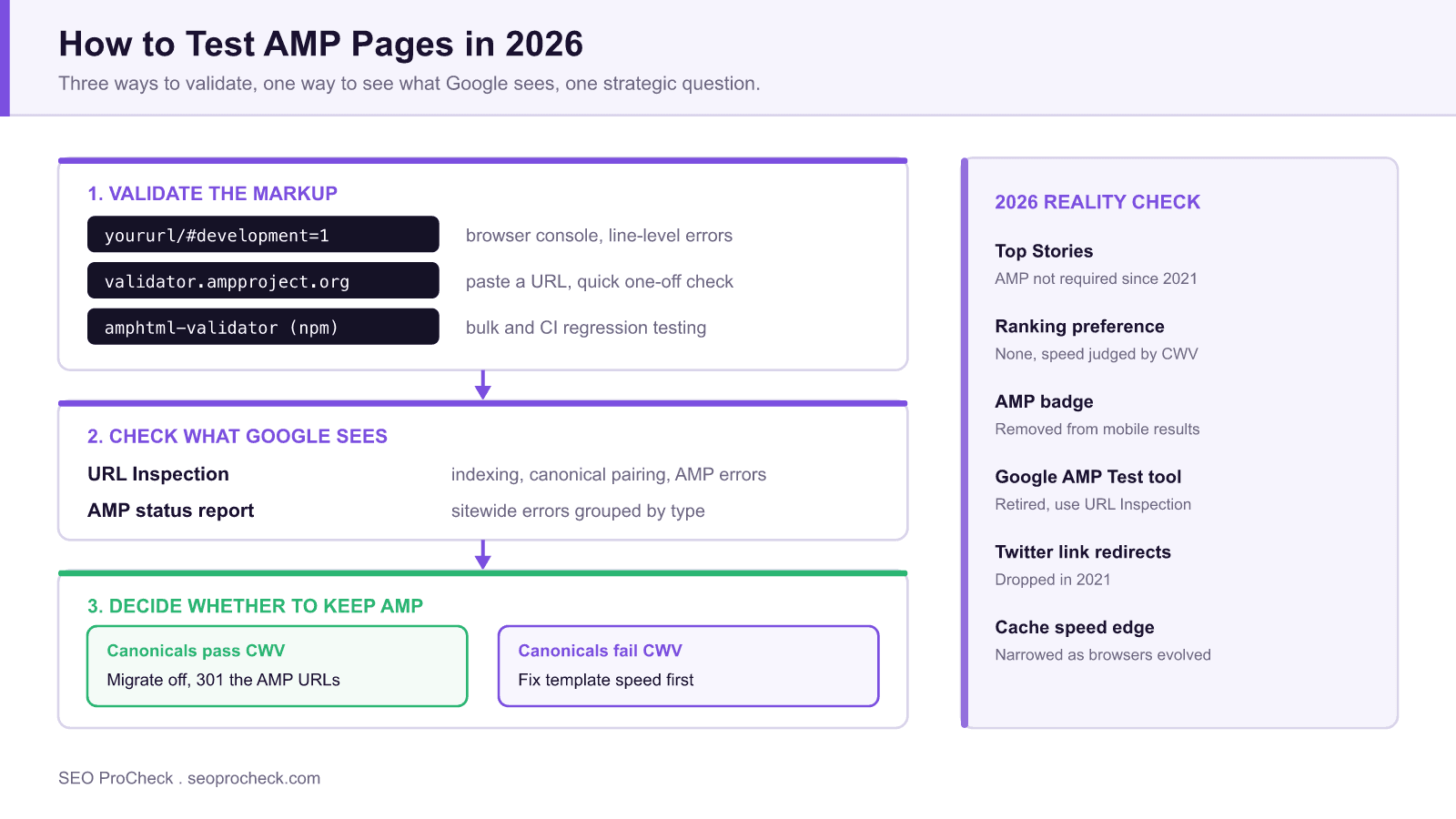
How do you test AMP pages? Validate the markup with the official AMP validator (append #development=1 to the URL and check the browser console, or use validator.ampproject.org), then confirm Google can index the AMP version using the URL Inspection tool in Search Console, which reports AMP-specific errors. In 2026 there is a bigger question to test first: whether you still need AMP at all, since Google no longer requires it for Top Stories or gives it any ranking preference.
Key Concepts
AMP validation is unusually strict compared with ordinary HTML checking, and understanding why explains most of the errors you will hit. An AMP document is not "HTML with some extra tags": it is a constrained subset with a fixed boilerplate, a mandatory runtime script, banned elements, and a hard rule that all custom styling lives in a single inline <style amp-custom> block under a size cap. Author-written JavaScript is disallowed outright. Validity is binary, so a single violation makes the whole document invalid and therefore ineligible for AMP treatment.
The second concept is pairing. Most sites run AMP as a parallel URL rather than a standalone site, which means two documents must reference each other correctly: the canonical page declares <link rel="amphtml" href="..."> and the AMP page declares <link rel="canonical" href="..."> pointing back. If either side breaks, the AMP version becomes an orphan that validates perfectly and still never surfaces, which is why markup validation alone is never a sufficient test.
The third is caching. AMP pages historically served from the Google AMP Cache under a Google domain, which is where the perceived speed advantage came from. That is also why AMP URLs persist in the wild long after you remove them, and why redirects need to outlive the migration by a wide margin.
Implementation Considerations
Testing AMP in practice means testing at three levels, not one. Page-level validation catches authoring errors, template-level checks catch the breakages that matter commercially, and pairing checks catch the failures that are invisible to validators.
- Test one page per template, not one page per site. AMP errors are almost always template-level, introduced by a theme update, a new ad unit, or a plugin injecting a script. Validating a single article tells you nothing about your category or product templates.
- Put the validator in CI. The
amphtml-validatornpm package exits non-zero on failure, so it drops straight into a build pipeline. Running it against a fixed list of representative URLs after every deploy is the only reliable defence against regressions, because nobody notices a broken AMP template manually. - Watch third-party injection. The most frequent cause of sudden invalidity is a tag manager, consent banner, or analytics snippet inserting a disallowed
<script>. AMP has its own components for these jobs (amp-analytics,amp-consent,amp-ad), and a standard web snippet dropped into an AMP template will always fail. - Check the CSS budget. AMP caps inline custom styles, and a growing stylesheet fails silently in development until it crosses the limit. Treat it as a build-time assertion rather than something you notice in production.
- Validate structured data separately. AMP validity and structured-data validity are independent. An AMP page can validate perfectly while its Article markup is malformed, which costs the rich result the AMP page existed to win.
Measuring Impact
Once the pages validate, the useful question is whether AMP is doing anything for you. Answer it with a template-level comparison rather than a sitewide average, because AMP typically covers only part of a site and mixing templates hides the effect.
- Real-user speed, not lab speed. Pull Core Web Vitals field data for the AMP template and the equivalent canonical template. If the canonical already passes, AMP's core justification is gone.
- Search Console coverage. The AMP status report gives you valid, valid-with-warnings, and error counts over time. A step change in the error line dates the regression to a specific deploy.
- Which URL Google actually serves. URL Inspection reports Google's selected canonical. If Google is consistently serving the canonical rather than the AMP version, AMP is costing maintenance and returning nothing.
- Engagement and revenue per session. Historically the strongest argument against AMP was not traffic but monetisation and analytics fidelity on the AMP version. Compare per-session outcomes, not just sessions.
If you decide to migrate away, measure the migration the same way: track impressions and clicks for the affected templates against an untouched control template so an unrelated core update does not get blamed on your redirects. That control-group discipline is the same one described in our guide to SEO A/B split testing.
What's Changed Since This Guide Was Written
The original guide dates from the height of the AMP era, and the landscape has shifted fundamentally. Treat the testing mechanics above as historical context and weigh these changes before investing further in AMP:
- Top Stories no longer requires AMP. With the Page Experience update (rolled out mid-2021), Google opened the Top Stories carousel to any page that meets its news content policies. AMP stopped being the price of admission for mobile news visibility.
- The AMP badge and preferential treatment are gone. Google removed the lightning-bolt badge from mobile results and stopped requiring AMP for its news experiences. There is no ranking boost specific to AMP; speed matters, but it is measured through Core Web Vitals on whatever stack you use.
- Signed exchanges and the AMP cache matter less. Much of AMP's perceived speed came from Google pre-rendering cached copies. As browsers and Google shifted toward privacy-preserving prefetching of ordinary pages, that structural advantage narrowed.
- The ecosystem has moved on. Twitter dropped AMP link redirection in 2021, and many large publishers (among them several that once championed the format) have publicly deprecated their AMP versions after finding no traffic loss.
- Testing tooling has consolidated. The standalone AMP Test tool was retired along with several other Google testing tools; the URL Inspection tool in Search Console and the open-source validator are the remaining canonical checks.
How to Test AMP Pages Today (If You Still Run Them)
If you maintain AMP pages, commonly the case on legacy news sites and some WordPress installs, a current testing workflow looks like this:
- Validate markup: load the AMP URL with
#development=1appended and read validation output in the browser console, or paste the URL into the web validator at validator.ampproject.org. CI pipelines can runamphtml-validatorfrom npm. - Check Google's view: run the URL through Search Console's URL Inspection tool. It reports whether the AMP version is indexed, which canonical Google selected, and any AMP errors blocking eligibility.
- Monitor at scale: the AMP status report in Search Console aggregates validation errors across the site, grouped by error type: the fastest way to spot a template-level breakage.
- Verify pairing: confirm the canonical page carries
<link rel="amphtml">and the AMP page points back withrel="canonical". Broken pairing is the most common silent failure after theme or plugin updates. - Compare real-user performance: pull CrUX / Core Web Vitals data for AMP and non-AMP templates. If your canonical pages already pass CWV, the case for keeping AMP weakens considerably.
AMP Testing Options at a Glance
| Method | What it checks | Best for | Status in 2026 |
|---|---|---|---|
#development=1 + browser console | Markup validity, per page | Developers debugging a template | Works; canonical method |
| validator.ampproject.org | Markup validity, per URL or pasted code | Quick one-off checks | Works |
amphtml-validator (npm CLI) | Markup validity in bulk / CI | Automated regression testing | Works |
| Search Console URL Inspection | Indexing, canonical pairing, AMP errors as Google sees them | Verifying search eligibility | Works; replaced the AMP Test tool |
| Search Console AMP status report | Sitewide validation errors by type | Monitoring at scale | Works |
| Standalone Google AMP Test tool | Per-URL validity + preview | No current use | Retired |
Common AMP Errors and What Actually Causes Them
| Validator message | Real-world cause | Fix |
|---|---|---|
Disallowed tag script | Tag manager, chat widget, or analytics snippet injected into the AMP template | Replace with the AMP component equivalent, such as amp-analytics |
| Custom stylesheet exceeds the size limit | Theme CSS accumulating in <style amp-custom> over time | Strip unused rules; assert the byte size in the build |
Mandatory attribute missing (width, height, layout) | Editors inserting plain <img> instead of amp-img | Enforce conversion in the template, not in the editor |
| Missing AMP runtime script | A caching or optimisation plugin rewriting the head | Exclude AMP URLs from HTML minification and script combining |
| Page indexed but AMP version not served | Broken amphtml or canonical pairing after an update | Re-crawl both URLs and confirm each declares the other |
| Inline style attribute disallowed | Pasted rich text carrying style="" attributes | Sanitise on save; move styling into amp-custom |
Should You Migrate Away From AMP?
For most sites the honest 2026 answer is yes, on a planned timeline. The decision hinges on whether your canonical pages can match AMP's real-user speed: if they pass Core Web Vitals, AMP is duplicated maintenance with no search upside. A safe migration removes the amphtml link from canonicals, serves 301 redirects from AMP URLs to their canonicals, and monitors Search Console for crawl anomalies over the following weeks. Keep the redirects indefinitely, because AMP URLs accumulate in caches and old links. What replaces AMP's discipline is performance work on your primary templates plus clean structured data markup, which carries the news/article eligibility duties AMP metadata once handled. And since visibility now flows increasingly through AI surfaces as well as the Top Stories carousel, that structural clarity also supports citation in AI answer engines, something AMP never influenced.
Frequently Asked Questions
No. Since the Page Experience update in 2021, any page that meets Google's news policies can appear in Top Stories. AMP is neither required nor preferentially ranked.
Append #development=1 to the AMP URL and open the browser developer console for a pass/fail with line-level errors, or use the web validator at validator.ampproject.org. For bulk checks, run the amphtml-validator npm package.
Google retired the standalone AMP Test tool; the URL Inspection tool inside Search Console is the current way to see AMP validity, indexing status, and canonical pairing as Google sees them.
Not inherently. Publishers that removed AMP with proper 301 redirects and canonical cleanup generally report stable rankings, provided their canonical pages perform well on Core Web Vitals. The risk is in sloppy migration (broken redirects or leftover amphtml references), not in the removal itself.
The usual causes: validation errors (check the AMP status report), a missing or mismatched canonical and amphtml pair, the AMP URL being blocked by robots.txt or noindex, or Google simply choosing the canonical version. URL Inspection will tell you which applies.
The open-source project still exists and AMP pages still validate and serve, but its strategic rationale, meaning mandatory entry to Top Stories and preferential mobile treatment, is gone. New builds almost never adopt it; remaining usage is largely legacy.
This resource contributes to the knowledge base SEO practitioners need for effective optimization in an evolving search landscape.
Source: https://www.searchenginejournal.com/amp-testing/212462/#close
Take this with you
The assistant links open with a question about this page already written. Nothing is sent until you press enter.
Claude Vincent is a technical SEO consultant focused on crawlability, rendering, and AI-search visibility. He writes the field guides and case studies at SEO ProCheck, with a bias toward the durable, unglamorous work that decides whether search engines and AI answer engines can actually read and cite a site.
About SEO ProCheck
Technical SEO consulting and GEO strategy with 20 years of enterprise experience. Case studies, resources, and tools for search and AI visibility.
Work With Me
Technical SEO audits, GEO strategy, site migrations, and international SEO. Hourly consulting for teams who need hands-on support, not just reports.
Subscribe to our newsletter!








Recent Posts
- Most Top Sites Never Say Who They Are in Structured Data October 14, 2026
- Homepage Titles Are Mostly Too Short, Not Too Long October 8, 2026
- Who Actually Serves an llms.txt? 184 Top Sites Measured September 29, 2026