

AI Summary
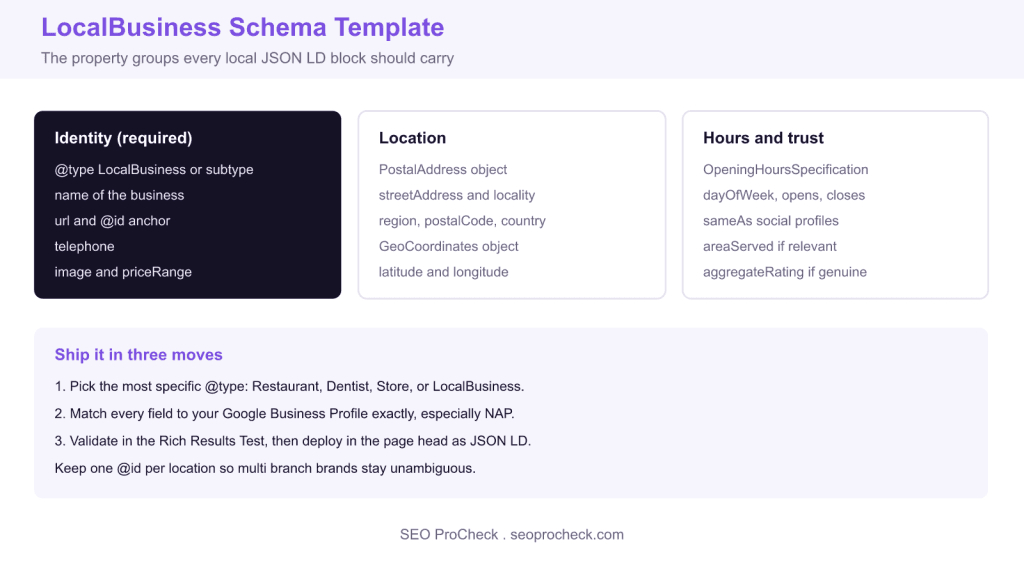
LocalBusiness schema is JSON LD structured data that declares your business name, address, phone, hours, and location so search engines can understand and present your local pages. Use the most specific type available, match every value to your Google Business Profile, and validate the block in the Rich Results Test before deploying.
- Only name and address are strictly required, but telephone, geo, and hours are strongly recommended.
- Pick the most specific subtype such as Restaurant or Dentist to inherit extra fields.
- Give each location a unique @id so multi branch brands stay unambiguous.
- Populate aggregateRating only with genuine review data, never invented numbers, and expect no Google stars for ratings about your own business.
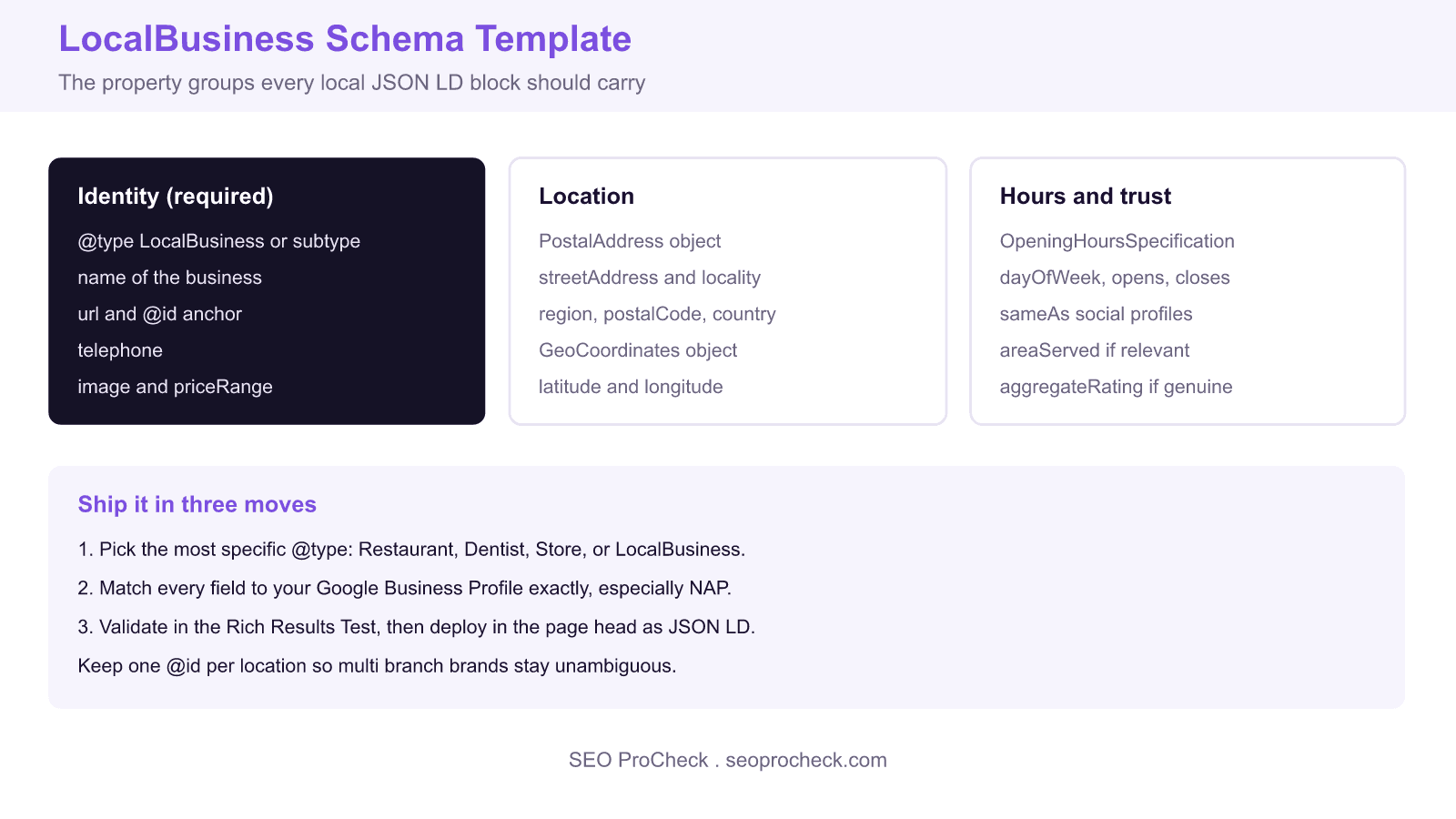
LocalBusiness schema is JSON LD structured data that tells Google exactly what your business is, where it operates, when it is open, and how to reach it. Adding it does not replace a Google Business Profile, but it reinforces the same facts on your own website, helps Google connect your site to your profile, and makes your pages eligible for richer local presentation. Below is a complete, copy ready template followed by a breakdown of every property.
The copy ready JSON LD template
Place this block inside the head or body of the location page. Replace every example value with your real business details, and keep the values identical to your Google Business Profile so the signals reinforce rather than contradict each other.
<script type="application/ld+json">
{
  "@context": "https://schema.org",
  "@type": "LocalBusiness",
  "@id": "https://example.com/#business",
  "name": "Example Coffee House",
  "url": "https://example.com",
  "image": "https://example.com/storefront.jpg",
  "telephone": "+15551234567",
  "priceRange": "$$",
  "address": {
    "@type": "PostalAddress",
    "streetAddress": "123 Market Street",
    "addressLocality": "Austin",
    "addressRegion": "TX",
    "postalCode": "78701",
    "addressCountry": "US"
  },
  "geo": {
    "@type": "GeoCoordinates",
    "latitude": 30.2672,
    "longitude": -97.7431
  },
  "openingHoursSpecification": [
    {
      "@type": "OpeningHoursSpecification",
      "dayOfWeek": ["Monday","Tuesday","Wednesday","Thursday","Friday"],
      "opens": "08:00",
      "closes": "18:00"
    }
  ],
  "sameAs": [
    "https://www.facebook.com/example",
    "https://www.instagram.com/example"
  ]
}
</script>
Choose the most specific type
The generic LocalBusiness works, but Google prefers the most specific subtype that fits. A restaurant should use Restaurant, a dental clinic Dentist, a shop Store or a narrower type such as ClothingStore. These subtypes inherit every LocalBusiness property and unlock type specific fields, for example servesCuisine and menu for restaurants, so the extra specificity is free value.
Get the identity and NAP right
The name, address, and telephone together form your NAP, and consistency here is the single most important thing you can control. The telephone value should be in international format such as +15551234567. The @id is a stable anchor, usually your URL plus a fragment like #business, that lets you reference this entity from other schema blocks and keeps multi location brands unambiguous. The priceRange uses a symbol scale from a single dollar sign to four.
Address, geo, and opening hours
The address is a nested PostalAddress with separate fields for street, locality, region, postal code, and a two letter country code. The optional geo object holds precise latitude and longitude coordinates, which helps map placement. Opening hours use OpeningHoursSpecification objects: group days that share the same hours into one entry with a dayOfWeek array, and add extra entries for weekends or split shifts. Use 24 hour time in the opens and closes fields.
Trust signals and validation
The sameAs array links your business to its official social and directory profiles, which strengthens entity recognition. You may add an aggregateRating, but only populate it with genuine review counts and scores, never invented numbers, because Google enforces this and fabricated ratings risk a manual action; Google shows stars only for reviews of other businesses, so ratings about your own business are self serving and not eligible, however genuine. Once your block is complete, paste the page URL into the Google Rich Results Test to confirm the markup is valid and eligible, then use the URL Inspection tool in Search Console after deployment to verify Google can read it on the live page.
What has changed since older schema templates
Two updates are worth flagging. Google tightened its policy on review and aggregateRating markup: self serving ratings that a business adds about itself are not eligible for star display, even when they come from a real review system, so stars on LocalBusiness markup are only for sites that review other businesses. Google also deprecated the standalone Structured Data Testing Tool in favour of the Rich Results Test and the open source Schema Markup Validator at validator.schema.org, so use those to check your block. The LocalBusiness vocabulary itself remains stable, which is why a clean template written today will keep working.
LocalBusiness property reference
| Property | Status | Purpose |
|---|---|---|
| @type | Required | Most specific business category |
| name | Required | Exact business name, matching NAP |
| address | Required | PostalAddress with full location fields |
| telephone | Recommended | Contact number in international format |
| geo | Recommended | GeoCoordinates for precise placement |
| openingHoursSpecification | Recommended | Structured business hours by day |
| sameAs | Optional | Links to official social profiles |
| aggregateRating | Optional | Genuine review score and count only |
Related reading
- Keep structured data consistent for mobile first indexing
- More technical SEO articles
- Free SEO tools from SEO ProCheck
Frequently asked questions
What is LocalBusiness schema and do I need it?
LocalBusiness schema is JSON LD structured data that describes your business name, address, phone, hours, and location to search engines. It is not mandatory, but it reinforces your Google Business Profile facts on your own site and helps Google understand and present your local pages, so any business with a physical location or service area benefits from it.
Where do I put the LocalBusiness JSON LD code?
Add the JSON LD script block to the location page, ideally on the page that describes that specific branch, and place it in the head or anywhere in the body. On multi location sites, give each location page its own block with a unique @id so Google can tell the branches apart.
Should the schema match my Google Business Profile?
Yes, exactly. The name, address, and phone number in your schema should be identical to your Google Business Profile and your website footer. Inconsistent NAP details across these sources dilute trust and can confuse the entity matching that connects your site to your profile.
Can I add star ratings to LocalBusiness schema?
Only if your site reviews other businesses. Google treats ratings a business shows about itself as self serving and does not show stars for them, even from a genuine review system, and fabricated review markup risks a manual action, so leave aggregateRating out unless you have authentic data to populate it.
Which LocalBusiness subtype should I use?
Use the most specific type that fits your business, such as Restaurant, Dentist, or ClothingStore, rather than the generic LocalBusiness. Subtypes inherit all LocalBusiness properties and add category specific fields, and Google rewards the added specificity with better understanding of what you do.
How do I test that my LocalBusiness schema is valid?
Paste the page URL or the code into the Google Rich Results Test to check eligibility and catch errors, then use the Schema Markup Validator for a full parse of the vocabulary. After deploying, run the page through URL Inspection in Search Console to confirm Google reads the markup on the live version.
Source: https://docs.google.com/spreadsheets/d/11eYmv9Kc5mDI3L7i_lcXV1bK5vwsyPWJB97sVx26tP0/edit#gid=0
Take this with you
The assistant links open with a question about this page already written. Nothing is sent until you press enter.
Claude Vincent is a technical SEO consultant focused on crawlability, rendering, and AI-search visibility. He writes the field guides and case studies at SEO ProCheck, with a bias toward the durable, unglamorous work that decides whether search engines and AI answer engines can actually read and cite a site.
About SEO ProCheck
Technical SEO consulting and GEO strategy with 20 years of enterprise experience. Case studies, resources, and tools for search and AI visibility.
Work With Me
Technical SEO audits, GEO strategy, site migrations, and international SEO. Hourly consulting for teams who need hands-on support, not just reports.
Subscribe to our newsletter!








Recent Posts
- Most Top Sites Never Say Who They Are in Structured Data October 14, 2026
- Homepage Titles Are Mostly Too Short, Not Too Long October 8, 2026
- Who Actually Serves an llms.txt? 184 Top Sites Measured September 29, 2026