

Case study: Fixing “Indexed, though blocked by robots.txt”
- September 4, 2023
- Crawling and Indexing
AI Summary
The Search Console status Indexed, though blocked by robots.txt means Google has indexed a URL it was never allowed to crawl, so the listing shows a missing or generic snippet. The durable fix is to unblock the URL in robots.txt, add a meta robots noindex tag so Google can read it on the next crawl, confirm the drop in Search Console, and only then re block the path if you still need to.
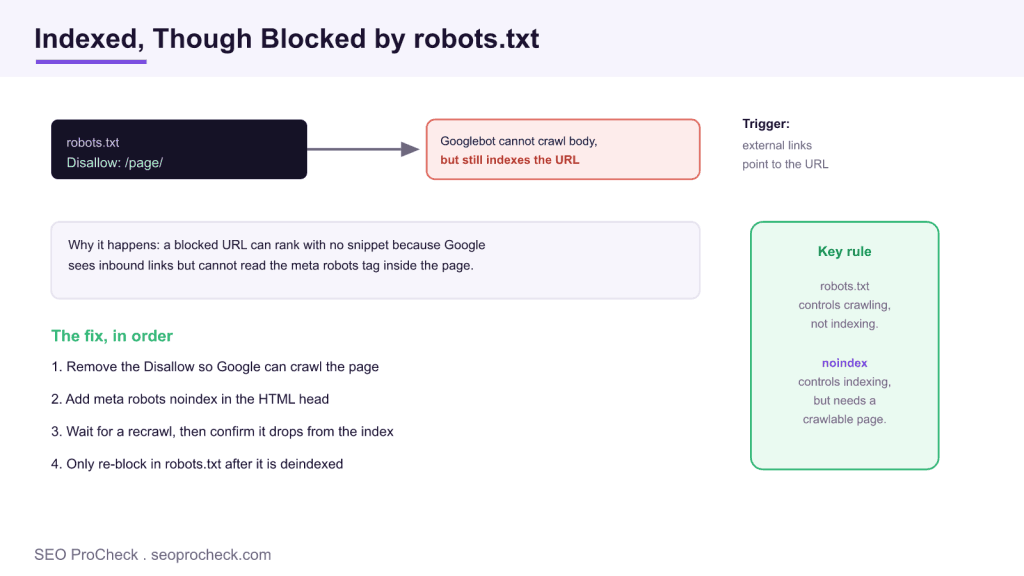
- robots.txt controls crawling, not indexing, so a blocked URL can still rank on the strength of inbound links.
- A blocked page is indexed without a snippet because Google never fetched the body.
- A noindex directive placed inside robots.txt has done nothing since September 2019.
- Unblock, add meta robots noindex, wait for a recrawl, confirm removal, then optionally re block.
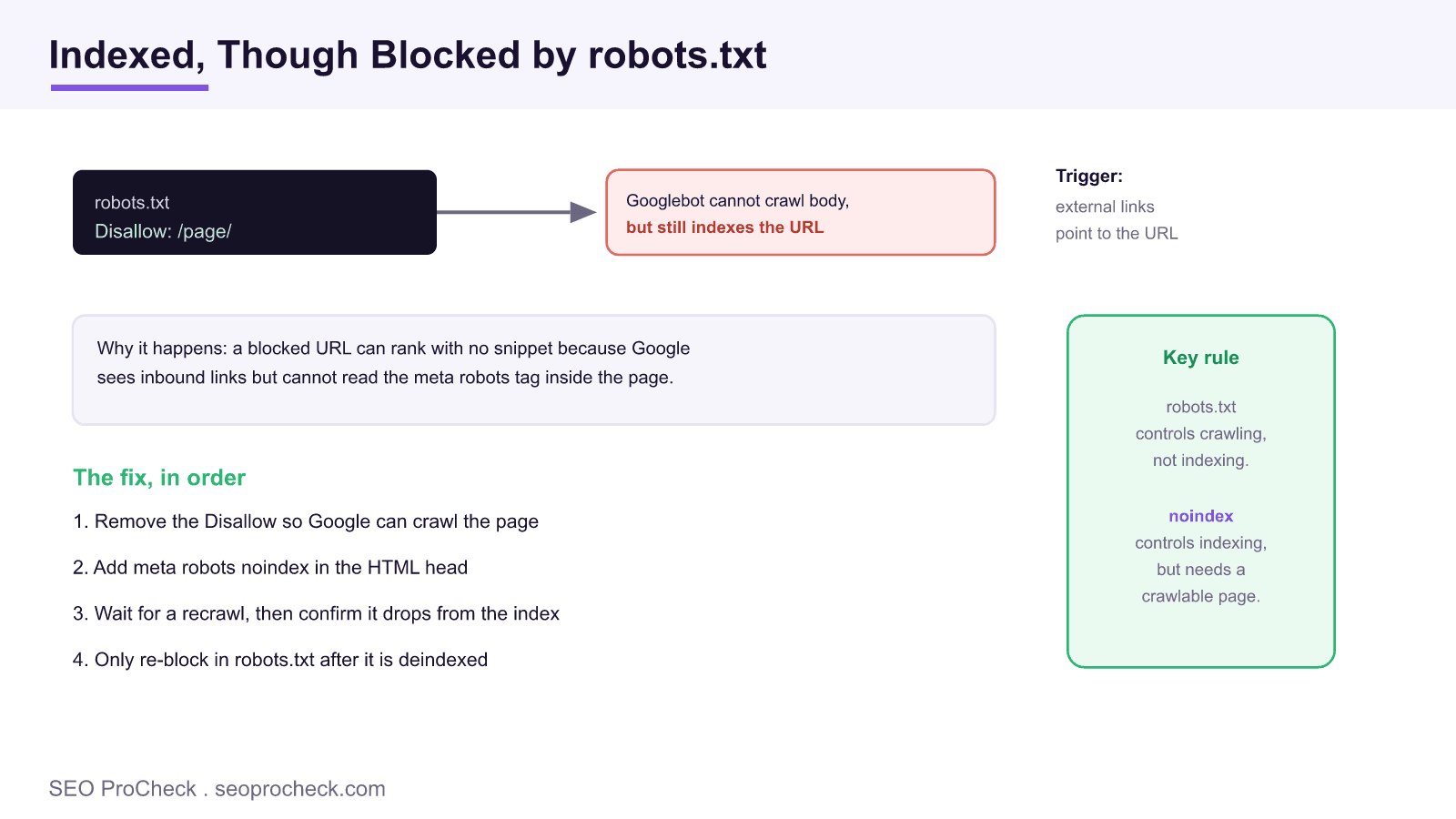
Few Search Console statuses generate as much confusion as Indexed, though blocked by robots.txt. It reads like a contradiction: the page is both blocked and indexed at the same time. It is not a contradiction, it is the predictable result of asking robots.txt to do a job it was never designed for. This practitioner guide, which builds on a case study by Eoghan Henn, explains exactly what the status means, why a blocked URL still lands in the index, and the precise order of changes that removes it for good. It also shows the exact robots.txt and tag edits so you can copy the pattern.
What the status actually means
The status appears in the Page indexing report under Why pages are not indexed, but the wording is slightly misleading because the page is indexed. What Google is really telling you is that it added the URL to its index despite being unable to crawl the page body. robots.txt controls crawling, not indexing. When you add a Disallow rule for a path, you tell Googlebot not to fetch the content, but if Google discovers the address through an internal link, an external backlink, or an XML sitemap, it can still record the URL. Because it never read the page, the listing usually shows the raw URL with a generic description such as "No information is available for this page," and it can quietly rank for branded or long tail queries you never intended to target.
This matters more than it looks. A thin, snippetless result can undercut a stronger page for the same query, waste the authority of inbound links on a dead end, and clutter your index with URLs you meant to keep private. The status is a signal that your crawling controls and your indexing controls are fighting each other.
A worked example: the exact edits
Suppose a shop blocked its faceted filter URLs to save crawl budget, and one of them, /collections/shoes?color=red, picked up a few backlinks and got indexed anyway. The robots.txt looked like this:
User-agent: *
Disallow: /collections/*?color=
The instinct to also drop a noindex into robots.txt is exactly the trap. This does nothing, because Google retired support for it:
User-agent: *
Disallow: /collections/*?color=
Noindex: /collections/*?color=   # ignored since 2019
The correct sequence is to first unblock the path, so Google can crawl it and read a real indexing directive:
User-agent: *
# Disallow rule removed so the URL can be crawled
Then serve a noindex on the URL itself. For an HTML page, put this in the head:
<meta name="robots" content="noindex, follow">For a non HTML resource such as a PDF, or when you want a server level rule, send the same instruction as a response header:
X-Robots-Tag: noindexOnce Google recrawls the now crawlable URL, it reads the noindex and drops the page. If, and only if, you still want to conserve crawl budget afterwards, you can restore the Disallow rule. The follow value keeps link equity flowing through the page while it is being deindexed.
| Control | What it does | What it does not do |
|---|---|---|
| robots.txt Disallow | Blocks crawling of the URL body | Does not remove the URL from the index |
| meta robots noindex | Removes a crawlable page from the index | Does not save crawl budget, the page must be crawled first |
| rel canonical | Suggests a preferred URL to consolidate signals | Is a hint, not a strict directive |
The fix, in the right order
The order is the whole game, and getting it wrong is why these pages linger for months. Before you touch anything, make one decision: do you want this URL indexed or not? That single choice sets the path.
If you want to keep the page indexed, the status is simply telling you the page is blocked. Remove the Disallow rule, make sure the page has no noindex tag, request indexing, and you are done. If you want to remove the page from the index, follow the four steps: remove the Disallow rule so Googlebot can crawl the URL again; add a meta robots noindex tag or an X-Robots-Tag: noindex header; wait for a recrawl and confirm in Search Console that the URL has dropped; and only after it is deindexed should you consider blocking it in robots.txt again. If you re block too early, Google cannot crawl the page, cannot see the noindex tag, and the URL stays stuck in the index indefinitely.
| Your goal for the URL | robots.txt | On the page | Then |
|---|---|---|---|
| Keep it indexed | Remove the Disallow | No noindex tag | Request indexing |
| Remove it from search | Remove the Disallow first | Add noindex, follow | Recrawl, confirm drop, re block if needed |
| Non HTML file (PDF, image) | Remove the Disallow first | X-Robots-Tag: noindex header | Recrawl, confirm drop |
Validating the fix in Search Console
Do not assume the change worked. Verify it. Open the URL Inspection tool in Search Console and paste the affected address. Under Page indexing, check that Crawl allowed reads Yes and that Indexing allowed shows the noindex is now detected. Click Request indexing to push the URL to the front of the crawl queue. Over the following days, watch the Indexed, though blocked by robots.txt row in the Page indexing report: as pages are recrawled and deindexed, the count should fall. When the URL you fixed moves to Excluded by noindex tag, the change has fully taken effect and you can, if you wish, restore the robots.txt block.
Common mistakes to avoid
Two mistakes dominate. The first is adding a noindex line inside robots.txt: Google stopped supporting that undocumented directive in September 2019, so it does nothing at all. The second is reaching for the URL removal tool as a permanent fix. That tool only hides a URL from results for about six months, so it buys time but does not solve the underlying setup. A third, subtler error is re blocking the path the moment you add the noindex tag, which prevents the very crawl that would let Google read it. Fix the crawl and noindex configuration together, in order, for a durable result. For the broader context on how Google spends its crawl on your site, read our crawl budget explainer and the guide to index bloat. For the underlying mechanics, see the complete robots.txt reference and the meta robots and X-Robots-Tag reference, and browse more crawling and indexing case studies.
About this case study
Source: https://www.rebelytics.com/fixing-indexed-though-blocked-by-robots-txt-case-study/
Frequently asked questions
What does Indexed, though blocked by robots.txt mean?
It means Google has added the URL to its index but was blocked from crawling the page body by a robots.txt rule. Google discovered the address, usually from internal or external links, and listed it without reading the content, so the result normally shows a missing or generic snippet.
Why can a page blocked in robots.txt still be indexed?
Because robots.txt controls crawling, not indexing. A Disallow rule tells Google not to fetch the page, but it does not tell Google to keep the URL out of the index. If links point at the address, Google can index the bare URL and it never sees any noindex tag, because the block stops the crawl that would reveal it.
How do I remove a page that is indexed but blocked by robots.txt?
First decide whether you want the page indexed. If not, remove the Disallow rule so Googlebot can crawl the URL, add a meta robots noindex tag or an X-Robots-Tag noindex header, then wait for a recrawl and confirm in Search Console that the URL has dropped. Only after it is deindexed should you consider blocking it in robots.txt again.
Will adding a noindex line to robots.txt work?
No. Google stopped supporting the undocumented noindex directive in robots.txt on 1 September 2019, so a line like noindex: /page/ does nothing today. Use a meta robots tag in the page head or an X-Robots-Tag header on a crawlable URL instead.
Should I use the URL removal tool to fix this?
The removal tool is a stopgap, not a fix. It hides a URL from results for about six months, then the page reappears if the underlying setup is unchanged. Use it only to buy time while the crawl and noindex change takes effect, not as the permanent solution.
How long does it take for a page to drop out of the index after the fix?
It depends on how often Google recrawls the URL, which can be a few days for popular pages or several weeks for rarely visited ones. You can speed up the first pass by requesting indexing through the URL Inspection tool in Search Console so Google returns to read the new noindex sooner.
Take this with you
The assistant links open with a question about this page already written. Nothing is sent until you press enter.
Claude Vincent is a technical SEO consultant focused on crawlability, rendering, and AI-search visibility. He writes the field guides and case studies at SEO ProCheck, with a bias toward the durable, unglamorous work that decides whether search engines and AI answer engines can actually read and cite a site.
About SEO ProCheck
Technical SEO consulting and GEO strategy with 20 years of enterprise experience. Case studies, resources, and tools for search and AI visibility.
Work With Me
Technical SEO audits, GEO strategy, site migrations, and international SEO. Hourly consulting for teams who need hands-on support, not just reports.
Subscribe to our newsletter!








Recent Posts
- Most Top Sites Never Say Who They Are in Structured Data October 14, 2026
- Homepage Titles Are Mostly Too Short, Not Too Long October 8, 2026
- Who Actually Serves an llms.txt? 184 Top Sites Measured September 29, 2026