


AI Summary
Server side rendering (SSR) sends fully built HTML in the first response, so search and AI crawlers read your main content on the very first fetch instead of waiting in a rendering queue. Kevin Indig's roundup of five case studies documents the pattern this page unpacks: moving critical content out of client side JavaScript and into the server response tends to speed up indexing and lift organic visibility.
- SSR and prerendering put content in the initial HTML, so it does not depend on the crawler running your JavaScript.
- Client side rendering (CSR) defers content to a render queue that can lag, which is why CSR only pages often surface slowly.
- Check what a crawler sees with View Source, the URL Inspection tool, and a Googlebot user agent fetch.
- Most AI crawlers do not execute JavaScript at all, so SSR now matters for AI Overviews and assistant answers too.
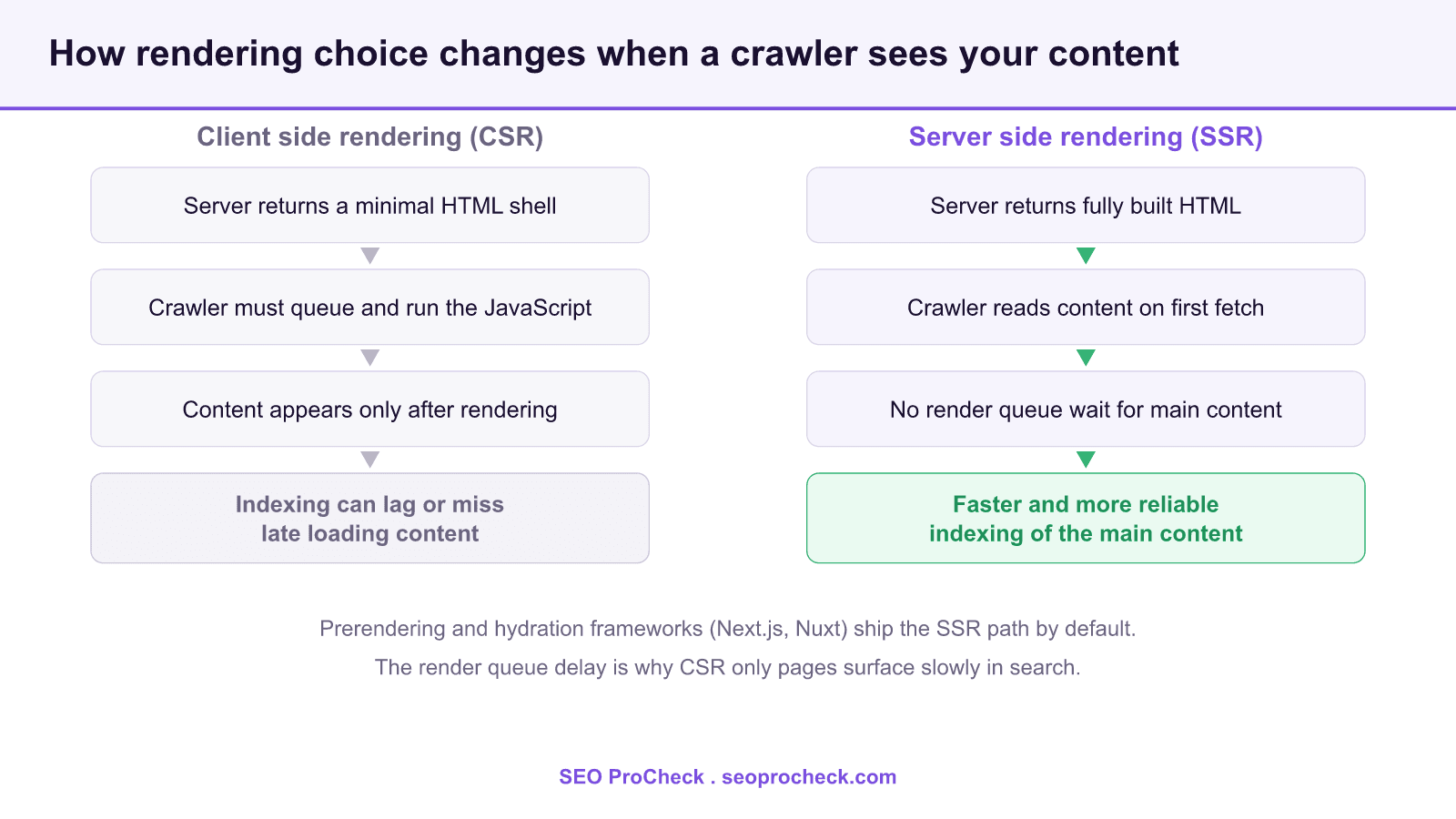
The source below collects five real case studies where teams moved rendering off the client and measured the effect on organic search. Rather than restate figures from those write ups, this page gives you the working model behind them: how the crawl, render, and index pipeline treats JavaScript, how to see exactly what a crawler receives, and the concrete configuration paths that put your content in the first response.
Why rendering strategy decides what gets indexed
A search crawler does three separate jobs: it crawls (fetches the raw HTML at a URL), renders (runs the page like a browser to build the final DOM), and indexes (stores the resulting content). With SSR the main content already sits in the crawled HTML, so indexing can proceed right away. With CSR the crawled HTML is close to empty and the real content only appears after the render step. Google renders with an evergreen Chromium engine, but rendering is resource heavy, so pages that need it wait in a render queue. That wait is variable, and any content that fails to render (a script error, a blocked resource, a slow API) never reaches the index.
This is the mechanism behind every case study in the source: the fix is almost always the same shape, which is to guarantee that the words, links, and structured data a page needs are present in the HTML the server returns, not assembled later in the browser.
SSR, CSR, and the options in between
Rendering is not a binary. The practical choices you will meet are:
- Client side rendering (CSR): the server returns a shell plus JavaScript; the browser builds the page. Cheapest to host, hardest for crawlers.
- Server side rendering (SSR): the server builds the HTML per request. Content is in the first response; you pay for server compute and watch time to first byte.
- Static generation (SSG): pages are built once at deploy time and served as static HTML. Fast and crawl friendly for content that does not change per request.
- Incremental static regeneration (ISR): static pages that rebuild in the background on a schedule, blending SSG speed with fresher data.
- Dynamic rendering: serving prerendered HTML to bots and CSR to users. Google now treats this as a workaround, not a recommendation, so prefer real SSR or SSG for new builds.
How to see what a crawler actually receives
Never guess. Confirm it with these steps, in order of speed:
- View Source (Ctrl+U or Cmd+Option+U): this shows the raw HTML the server returned, which is what a non rendering crawler sees first. If your headline and body copy are missing here, they depend on JavaScript.
- Compare with the rendered DOM: open DevTools, Elements panel. If content is present here but absent in View Source, it was added by client side JavaScript.
- Googlebot fetch: run
curl -sL -A "Googlebot" https://example.com/pathand read the returned markup. It is a fast approximation of the crawled HTML. - URL Inspection in Search Console: use Test Live URL, then View Tested Page. The HTML tab shows the rendered HTML Google built, and the Screenshot tab shows what it saw. Anything missing there will not be indexed.
The configuration that fixes a gap depends on your framework. In Next.js you move data fetching into getServerSideProps, getStaticProps, or an App Router server component. In Nuxt you use useAsyncData or useFetch with server rendering enabled. Angular teams reach for Angular Universal. In every case the goal is identical: the content is resolved on the server and written into the HTML.
Rendering strategies at a glance
| Strategy | Content in first HTML? | Indexing reliability | Best fit |
|---|---|---|---|
| CSR | No | Lowest, depends on render queue | Logged in app views that do not need to rank |
| SSR | Yes | High | Personalized or frequently changing pages that must rank |
| SSG | Yes | High | Marketing pages, docs, blog posts |
| ISR | Yes | High | Large catalogs that update on a schedule |
| Dynamic rendering | For bots only | Medium, a workaround | Legacy CSR apps you cannot rebuild yet |
The performance angle: SSR and Core Web Vitals
Putting content in the server response usually helps Largest Contentful Paint, because the main element is in the HTML rather than waiting on a script. Two cautions matter. First, SSR adds work on the server, so watch time to first byte; a slow API behind SSR can erase the gain. Second, hydration (the step where JavaScript reattaches interactivity to server rendered HTML) has a cost that can hurt Interaction to Next Paint, the responsiveness metric that replaced First Input Delay in March 2024. Ship less client JavaScript, stream HTML where the framework supports it, and defer non critical scripts to keep both metrics healthy.
A practical checklist
- Confirm the main heading, body copy, canonical link, and structured data are present in View Source.
- Make sure primary navigation and internal links are real anchor tags in the HTML, not click handlers added later.
- Do not block your JavaScript or API endpoints in robots.txt, or rendering will fail silently.
- Validate the rendered page in URL Inspection and the Rich Results Test before you rely on a template.
- Measure time to first byte after moving to SSR so server latency does not undo the win.
What has changed since these case studies
Two shifts make rendering strategy more important now, not less. Google retired its separate mobile crawler timing quirks and renders with an evergreen engine, so the old two wave indexing story is simpler, but the render queue delay for CSR remains real. More decisively, the AI crawlers that feed AI Overviews, ChatGPT, Perplexity, and Claude mostly do not run JavaScript at all. A page that renders fine for Googlebot can be invisible to these systems if its content is client rendered. That raises the floor: server rendered or statically generated HTML is now the safe default for anything you want read by both search engines and AI answer engines. See our companion note on SSR versus CSR for AI crawlers and why the HTML you ship still decides visibility. For the responsiveness metric mentioned above, see our guide to Interaction to Next Paint, and for how rendering interacts with crawl efficiency, our crawl budget explainer.
Frequently asked questions
Yes, in the sense that it makes indexing more reliable. SSR puts your main content in the first HTML response, so a crawler does not have to run your JavaScript to see it. That removes the render queue delay and the risk of a script failure hiding your content.
Google can render JavaScript and index CSR pages, but it happens on a delay through a render queue, and any resource that fails to load can leave content out. SSR or static generation avoids that uncertainty.
Open View Source with Ctrl+U and search for your headline and body text. If they are missing from the raw HTML but present in the DevTools Elements panel, the content is added by client side JavaScript. The URL Inspection tool in Search Console confirms what Google actually rendered.
For content that does not change per request, static generation (SSG) is often the simplest crawl friendly option because pages are prebuilt HTML served fast from a cache. Use SSR when pages must reflect per request or frequently changing data.
Most do not. The crawlers behind AI Overviews and assistants such as ChatGPT, Perplexity, and Claude typically read the raw HTML without executing scripts, so client rendered content can be invisible to them. Server rendered HTML is the safer choice for AI visibility.
It usually helps Largest Contentful Paint because the main content is in the HTML. Watch time to first byte, since server work adds latency, and watch Interaction to Next Paint, since hydrating heavy JavaScript can hurt responsiveness.
Case study summary and source
This SEO case study documents a successful optimization initiative, providing actionable insights for practitioners. The documented approach demonstrates how strategic SEO implementation drives measurable results.
Initial Situation
Understanding the starting point is essential context for evaluating any case study. This documentation covers the initial challenges, competitive position, and business objectives that shaped the SEO strategy.
Strategy and Approach
The strategic approach combined multiple SEO disciplines to address identified opportunities. Key decisions around prioritization and resource allocation provide a template for similar initiatives.
Implementation
Moving from strategy to execution required specific technical implementations, content development, and process changes. This case study documents the practical steps that translated strategy into action.
Results and Learnings
The outcomes demonstrate effectiveness through measurable improvements in rankings, traffic, and business metrics. Analysis of successes and challenges provides learning value for practitioners.
Case studies like this contribute to the SEO knowledge base, helping practitioners learn from documented real-world experiences.
Source: https://www.kevin-indig.com/5-case-studies-showing-the-benefits-of-server-side-rendering/
Take this with you
The assistant links open with a question about this page already written.
Claude Vincent is a technical SEO consultant focused on crawlability, rendering, and AI-search visibility. He writes the field guides and case studies at SEO ProCheck, with a bias toward the durable, unglamorous work that decides whether search engines and AI answer engines can actually read and cite a site.
About SEO ProCheck
Technical SEO consulting and GEO strategy with 20 years of enterprise experience. Case studies, resources, and tools for search and AI visibility.
Work With Me
Technical SEO audits, GEO strategy, site migrations, and international SEO. Hourly consulting for teams who need hands-on support, not just reports.
Subscribe to our newsletter!








Recent Posts
- Google Algorithm Updates: The Dated List Since 2003, and What to Do After Each October 31, 2026
- AI Readiness: The Checklist, the Research and the Free Tools October 28, 2026
- AI Readiness Checklist (2026): 51 Checks, Each With Its Source October 28, 2026