

Server Side Rendering and its Relationship with SEO in Airtable
- March 8, 2022
- JavaScript SEO
AI Summary
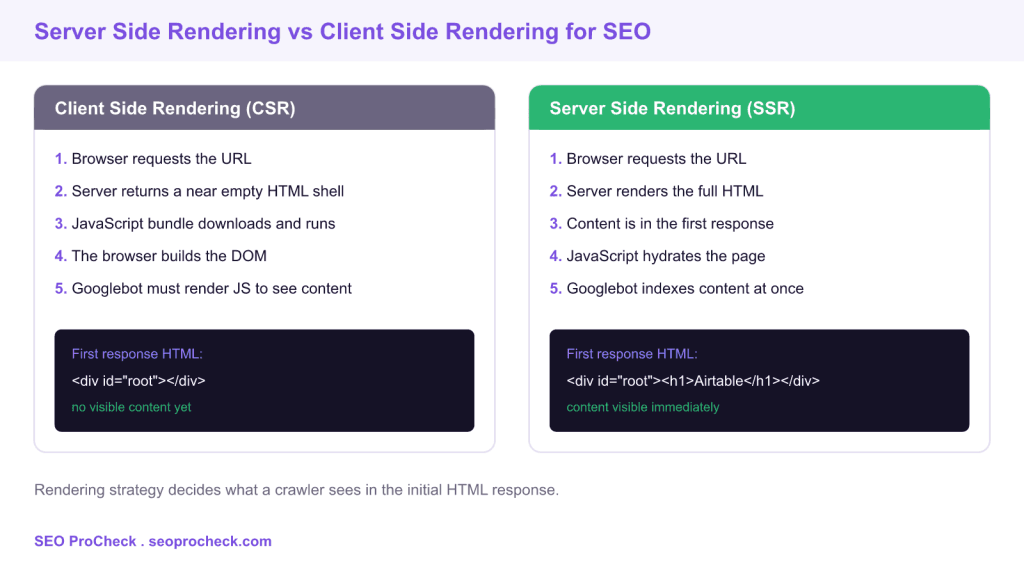
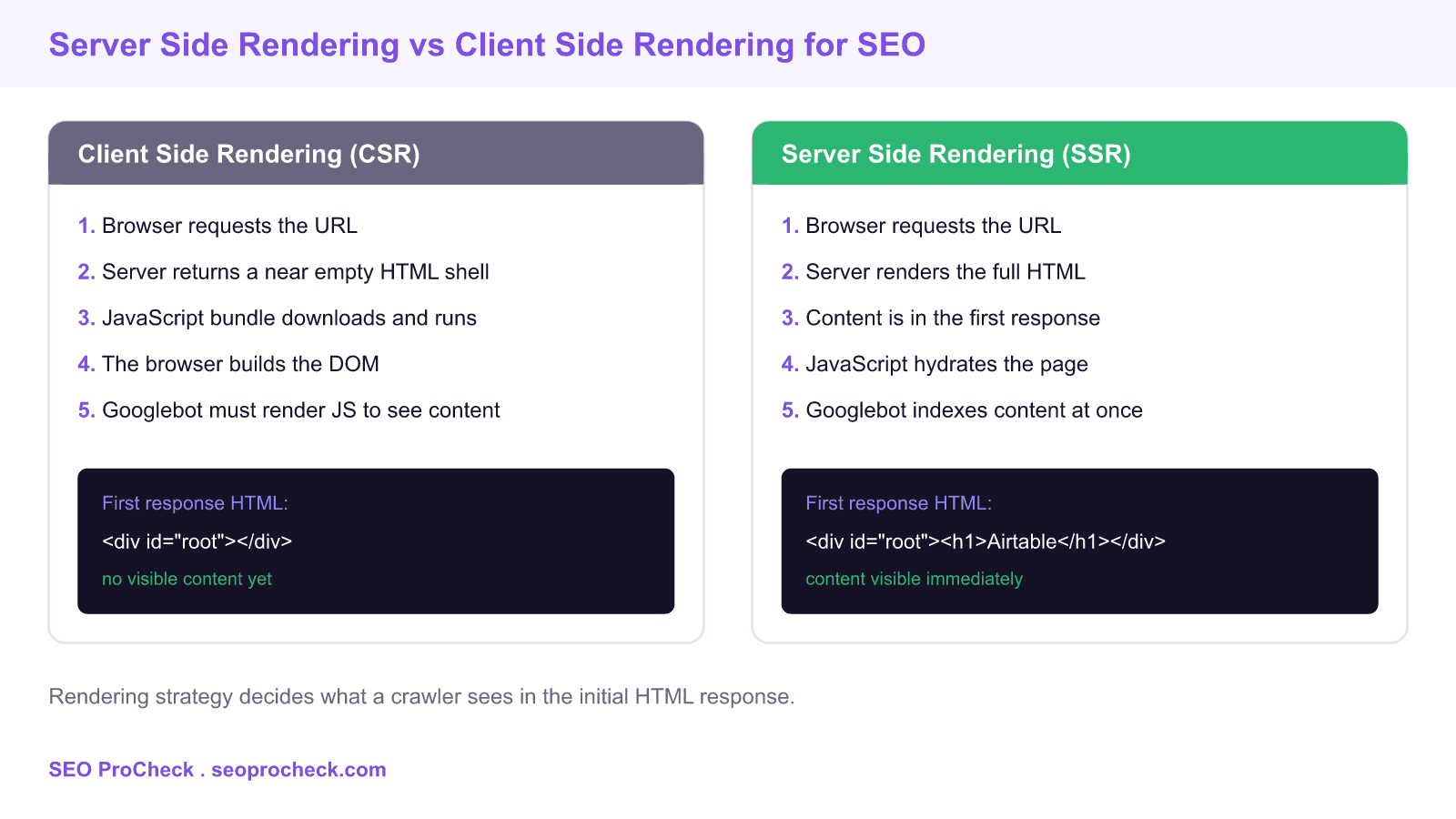
Server side rendering (SSR) sends fully formed HTML from the server so search engines can read a page without executing JavaScript, while client side rendering (CSR) ships an empty shell that only fills in after scripts run. The Airtable engineering write up is a practitioner account of why a JavaScript heavy product moved key pages to SSR to keep them crawlable and indexable.
- SSR puts real content in the first HTML response, so crawlers index it without a separate render pass.
- CSR returns a bare markup shell, which delays or blocks indexing when rendering fails or is deprioritized.
- Google does render JavaScript, but rendering is queued, resource limited, and easy to break in ways SSR avoids.
- Modern frameworks such as Next.js, Nuxt, and Astro make SSR and static rendering the default choice for SEO critical routes.
Airtable is a JavaScript heavy application, and like many single page apps it originally rendered most of its marketing and template pages in the browser. The Airtable engineering team documented how that architecture affected organic search and why they adopted server side rendering for pages that needed to rank. This page keeps that source and adds practitioner commentary on how rendering strategy shapes crawlability, indexing, and measurable organic visibility.
Why rendering strategy matters for SEO
A search engine works in two phases. First it crawls the raw HTML returned by your server. Then, if the page depends on JavaScript, it queues the URL for a second rendering phase where a headless browser executes scripts and captures the final DOM. The gap between those two phases is where client side rendering costs you. If the crawler fetches your URL and finds an empty container, it has nothing to index until the render queue catches up, and that queue is neither instant nor guaranteed.
Server side rendering closes the gap. The server runs the framework, produces complete HTML with headings, copy, links, and structured data already present, and returns that in the first response. The crawler reads meaningful content on the initial fetch. JavaScript still loads afterward to make the page interactive, a step called hydration, but indexing no longer depends on it.
How Airtable framed the SSR and SEO problem
The core observation in the Airtable write up is one every JavaScript SEO practitioner meets: a product built for rich interactivity defaults to shipping logic to the browser, and that default quietly undermines discoverability. Template galleries, landing pages, and help content are exactly the surfaces that need to rank, yet they were the surfaces most exposed to render dependent indexing. Moving them to SSR aligned the rendering path with how search engines actually consume pages.
The practical lesson generalizes beyond Airtable. You do not need to server render an entire application. You need to server render the routes that must be found in search, and you can leave authenticated, interactive dashboards as client rendered because they are not meant to be indexed anyway.
Client side versus server side rendering: what a crawler receives
The table below compares the common rendering modes by what the server actually sends in the first response, which is the single factor that determines crawlability.
| Rendering mode | What the server sends first | Crawlability | Good fit for |
|---|---|---|---|
| Client side (CSR) | Empty shell plus a JavaScript bundle | Weak, depends on the render queue | Logged in dashboards, app views |
| Server side (SSR) | Full HTML built per request | Strong, content in first response | Personalized or frequently changing pages |
| Static (SSG) | Prebuilt HTML from the last build | Strong, plus fastest delivery | Marketing, docs, blog, templates |
| Incremental static | Cached static HTML, revalidated on a timer | Strong, near static performance | Large catalogs that change slowly |
SSR implementation patterns that protect crawlability
In a Next.js codebase the rendering mode is chosen per route. A page that must rank can export a server data function so the HTML is built before it reaches the browser:
// pages/templates/[slug].js
export async function getServerSideProps(context) {
  const data = await fetchTemplate(context.params.slug);
  return { props: { data } }; // HTML is rendered on the server
}

// For pages that rarely change, prebuild them instead:
export async function getStaticProps() {
  const templates = await fetchAllTemplates();
  return { props: { templates }, revalidate: 3600 };
}
Whichever function you pick, confirm the output rather than trusting it. Run a production build and read the emitted HTML. With Next.js the command next build reports which routes are static, server rendered, or dynamic, and that report is your first crawlability audit.
Three rules keep SSR pages healthy. Put the primary heading and body copy in the server HTML, never inject them with client only effects. Emit canonical tags, meta descriptions, and JSON-LD on the server so they exist before hydration. Keep internal links as real anchor elements with an href, because a link that only fires a click handler is invisible to a crawler.
How to test what Googlebot actually sees
Do not guess whether content is in the first response. Fetch the raw HTML the way a crawler does and look for your real content:
# Fetch the server HTML and search for the main heading
curl -s https://example.com/templates/project-tracker | grep -i "
Then confirm inside Google Search Console. Open the URL Inspection tool, run a live test, and read the rendered HTML and screenshot under the crawled page view. If the heading and body appear in the raw curl output, SSR is doing its job. If they only appear after rendering, you are still exposed to the render queue. The Rich Results Test shows the same rendered source for a quick second opinion, and disabling JavaScript in Chrome DevTools is a fast local sanity check.
What has changed since this case study
Google renders JavaScript far more reliably now than in the early single page app era, and the rendering delay is usually short. That progress does not retire SSR. Rendering remains a queued, resource bounded process, third party scripts still break it, and every extra render step is a chance for content to be missed. Two shifts reinforce the case for server rendering. First, Google retired its dynamic rendering recommendation and now advises real SSR or static generation instead of serving a separate prerendered version to bots. Second, Core Web Vitals reward the fast first paint that server rendered and static pages deliver, so the SEO and performance incentives now point the same direction.
For related failure modes, see our Hulu JavaScript SEO case study and the wider JavaScript SEO case study library for more worked examples of rendering issues and fixes.
Frequently asked questions
Is server side rendering required for good SEO?
Not for every page, but it is the safest choice for any route that must rank. Server rendering or static generation guarantees content is in the first HTML response, which removes the risk of render dependent indexing. Interactive pages that are not meant to be indexed can stay client rendered.
Does Google index client side rendered pages at all?
Yes, Google can render JavaScript and index client rendered content. The catch is that rendering is queued and resource limited, so indexing can be delayed or incomplete when scripts are heavy or fail. Server rendering avoids depending on that second pass.
What is hydration and does it affect SEO?
Hydration is when JavaScript attaches interactivity to the already rendered HTML in the browser. It does not affect what a crawler indexes because the content is present before hydration runs. It mainly affects perceived performance and interactivity.
How do I check if my page is server rendered?
Fetch the raw HTML with a tool like curl and search for your main heading and body copy. If they appear in that raw response, the page is server rendered. You can confirm with the URL Inspection tool in Search Console by comparing the crawled HTML with the rendered output.
Should I use dynamic rendering to serve bots prerendered HTML?
Google no longer recommends dynamic rendering and treats it as a workaround rather than a solution. The current guidance is to use true server side rendering or static generation so every visitor and crawler receives the same content. This is simpler to maintain and avoids cloaking risk.
SSR or static generation, which should I pick?
Use static generation for pages that change slowly, such as marketing, docs, and template galleries, because it is the fastest and cheapest to serve. Use server side rendering when content is personalized or changes on every request. Incremental static regeneration is a middle ground for large catalogs.
Source: https://medium.com/airtable-eng/server-side-rendering-and-its-relationship-with-seo-d9fff26bdde9
Take this with you
The assistant links open with a question about this page already written. Nothing is sent until you press enter.
Claude Vincent is a technical SEO consultant focused on crawlability, rendering, and AI-search visibility. He writes the field guides and case studies at SEO ProCheck, with a bias toward the durable, unglamorous work that decides whether search engines and AI answer engines can actually read and cite a site.
About SEO ProCheck
Technical SEO consulting and GEO strategy with 20 years of enterprise experience. Case studies, resources, and tools for search and AI visibility.
Work With Me
Technical SEO audits, GEO strategy, site migrations, and international SEO. Hourly consulting for teams who need hands-on support, not just reports.
Subscribe to our newsletter!







Recent Posts
- Finding a Competitor's Sitemap, and Turning It Into a Change Log September 15, 2026
- AI Crawler User Agents: The Current Names, and Which Ones Sites Actually Block September 9, 2026
- Can AI Crawlers Actually Read Your Site? I Measured 400 of the Biggest September 5, 2026