

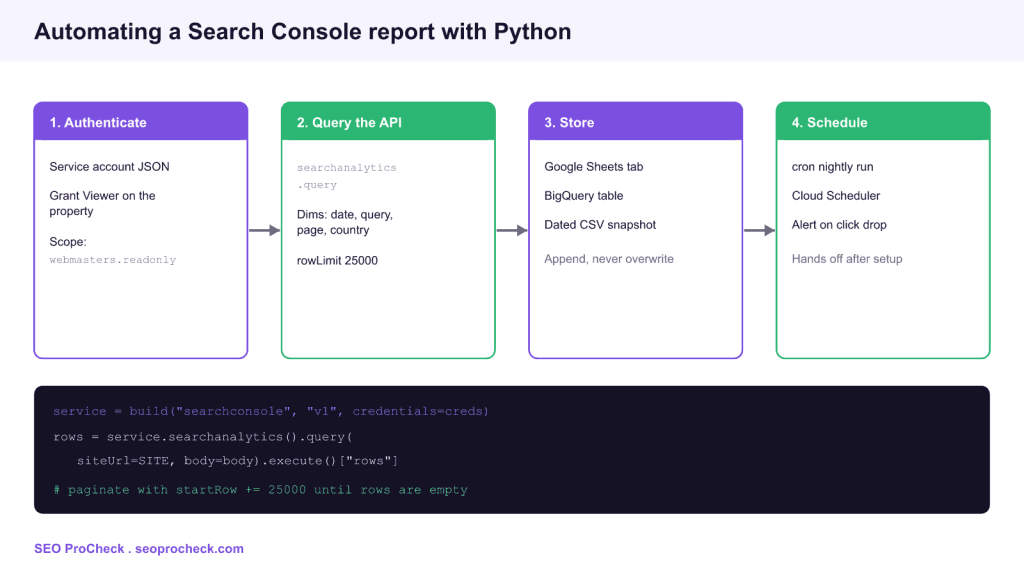
AI Summary
Automating a Search Console report means pulling clicks, impressions, CTR, and position from the Search Console API on a schedule instead of exporting spreadsheets by hand. A Python script authenticates with a service account, queries the Search Analytics endpoint, paginates through the results, and writes them to Sheets, BigQuery, or a database so the data accumulates beyond the 16 month interface limit.
- Authenticate with a Google service account granted access to the property, using the
webmasters.readonlyscope. - Call
searchanalytics().query()with your dimensions, date range, and arowLimitof 25000 per page. - Paginate with
startRowuntil a request returns no rows, or you will silently truncate the data. - Append dated snapshots so you keep history the Search Console UI throws away after 16 months.

The Search Console interface is fine for a quick look, but it has two hard limits that make manual reporting painful: it only keeps 16 months of data, and it caps most views at 1000 rows. Exporting the same tabs by hand every week is exactly the kind of task worth automating once and never touching again. This guide walks through building a Python script that pulls Search Console data through the API, paginates past the row limit, and stores dated snapshots so your history grows instead of expiring.
What you can pull and why it beats the UI
The Search Analytics API returns the same core metrics you see in the Performance report: clicks, impressions, click through rate, and average position. The difference is scale and permanence. You can request up to 25000 rows per page and paginate for more, break results down by query, page, country, device, and date at once, and keep every daily snapshot forever. That last point matters most. Once your own store holds more than 16 months, you can measure year over year change that the interface simply cannot show you anymore.
Step 1: authenticate with a service account
For an unattended script, a service account is cleaner than interactive OAuth because it never needs a human to click a consent screen. Create a service account in Google Cloud, download its JSON key, and enable the Search Console API on the project. Then add the service account email as a user on the Search Console property with at least Restricted or Full access. The only scope you need is https://www.googleapis.com/auth/webmasters.readonly. Build the client with the Google API Python library: service = build("searchconsole", "v1", credentials=creds).
Step 2: query the Search Analytics endpoint
The core call is service.searchanalytics().query(), which takes a siteUrl and a request body. The body sets a startDate and endDate, a list of dimensions such as ["date","query","page"], and a rowLimit. Note that Search Console data lags by two to three days, so never request up to today or the most recent rows will be empty or incomplete. Request a closed window that ends three days ago for stable numbers.
Step 3: paginate, or you will lose data quietly
This is the mistake that catches almost everyone. A single query returns at most 25000 rows. If your site has more query and page combinations than that, one call silently returns a truncated slice and your totals will be wrong with no error. The fix is to loop: request 25000 rows, then increase startRow by 25000 and request again, repeating until a call comes back with no rows. Only then do you have everything the API will give you for that window, and that is still not the complete dataset: Google caps it at 50,000 rows per day per search type, returns top rows only, and leaves out anonymized queries. Past that cap, use the BigQuery bulk export.
| Request field | Purpose | Practical value |
|---|---|---|
startDate, endDate | Date window | End three days ago for stable data |
dimensions | Breakdown | date, query, page, country, device |
rowLimit | Rows per page | 25000, the maximum |
startRow | Pagination offset | Increment by 25000 per page |
dimensionFilterGroups | Filtering | Limit to a folder, brand, or country |
Step 4: store dated snapshots, then schedule it
Where you write the data depends on scale. Google Sheets is perfect for a small site and a Looker Studio dashboard on top. BigQuery suits large sites and SQL joins against GA4. A dated CSV per run is the simplest durable archive. Whatever you choose, append rather than overwrite, and stamp each row with the run date so nothing is lost. Then schedule the script with cron on a server, a LaunchAgent locally, or Cloud Scheduler with a Cloud Function. A nightly closed window run keeps a rolling archive with zero manual effort. This same pattern is the foundation of a Python SEO API and feeds directly into a custom GA4 dashboard.
Handle quotas and errors like it runs unattended
An automated report has to survive the internet. Wrap API calls in retry logic with exponential backoff so a transient 429 or 500 does not kill the run. The API enforces per minute and per day quotas, so pace large backfills and do not fire hundreds of pages in a burst. Log each run with a row count so a day that returns far fewer rows than usual is visible immediately, which doubles as an early warning of a traffic drop. Clean, complete Search Console history like this is what makes reliable SEO forecasting possible in the first place.
Frequently asked questions
Why automate Search Console reports instead of exporting manually?
The interface keeps only 16 months of data and caps most views at 1000 rows. An automated pull can store unlimited history, return 25000 rows per page, and run on a schedule, so you keep year over year data the UI deletes.
Should I use a service account or OAuth?
For an unattended, scheduled script use a service account, because it authenticates without a human clicking a consent screen. Add its email as a user on the Search Console property with the webmasters.readonly scope.
How do I get more than 25000 rows?
Paginate. Request 25000 rows, then repeat the query with startRow increased by 25000, and keep going until a request returns no rows. A single call silently truncates larger datasets without raising an error, and paging stops at 50,000 rows per day per search type.
Why is the most recent data missing or wrong?
Search Console data lags by two to three days and finalizes gradually. Request a closed window that ends three days ago rather than up to today, so you store stable numbers instead of partial ones.
Where should I store the exported data?
Google Sheets works for small sites feeding a dashboard, BigQuery suits large sites and SQL joins, and dated CSV files are a simple durable archive. Whichever you pick, append and date each run instead of overwriting.
Take this with you
The assistant links open with a question about this page already written.
Claude Vincent is a technical SEO consultant focused on crawlability, rendering, and AI-search visibility. He writes the field guides and case studies at SEO ProCheck, with a bias toward the durable, unglamorous work that decides whether search engines and AI answer engines can actually read and cite a site.
About SEO ProCheck
Technical SEO consulting and GEO strategy with 20 years of enterprise experience. Case studies, resources, and tools for search and AI visibility.
Work With Me
Technical SEO audits, GEO strategy, site migrations, and international SEO. Hourly consulting for teams who need hands-on support, not just reports.
Subscribe to our newsletter!








Recent Posts
- Google August 2026 Spam Update: Dates, Duration and How to Read Your Data November 2, 2026
- Google Algorithm Updates: The Dated List Since 2003, and What to Do After Each October 31, 2026
- AI Readiness: The Checklist, the Research and the Free Tools October 28, 2026