

AI Summary
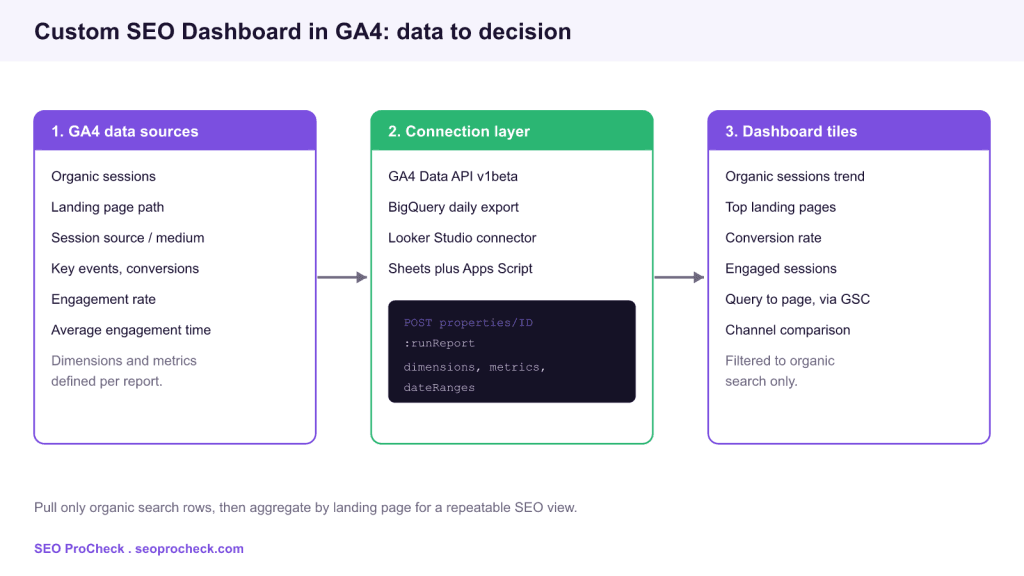
A custom SEO dashboard in GA4 is a filtered view of your organic search traffic, built by pulling GA4 dimensions and metrics through the Data API, BigQuery export, or a Looker Studio connector and reshaping them around landing pages and queries. The goal is a repeatable report that answers one question fast: is organic search growing, and which pages drive it.
- GA4 has no built in SEO report, so you filter
sessionDefaultChannelGrouptoOrganic Searchand rebuild the view yourself. - Join GA4 behavior data to Search Console query data to see both what users searched and what they did next.
- Looker Studio is fastest to ship, the GA4 Data API gives full control, and BigQuery export unlocks unsampled history.
- Track sessions, engagement rate, key events, and conversion rate per landing page, not sitewide averages.

Google Analytics 4 ships with no dedicated SEO report. The old Universal Analytics landing page and organic traffic views are gone, and the default GA4 reports mix every channel together. If you want a clean picture of organic search performance, you build it yourself. This guide covers the three practical ways to assemble a custom SEO dashboard in GA4, the exact dimensions and metrics to use, and how to join GA4 behavior data with Search Console so a single screen tells you what people searched and what they did after clicking.
What a custom SEO dashboard needs to answer
Before touching a connector, define the questions. A dashboard that tries to show everything shows nothing. For organic search, four questions cover most of the work: Is organic traffic trending up or down over the last 12 months? Which landing pages earn the most organic sessions, and are any falling? Do organic visitors engage and convert, or bounce? And which search queries bring them in? The first three come from GA4. The fourth comes from Search Console, because GA4 does not store the query a user typed.
The three ways to build it
You have three routes, and the right one depends on how much control and history you need. Looker Studio is the quickest path to a shareable dashboard. The GA4 Data API gives you programmatic control for a scripted report or an internal tool. BigQuery export removes sampling and thresholding entirely and keeps raw event data for as long as you retain it.
| Method | Best for | Sampling | Effort |
|---|---|---|---|
| Looker Studio connector | Shareable visual dashboards | Possible on large ranges | Low |
| GA4 Data API (runReport) | Scripts, internal tools, Sheets | Possible, quota governed | Medium |
| BigQuery daily export | Unsampled history, SQL joins | None | High |
The dimensions and metrics that matter
Whichever method you pick, the field names are the same. To isolate organic search, filter the dimension sessionDefaultChannelGroup to the value Organic Search. Then build the view from a small, deliberate set of fields.
landingPagePlusQueryStringorlandingPage: the page that started the session, your primary grouping.sessionsandengagedSessions: volume and quality of visits.engagementRateandaverageEngagementTime: whether the content holds attention.keyEventsandsessionKeyEventRate: conversions and the rate at which organic sessions convert.sessionSourceandsessionMedium: to separate Google from Bing and other organic sources.
Group by landing page, not sitewide. A sitewide engagement rate hides the two pages that are quietly collapsing. The landing page cut is where SEO decisions actually get made.
Pulling data with the GA4 Data API
For a scripted dashboard, the Data API endpoint is properties/PROPERTY_ID:runReport. You POST a JSON body listing dimensions, metrics, date ranges, and a dimension filter. A minimal request for organic landing pages sends the dimension landingPage, the metrics sessions and engagementRate, a dateRanges block, and a dimensionFilter that matches sessionDefaultChannelGroup to Organic Search. Authenticate with a Google service account granted Viewer access on the GA4 property, and read the property ID from Admin, Property Settings. The same call runs from Python, Apps Script, or curl, which makes it the backbone of a Python powered SEO API or a scheduled export into Google Sheets.
Joining Search Console for the query layer
GA4 knows the landing page and behavior. It does not know the query. Search Console knows the query, clicks, impressions, and average position, but nothing about what happened after the click. Joining them on the page URL gives you the full funnel: query, click, then engagement and conversion. In Looker Studio you blend a GA4 source and a Search Console source on the page dimension. In BigQuery you export both and JOIN on the URL. If you would rather script the Search Console side, the same pattern drives an automated Search Console report that feeds the dashboard on a schedule.
Watch for sampling and thresholding
Two GA4 behaviors quietly distort dashboards. Sampling kicks in when a query spans a large date range with high cardinality, and the numbers become estimates. Data thresholding hides rows when Google Signals could identify individual users, so low traffic pages can vanish from a report entirely. Both are removed by the BigQuery export, which is the main reason data teams turn it on. If you see a green sampling icon in Looker Studio or a thresholding notice, shorten the range or move that view to BigQuery before you trust the totals. Clean inputs also make downstream SEO forecasting and organic traffic attribution far more reliable.
A practical build order
Ship in stages. Start in Looker Studio with a single organic sessions time series and a top landing pages table filtered to Organic Search. Add engagement rate and key event rate columns so quality sits next to volume. Blend Search Console for queries once the GA4 side is stable. Only move to the Data API or BigQuery when you need automation, unsampled history, or joins that Looker Studio blends cannot handle. Each stage is useful on its own, so you always have a working dashboard rather than a half finished migration.
Frequently asked questions
Does GA4 have a built in SEO or organic traffic report?
No. GA4 has no dedicated SEO report. You create the view by filtering the channel group dimension to Organic Search and building your own report in Explorations, Looker Studio, or through the Data API.
How do I see search queries in GA4?
You cannot see queries in GA4 alone. Connect Search Console, either through the native GA4 link or by blending Search Console data in Looker Studio on the page dimension, to add the query, clicks, and impressions layer.
Should I use the GA4 Data API or BigQuery?
Use the Data API for scheduled reports and modest data volumes. Use BigQuery when you need unsampled data, long history, or SQL joins across GA4 and Search Console. Many teams run both: BigQuery for storage, the API for quick pulls.
Why do my dashboard numbers not match the default GA4 reports?
Usually sampling or data thresholding. Large date ranges trigger sampling estimates, and thresholding hides low volume rows to protect privacy. Shorten the range or switch to the BigQuery export to get exact counts.
Which metric best shows organic content quality?
Engagement rate and average engagement time per landing page, read alongside the key event rate. Volume tells you traffic arrived, engagement and conversion rate tell you the page did its job.
Take this with you
The assistant links open with a question about this page already written. Nothing is sent until you press enter.
Claude Vincent is a technical SEO consultant focused on crawlability, rendering, and AI-search visibility. He writes the field guides and case studies at SEO ProCheck, with a bias toward the durable, unglamorous work that decides whether search engines and AI answer engines can actually read and cite a site.
About SEO ProCheck
Technical SEO consulting and GEO strategy with 20 years of enterprise experience. Case studies, resources, and tools for search and AI visibility.
Work With Me
Technical SEO audits, GEO strategy, site migrations, and international SEO. Hourly consulting for teams who need hands-on support, not just reports.
Subscribe to our newsletter!








Recent Posts
- Most Top Sites Never Say Who They Are in Structured Data October 14, 2026
- Homepage Titles Are Mostly Too Short, Not Too Long October 8, 2026
- Who Actually Serves an llms.txt? 184 Top Sites Measured September 29, 2026