


AI Summary
A Python log file parser reads raw server access logs and turns each request line into structured fields you can filter and count, which is how you see what search and AI crawlers actually do on your site. It is the most direct way to measure crawl budget, spot wasted crawling, and confirm which bots hit which URLs.
- Server logs are the only fully accurate record of every bot request; analytics and crawlers only estimate.
- Parse the Combined Log Format with a regex or a library, then load rows into pandas for analysis.
- Always verify Googlebot by reverse DNS; the user agent string alone is trivially spoofed.
- Key outputs: crawl frequency per URL, status code mix, and crawl waste on parameters and redirects.
Server access logs are the ground truth of technical SEO. Every time Googlebot, Bingbot, GPTBot, or a human requests a URL, the web server writes one line to a log file. Nothing else, not Google Search Console, not a crawler like Screaming Frog, records every real bot request the way the log does. The problem is scale: a mid sized site produces millions of log lines a month. Python log file parsers exist to turn that wall of text into structured rows you can group, count, and chart. This guide shows the log formats, the parsing approaches, and the analysis that actually changes rankings.
What is in a server log line
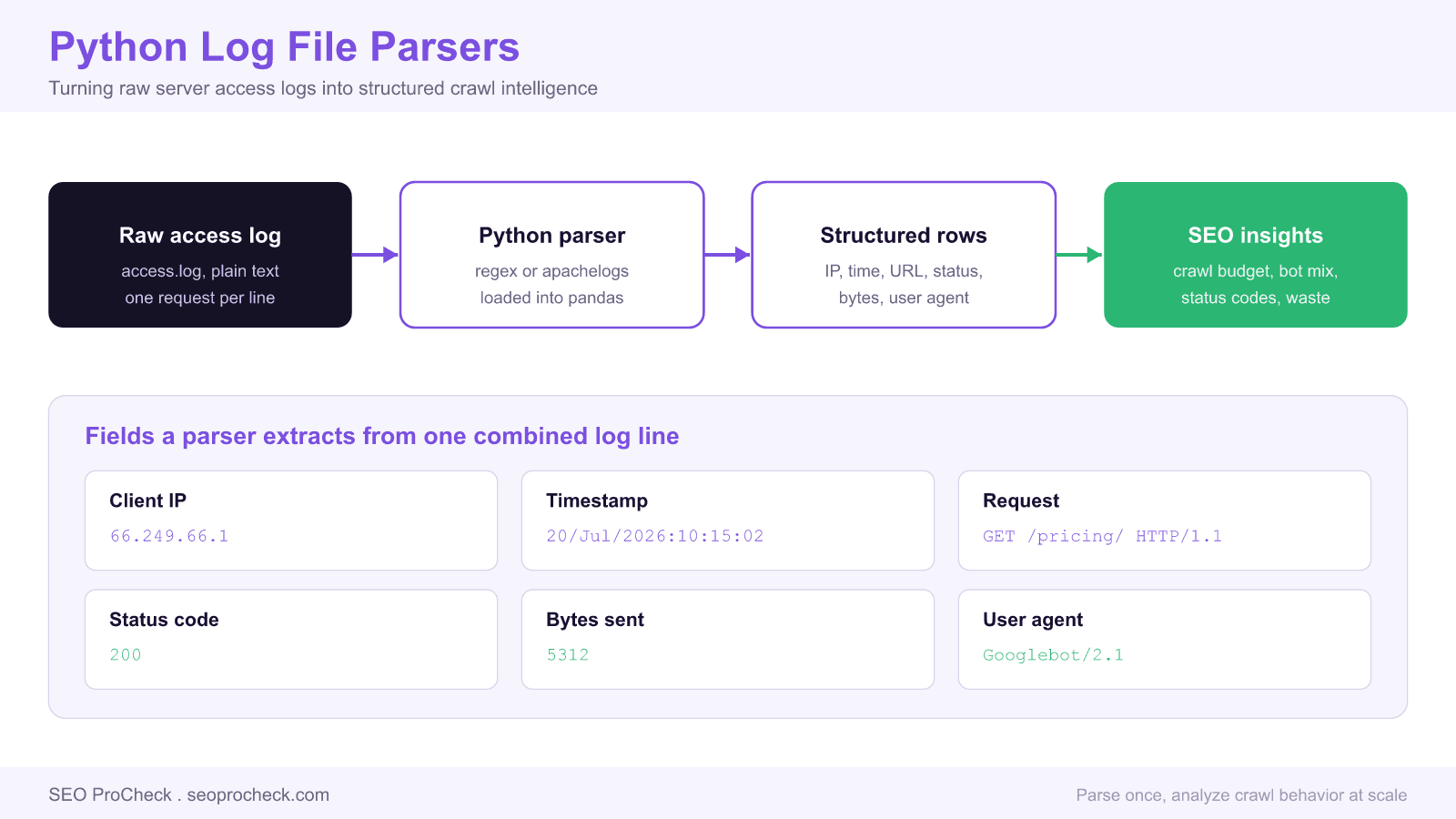
Most Apache and Nginx servers write the Combined Log Format by default. One request is one line, and the fields are positional. Here is a single Googlebot request:
66.249.66.1 - - [20/Jul/2026:10:15:02 +0000] "GET /pricing/ HTTP/1.1" 200 5312 "-" "Mozilla/5.0 (compatible; Googlebot/2.1; +http://www.google.com/bot.html)"Read left to right, the fields are the client IP, two identity fields that are usually blank, the timestamp in brackets, the request line with method and path, the HTTP status code, the response size in bytes, the referrer, and the user agent string. A parser turns those positions into named columns.
Three ways to parse logs in Python
You have three practical options, from most control to least code.
1. A regular expression
The Combined Log Format is regular enough to capture with one pattern. This is the zero dependency approach and it is fast:
import re
pattern = re.compile(
    r'(?P<ip>\S+) \S+ \S+ \[(?P<time>[^\]]+)\] '
    r'"(?P<method>\S+) (?P<url>\S+) [^"]*" '
    r'(?P<status>\d{3}) (?P<bytes>\S+) '
    r'"[^"]*" "(?P<ua>[^"]*)"'
)
rows = []
with open("access.log") as fh:
    for line in fh:
        m = pattern.match(line)
        if m:
            rows.append(m.groupdict())
2. A dedicated library
Packages such as apachelogs and clfparser handle format quirks, escaped quotes, and timezone parsing for you. They cost a dependency but save you from edge case bugs when logs contain unusual user agents or malformed lines.
3. pandas for analysis
Whichever way you extract the fields, load the rows into a pandas DataFrame. From there the analysis is a few lines. Parse the timestamp, cast the status to an integer, and you can group by anything:
import pandas as pd
df = pd.DataFrame(rows)
df["status"] = df["status"].astype(int)
bots = df[df["ua"].str.contains("Googlebot", na=False)]
print(bots["url"].value_counts().head(20))
print(bots["status"].value_counts())
The six fields worth extracting
| Field | Example | Why SEO cares |
|---|---|---|
| Client IP | 66.249.66.1 | Verify a bot is genuine by reverse DNS on this IP |
| Timestamp | 20/Jul/2026:10:15:02 | Crawl frequency and time of day patterns |
| Request URL | GET /pricing/ | Which pages get crawl budget and which are ignored |
| Status code | 200, 301, 404, 500 | Crawl waste on redirects and errors |
| Bytes sent | 5312 | Heavy responses that slow crawling |
| User agent | Googlebot/2.1 | Separate search bots, AI crawlers, and humans |
Verify Googlebot, do not trust the user agent
Any scraper can send a user agent that says Googlebot. Before you attribute crawl behavior to Google, confirm the IP. Run a reverse DNS lookup on the client IP; a genuine Googlebot resolves to a googlebot.com or google.com host, and a forward lookup of that host returns the original IP. Python does this with the standard library:
import socket
def is_googlebot(ip):
    try:
        host = socket.gethostbyaddr(ip)[0]
        if not host.endswith((".googlebot.com", ".google.com")):
            return False
        return socket.gethostbyname(host) == ip
    except socket.herror:
        return False
Skip this step and your crawl budget numbers include impostors, which quietly corrupts every conclusion.
What log analysis reveals
- Crawl waste. If 40 percent of Googlebot requests hit URLs with tracking parameters or session IDs, that budget is not reaching your real pages. Parameter driven category pages are a frequent offender; the faceted navigation SEO strategy guide covers how to contain them.
- Orphan and never crawled pages. Join your sitemap URLs against crawled URLs from the log. Pages in the sitemap that never appear in the log are being ignored, usually because internal linking does not reach them.
- Status code drift. A rising share of 404 or 5xx responses to bots signals broken links or an overloaded server throttling the crawler.
- Redirect chains. Repeated 301 hops on bot requests waste budget on every crawl. Confirm the fix serves a direct 200. To batch check status codes across a URL list, pair log analysis with bulk URL testing scripts.
Where do the raw logs come from? On Apache they usually live at /var/log/apache2/access.log, on Nginx at /var/log/nginx/access.log, and on managed hosts you download them from the control panel or a CDN log export. Rotated logs are often gzipped, so read them with Python's gzip module rather than decompressing to disk. For the wider context of where log analysis fits, see what is technical SEO.
FAQ
A crawler such as Screaming Frog simulates how a bot could crawl your site. A server log records how bots actually did crawl it. Only the log shows real crawl frequency, which URLs Google prioritizes, and how much budget is wasted on errors and parameters. Use a crawler to model the site and logs to see reality.
The Combined Log Format is the default on Apache and Nginx. It records the client IP, timestamp, request line, status code, response size, referrer, and user agent, one request per line. If your logs look different, check the server config for a custom LogFormat directive so your parser matches the exact field order.
Do a reverse DNS lookup on the client IP. A genuine Googlebot IP resolves to a host ending in googlebot.com or google.com, and a forward lookup of that host must return the same IP. The user agent string is not proof because anyone can send Googlebot as their user agent.
No. You can parse and count with only the standard library using re for extraction and collections.Counter for tallies. pandas becomes worthwhile once you want to group by multiple fields, join logs against a sitemap, or produce charts, because it makes those operations one line each instead of custom loops.
Aim for at least two to four weeks so crawl patterns and weekly cycles show up. For large sites even a few days reveals obvious crawl waste, but short windows miss pages Google crawls infrequently. Longer windows also let you see whether a fix changed bot behavior over time.
Yes. The same parser handles any user agent, so you can isolate GPTBot, PerplexityBot, and ClaudeBot by filtering the user agent column. Google-Extended will not appear, because it is a robots.txt control token with no user agent of its own; it fetches nothing and does not affect Google Search or AI Overviews. That tells you which AI systems are reading your content and which sections they request most, the AI era equivalent of classic crawl analysis.
Want to know where your crawl budget really goes?
Log analysis often finds that a large share of crawling is spent on parameters, redirects, and errors instead of your money pages. An audit turns that into a fix list.
Take this with you
The assistant links open with a question about this page already written.
Claude Vincent is a technical SEO consultant focused on crawlability, rendering, and AI-search visibility. He writes the field guides and case studies at SEO ProCheck, with a bias toward the durable, unglamorous work that decides whether search engines and AI answer engines can actually read and cite a site.
About SEO ProCheck
Technical SEO consulting and GEO strategy with 20 years of enterprise experience. Case studies, resources, and tools for search and AI visibility.
Work With Me
Technical SEO audits, GEO strategy, site migrations, and international SEO. Hourly consulting for teams who need hands-on support, not just reports.
Subscribe to our newsletter!








Recent Posts
- Google August 2026 Spam Update: Dates, Duration and How to Read Your Data November 2, 2026
- Google Algorithm Updates: The Dated List Since 2003, and What to Do After Each October 31, 2026
- AI Readiness: The Checklist, the Research and the Free Tools October 28, 2026