

ItemList Schema for Product Collections
- January 20, 2025
- Schema and Structured Data, Technical SEO
AI Summary
ItemList schema describes an ordered set of items, such as the products on a category or collection page, using itemListElement entries that each carry a position and either a url or a full item object. It tells search engines the exact order and membership of the list so that structure matches what shoppers see on the page.
- Every
ListItemneeds a sequentialpositionstarting at 1 and matching the visible order. - Two documented patterns: a summary page with
urlonly, or an all in one page with a fullitemobject per entry. - ItemList clarifies list structure, but per product rich results still come from
Productmarkup on the product pages. - Only mark items that are actually visible on the page, and keep
numberOfItemsaccurate.
What ItemList does on a collection page
An ItemList is the schema.org type for an ordered or unordered collection of items. On an ecommerce category page, a search results page, or a curated collection, it states which items are in the list and in what order. Each member is an itemListElement of type ListItem, and each ListItem has a position and points at the underlying thing with a url or an inline item. That explicit ordering is the value: search engines no longer have to infer the sequence from your HTML.
Be precise about what ItemList does and does not buy you. It communicates list structure and can support list style carousel treatments in the contexts Google supports them, but the rich product details a shopper sees, price, availability, review stars, come from Product and Offer markup on the individual product pages. Think of ItemList as the table of contents and Product markup as the chapters.
Pattern one: summary page
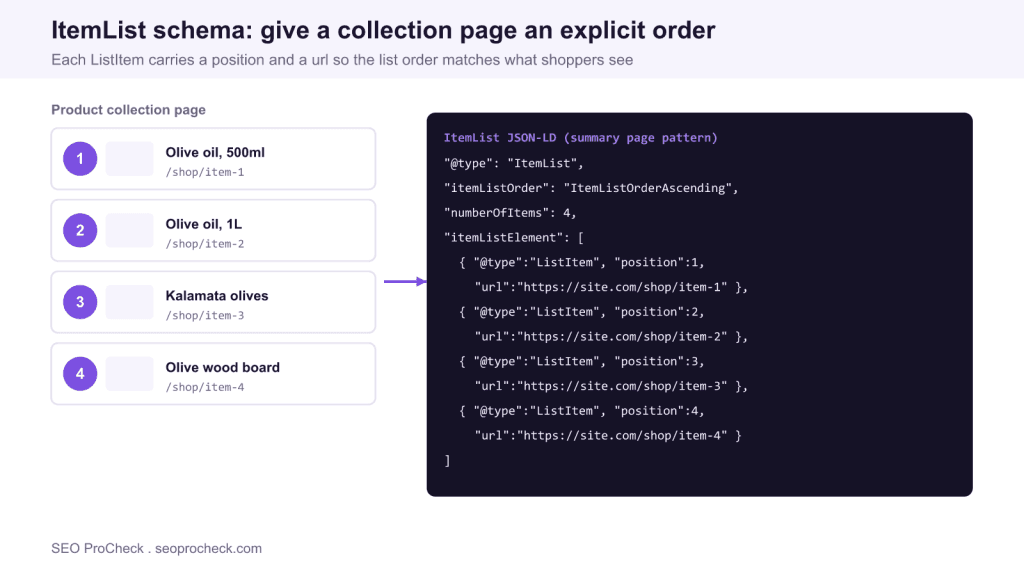
Use this when the collection page links out to separate product detail pages, which is the normal ecommerce case. Each ListItem carries only a position and a url. The order of the entries must match the order the products appear on the page.
{
  "@context": "https://schema.org",
  "@type": "ItemList",
  "itemListOrder": "ItemListOrderAscending",
  "numberOfItems": 4,
  "itemListElement": [
    { "@type": "ListItem", "position": 1, "url": "https://site.com/shop/item-1" },
    { "@type": "ListItem", "position": 2, "url": "https://site.com/shop/item-2" },
    { "@type": "ListItem", "position": 3, "url": "https://site.com/shop/item-3" },
    { "@type": "ListItem", "position": 4, "url": "https://site.com/shop/item-4" }
  ]
}
Pattern two: all in one page
Use this when every item is fully described on the same page, for example a single page ranking or a guide that lists products inline with all their details. Here each ListItem nests a full item object, typically a Product, so the details live inside the list itself.
{
  "@context": "https://schema.org",
  "@type": "ItemList",
  "itemListElement": [
    {
      "@type": "ListItem",
      "position": 1,
      "item": {
        "@type": "Product",
        "name": "Extra virgin olive oil, 500ml",
        "url": "https://site.com/shop/item-1",
        "image": "https://site.com/img/item-1.jpg",
        "offers": { "@type": "Offer", "price": "18.00", "priceCurrency": "USD" }
      }
    }
  ]
}
Do not mix the two patterns inside one ItemList. Either every entry uses url only, or every entry uses a full item. A half and half list confuses parsers and can invalidate the whole block.
Property reference
| Property | Where | Notes |
|---|---|---|
itemListElement | ItemList | Array of ListItem entries, required |
position | ListItem | Integer starting at 1, sequential, matches visible order |
url | ListItem | Summary pattern: canonical URL of the item page |
item | ListItem | All in one pattern: nested object such as Product |
numberOfItems | ItemList | Total count, keep it accurate |
itemListOrder | ItemList | Ascending, descending, or unordered |
Common mistakes
The most common error is a position sequence that does not match the page: positions must start at 1 and increment by 1 in the order items are shown, not the order they exist in your database. The second is marking items that are not visible, for example including paginated results from page 2 in the ItemList for page 1. The third is a mismatch between numberOfItems and the actual number of itemListElement entries. The fourth is expecting product rich results from ItemList alone: add Product markup on each detail page for price and review treatments.
Testing
Validate the markup in Google's Rich Results Test for the supported content types and in the Schema Markup Validator at validator.schema.org for a pure schema check. Confirm the number of ListItem entries detected matches numberOfItems, that positions run 1, 2, 3 with no gaps, and that each url returns a live 200 page. In Search Console, watch the relevant enhancement report for parse errors after deployment.
Frequently asked questions
What is ItemList schema used for?
It describes an ordered collection of items, such as products on a category or collection page, and states their exact order and membership. Search engines use it to understand list structure instead of inferring it from your HTML.
Does ItemList give me product rich results?
Not on its own. ItemList communicates list structure and can support list carousels in the contexts Google supports. Price, availability and review stars come from Product and Offer markup on the individual product pages.
Should position start at 0 or 1?
Position starts at 1 and increments by 1. It must follow the order items are actually shown on the page, not the order they are stored in your system. Gaps or a zero based sequence are errors.
Can I combine url and full item entries in one list?
No. Use one pattern per ItemList. Either every ListItem uses url only, the summary pattern, or every ListItem nests a full item object, the all in one pattern. Mixing them can invalidate the block.
How many items should I include?
Include the items actually visible on that page and keep numberOfItems equal to the count of ListItem entries. Do not roll in products from other paginated pages, and keep the list to a sensible length for the page.
How do I test ItemList markup?
Run the page through the Rich Results Test and the Schema Markup Validator at validator.schema.org. Check that the detected item count matches numberOfItems, that positions run in sequence, and that each url resolves to a live page.
Related reading
ItemList is one entry in the wider practice of schema and structured data, part of the broader technical SEO glossary.
Take this with you
The assistant links open with a question about this page already written. Nothing is sent until you press enter.
Claude Vincent is a technical SEO consultant focused on crawlability, rendering, and AI-search visibility. He writes the field guides and case studies at SEO ProCheck, with a bias toward the durable, unglamorous work that decides whether search engines and AI answer engines can actually read and cite a site.
About SEO ProCheck
Technical SEO consulting and GEO strategy with 20 years of enterprise experience. Case studies, resources, and tools for search and AI visibility.
Work With Me
Technical SEO audits, GEO strategy, site migrations, and international SEO. Hourly consulting for teams who need hands-on support, not just reports.
Subscribe to our newsletter!







Recent Posts
- Finding a Competitor's Sitemap, and Turning It Into a Change Log September 15, 2026
- AI Crawler User Agents: The Current Names, and Which Ones Sites Actually Block September 9, 2026
- Can AI Crawlers Actually Read Your Site? I Measured 400 of the Biggest September 5, 2026