

AI Summary
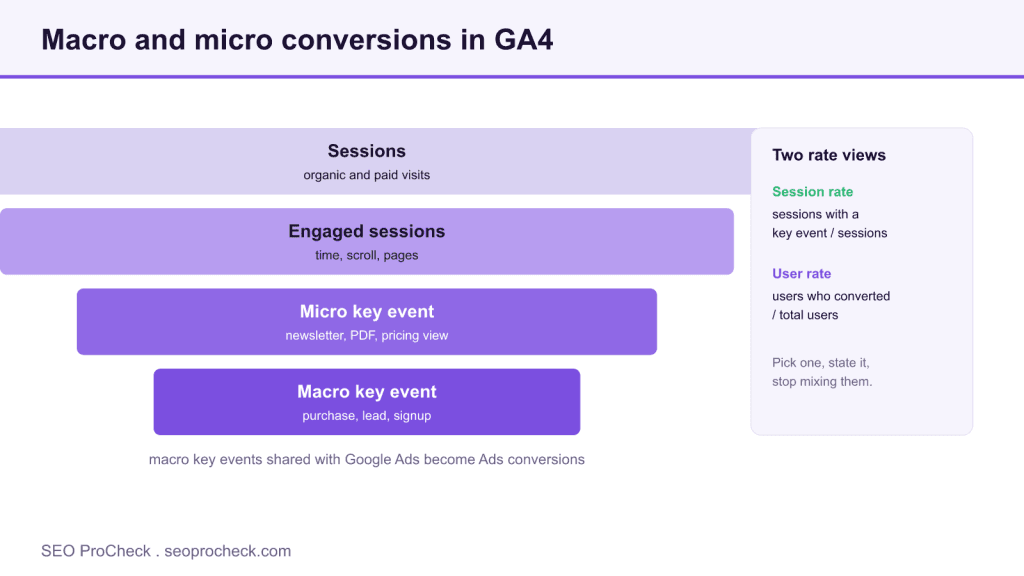
A conversion is any visitor action you have decided has business value, such as a purchase, lead, signup, or booked call. In GA4 these are now called key events, and tracking them correctly is the only way to connect SEO work to money.
- GA4 renamed conversions to key events in March 2024; Google Ads still says conversion.
- Fire events on genuine success, not on button click, or your numbers get poisoned.
- Session key event rate is usually the honest rate for SEO landing page work.
- Mark macro actions as key events; keep micro events as segments, not headline numbers.
What a Conversion Is
A conversion is any visitor action you've decided has business value, a purchase, a submitted lead form, a signup, a booked call. It matters because it's the only metric in your stack that connects SEO work to money; traffic without conversions is a vanity report, and I've audited plenty of sites ranking beautifully for queries that never bought anything.
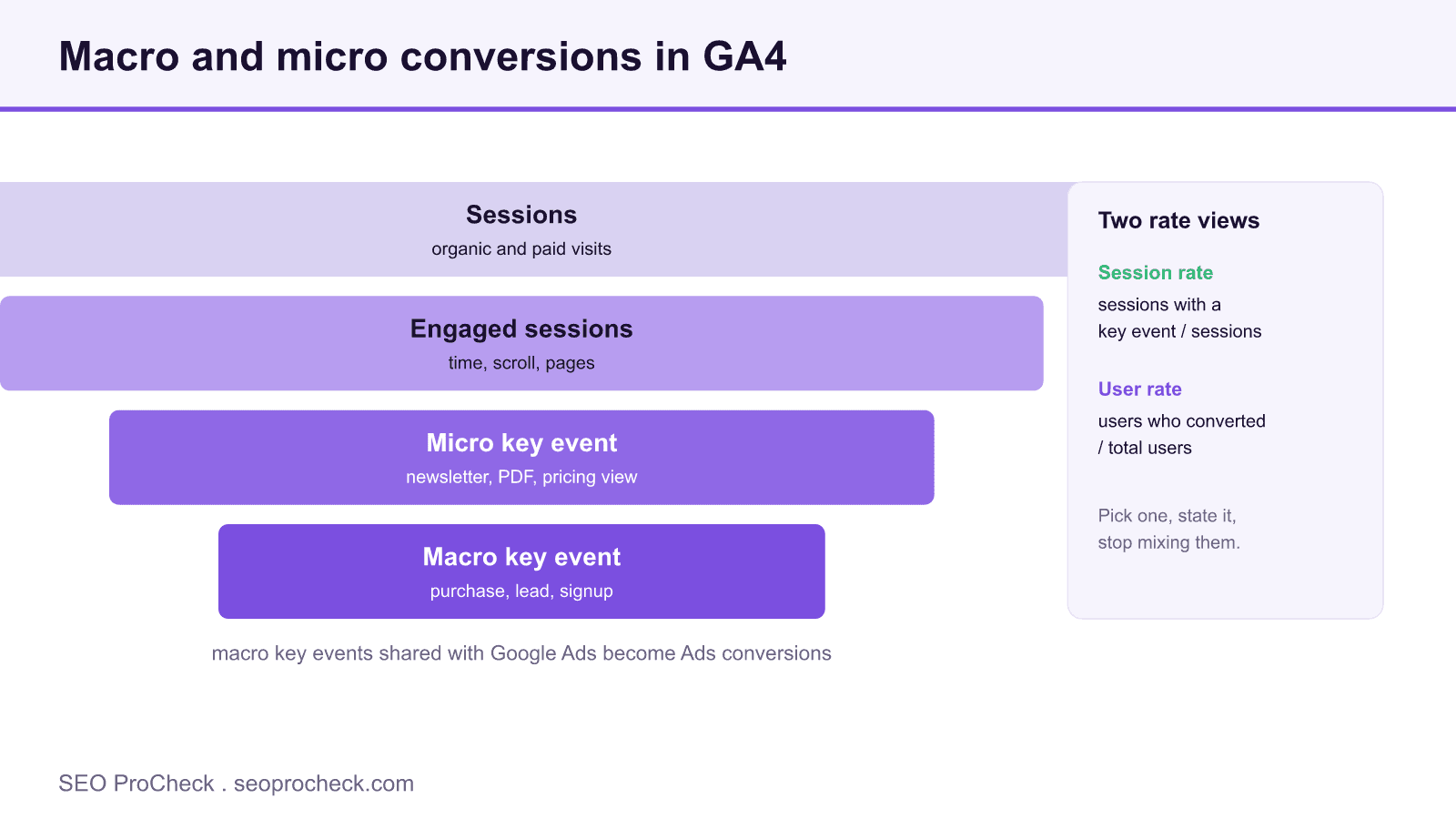
Terminology landmine first: in March 2024, GA4 renamed conversions to key events. "Conversion" in Google's ecosystem now officially refers to key events that get shared with Google Ads for bidding. In practice everyone still says conversion, every client deck says conversion, and this page says conversion, just know that inside the GA4 interface you're hunting for the "key event" toggle, and that the Ads team's "conversions" and your "key events" may legitimately show different numbers because they count differently (attribution windows, counting method, modeled data).
Conversion Types and How to Set Each Up in GA4
| Conversion Type | Example | GA4 Setup | Notes |
|---|---|---|---|
| Purchase (macro) | Completed checkout | Implement the recommended purchase event with items array and value; it's a key event by default | The one event you should never rename or improvise, the whole ecommerce reporting suite depends on its exact schema |
| Lead (macro) | Contact / quote form submit | Send generate_lead (or a form event) on genuine success, then Admin → Events → toggle "Mark as key event" | Fire on the server response or thank-you state, not on button click, failed submits will poison your numbers |
| Signup (macro) | Account or trial created | Recommended event sign_up, marked as key event | Deduplicate: one user re-registering three times is one lead, not three |
| Micro-conversion | Newsletter join, PDF download, pricing-page view | Custom event via GTM or code; mark as key event only if you'll act on it | Useful as leading indicators; dangerous when reported to executives as "conversions" alongside sales |
| Call / offline | Phone call, showroom visit, closed deal in CRM | Call tracking pushes an event; CRM outcomes come back via Measurement Protocol or offline import to Ads | The highest-value conversions on many local and B2B sites are the ones GA4 never sees by default |
Conversion Rate, Two Ways
GA4 gives you session key event rate (sessions with a key event ÷ sessions) and user key event rate (users who converted ÷ users). For SEO landing-page work, session rate is usually the honest one; user rate flatters you whenever people take multiple visits to decide, which, for anything expensive, is every time. Pick one, state which one you're using, and stop mixing them mid-report. For the broader discipline of moving that number, see the CRO glossary entry.
How to Check Conversions in GA4
- Confirm what's being counted: Admin → Data display → Key events, this list is your source of truth, and auditing it takes thirty seconds.
- Go to Reports → Engagement → Key events (Conversions) for totals per event.
- For SEO attribution, open Reports → Acquisition → Traffic acquisition, add the key events column, and filter to Organic Search.
- For per-landing-page conversion data, use Reports → Engagement → Landing page with the key events and session key event rate columns.
- Test new events in DebugView before trusting them: trigger the action yourself and watch the event arrive with its parameters.
- To tie conversions back to actual search queries, connect Search Console, the full wiring is in the GA4 + Search Console attribution guide.
Common Mistakes (and Fixes)
- Firing the event on click instead of success. A form that errors out still "converted." Fix: trigger on the confirmation page or successful server response, then verify in DebugView with a deliberately failed submission.
- Marking everything as a key event. Ten key events where nine are scrolls and outbound clicks make the one that matters unreadable. Fix: macro conversions get key-event status; micro-conversions stay regular events you segment on when needed.
- Counting the thank-you page reload as a new conversion. Refresh, back-button revisit, or a bookmarked confirmation URL all re-fire pageview-based triggers. Fix: fire once per transaction with a unique
transaction_id, or gate the trigger. - Reporting ranking wins as business wins. Position 3 on a query that converts at zero is decoration. Fix: run the diagnostic in traffic-but-no-conversions before celebrating traffic.
- Ignoring the GA4-vs-Ads gap. Ads counts with its own attribution and modeling; GA4 counts key events its way. Fix: expect a gap, document which number each stakeholder gets, and never silently swap sources between monthly reports.
FAQ
Are conversions and key events the same thing?
In GA4 today, yes, "key event" is the current name for what was called a conversion before March 2024. Google now reserves "conversion" for key events shared with Google Ads. Same underlying action, two labels depending on which product you're standing in.
What's a good conversion rate?
Depends entirely on what you count as a conversion, your traffic mix, and your price point, a newsletter signup and a $40k contract are both "conversions." Benchmark your own pages against each other and against their history; cross-industry averages will only mislead you.
Do conversions affect SEO rankings?
No. Google doesn't see your GA4 key events and doesn't rank you on them. Conversions are how you judge whether the rankings you earned are worth having.
Why does GA4 show fewer conversions than my CRM?
Consent banners, ad blockers, users converting on a second device, and offline closes all happen outside GA4's view. Treat GA4 as directional for trend and channel mix; treat the CRM as the system of record for revenue.
Should micro-conversions go in client reports?
Yes, clearly labeled and never summed with macro conversions. "212 newsletter signups and 9 qualified leads" is honest reporting; "221 conversions" is how trust dies.
Related Reading
- Conversion Rate Optimization (CRO)
- Traffic But No Conversions: the diagnostic checklist
- Connecting GA4 and Search Console for Full-Funnel SEO
Take this with you
The assistant links open with a question about this page already written.
Claude Vincent is a technical SEO consultant focused on crawlability, rendering, and AI-search visibility. He writes the field guides and case studies at SEO ProCheck, with a bias toward the durable, unglamorous work that decides whether search engines and AI answer engines can actually read and cite a site.
About SEO ProCheck
Technical SEO consulting and GEO strategy with 20 years of enterprise experience. Case studies, resources, and tools for search and AI visibility.
Work With Me
Technical SEO audits, GEO strategy, site migrations, and international SEO. Hourly consulting for teams who need hands-on support, not just reports.
Subscribe to our newsletter!








Recent Posts
- Google August 2026 Spam Update: Dates, Duration and How to Read Your Data November 2, 2026
- Google Algorithm Updates: The Dated List Since 2003, and What to Do After Each October 31, 2026
- AI Readiness: The Checklist, the Research and the Free Tools October 28, 2026