AI Summary
Log file analysis means reading your web server's raw access logs to see exactly which URLs search engine and AI crawlers requested, when, and what status code your server returned. It is the only ground-truth source for crawl behaviour: crawl simulations show what a bot could fetch, logs show what Googlebot did fetch.
- A log line gives you client IP, timestamp, method and path, status code, response size, and user agent. Nothing about rendering.
- Always reverse-DNS-verify Googlebot: the user agent string is trivially faked by scrapers.
- Analyse 30 days minimum. Googlebot crawls in waves, so a single day of data will mislead you.
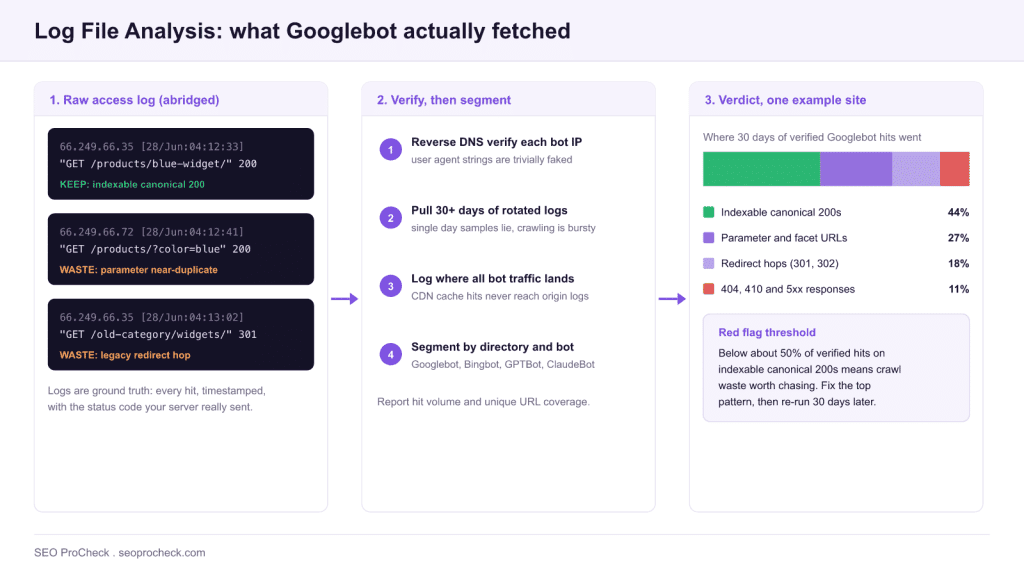
- If under roughly 50% of verified bot hits land on indexable canonical 200s, you have crawl waste worth chasing.
- Logs are the only place you can observe AI crawlers such as GPTBot, ClaudeBot and PerplexityBot: they report to no console.

Log file analysis is the practice of reading your web server's raw access logs to see exactly what search engine crawlers requested, when, and what response they got. Unlike a crawl simulation or Search Console's sampled charts, logs are the ground truth: every single Googlebot hit, timestamped, with the actual status code your server returned.
Why it matters: everything else in technical SEO is inference. A crawler like Screaming Frog shows what a bot could fetch; logs show what Googlebot actually fetched. On sites past a few tens of thousands of URLs, the gap between those two is where crawl budget dies: bots hammering parameter junk, faceted URLs, and dead redirects while your new content waits days for a first visit. You cannot see that anywhere except the logs.
What a log line actually says
Here are three real-format lines (Apache/nginx combined log format) of the kind you'll see when you grep for Googlebot:
66.249.66.35 - - [28/Jun/2026:04:12:33 +0000] "GET /products/blue-widget/ HTTP/1.1" 200 48213 "-" "Mozilla/5.0 (compatible; Googlebot/2.1; +http://www.google.com/bot.html)"
66.249.66.72 - - [28/Jun/2026:04:12:41 +0000] "GET /products/?color=blue&sort=price_asc HTTP/1.1" 200 47950 "-" "Mozilla/5.0 (compatible; Googlebot/2.1; +http://www.google.com/bot.html)"
66.249.66.35 - - [28/Jun/2026:04:13:02 +0000] "GET /old-category/widgets/ HTTP/1.1" 301 - "-" "Mozilla/5.0 (compatible; Googlebot/2.1; +http://www.google.com/bot.html)"
Line one is healthy. Line two is Googlebot spending a request on a filtered-and-sorted parameter URL that's near-duplicate of the category page. Line three is a crawl hit wasted on a redirect that's probably been live for years. Multiply lines two and three by 40,000 a day and you've found your indexing lag.
Reading the fields
| Field | Example | What it tells you in an SEO context |
|---|---|---|
| Client IP | 66.249.66.35 | Whether "Googlebot" is really Googlebot: verify with reverse DNS, since the user-agent string is trivially faked by scrapers |
| Timestamp | [28/Jun/2026:04:12:33 +0000] | Crawl frequency and recency per URL or directory; how long after publishing a page gets its first hit |
| Method + path | GET /products/?color=blue | The exact URL requested, parameters and all: this is where parameter bloat and faceted-navigation waste become visible |
| Status code | 200 / 301 / 404 / 5xx | What the bot experienced: chains of 301s, persistent 404 re-crawling, and 5xx spikes that throttle crawl rate |
| Response size | 48213 | Anomalies: a "200" page returning 2 KB is often a soft error or an empty template |
| User-agent | Googlebot/2.1 | Which bot, and which flavor: Googlebot Smartphone vs Desktop, Googlebot-Image, plus AI crawlers (GPTBot, ClaudeBot, PerplexityBot) whose behavior you can only observe here |
Note what's absent: no referrer of value (bots send -), no rendering, no JavaScript execution. Logs tell you about requests, not about what the bot did with the response. Pair them with crawl data for the full picture.
How to check it on your own site
- Get the raw access logs. cPanel: Metrics → Raw Access. nginx: usually
/var/log/nginx/access.log. Behind Cloudflare or a load balancer, make sure logs record the real client IP or bot verification is impossible. This is honestly the hardest step: half of log-analysis projects die at "ops can't give us the logs." - Isolate verified Googlebot:
grep Googlebot access.logfor the first pass, then verify a sample of IPs withhost 66.249.66.35(must resolve to*.googlebot.comor*.google.comand back). - Run the file through GoAccess (
goaccess access.log --log-format=COMBINED) for instant per-status, per-URL breakdowns, or use the log file analyzer for an SEO-oriented view without shell work. Screaming Frog Log File Analyser is the desktop route and joins log data to crawl data. - Answer four questions: What share of bot hits land on URLs you actually want indexed? What share hit parameters, redirects, and 404s? Which important sections get crawled rarely or never? How fast does new content get its first Googlebot hit?
- Segment by directory and by bot, and trend it over at least 30 days: single-day samples lie, because Googlebot's attention is bursty. For rolling your own, there are ready-made Python log file parsers to build on.
Ten-minute triage: the one-liners
Before any tooling, these shell one-liners against a combined-format access.log answer the first-pass questions. Each assumes the standard field order shown in the sample lines above (status is field 9, path is field 7).
# Status code distribution for Googlebot hits
grep Googlebot access.log | awk '{print $9}' | sort | uniq -c | sort -rn

# Top 20 most-crawled URLs
grep Googlebot access.log | awk '{print $7}' | sort | uniq -c | sort -rn | head -20

# Share of bot hits wasted on parameter URLs
grep Googlebot access.log | awk '{print $7}' | grep -c '?'

# Every 404 Googlebot keeps re-requesting
grep Googlebot access.log | awk '$9==404 {print $7}' | sort | uniq -c | sort -rn

# Crawl activity per directory (first path segment)
grep Googlebot access.log | awk -F'/' '{print $2}' | sort | uniq -c | sort -rn | head

# AI crawlers hitting the site, by user-agent
grep -E 'GPTBot|ClaudeBot|PerplexityBot|Bytespider|CCBot' access.log | awk -F'"' '{print $6}' | sort | uniq -c | sort -rn

# Unique verified-range Googlebot IPs to sample for reverse DNS
grep Googlebot access.log | awk '{print $1}' | sort -u | head
Rotated logs are usually gzipped; swap grep for zgrep (or zcat access.log.*.gz | grep ...) to include them, and run across at least 30 days of files before trusting any percentage.
Which bots to expect, and what each one proves
Segmenting by user agent turns one number into a diagnosis. A drop in total bot hits means nothing until you know which bot stopped coming. Run the per-bot counts separately, then read them like this:
| User-agent token in the logs | Who it is | What its behavior tells you |
|---|---|---|
Googlebot/2.1 (smartphone) | Google's primary indexing crawler | Your real crawl budget picture. Mobile-first means this is the flavor that matters; desktop hits should be a small minority |
Googlebot-Image, Googlebot-Video | Google media crawlers | Whether media assets are reachable. Absent hits on a large image library usually means blocked paths or missing internal links |
bingbot | Microsoft's crawler, also feeding Copilot | A useful control group. If Bingbot crawls a section happily and Googlebot ignores it, the cause is more likely quality or demand than blocking |
GPTBot | OpenAI's crawler | Whether your content is reachable for ChatGPT retrieval. Blocked by robots.txt on many sites by accident |
ClaudeBot | Anthropic's crawler | Same question for Claude. Volume is typically far lower than Googlebot, so measure share, not raw count |
PerplexityBot | Perplexity's crawler | Citation-oriented retrieval. Sustained visits to a section suggest it is being used to answer live queries |
Faked Googlebot from odd IPs | Scrapers and bandwidth thieves | Not an SEO problem at all. If reverse DNS fails, it belongs in a WAF ticket, not a crawl budget report |
The AI crawlers deserve their own pass, because their robots.txt tokens, rendering behaviour and retrieval models differ from each other in ways that change what you should allow. The AI crawler comparison of GPTBot, ClaudeBot and PerplexityBot breaks down each one. Before you block anything, remember that crawl-level blocks and index-level directives are different controls: see the meta robots and X-Robots-Tag reference for which lever does what.
Red-flag thresholds worth acting on
Rules of thumb from repeated audits, starting points for judgment rather than lab constants:
| Metric from the logs | Generally healthy | Red flag | First move |
|---|---|---|---|
| Bot hits on indexable canonical 200s | 70 to 80%+ of verified hits | Below ~50% | Identify the top waste pattern (parameters, facets, redirects) and cut it at robots.txt or linking level |
| Hits on parameter URLs | Under ~10% | Over ~25% | Audit faceted navigation; disallow crawl-trap parameter patterns |
| Hits answered with 301/302 | A few percent | Over ~10% sustained | Update internal links to final URLs; flatten redirect chains |
| Hits answered with 404/410 | Low single digits | Over ~5%, or the same URLs daily | Fix or remove the internal/external links feeding them |
| 5xx responses to bots | Near zero | Any sustained cluster | Treat as an incident: 5xx spikes cause Googlebot to slow its crawl rate |
| First Googlebot hit on new content | Within hours to ~2 days | Over a week | Strengthen internal links from crawl-frequent pages; check sitemap freshness |
| Share of section's URLs crawled in 30 days | Near 100% for priority sections | Large sections never visited | Check depth, internal links, and whether the section is orphaned |
Common mistakes
- Trusting the user-agent string. A hell of a lot of "Googlebot traffic" in raw logs is scrapers wearing a costume. Always reverse-DNS-verify before drawing conclusions, or your "crawl budget problem" is actually a scraping problem.
- Analyzing one day of logs. Googlebot crawls in waves. A 24-hour slice will convince you a section is ignored when it was crawled thoroughly last Tuesday. Thirty days minimum, ninety for seasonal sites.
- CDN logs vs origin logs confusion. If Cloudflare serves a cached copy, the request may never reach your origin log. Audit at the layer that sees all bot traffic: for cached sites that means the CDN's logs, not the server's.
- Counting hits instead of unique URLs. 100,000 Googlebot hits sounds great until you see 60% of them went to 200 infinite-calendar URLs. Always report both hit volume and unique-URL coverage.
- Finding waste and stopping there. The log analysis isn't the deliverable; the robots.txt rule, the parameter cleanup, or the redirect fix is. Tie every finding to a change, then re-run the logs a month later to prove the shift.
For the full workflow (sampling strategy, joins against crawl data, and reporting templates) see the complete log file analysis guide. If you're dealing with multi-CDN setups and log volumes in the terabytes, the enterprise log file analysis piece covers the plumbing.
FAQ
It's a good smoke alarm, not an inspection. Crawl Stats gives you sampled, aggregated trends: total requests, response breakdowns, a few example URLs. It won't give you per-URL hit counts, per-directory coverage, or anything about Bing and AI crawlers. Use it to spot a fire, use logs to find out what's burning.
Under roughly 10,000 URLs, crawl budget is rarely your constraint and logs mostly confirm that everything gets crawled. The exceptions: diagnosing a specific incident (5xx spike, deindexing event), verifying a migration, or checking whether AI bots can reach you at all.
Yes, and logs are the only place you can. GPTBot, ClaudeBot, PerplexityBot and friends don't report to any webmaster console. Grep for their user-agents to see what they're reading, and to confirm your firewall isn't blocking bots you actually want.
There's no universal number, but a working rule from audits: if less than 70 to 80% of verified Googlebot hits land on indexable, canonical, 200-status URLs, you have meaningful waste worth chasing. Sites with unmanaged faceted navigation regularly sit below 40%.
Google publishes its crawler IP ranges as JSON (googlebot.json on developers.google.com, under the crawler verification documentation). Download the ranges and match log IPs against them in your parser: far faster than per-IP host lookups. Keep the two-way reverse-DNS check for spot audits; the published ranges are the bulk method.
Rolling 90 days covers most SEO analysis. Keep a monthly aggregate (hits per directory per bot) forever: it's tiny, and being able to compare crawl distribution before and after a redesign two years later is worth more than the raw lines.
Take this with you
The assistant links open with a question about this page already written.
Claude Vincent is a technical SEO consultant focused on crawlability, rendering, and AI-search visibility. He writes the field guides and case studies at SEO ProCheck, with a bias toward the durable, unglamorous work that decides whether search engines and AI answer engines can actually read and cite a site.
About SEO ProCheck
Technical SEO consulting and GEO strategy with 20 years of enterprise experience. Case studies, resources, and tools for search and AI visibility.
Work With Me
Technical SEO audits, GEO strategy, site migrations, and international SEO. Hourly consulting for teams who need hands-on support, not just reports.
Subscribe to our newsletter!