

AI Summary
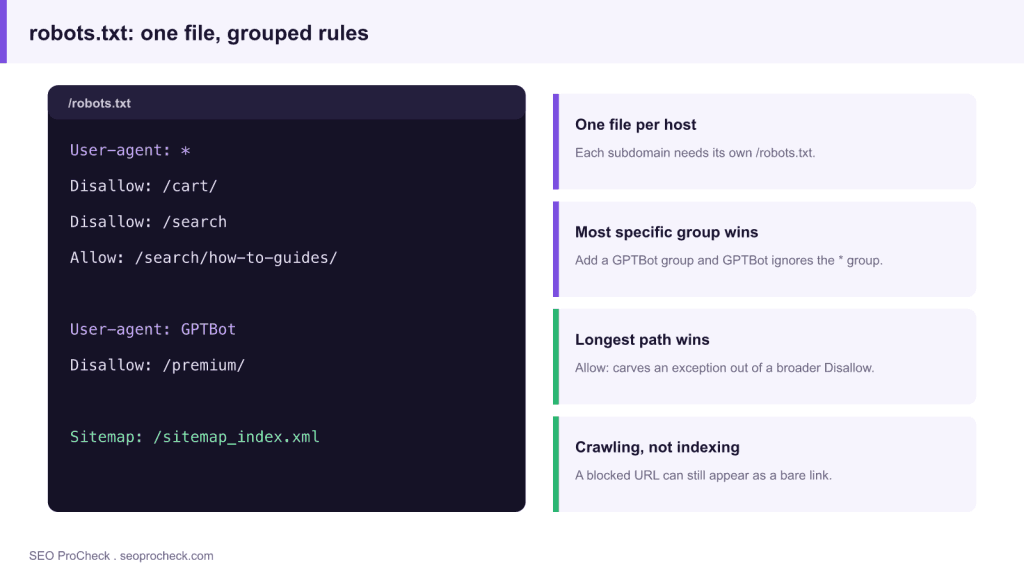
Robots.txt is a plain text file at your domain root that tells compliant crawlers which paths they may request. It controls crawling, not indexing, so a blocked URL can still surface as a bare link, and one wrong character can hide an entire site.
- One file per host: every subdomain needs its own /robots.txt.
- A bot obeys only the most specific user agent group that matches its name.
- Within a group the longest matching path wins, which is how Allow carves an exception.
- Use robots.txt for crawl budget, not to remove pages: removal needs meta robots or X-Robots-Tag.
Robots.txt is a plain-text file at your domain root that tells crawlers which paths they may request, it's the bouncer at the door, checked before any compliant bot fetches a page. Get one character wrong and the consequences run from "Google wastes a month on your filter pages" to "your entire site vanishes from search because someone shipped the staging file to production." Both happen constantly; the second one has a genre of postmortems named after it.
The file, decoded
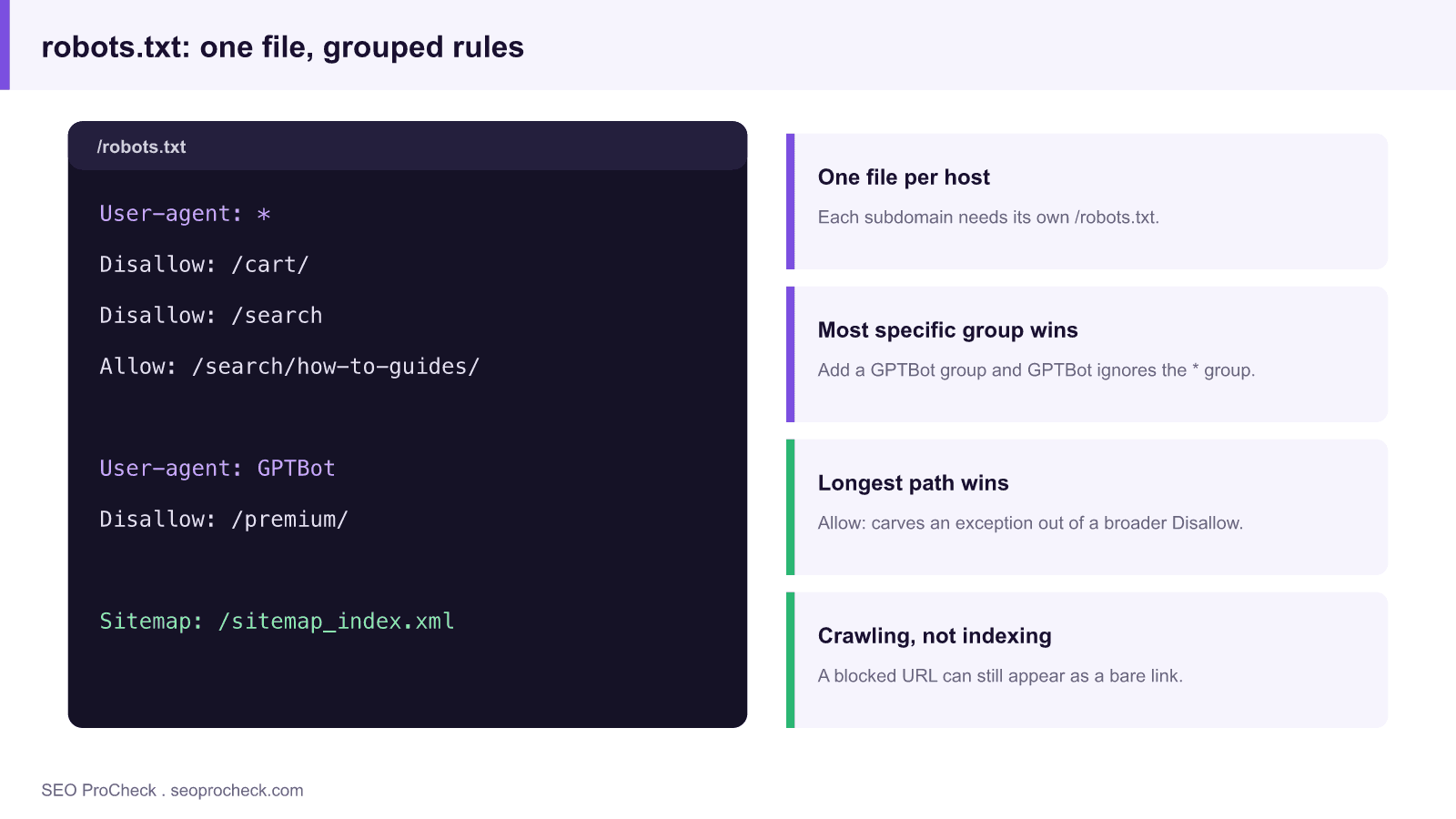
It lives at exactly one place per host, https://www.example.com/robots.txt, and subdomains each need their own. A working example with the parts that matter:
User-agent: *
Disallow: /cart/
Disallow: /*?sessionid=
Disallow: /search
Allow: /search/how-to-guides/

User-agent: GPTBot
Disallow: /premium/

Sitemap: https://www.example.com/sitemap_index.xml
Rules are grouped by user-agent. A bot obeys the most specific group matching its name and ignores all others, so the moment you add a User-agent: GPTBot group, GPTBot stops reading your * group entirely. Within a group, the longest matching path wins, which is how the Allow: above carves an exception out of the /search block. Two wildcards exist: * matches any character sequence, $ anchors end-of-URL. Matching is case-sensitive: Disallow: /PDF/ does nothing to /pdf/.
Who supports what is less uniform than people assume:
| Directive | Googlebot | Bingbot | GPTBot / ClaudeBot | Notes |
|---|---|---|---|---|
Disallow / Allow | Yes | Yes | Yes (documented) | Core of RFC 9309 |
Wildcards * and $ | Yes | Yes | Generally yes | Not in the original 1994 protocol; test per bot |
Crawl-delay | Ignored | Supported | Varies | For Google, manage rate via server responses instead |
Sitemap: | Yes | Yes | N/A | Absolute URL; can be cross-host |
Noindex: (in robots.txt) | No, support ended 2019 | No | No | Was never official; use meta robots or X-Robots-Tag |
Host: | No | No | No | Yandex legacy; dead weight in most files that carry it |
The precedence rules, edge cases, and the current AI-bot landscape get the long treatment in the complete robots.txt reference.
The two-word rule: crawling, not indexing
Robots.txt stops the request. It does not remove anything from Google's index, because a URL Google can't fetch can still be indexed from anchor text alone, it shows up in results as a bare link, often captioned "No information is available for this page." Worse, blocking a page prevents Google from ever seeing a noindex tag on it, so the block actively locks the zombie listing in place. That failure mode is common enough that there's a dedicated case study on fixing "Indexed, though blocked by robots.txt". What robots.txt IS for: keeping bots out of infinite parameter spaces, carts, internal search, the crawl budget protection layer.
Also remember it's an honor system. Compliant crawlers obey; scrapers don't. Anything genuinely private belongs behind authentication, and since the file is public, your disallow lines are a map of what you'd rather people not look at.
How to audit the file on your own site
- Fetch it the way a bot does:
curl -s https://www.example.com/robots.txtConfirm it returns 200 and text/plain. A 5xx here is serious: if robots.txt errors persistently, Google may stop crawling the site entirely as a precaution. (A 404 is fine, it means "everything allowed.")
- Check what Google actually has: GSC → Settings → robots.txt shows the fetched versions, fetch status, and parse warnings per host.
- Test specific URLs against your rules before deploying changes, the robots.txt generator helps build clean rule groups, and Screaming Frog's custom-robots.txt mode lets you dry-run a proposed file against a full crawl.
- Diff it over time. Put robots.txt in version control or a change monitor. Most robots.txt disasters are deploys, and the file that changed is the file nobody was watching.
- Grep your blocked paths against GSC's "Blocked by robots.txt" list to confirm nothing you monetize is in there.
Common mistakes
Disallow: /shipped from staging. The classic. Fix: a deploy-pipeline assertion that production robots.txt never contains a bareDisallow: /, plus protect staging with auth instead of robots rules.- Blocking CSS and JS directories. Google renders pages; blocked resources mean it renders them broken, and mobile-friendliness and content visibility suffer. Fix: unblock
/assets/,/wp-includes/-style paths and re-test in URL Inspection's live test. - Using robots.txt to hide duplicate content. Blocked duplicates can't pass their signals anywhere, consolidation needs the page to be crawlable with a canonical on it. Fix: choose canonicalization for duplicates, robots.txt for true junk.
- Forgetting group isolation. Adding
User-agent: Googlebotwith one rule silently exempts Googlebot from your entire*group. Fix: repeat the shared rules inside every named group. - Wildcard overreach.
Disallow: /*?kills every parameterized URL, including paginated categories that were your crawl paths. Fix: block specific parameters (/*?sessionid=), not the question mark itself.
FAQ
Do I even need a robots.txt?
Small sites often don't, no file means everything is crawlable, which is a perfectly valid policy. You need one the moment you have paths bots shouldn't waste time in, or bots you want to treat differently.
How fast do changes take effect?
Google caches robots.txt for up to about 24 hours, so expect same-day-ish enforcement, not instant. Other bots have their own cache windows.
Can I block AI training bots without touching Google?
Yes, that's exactly what named groups are for. A User-agent: GPTBot / Disallow: / group affects only GPTBot; Googlebot keeps following the rules in its own or the wildcard group.
Does the Sitemap line have to be in robots.txt?
No, it's optional, but it's the only sitemap discovery mechanism that works for every engine without a webmaster-tools account, so include it.
Is robots.txt case-sensitive?
The path matching is, yes. Directive names (User-agent, Disallow) are not. If your CMS produces mixed-case URLs, your rules need to cover the variants that actually exist in your logs.
Claude Vincent is a technical SEO consultant focused on crawlability, rendering, and AI-search visibility. He writes the field guides and case studies at SEO ProCheck, with a bias toward the durable, unglamorous work that decides whether search engines and AI answer engines can actually read and cite a site.
About SEO ProCheck
Technical SEO consulting and GEO strategy with 20 years of enterprise experience. Case studies, resources, and tools for search and AI visibility.
Work With Me
Technical SEO audits, GEO strategy, site migrations, and international SEO. Hourly consulting for teams who need hands-on support, not just reports.
Subscribe to our newsletter!







Recent Posts
- Can AI Crawlers Actually Read Your Site? I Measured 400 of the Biggest September 5, 2026
- The Pre-Publish Quality Gate for AI-Assisted Content August 6, 2026
- AGENTS.md vs llms.txt vs llms-full.txt: Which Agent File Does What July 18, 2026