

AI Summary
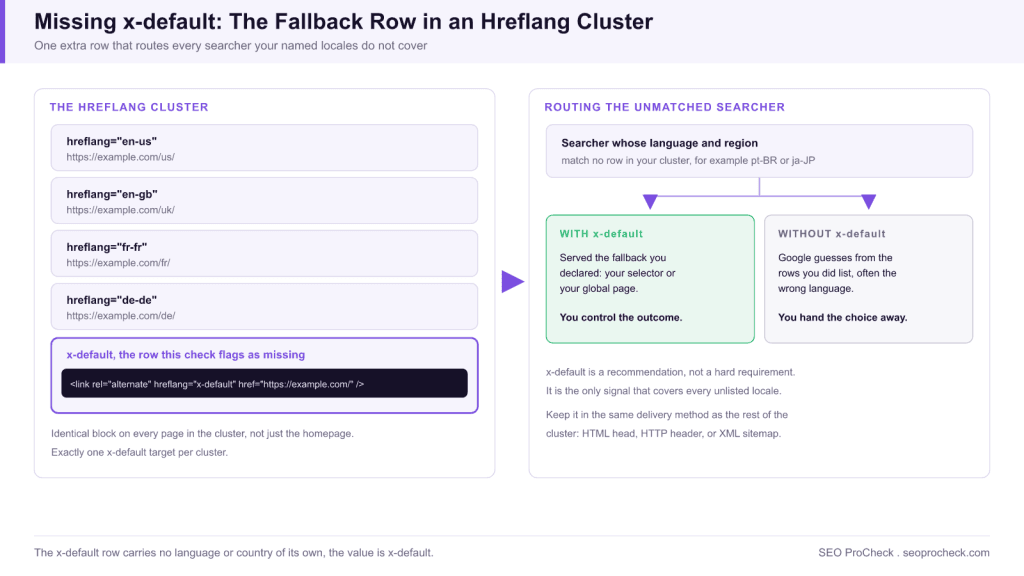
A missing x-default hreflang means your cluster declares no fallback URL for searchers whose language or region matches none of your targeted versions. Fix it by adding one extra row, <link rel="alternate" hreflang="x-default" href="..." />, to the same hreflang block on every page in the cluster, pointing at your language selector or your most universal version.
- It is a recommendation, not a hard requirement, but omitting it hands routing for every unlisted locale back to Google guesswork.
- The row carries no language or country of its own, the value is
x-default. - It must appear on every page in the cluster, not just the homepage, and exactly one target per cluster.
- Keep it in the same delivery method as the rest of the cluster: HTML head, HTTP header, or XML sitemap.
The x-default row tells Google which URL to serve when a searcher's language or country matches none of the versions you explicitly target. This check fires when your hreflang cluster is otherwise fine but has no x-default at all, leaving everyone outside your named locales to Google's guesswork.
What this check flags and the stakes
Without an x-default, a Portuguese speaker in a market you never listed, or anyone whose Accept-Language does not map to your set, gets whichever version Google decides looks closest, which is frequently the wrong one. The gap is startlingly common; our breakdown of why most hreflang setups silently break cites Patrick Stox's large-scale Ahrefs study on exactly how many live sites omit it. This check makes sure yours is not one of them.
What the fix looks like
The x-default is a single extra row appended to the same block every page already carries. It usually points at your language selector, your global homepage, or your most universal version (often English). Here it is added to a four-language set:
<link rel="alternate" hreflang="en-us" href="https://example.com/us/" />
<link rel="alternate" hreflang="en-gb" href="https://example.com/uk/" />
<link rel="alternate" hreflang="fr-fr" href="https://example.com/fr/" />
<link rel="alternate" hreflang="de-de" href="https://example.com/de/" />
<link rel="alternate" hreflang="x-default" href="https://example.com/" />
The x-default row carries no language or country attribute of its own; the value is x-default. Like every other row, it appears identically on every page in the cluster.
x-default in each delivery method
Hreflang can be delivered three ways, and the x-default row must live in the same method as the rest of your cluster. The exact syntax differs per method:
| Delivery method | Exact x-default syntax | Gotcha to avoid |
|---|---|---|
HTML <head> | <link rel="alternate" hreflang="x-default" href="https://example.com/" /> | Must be in the raw <head>, not injected after load; tags that only appear post-render via tag managers are unreliable |
| HTTP header (for PDFs and other non-HTML files) | Link: <https://example.com/file.pdf>; rel="alternate"; hreflang="x-default" | All alternates go in one comma-separated Link header; easy to drop the x-default entry when the header is built dynamically |
| XML sitemap | <xhtml:link rel="alternate" hreflang="x-default" href="https://example.com/" /> inside each <url> entry | Requires xmlns:xhtml="http://www.w3.org/1999/xhtml" declared on the <urlset>; the x-default row must repeat inside every URL entry of the cluster, not just once |
Pick one method and keep the whole cluster, x-default included, in it. Splitting a cluster across methods is a classic source of silent breakage.
Where to point x-default
The target choice is not arbitrary. This table maps common setups to the right destination.
| Your site shape | Point x-default at | Why |
|---|---|---|
| Has a real language/country selector page | The selector URL | Lets the unmatched user choose, no wrong guess imposed |
| No selector, one dominant version | The global or English version | Gives a sane, widely-understood fallback |
| Geo-redirecting homepage | A non-redirecting neutral URL | An x-default that instantly bounces the user defeats the purpose |
| Single market, no alternates | Nothing; you do not need hreflang | x-default only matters inside a real cluster |
How to detect it
- Screaming Frog, Hreflang tab. Crawl with Configuration > Spider > Crawl > Hreflang enabled, then check the Missing X-Default filter. Frog lists every clustered URL whose set lacks the x-default row.
- View source. Search the head of any localized page for
x-default. If it is absent while other hreflang rows are present, this is your flag. - Validator. An hreflang validator reports a present, valid cluster with a missing x-default as a distinct, lower-severity notice, separate from hard errors.
- Search Console, indirectly. Google removed the old International Targeting report, so there is no dedicated hreflang view anymore. Instead, open Performance > Search results, add a Country filter for a market you do not explicitly target, and check which URLs earn the impressions there. If the wrong-language version keeps surfacing for unlisted countries, a missing x-default is the usual cause.
How to fix it
- Decide the target using the table above. Selector first, dominant version second.
- Add the single row to your canonical hreflang block so it prints on every page, not just the homepage.
- Confirm the target resolves 200 and does not itself geo-redirect the unmatched visitor straight back into the maze.
- Keep it consistent across HTML, header, or sitemap; do not add x-default in one delivery method while the rest of the cluster lives in another.
- Recrawl and validate that the row now appears everywhere.
Absent and broken are two different tickets. Once the row exists, make sure it is pointed correctly, which is the job of x-default missing or misconfigured. For the concept in isolation, the x-default definition is a quick reference, and the implementation guide shows how it fits the whole cluster.
FAQ
Is x-default required for hreflang to work?
No, a cluster without it is still valid. But it is strongly recommended, because it is the only signal covering searchers outside your named locales, and that audience is usually larger than teams assume.
Can x-default point to a page that also has its own language tag?
Yes. It is normal for x-default and, say, the en row to point at the same English URL. The English page gets both a language-specific tag and the fallback role.
Do I need x-default on every page or just the homepage?
Every page in the cluster. The block is identical across the group, so the x-default row rides along on each URL, not only the root.
Should x-default point to a language selector or a real page?
A genuine selector is ideal because it hands the choice to the user. If you have none, a stable dominant-language page is the pragmatic fallback. Avoid anything that auto-redirects by geography.
Can I have more than one x-default in a cluster?
No. One cluster gets exactly one x-default URL, repeated identically across every page's block. Two different x-default targets inside the same cluster contradict each other, and Google will simply pick one or ignore the signal.
What happens if I just never add it?
Google serves unlisted-locale searchers its best guess from your existing rows, which is frequently the wrong language and drives the exact mismatched-result problem hreflang exists to solve.
Does x-default replace the need for language-specific tags?
No. It sits alongside them as a catch-all. You still need a real hreflang row for every language and region you target; x-default only handles the searchers who match none of those rows. Dropping the language rows in favor of x-default alone would strip Google of the precise routing it needs for your named markets.
Take this with you
The assistant links open with a question about this page already written. Nothing is sent until you press enter.
Claude Vincent is a technical SEO consultant focused on crawlability, rendering, and AI-search visibility. He writes the field guides and case studies at SEO ProCheck, with a bias toward the durable, unglamorous work that decides whether search engines and AI answer engines can actually read and cite a site.
About SEO ProCheck
Technical SEO consulting and GEO strategy with 20 years of enterprise experience. Case studies, resources, and tools for search and AI visibility.
Work With Me
Technical SEO audits, GEO strategy, site migrations, and international SEO. Hourly consulting for teams who need hands-on support, not just reports.
Subscribe to our newsletter!








Recent Posts
- Most Top Sites Never Say Who They Are in Structured Data October 14, 2026
- Homepage Titles Are Mostly Too Short, Not Too Long October 8, 2026
- Who Actually Serves an llms.txt? 184 Top Sites Measured September 29, 2026