

AI Summary
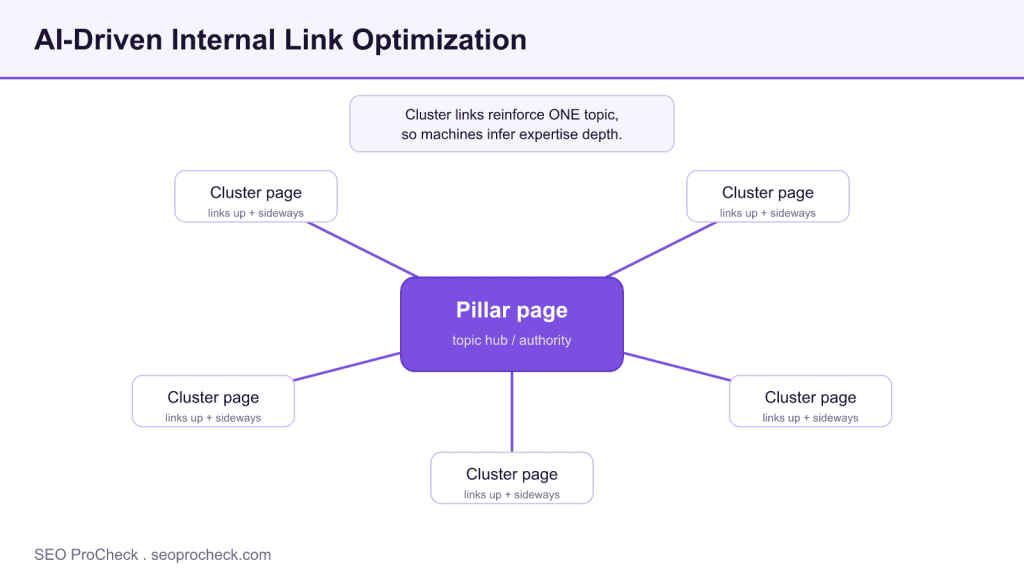
AI-driven internal link optimization means shaping your internal links around topic clusters so both search engines and AI systems can read your expertise depth on a subject. Instead of random cross-links, cluster pages point up to a pillar page and sideways to close siblings, which concentrates topical authority signals.
- Element code TE-010: internal linking not organized around topic clusters.
- Fix is structural: build one pillar page per topic and link related pages up to it and across to each other.
- Anchor text should describe the destination topic in plain words, not say click here.
- AI models infer topical authority from link neighborhoods, so a tidy cluster reads as subject depth.
Quick Reference
Element Code: TE-010
Issue: Internal linking not optimized for topical clustering
Impact: Weak topic authority signals
Fix: Restructure internal links around topic clusters
Detection: Link analysis, topic mapping
What Is This Issue?
Internal linking should reinforce topic clusters and demonstrate expertise depth. Random linking wastes opportunity.
Why This Matters for Your Website
Strategic internal linking builds topical authority signals for both traditional and AI search.
How to Fix This Issue
- Map topics: Identify content clusters
- Create hubs: Pillar pages for each topic
- Link strategically: Connect related content
Tools for Detection
- Link analysis: Map internal link structure
AI Search and GEO Considerations
Topical internal linking helps AI understand content relationships and expertise.
TL;DR (The Simple Version)
Organize internal links around topic clusters to build stronger topical authority signals.
How AI-driven internal linking actually works
Search engines and AI systems both read your site as a graph: pages are nodes, internal links are edges. When many pages about the same subject link to one another and up to a single hub, that dense neighborhood is a strong signal that you cover the subject in depth. The "AI-driven" part is not that a model rewrites your links for you; it is that you use topic clustering and, optionally, embeddings or a crawl tool to find which pages are semantically close, then wire them together deliberately.
The unit of work is the topic cluster: one topical authority hub (the pillar) plus every supporting page that answers a narrower question under it. See the broader mechanics in our internal linking lexicon entry. The pillar links down to each cluster page, each cluster page links back up to the pillar, and close siblings link across to each other. That pattern is what the diagram above shows.
A worked example
Say you run a payroll software blog. Your pillar is a definitive guide to payroll compliance. Cluster pages cover overtime rules, tax filing deadlines, contractor classification and pay-stub requirements. The fix is concrete: every cluster page opens or closes with a link back to the pillar using descriptive anchor text such as "payroll compliance guide," and the contractor-classification page links sideways to the overtime page because a reader on one very likely needs the other. You are not adding links to inflate a count; you are modeling how the topics relate.
Anchor text and placement rules
Anchor text is the label a machine reads for the destination. "Click here" and bare URLs waste that signal. Describe the target topic in two to five words. Place the most important internal links inside the main content, not only in the footer or a sidebar, because in-content links carry more contextual weight and are the ones AI extractors are most likely to follow when they trace a claim to a supporting page.
| Link type | Direction | Purpose | Anchor text example |
|---|---|---|---|
| Cluster to pillar | Up | Consolidate topic authority on the hub | payroll compliance guide |
| Pillar to cluster | Down | Distribute relevance to each subtopic | contractor classification rules |
| Sibling to sibling | Sideways | Connect closely related reader journeys | calculating overtime pay |
| New page to established page | Up or sideways | Pass authority to fresh content fast | 2026 tax filing deadlines |
How to audit your current internal links
- Crawl the site. Use any crawler that exports internal links per URL. Sort pages by internal inbound links; orphan and near-orphan pages surface immediately.
- Map pages to clusters. Group every URL under the topic it belongs to. Pages that fit no cluster are either off-strategy or a missing pillar.
- Check each pillar. A real hub should receive links from most of its cluster pages. If it does not, the authority you built is scattered.
- Fix anchor text. Replace generic anchors with topic-descriptive ones in the main content.
- Re-crawl and confirm. Verify orphans are gone and every cluster page links up to its pillar.
Common mistakes
- Linking by volume, not meaning. Twenty unrelated links dilute the signal. A handful of relevant links beats a wall of them.
- All links in the footer. Site-wide boilerplate links are discounted. Put the ones that matter in the body.
- No pillar at all. Clusters without a hub have nowhere to concentrate authority. Build the hub first.
- Ignoring entities. Internal linking pairs naturally with knowledge graph entity linking; together they tell machines both what you cover and who you are. This is core to generative engine optimization.
FAQ
Does internal linking still matter for AI search?
Yes, arguably more. AI systems trace claims across a site to judge depth and consistency. A clean cluster structure makes it obvious that you cover a subject thoroughly, which helps you get retrieved and cited rather than skimmed once and forgotten.
How many internal links should a page have?
There is no magic number. Add links where they genuinely help a reader or a machine understand the topic. On a long guide that may be a dozen contextual links; on a short definition it may be two or three. Relevance beats quantity every time.
What anchor text should I use for internal links?
Short, descriptive phrases that name the destination topic, such as "hreflang implementation" rather than "read more." Vary the wording naturally across pages instead of repeating one exact phrase, which can look manipulative.
Should I use nofollow on internal links?
No. Internal links are how you shape the flow of authority through your own site; nofollowing them throws that away. Reserve nofollow for links you do not want to endorse, which almost never applies to your own pages.
How is this different from a sitemap?
A sitemap lists URLs for discovery; it says nothing about how topics relate. Internal links express relationships and pass relevance. You want both, but only internal linking builds the topical structure that AI systems read as expertise.
How often should I revisit my internal linking?
Whenever you publish new content, link it into its cluster immediately, and run a full internal-link audit once or twice a year. New pages benefit most from an authority boost right after launch.
Take this with you
The assistant links open with a question about this page already written. Nothing is sent until you press enter.
Claude Vincent is a technical SEO consultant focused on crawlability, rendering, and AI-search visibility. He writes the field guides and case studies at SEO ProCheck, with a bias toward the durable, unglamorous work that decides whether search engines and AI answer engines can actually read and cite a site.
About SEO ProCheck
Technical SEO consulting and GEO strategy with 20 years of enterprise experience. Case studies, resources, and tools for search and AI visibility.
Work With Me
Technical SEO audits, GEO strategy, site migrations, and international SEO. Hourly consulting for teams who need hands-on support, not just reports.
Subscribe to our newsletter!








Recent Posts
- Most Top Sites Never Say Who They Are in Structured Data October 14, 2026
- Homepage Titles Are Mostly Too Short, Not Too Long October 8, 2026
- Who Actually Serves an llms.txt? 184 Top Sites Measured September 29, 2026