

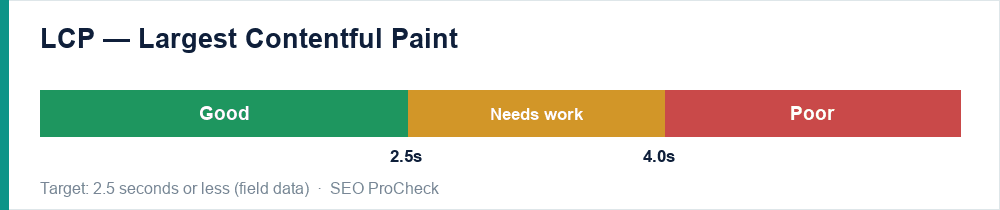
LCP (Largest Contentful Paint) is the time until your largest above-the-fold element finishes rendering. It is the Core Web Vital most sites fail, and usually the highest-impact one to fix because the same changes also speed up the whole page. The target is 2.5 seconds or less at the 75th percentile of real users.
What "largest element" actually means
It is the biggest image, video poster, background image, or block of text visible without scrolling. On most pages it is the hero image or the main headline. Knowing which element is your LCP is the first step — PageSpeed Insights and DevTools both tell you.
The common causes of slow LCP
- Slow server response (high TTFB) — the page takes too long to even start arriving.
- Render-blocking CSS and JavaScript — the browser must download and process them before it can paint.
- Large, unoptimized images — a 2MB hero image is a guaranteed LCP problem.
- The LCP resource discovered late — the browser does not learn it needs the image until deep into parsing.
- Client-side rendering — the content does not exist until JavaScript builds it.
How to fix it, in order
- Cut server response time. Page caching plus a CDN is the single biggest lever — it often moves LCP from "poor" to "good" on its own. (See speeding up WordPress.)
- Optimize the LCP image. Compress it, serve modern formats (WebP/AVIF), size it to the dimensions actually displayed, and add
fetchpriority="high"so the browser fetches it first. - Preload the LCP resource with a
<link rel="preload">so it is discovered immediately. - Never lazy-load the LCP image. Lazy-loading is for below-the-fold images; lazy-loading the hero delays the very thing being measured.
- Remove render-blocking resources. Minify and defer non-critical CSS/JS; inline the critical CSS for above-the-fold content.
- Server-render key content so the LCP element is in the initial HTML, not built by JavaScript.
Common mistakes
- Optimizing lab score while field LCP stays poor — chase field data.
- Lazy-loading every image, including the hero.
- Compressing the image but leaving a 3-second server response untouched.
How to measure progress
Lab improvements (PageSpeed/Lighthouse) appear immediately; field LCP in Search Console updates over a rolling ~28-day window as real-user data accumulates, so give it a few weeks after a fix before judging.
Failing Core Web Vitals?
Speed and stability are part of every technical audit I run. See how an advanced SEO audit works →
Take this with you
The assistant links open with a question about this page already written. Nothing is sent until you press enter.
Claude Vincent is a technical SEO consultant focused on crawlability, rendering, and AI-search visibility. He writes the field guides and case studies at SEO ProCheck, with a bias toward the durable, unglamorous work that decides whether search engines and AI answer engines can actually read and cite a site.
About SEO ProCheck
Technical SEO consulting and GEO strategy with 20 years of enterprise experience. Case studies, resources, and tools for search and AI visibility.
Work With Me
Technical SEO audits, GEO strategy, site migrations, and international SEO. Hourly consulting for teams who need hands-on support, not just reports.
Subscribe to our newsletter!








Recent Posts
- Most Top Sites Never Say Who They Are in Structured Data October 14, 2026
- Homepage Titles Are Mostly Too Short, Not Too Long October 8, 2026
- Who Actually Serves an llms.txt? 184 Top Sites Measured September 29, 2026