

AI Summary
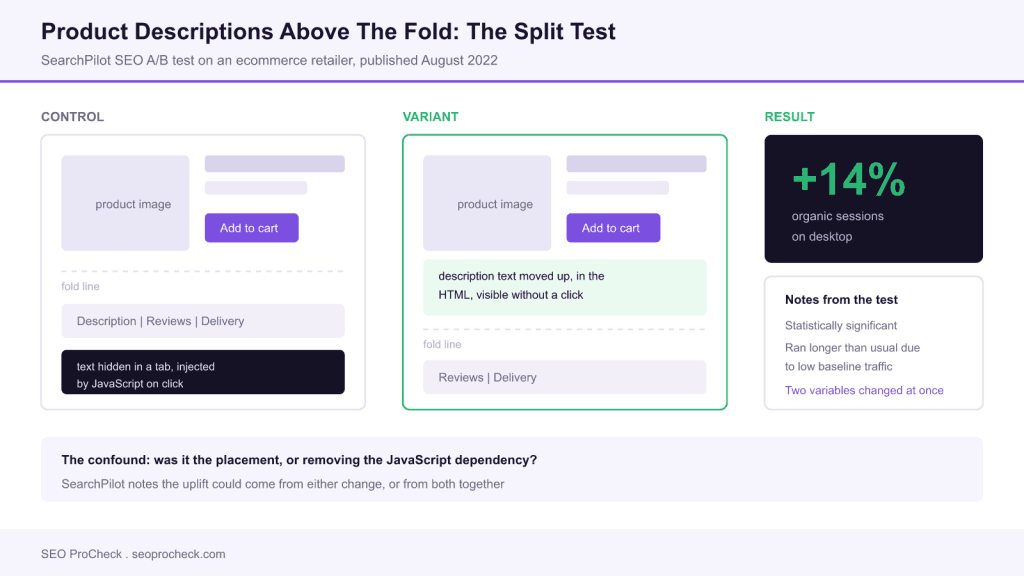
SearchPilot ran an SEO split test on an ecommerce retailer, moving product description content out of a JavaScript-driven tab lower down the page and into a visible container above the fold. The result was a 14 percent uplift in organic sessions on desktop at statistical significance, with the important caveat that the change removed a JavaScript dependency at the same time as it changed placement, so the cause is not cleanly isolated.
- Published by SearchPilot on 16 August 2022; site type: ecommerce retailer.
- Hypothesis: surfacing long-tail description content would improve organic traffic.
- Result: 14 percent uplift on desktop, statistically significant, test ran longer than usual due to low baseline traffic.
- Confound acknowledged by SearchPilot: placement, JavaScript removal, or both.
What was tested
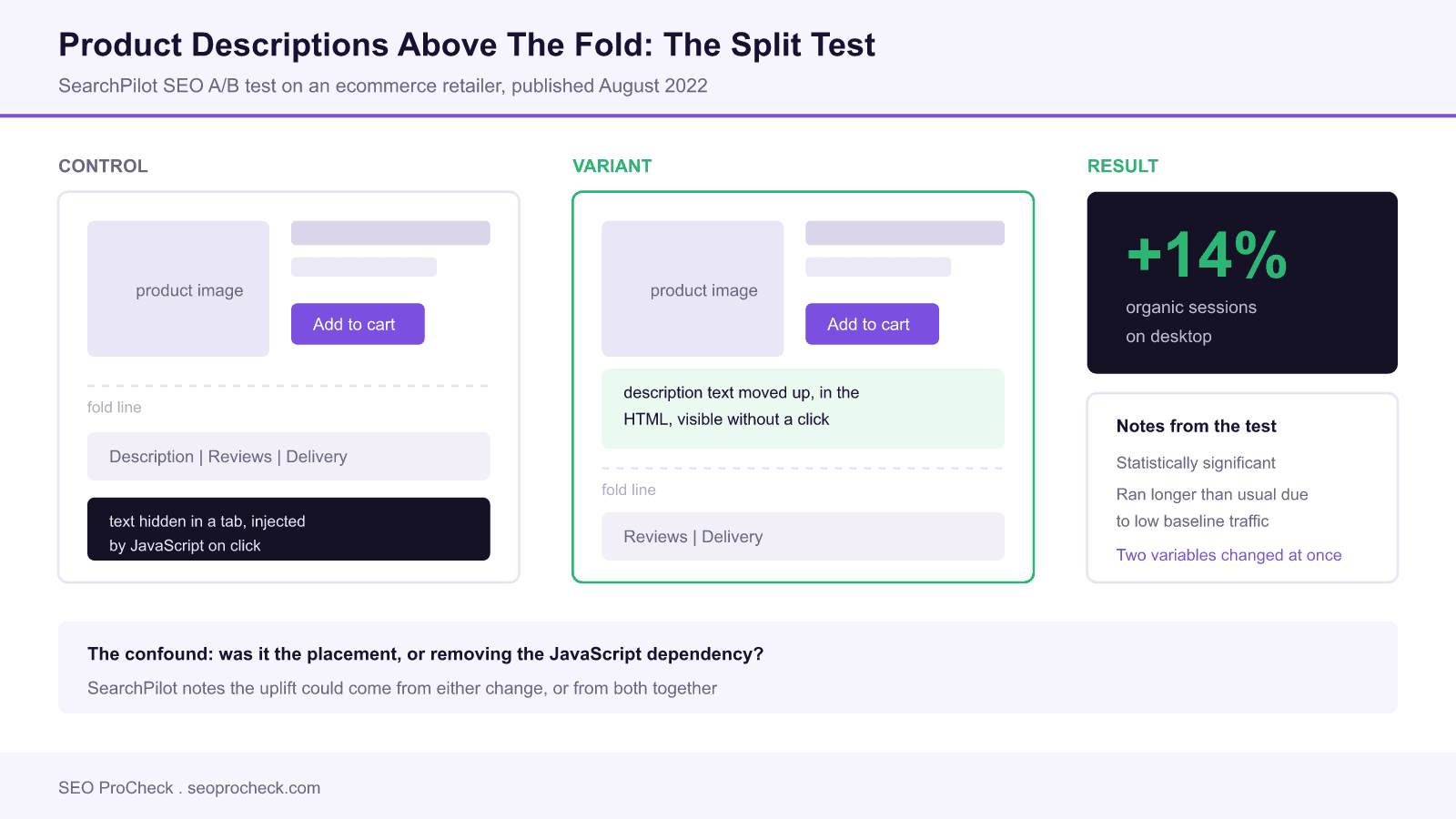
The subject was product description content on an ecommerce retailer's product detail pages. In the control, that
description sat in a tabbed section lower down the page, dependent on JavaScript to display. In the variant, the same
content was relocated into an above-the-fold container where it was present and visible without interaction.
The hypothesis was that description copy contains the long-tail vocabulary that product pages rank for, and that making
it plainly available, without a JavaScript dependency, would increase organic traffic. The measured result was a 14 percent
uplift on desktop in organic sessions, reaching statistical significance, though the test required a longer run than
typical because the site's baseline traffic volume was low. SearchPilot explicitly acknowledges that the result could stem
from the content placement, from the removal of the JavaScript dependency, or from a combination of both.
Practitioner commentary: the confound is the most useful part
It is tempting to read this as "above the fold content wins" and reorder every template accordingly. The test does not
support that, and SearchPilot is straightforward about why. Two variables moved at once, and they have very different
implications.
If the driver was JavaScript removal, the finding is a rendering finding, and it says your description
text may not have been indexed at all before. That is a large, binary problem affecting a specific class of implementation:
content fetched by an XHR call on tab click. Fixing it is not a design decision, it is a bug fix, and the gain should be
much larger than 14 percent on sites where it applies.
If the driver was placement, the finding is a weighting finding, and it says Google gives more credit to
text positioned prominently in the main content area. That is a smaller, continuous effect that would apply broadly but
modestly, which is more consistent with a 14 percent number.
The practical consequence is that you should diagnose which situation you are in before copying the change. The
diagnostic takes five minutes and is described below. Running the wrong fix costs a template redesign and gains nothing.
Diagnosing your own product pages first
Work through these in order. Stop as soon as one fails, because that is your actual problem.
| Check | How to run it | Failing result | What it means |
|---|---|---|---|
| Is the text in the raw HTML? | View source, search for a distinctive sentence from the description | Not found | Content is client-side injected, highest priority fix |
| Is the text in the rendered HTML? | Search Console URL Inspection, live test, read rendered HTML | Not found | Googlebot never sees it, treat as a rendering bug |
| Is the text indexed? | Google search for a 10 word verbatim phrase in quotes plus site: your domain | Page does not return | Indexed without that section, or not indexed at all |
| Is it ranking for its vocabulary? | Search Console Performance, filter queries to description-only terms | Zero impressions | Text is indexed but carries no ranking weight where it sits |
| Is it above the fold? | Lighthouse or a 1366x768 screenshot of the rendered page | Below fold | Candidate for the placement test in this case study |
Only the last row is a layout decision. The first four are technical faults that should be fixed regardless of what any split test says.
The rendered-HTML check is the one people skip. Source and rendered output differ on most modern ecommerce
stacks, and the whole question here turns on that difference. Our
HTTP header checker is useful alongside it for
confirming the response is not being served differently to bots, and the
word counter tells you how much text actually
exists in the main content once the tabs are excluded.
Implementing the change safely
If your diagnosis points at placement rather than rendering, the implementation detail that matters is keeping the
commercial elements intact. In the tested variant the product image, title, price and call to action stayed where they
were; the description was surfaced into the visible region rather than pushed in front of the buy button.
A workable pattern is a truncated description of two to three sentences above the fold, with the remainder expanded
inline below, all of it present in the initial HTML:
Product name
$00.00
First two or three sentences, server rendered, always visible.
Remaining description, in the HTML on first response,
visually collapsed but never fetched on demand.
The critical word is collapsed, not loaded. Hiding text with CSS keeps it in the DOM and
in the rendered output; loading it with a click handler does not. If you change nothing else after reading this case study,
change any tab that fetches its own content.
Watch Core Web Vitals afterwards. Moving text above the fold changes what is painted first and can shift Largest
Contentful Paint from the product image to a text block, which is usually neutral or positive, but occasionally moves
Cumulative Layout Shift the wrong way if the description height is not reserved. Our
Core Web Vitals checker covers that
before-and-after comparison.
Why one test result is not a rule
This is a single test, on a single ecommerce site, at one point in time, and SearchPilot's own body of published tests
is full of changes that helped one site and hurt another. That is not a weakness of the method, it is the entire argument
for the method: templated sites are different enough that inherited best practice is frequently wrong for any given one.
The transferable output here is not "move descriptions up". It is a testable hypothesis, a documented magnitude to power
your own test against, and a named confound to control for. If you run it, isolate the variables: change placement in one
test and the rendering dependency in another. You will learn more from two clean tests than from one that reproduces this
ambiguity. The related question of how much content weight sits in the main body is covered in our
content structure analyzer, and the
strategic framing in our
technical versus content SEO briefing.
FAQ
In this SearchPilot test on an ecommerce retailer it did: moving product description text above the fold produced a 14 percent uplift in organic sessions on desktop, at statistical significance. The caveat the test itself raises is that the change also removed a JavaScript dependency, so placement alone may not be the whole cause. Treat it as evidence worth testing on your own site rather than a universal rule.
Yes, provided the text is present in the HTML that Googlebot receives. Google has stated it indexes content in collapsed elements. The failure case is different: if the text is only fetched and injected by JavaScript after a user clicks, there is no click during rendering, so the content may never enter the DOM Googlebot sees. That is the distinction that matters, not whether the tab is visually open.
Google has said mobile-first indexing does not discount content in tabs and accordions. Whether that holds equally in practice is exactly what tests like this one probe, and the results are mixed across sites. The defensible position is that visible text is never worse and is sometimes measurably better, so if you have the layout freedom, surface the text.
Use the URL Inspection tool in Search Console, run a live test and read the rendered HTML rather than the source. Search that rendered output for a distinctive sentence from inside the tab. If the sentence is absent, Googlebot is not seeing it. A quicker sanity check is to search Google for a long verbatim phrase from the tab in quotes and see whether your page returns.
Long enough to reach significance given your traffic volume, which on lower-traffic sites can mean months rather than weeks. SearchPilot explicitly notes this test needed a longer duration than usual because the baseline traffic was low. Stopping a test early when it looks positive is the most common way to generate a result that does not replicate.
Not necessarily, and this test does not claim you should. The variant kept the buying elements in place and moved description text into the visible area, rather than displacing the call to action. Pushing the add-to-cart button below a wall of text risks a conversion loss that would dwarf a 14 percent organic session gain, so measure both sides.
Unsure whether your product page content is even being indexed?
An advanced audit checks rendered output template by template and quantifies what Googlebot is missing.
Source: https://www.searchpilot.com/resources/case-studies/adding-product-descriptions-above-the-fold/
Take this with you
The assistant links open with a question about this page already written. Nothing is sent until you press enter.
Claude Vincent is a technical SEO consultant focused on crawlability, rendering, and AI-search visibility. He writes the field guides and case studies at SEO ProCheck, with a bias toward the durable, unglamorous work that decides whether search engines and AI answer engines can actually read and cite a site.
About SEO ProCheck
Technical SEO consulting and GEO strategy with 20 years of enterprise experience. Case studies, resources, and tools for search and AI visibility.
Work With Me
Technical SEO audits, GEO strategy, site migrations, and international SEO. Hourly consulting for teams who need hands-on support, not just reports.
Subscribe to our newsletter!







Recent Posts
- Finding a Competitor's Sitemap, and Turning It Into a Change Log September 15, 2026
- AI Crawler User Agents: The Current Names, and Which Ones Sites Actually Block September 9, 2026
- Can AI Crawlers Actually Read Your Site? I Measured 400 of the Biggest September 5, 2026