

AI Summary
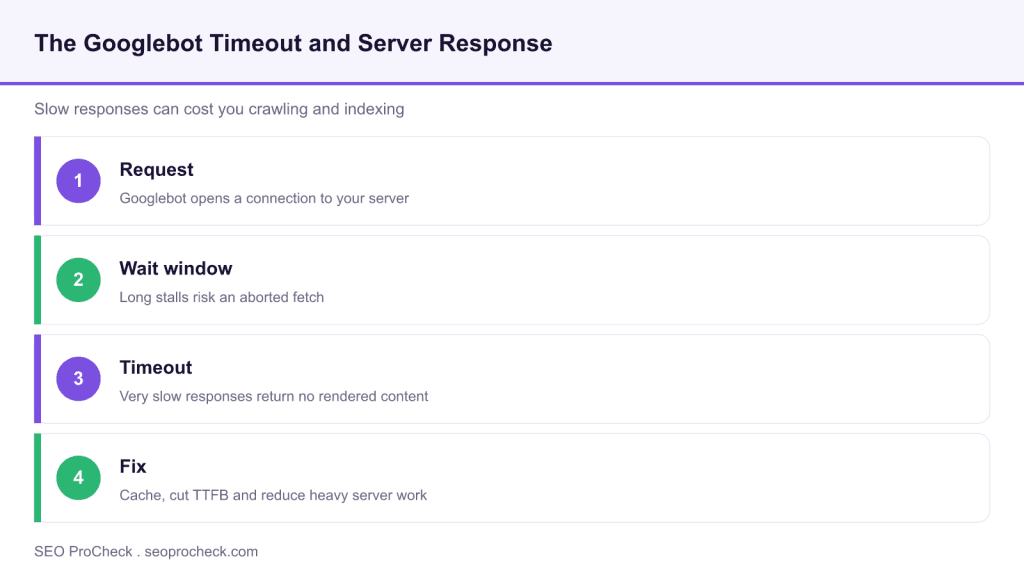
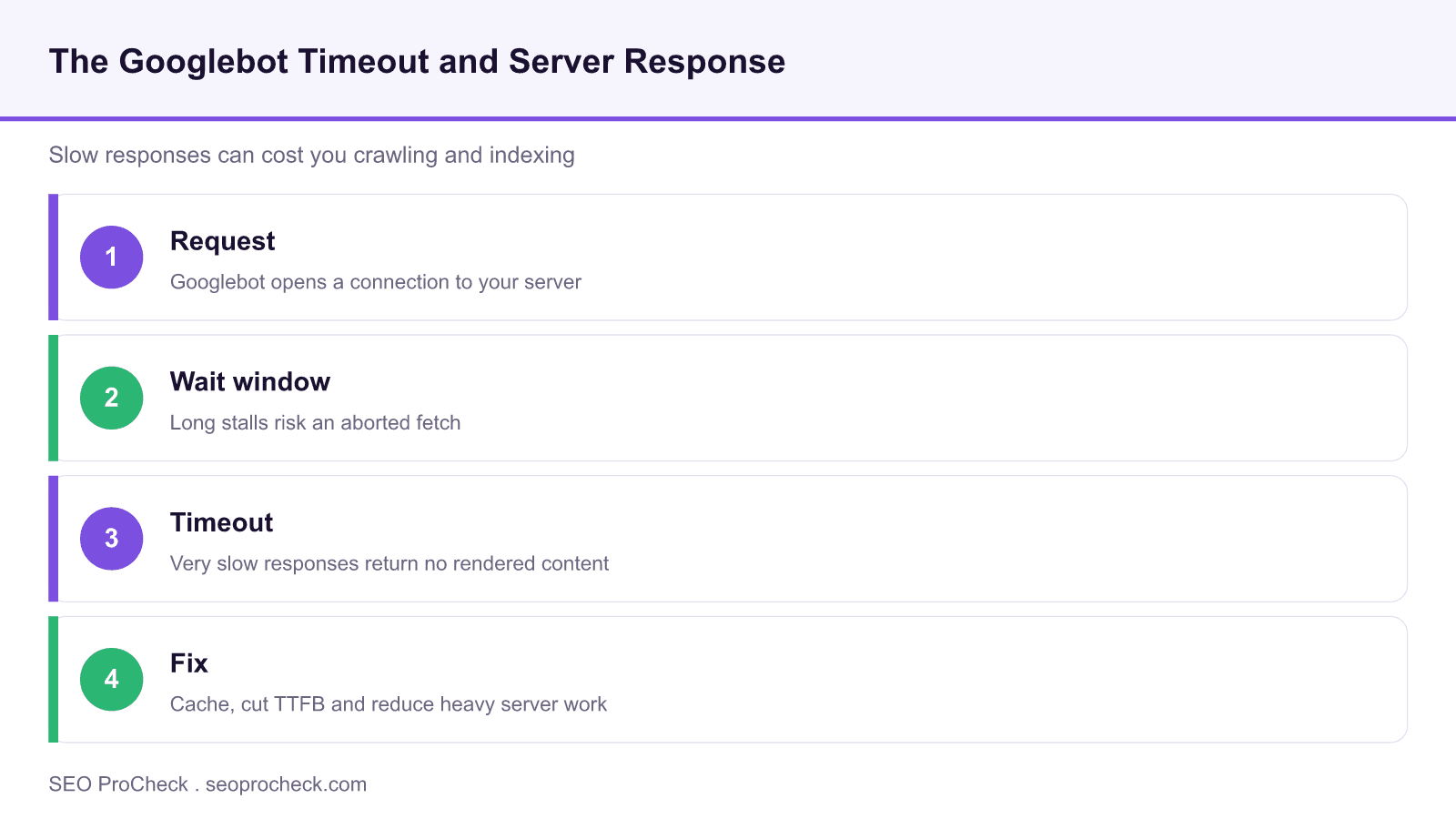
This case study, drawing on testing reported by DeepCrawl, discusses the observation that Googlebot will abandon a request that takes too long, with a reported timeout in the region of three minutes. The practical lesson is not the exact number but the principle: a server that responds slowly risks having its pages fetched incompletely or not at all, so response time is a crawling and indexing issue, not just a user experience one.
- Googlebot abandons requests that stall for too long, so slow responses can go uncrawled.
- The reported three minute figure is an observation from testing, not an official constant.
- Time to first byte and heavy synchronous work are the usual causes of slow responses.
- Caching, efficient back ends and lighter rendering keep pages inside the crawl window.
This SEO case study documents a successful optimization initiative, providing actionable insights for practitioners. The documented approach demonstrates how strategic SEO implementation drives measurable results.
Initial Situation
Understanding the starting point is essential context for evaluating any case study. This documentation covers the initial challenges, competitive position, and business objectives that shaped the SEO strategy.
Strategy and Approach
The strategic approach combined multiple SEO disciplines to address identified opportunities. Key decisions around prioritization and resource allocation provide a template for similar initiatives.
Implementation
Moving from strategy to execution required specific technical implementations, content development, and process changes. This case study documents the practical steps that translated strategy into action.
Results and Learnings
The outcomes demonstrate effectiveness through measurable improvements in rankings, traffic, and business metrics. Analysis of successes and challenges provides learning value for practitioners.
Case studies like this contribute to the SEO knowledge base, helping practitioners learn from documented real-world experiences.
Source: https://www.deepcrawl.com/blog/best-practice/googlebot-3-minute-timeout/
What the timeout really tells us
The specific number gets the attention, but the durable insight is that crawling has a patience limit. If your server sits on a request while it assembles a page from slow database calls or blocking third party services, you are gambling with whether that page gets fetched at all. When the crawler gives up, the page is treated as unavailable for that visit, which at scale means slower indexing and staler content. Treat server response time as a first class SEO metric alongside your work on crawl budget.
It helps to separate two things: the time to first byte for the HTML document, and the time to fetch the additional resources needed to render it. Both live under the same patience budget. A fast HTML response followed by dozens of slow, render blocking resources can still push a page past a comfortable window, so measure the whole picture, not just the document response.
How I keep pages inside the crawl window
Start with time to first byte. Cache aggressively at the edge and in the application layer so that common pages are served from memory rather than rebuilt on every request. Move slow work out of the request path with queues and background jobs, and set strict timeouts on any third party call so one slow dependency cannot stall the whole response. Conditional requests help too, and this study on whether Googlebot uses ETag headers is a useful companion on serving unchanged content cheaply.
On the rendering side, reduce the number and weight of resources the crawler must fetch to see your content. Server render the main content so it does not depend on a long client side execution, and lazy load anything non essential. The same fixes that shorten response times usually free up crawl budget as well, so the effort pays off twice.
| Response time band | Likely crawl outcome | Action |
|---|---|---|
| Under 200 ms first byte | Comfortable, pages fetched reliably | Maintain caching and monitor |
| 200 ms to 1 s first byte | Usually fine, watch under load | Profile back end and cache hot paths |
| 1 s to several seconds | Risk grows on heavy pages and peak load | Cut database and third party latency |
| Stalls toward minutes | High risk of an abandoned fetch | Fix blocking work and add timeouts |
What's changed since
Google's rendering is now evergreen and based on a current Chromium, and Search Console exposes a crawl stats report that includes average response time, so you no longer have to infer server behavior only from logs. The exact patience threshold has never been an official published constant, and treating any single number as gospel was always risky.
What has not changed is the direction of the advice. Fast, reliable responses keep pages inside whatever window the crawler allows, and time to first byte is now an explicit part of Core Web Vitals thinking. The band figures above are practical web performance targets for planning, not promises about Googlebot internals.
Frequently asked questions
Is Googlebot's timeout really three minutes?
Three minutes is a figure reported from testing, not an official constant that Google publishes or guarantees. Treat it as evidence that a patience limit exists rather than a precise threshold to design against, and aim for responses that are far faster than any such limit.
Does a slow server hurt rankings directly?
The bigger risk is indirect: slow responses reduce how much Googlebot can crawl and can leave pages fetched incompletely, which slows indexing and refresh. Speed is also a documented ranking and user experience factor through Core Web Vitals, so it matters on both fronts.
What is a good time to first byte to aim for?
As a practical planning target, keep the first byte of the HTML document well under a second, and under a couple of hundred milliseconds for cached pages. The faster it is, the more headroom you leave for rendering and for peak load.
How do I find slow responses on my site?
Use the Search Console crawl stats report for Googlebot's own view of average response time, and combine it with server logs and synthetic monitoring. Watch behavior under real traffic peaks, since many sites are fast when idle and slow when busy.
Do timeouts affect JavaScript rendered pages more?
They can, because rendering requires fetching and executing extra resources, each of which adds time. Server rendering the main content reduces this dependency and keeps the important text available even if secondary resources are slow.
Will a content delivery network fix timeout risk?
A CDN helps a great deal for cacheable content by serving it from locations near the crawler with low latency. It does not fix slow dynamic responses that must hit your origin, so pair a CDN with back end and database optimization.
Take this with you
The assistant links open with a question about this page already written.
Claude Vincent is a technical SEO consultant focused on crawlability, rendering, and AI-search visibility. He writes the field guides and case studies at SEO ProCheck, with a bias toward the durable, unglamorous work that decides whether search engines and AI answer engines can actually read and cite a site.
About SEO ProCheck
Technical SEO consulting and GEO strategy with 20 years of enterprise experience. Case studies, resources, and tools for search and AI visibility.
Work With Me
Technical SEO audits, GEO strategy, site migrations, and international SEO. Hourly consulting for teams who need hands-on support, not just reports.
Subscribe to our newsletter!








Recent Posts
- Google August 2026 Spam Update: Dates, Duration and How to Read Your Data November 2, 2026
- Google Algorithm Updates: The Dated List Since 2003, and What to Do After Each October 31, 2026
- AI Readiness: The Checklist, the Research and the Free Tools October 28, 2026