

AI Summary
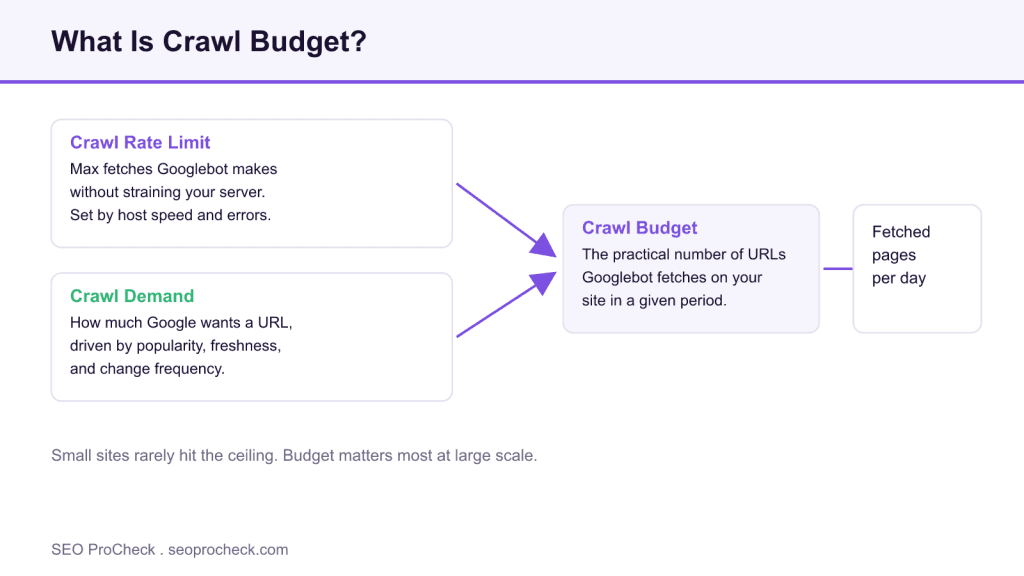
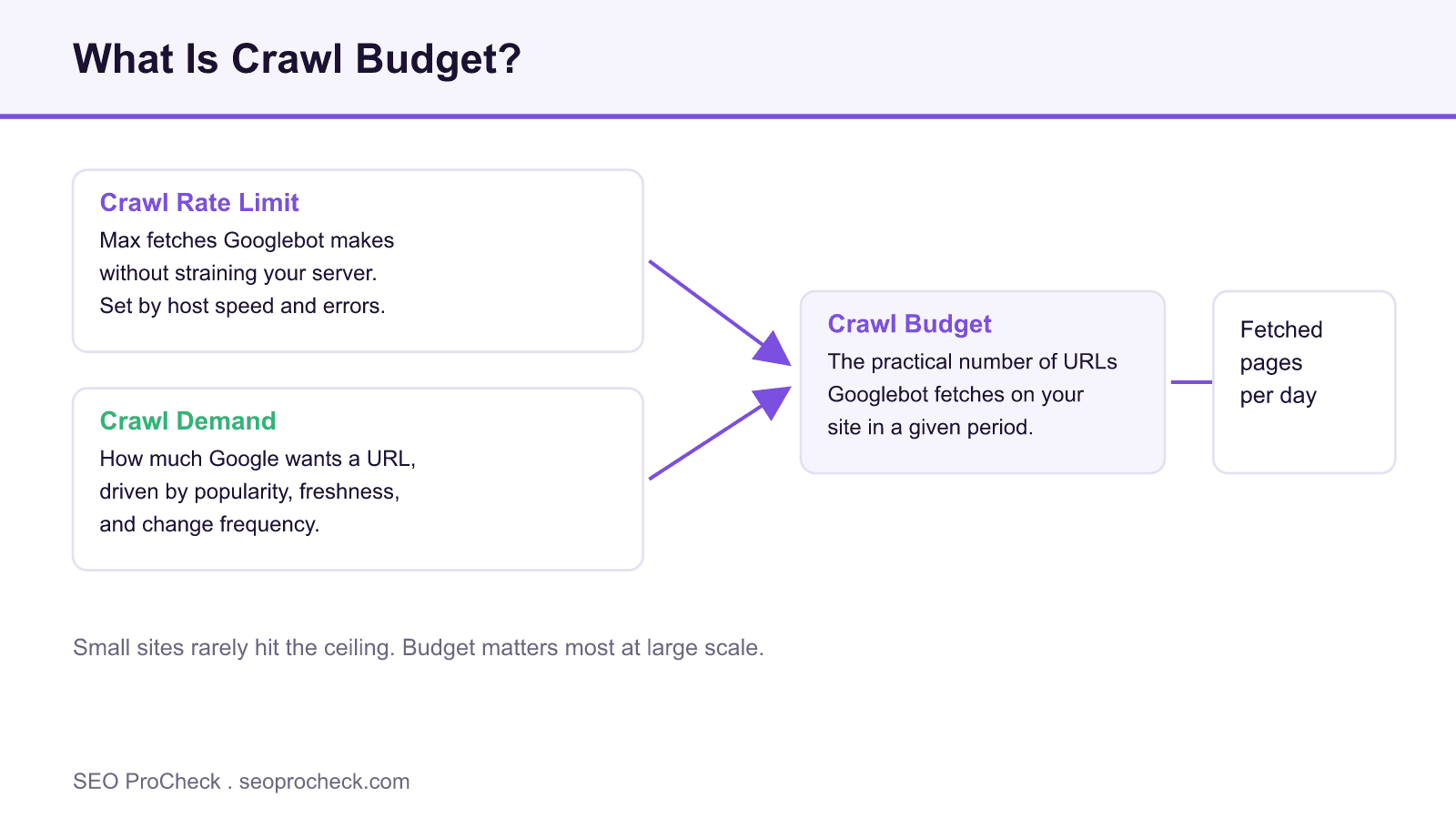
Crawl budget is the number of URLs Googlebot is willing and able to fetch on your site in a given window. It is the product of two forces: the crawl rate limit your server can sustain, and the crawl demand Google feels for your URLs based on popularity and how often they change.
- Crawl budget matters most for large sites, sites with many auto generated URLs, and sites that change constantly.
- The two inputs are crawl rate limit (server capacity) and crawl demand (how much Google wants your URLs).
- You do not raise it by force. You earn more effective crawling by removing waste and serving pages fast.
- Check the Crawl Stats report in Google Search Console and your server logs to see where fetches actually go.
This SEO case study documents a successful optimization initiative, providing actionable insights for practitioners. The documented approach demonstrates how strategic SEO implementation drives measurable results.
Initial Situation
Understanding the starting point is essential context for evaluating any case study. This documentation covers the initial challenges, competitive position, and business objectives that shaped the SEO strategy.
Strategy and Approach
The strategic approach combined multiple SEO disciplines to address identified opportunities. Key decisions around prioritization and resource allocation provide a template for similar initiatives.
Implementation
Moving from strategy to execution required specific technical implementations, content development, and process changes. This case study documents the practical steps that translated strategy into action.
Results and Learnings
The outcomes demonstrate effectiveness through measurable improvements in rankings, traffic, and business metrics. Analysis of successes and challenges provides learning value for practitioners.
Case studies like this contribute to the SEO knowledge base, helping practitioners learn from documented real-world experiences.
Source: https://www.botify.com/blog/crawl-budget-optimization
What crawl budget really means
Google frames crawl budget as two combined ideas. The first is the crawl rate limit, which is the maximum number of parallel connections and the delay between fetches that Googlebot uses so it does not overload your server. The second is crawl demand, which reflects how much Google wants to fetch a URL based on how popular it is and how often it changes. Put the two together and you get the practical number of fetches your site receives each day.
The important nuance is that crawl budget is not a lever you pull. You cannot ask Google for more of it. What you can do is remove the friction and the waste that cause Googlebot to spend fetches on URLs that will never earn a visit. That is the whole game for large sites, and it is why the topic sits next to practical crawl budget optimization and strategy for very large sites.
When you should actually care
For a site with a few thousand URLs that are all reachable and reasonably fresh, crawl budget is rarely the bottleneck. Google fetches those pages without difficulty. The topic becomes real when you cross into tens or hundreds of thousands of URLs, when a faceted catalog generates near infinite filter combinations, or when a news or listings site publishes and updates content every hour. In those cases the difference between a tidy URL space and a bloated one shows up directly as slow discovery and slow refresh of the pages that matter.
How to measure it before you touch anything
Open Google Search Console, go to Settings, then open the Crawl Stats report. It shows total crawl requests over time, average response time, and a breakdown by response code, file type, purpose (discovery versus refresh), and Googlebot type. A rising share of 404 or 301 responses, or a large slice of fetches going to parameter URLs, is a direct signal of waste. Pair that with your raw server access logs, filtered to verified Googlebot, so you can group fetches by directory and template and see exactly where attention is going.
The signals of wasted crawling
Common sinks include soft 404 pages that return 200 with empty results, long redirect chains, session identifiers in URLs, calendar and filter permutations, and duplicate content served under multiple parameters. Each of these consumes fetches that could have gone to a product, article, or category that earns traffic. Reducing that waste is usually far more valuable than chasing a higher raw crawl rate.
The two inputs to crawl budget
| Input | What drives it | How you influence it |
|---|---|---|
| Crawl rate limit | Server response time, error rate, host health | Serve fast, keep 5xx and timeouts near zero, use good hosting |
| Crawl demand | Popularity, internal and external links, change frequency | Earn links, keep valuable pages fresh, prune dead URLs |
| Effective budget | The combination of both, minus waste | Remove low value URLs so fetches reach money pages |
What has changed since this case study
Two shifts are worth knowing. First, Google retired the manual crawl rate limiter tool that used to live in the old Search Console settings, and the change took effect in early 2024. Googlebot now adjusts its own rate automatically based on how your server responds, so the practical way to protect capacity is to keep response times low and error rates near zero. Second, Google consolidated its guidance into a large site owner guide to managing crawl budget, and it continues to emphasize conditional requests, which lets Googlebot skip content that has not changed. That behaviour connects directly to how Googlebot uses ETag and validator headers.
Related on SEO ProCheck
- how we optimized our crawl budget
- behemoth seo search strategy for huge websites
- revisiting the importance of quality indexation for large sc
Frequently asked questions
Is crawl budget a ranking factor?
No. Crawling is how Google discovers and refreshes pages, not how it ranks them. Better crawling helps your important pages get found and updated faster, which can lead to results indirectly, but the fetch itself is not a ranking signal.
How many URLs before crawl budget matters?
Google has said most sites do not need to worry until they reach large scale. As a rough guide, sites in the low thousands of URLs are usually fine, while sites with tens of thousands of URLs or heavy auto generated pages should watch it closely.
Where do I see my crawl budget?
There is no single number. The closest view is the Crawl Stats report in Google Search Console under Settings, combined with your server access logs filtered to verified Googlebot.
Does blocking URLs in robots.txt save crawl budget?
Yes, disallowing a pattern stops Googlebot fetching those URLs, which frees capacity. Be aware that a blocked URL can still appear in results as a bare link if it is discovered elsewhere, because robots.txt controls crawling, not indexing.
Can I increase crawl budget directly?
Not by request. You raise effective crawling by serving pages quickly, keeping errors low, removing duplicate and thin URLs, and earning links to the pages you care about.
Do sitemaps help crawl budget?
A clean XML sitemap that lists only canonical, indexable URLs helps Google prioritize the right pages and spot fresh ones through the lastmod value. It does not add budget, but it points existing crawling at the correct targets.
Take this with you
The assistant links open with a question about this page already written. Nothing is sent until you press enter.
Claude Vincent is a technical SEO consultant focused on crawlability, rendering, and AI-search visibility. He writes the field guides and case studies at SEO ProCheck, with a bias toward the durable, unglamorous work that decides whether search engines and AI answer engines can actually read and cite a site.
About SEO ProCheck
Technical SEO consulting and GEO strategy with 20 years of enterprise experience. Case studies, resources, and tools for search and AI visibility.
Work With Me
Technical SEO audits, GEO strategy, site migrations, and international SEO. Hourly consulting for teams who need hands-on support, not just reports.
Subscribe to our newsletter!








Recent Posts
- Most Top Sites Never Say Who They Are in Structured Data October 14, 2026
- Homepage Titles Are Mostly Too Short, Not Too Long October 8, 2026
- Who Actually Serves an llms.txt? 184 Top Sites Measured September 29, 2026