


AI Summary
Orange rebuilt its mobile experience as a progressive web app, and the source case study reports a 52 percent better conversion rate on mobile than the previous experience. The mechanism is not magic: a service worker serves the app shell from local cache on repeat visits, so the second and third sessions do not pay the cost of a mobile radio round trip.
- A PWA needs three things: HTTPS, a registered service worker with a fetch handler, and a web app manifest.
- Service workers do not run for search crawlers. Anything that exists only in the cache is invisible to Google, so the first response still has to contain the content.
- Every view needs a real URL through the History API. Hash fragment routing gives the whole app one indexable URL.
- The manifest is not a ranking signal. The speed and stability it enables are what search measures.
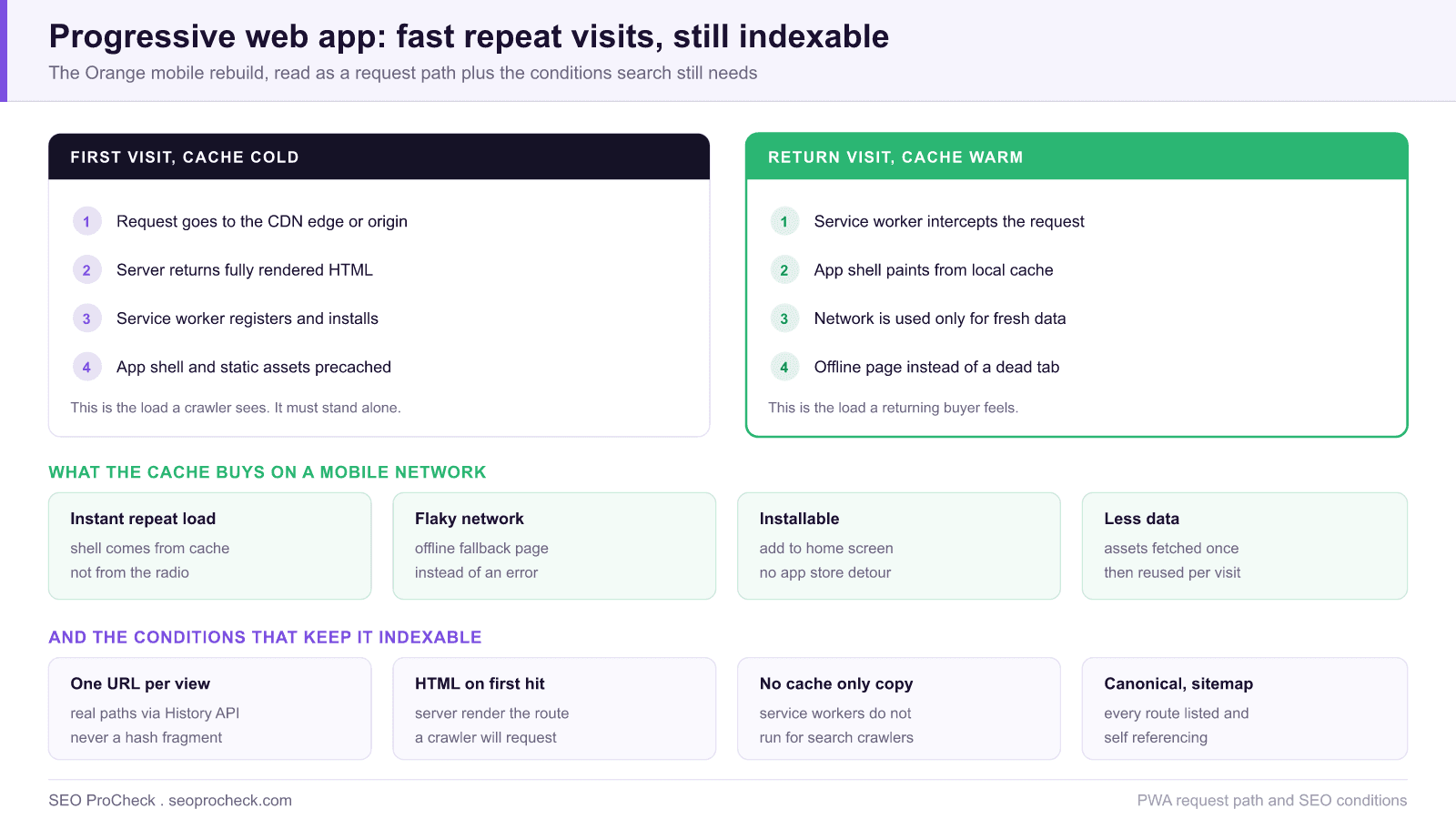
A telco marketing and sales site is a hard performance environment: most visits arrive on mobile data, sessions are short, and the checkout path is several steps long. That is the setting for this Orange case study, and it is why the progressive web app pattern pays off there more visibly than it would on a desktop heavy site. The reported outcome is a 52 percent better mobile conversion rate against the previous experience.
What follows is the implementation layer around that result: the exact pieces of a PWA, which caching strategy belongs on which type of request, the conditions that keep the app indexable, and how to prove the conversion difference in your own analytics rather than borrowing someone else's number.
What a PWA actually consists of
Stripped of marketing language, a progressive web app is a normal website that satisfies three technical requirements. It is served over HTTPS. It registers a service worker, a script that runs in a separate thread and can intercept network requests through a fetch event handler. And it ships a web app manifest, a JSON file linked from the head that declares name, short_name, start_url, display, theme_color and an icons array containing at minimum a 192 pixel and a 512 pixel icon.
Those three pieces produce the two user visible wins. The service worker makes repeat visits fast and makes the site usable when the connection drops. The manifest, combined with a service worker that has a fetch handler, makes the site installable, so a returning customer can open it from the home screen without going through an app store. Nothing here is a ranking signal on its own. What search measures is the consequence: a faster, more stable page, which is exactly what the Core Web Vitals assessment scores.
Caching strategy is a per request decision
The single biggest mistake in service worker work is applying one caching strategy to the whole site. A cache first rule that is correct for a logo is catastrophic for a pricing page. Decide per request type.
| Strategy | Behaviour | Right for | Wrong for |
|---|---|---|---|
| Cache first | Serve from cache, only hit the network on a miss | Fingerprinted CSS, JS, fonts, logos | HTML documents, prices, stock levels |
| Network first | Try the network, fall back to cache on failure | HTML navigations, account pages, cart | Large static assets, wasted round trips |
| Stale while revalidate | Serve cache instantly, refresh it in the background | Product images, listing thumbnails, avatars | Anything where showing stale data misleads |
| Network only | Never cached, always fetched | Checkout, payment, authentication | Anything you want available offline |
| Cache only | Served purely from the precache | The offline fallback page and its assets | Any content you want indexed |
Two operational rules keep this from turning into a support problem. Version your cache names, for example shell-v14, and delete old versions in the activate event, otherwise users end up pinned to a build from three deploys ago with no way to escape. And enable navigationPreload so the network request for a navigation starts in parallel with the service worker boot, instead of waiting behind it. Our background piece on caching covers how this layer interacts with HTTP cache headers, which still apply underneath.
The conditions that keep a PWA indexable
The failure mode that costs traffic is simple to state: service workers do not run for search crawlers. Googlebot fetches your URL directly, so it sees whatever the server returns, not whatever your cached shell would have assembled. Any architecture where the useful content only materialises after the service worker or client router does its work leaves the crawler with an empty template.
- Real URLs, one per view. Route with the History API so every screen has its own crawlable path. Hash fragment routing collapses the entire application into a single indexable URL, because everything after the
#is not sent to the server. - Content in the first response. Server render or prerender the routes that need to rank. Test it by fetching the URL with curl and searching the raw HTML for a sentence you can see on screen.
- Do not gate on the app shell. If the HTML is an empty div plus a bundle, the page depends entirely on the render queue, with all the delay and fragility that implies.
- Canonicals and sitemaps still apply. Every route needs a self referencing canonical and a place in the XML sitemap. A single page application does not get an exemption.
- Keep the viewport meta correct. A broken or missing viewport declaration undoes the mobile gains, which is covered in our guide to mobile viewport issues.
Technical Challenge
Technical SEO issues often create invisible barriers to ranking potential. This case study identifies the specific technical challenges addressed, from crawlability issues to performance bottlenecks. Understanding the problem scope helps practitioners diagnose similar issues.
On a mobile carrier site the barrier is latency compounded by session length. Each step of a subscription or device purchase flow requires a fresh round trip over a mobile network, and each round trip is an opportunity for the user to leave. The technical challenge is therefore to remove repeated network dependency without removing the server rendered HTML that search depends on, which is precisely the tension a service worker introduces if it is configured carelessly.
Diagnostic Process
Identifying technical issues requires systematic analysis using crawling tools, log file analysis, and Search Console data. This case study documents the diagnostic methodology that uncovered actionable issues. The process itself provides value for practitioners building technical audit capabilities.
For a PWA the diagnostic has an extra dimension: you must test the cold state and the warm state separately, because they behave like two different sites. In Chrome DevTools, the Application panel lists the registered service worker, the cache storage buckets and the manifest, and offers an Update on reload checkbox plus an Unregister action for reproducing a genuine first visit. Use the Network panel to confirm which responses were served by the service worker, and then repeat the same URL fetch with the service worker unregistered to see exactly what a crawler receives. If the two differ in content, that difference is your indexation risk.
Implementation and Solutions
Each identified issue required specific technical solutions implemented within development constraints. The case study details solutions for rendering issues, performance optimization, crawl management, and indexation improvements. Implementation approaches balance ideal solutions with practical constraints.
A practical rollout order that avoids the usual regressions: ship server rendered HTML first, so the crawler facing baseline is correct before any caching exists. Add the manifest and icons next, since they are inert and carry no risk. Then introduce the service worker with a deliberately narrow scope, precaching only fingerprinted static assets and an offline fallback page, using network first for every HTML navigation. Only after that is stable in production should you widen caching to images and API responses. Shipping the service worker first, which is the tempting order because it is the interesting part, is how teams end up serving stale HTML to real customers.
Measurable Impact
Technical improvements demonstrate value through measurable outcomes: improved crawl stats, faster indexation, better Core Web Vitals scores, and ultimately improved rankings and traffic. This case study quantifies the impact of technical optimization.
Do not import someone else's conversion percentage into your business case. Measure your own with three cuts:
| Question | How to measure it | Watch for |
|---|---|---|
| Are installed sessions better? | Detect standalone mode with the display-mode: standalone media query and set it as an analytics dimension | Installed users are already loyal, so the segment is self selecting |
| Are repeat visits faster? | Report LCP by whether the service worker controlled the page | First visits should not regress, check both |
| Did organic performance hold? | Search Console impressions and indexed page counts before and after launch | A drop in indexed URLs points at routing or rendering, not caching |
| Did mobile CWV improve? | CrUX p75 by device over a 28 day window | Field data lags, so allow a full window before judging |
If mobile Core Web Vitals are the constraint you are trying to lift, the template level checklist in mobile Core Web Vitals failing is the faster place to start, because a service worker cannot rescue a page whose first render is already slow.
Technical SEO case studies like this one help practitioners understand the tangible value of investing in site infrastructure.
This technical SEO case study demonstrates how resolving technical issues and optimizing site infrastructure directly impacts organic visibility. The documented approach provides a template for technical optimization initiatives.
FAQ
Not directly. There is no ranking bonus for registering a service worker or shipping a manifest. What helps is the effect: faster repeat loads and a more stable page improve Core Web Vitals, and a site that stays usable on a weak connection keeps users engaged rather than bouncing back to the results page.
No, and that is the important part. Service workers do not run for search crawlers, so Google receives whatever your server returns for that URL. If the real content only appears once the cached shell hydrates, the crawler sees an empty template.
The manifest is not a ranking signal. It declares the name, icons, start URL and display mode that make the site installable, which affects retention and repeat visits rather than search position. Missing icons or a bad start URL break installability, not indexing.
Three things together: the site is served over HTTPS, it links a valid manifest with a name, a start URL, a display mode and icons including a 192 pixel and a 512 pixel version, and it registers a service worker that has a fetch event handler. Missing any one of them means the install prompt never appears.
It can, but not if you want the individual views to rank. Everything after the hash is never sent to the server, so the whole application collapses into one indexable URL. Use the History API so each view has a real path that a crawler can request and a user can share.
Set an analytics dimension from the display-mode standalone media query so installed sessions are separable, and split conversion by whether the service worker controlled the page. Compare like for like across the same traffic sources, because installed users are already loyal and will look better for reasons unrelated to the technology.
Source: https://web.dev/orange/
Take this with you
The assistant links open with a question about this page already written. Nothing is sent until you press enter.
Claude Vincent is a technical SEO consultant focused on crawlability, rendering, and AI-search visibility. He writes the field guides and case studies at SEO ProCheck, with a bias toward the durable, unglamorous work that decides whether search engines and AI answer engines can actually read and cite a site.
About SEO ProCheck
Technical SEO consulting and GEO strategy with 20 years of enterprise experience. Case studies, resources, and tools for search and AI visibility.
Work With Me
Technical SEO audits, GEO strategy, site migrations, and international SEO. Hourly consulting for teams who need hands-on support, not just reports.
Subscribe to our newsletter!








Recent Posts
- Most Top Sites Never Say Who They Are in Structured Data October 14, 2026
- Homepage Titles Are Mostly Too Short, Not Too Long October 8, 2026
- Who Actually Serves an llms.txt? 184 Top Sites Measured September 29, 2026