

AI Summary
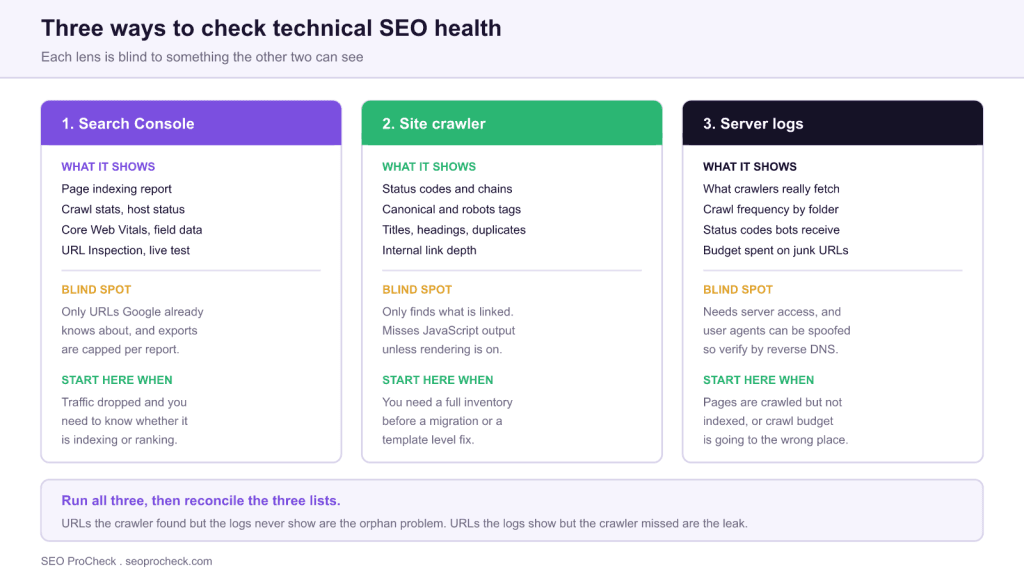
There are three practical ways to check technical SEO health, and each one is blind to something the other two can see. Search Console reports what Google did, a site crawler reports what your site says, and server logs report what crawlers actually fetched. The diagnosis usually lives in the gaps between them.
- Search Console shows real outcomes but only for URLs Google already knows, with capped exports.
- A crawler gives a complete inventory but only finds what is linked, and misses JavaScript output unless rendering is enabled.
- Server logs are the only source that shows what crawlers really requested and what status they received.
- Reconcile the three lists: URLs the crawler found but the logs never show are orphans, URLs the logs show but the crawler missed are leaks.

Technical SEO problems are rarely discovered by looking harder at one report. They are discovered by noticing that two reports disagree. A page that your crawler says is indexable, that Search Console says is excluded, and that your logs say has not been requested in six weeks is telling you a coherent story, but only if you have all three in front of you.
This page covers what each of the three lenses genuinely shows, what it structurally cannot show, and how to read them against each other. The order below is also the order to work in: start with outcomes, move to inventory, and open the logs when the first two disagree.
| Lens | What it shows | Blind spot | Open it first when |
|---|---|---|---|
| Search Console | Page indexing status, crawl stats, host status, Core Web Vitals field data, live URL inspection | Only URLs Google already knows about, and report exports are capped | Traffic dropped and you need to know if it is an indexing or a ranking problem |
| Site crawler | Status codes, redirect chains, canonical and robots directives, titles, headings, internal link depth | Only finds what is linked, and misses JavaScript output unless rendering is on | You need a full inventory before a migration or a template level fix |
| Server logs | What crawlers actually fetched, how often, which folders, and the status codes they received | Needs server access, and user agents can be spoofed so verification is required | Pages are crawled but not indexed, or crawl budget is going to the wrong places |
Crawlability Essentials
Crawling is where all three lenses overlap most usefully, because each one answers a different question about the same process.
From the crawler, you learn what your site tells a visitor that follows links. Configure it properly or the answer is misleading: enable JavaScript rendering if your templates build content or navigation client side, import your XML sitemaps and a Search Console URL export as extra seed lists so you can identify orphans, and record robots directives as data rather than obeying them, so that excluded URLs still appear in the export. If the sitemap side is unreliable the orphan analysis is worthless, and the XML sitemaps reference covers the generation rules that matter.
From Search Console, the Crawl stats report under Settings gives you total requests over time, average response time, and a breakdown by response code, file type and purpose. The single most useful reading is the split between discovery and refresh: a site spending nearly all its crawl on refresh is not getting new content picked up.
From the logs, you learn what was actually requested, which is the only lens that can prove waste. Group requests by directory and you will typically find that a meaningful share of crawler activity is going to faceted URLs, tracking parameters, or paginated archives nobody wants indexed. Verify crawler identity by reverse DNS before trusting any of it, because the user agent string is trivially spoofed. Method and worked examples are in the log file analysis guide, and the ongoing version of this is covered in crawl budget monitoring.
Indexation Optimization
The Page indexing report is the highest value two minutes in technical SEO, provided you read the excluded categories rather than the headline count. Each category is a different diagnosis and they are not interchangeable.
| Search Console status | What it actually means | Usual cause | First move |
|---|---|---|---|
| Discovered, currently not indexed | Google knows the URL but has not fetched it | Crawl capacity or perceived low value | Strengthen internal links, reduce total low value URLs |
| Crawled, currently not indexed | It was fetched and Google chose not to index it | Thin, duplicative or low demand content | Improve or consolidate, do not resubmit and hope |
| Duplicate, Google chose different canonical | Your declared canonical was overruled | Near duplicate pages competing | Resolve the duplication, then align the declaration |
| Excluded by noindex tag | A directive is doing exactly what it says | Intentional, or a staging rule that shipped | Confirm intent, check the header as well as the HTML |
| Blocked by robots.txt | The crawler was not allowed to fetch it | Overbroad disallow rule | Narrow the rule, and never combine a block with a noindex |
| Soft 404 | A 200 response that reads as a missing page | Client side router or an empty template | Return a real 404 or 410, or restore the content |
| Alternate page with proper canonical tag | Working as intended | Normal consolidation | Nothing, this is a healthy state |
For a handful of ambiguous URLs, the URL Inspection tool gives an authoritative answer including the Google selected canonical and the last crawl date. The live test is the part people forget: it fetches the page now, so it is how you confirm a fix before waiting for a natural recrawl.
Performance and Experience
Core Web Vitals is the one area where the three lenses disagree by design, and understanding why prevents a lot of wasted effort.
The Core Web Vitals report in Search Console is field data: real visits, aggregated over a rolling 28 day window, grouped into URL patterns. It is the assessment that counts, and it is slow to move, which means a fix deployed today will not show up for weeks. A lab tool tests one page once on a simulated device and connection. It is repeatable and it is how you debug, but it is not the score.
When the two disagree, field data is correct and the lab test is unrepresentative, usually because real users are on slower devices, arriving with a cold cache, or hitting the page in a state the test never reproduced. The practical workflow is to find the failing URL group in the field report, then use lab tooling to reproduce and fix, then wait out the window before judging.
Two things worth noting. Grouping is by URL pattern, so a single bad template drags many URLs with it, which is also why the fix is nearly always at template level. And a crawler can flag correlates of poor performance, such as uncompressed images or render blocking resources, but it cannot tell you what real users experienced. More detail sits in the Core Web Vitals FAQ.
Reconcile the three lists
The individual reports are the easy part. The diagnosis comes from set differences between them, and there are four comparisons worth running every time.
- In the crawl, absent from the logs. Your site links to these pages and crawlers are not fetching them. Expect to find deep pagination, low value archives, or a section buried too far from the homepage.
- In the logs, absent from the crawl. Crawlers are fetching URLs your site does not link to. Expect orphans left by a redesign, old URLs still being retried, or parameter variants generated by something you forgot about.
- In the sitemap, absent from the crawl. Your sitemap is advertising URLs your own navigation does not reach. Either link them properly or remove them, because a sitemap full of orphans degrades trust in the file.
- Crawled heavily, not indexed. The crawler is spending budget on pages Google then declines to index. This is the clearest signal that the problem is content quality or duplication rather than anything technical.
One caution on sequencing. Fix indexing blockers before anything else, because no other improvement can produce value while a page is unreachable or excluded. An unintended noindex outranks every performance finding in your report, however unglamorous that makes the fix.
FAQ
Open the Page indexing report in Search Console and read the excluded categories. It takes two minutes, it is based on what Google actually did with your URLs, and it will point you at the right area to investigate more deeply. It is a starting point rather than a full diagnosis.
Not for a small site. Search Console and a crawler will cover most issues under a few thousand URLs. Logs become necessary when the site is large enough that crawl budget is a real constraint, or when pages are being crawled and still not indexed and you need to know what the crawler is actually fetching.
Usually because the pages are linked internally but have never been indexed, which can mean they are new, excluded by a directive, or judged too low value. It can also mean Google chose a different canonical, so the page is represented in reports under another URL.
Check Search Console monthly, run a full crawl quarterly, and run both before and after any release that touches templates, routing or the CDN. Migrations deserve a crawl of the old site kept as a reference, because you cannot compare against a site that no longer exists.
Lab data comes from a single simulated test on a fixed device and connection, which makes it repeatable and good for debugging. Field data is aggregated from real visits over a rolling 28 day window and is what actually counts for assessment. They routinely disagree, and when they do, field data wins.
Anything that blocks indexing of pages you want indexed, then anything that wastes crawl on pages you do not, then everything else. An unintended noindex or a robots.txt block outranks every other finding in urgency, because no other improvement can produce value while it is in place.
Source: https://searchengineland.com/3-ways-to-check-technical-seo-health-issues-on-your-website-378361
Claude Vincent is a technical SEO consultant focused on crawlability, rendering, and AI-search visibility. He writes the field guides and case studies at SEO ProCheck, with a bias toward the durable, unglamorous work that decides whether search engines and AI answer engines can actually read and cite a site.
About SEO ProCheck
Technical SEO consulting and GEO strategy with 20 years of enterprise experience. Case studies, resources, and tools for search and AI visibility.
Work With Me
Technical SEO audits, GEO strategy, site migrations, and international SEO. Hourly consulting for teams who need hands-on support, not just reports.
Subscribe to our newsletter!







Recent Posts
- Finding a Competitor's Sitemap, and Turning It Into a Change Log September 15, 2026
- AI Crawler User Agents: The Current Names, and Which Ones Sites Actually Block September 9, 2026
- Can AI Crawlers Actually Read Your Site? I Measured 400 of the Biggest September 5, 2026