Crawl Budget Management For Large Sites | Google Search Central | Documentation | Google Developers
- January 5, 2023
- General
AI Summary
Google models crawl budget as the crawl capacity limit your server supports plus the crawl demand your content earns, and it is a concern only for very large sites. Google names the thresholds as over one million pages changing weekly or over ten thousand pages changing daily, below which most sites need no crawl management.
- Crawl budget equals crawl capacity limit plus crawl demand.
- Only sites past Google's stated thresholds need to manage it.
- Consolidate duplicates, return 404 or 410, and keep sitemaps current.
- noindex does not save crawl budget because Google must still crawl the page.

The linked Google Search Central document is the authoritative reference on managing crawl budget for large sites. It is worth reading in full, but two things get lost when people cite it: the precise model Google uses, and the clear thresholds for who should actually care. Most sites do not need to think about crawl budget at all. This article restates Google's model faithfully and adds the practitioner context for applying its recommendations.
Google's model: capacity limit plus demand
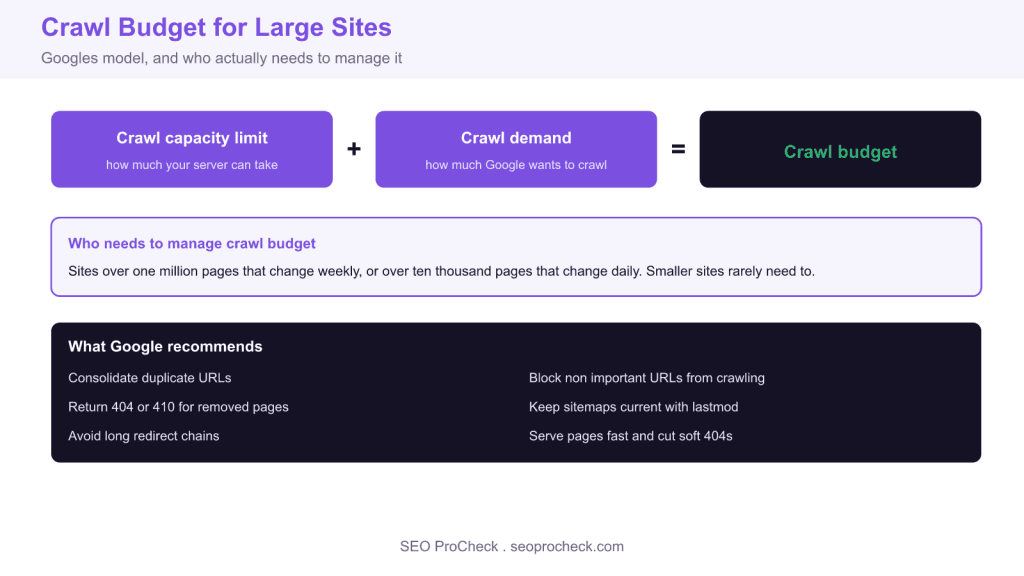
Google defines crawl budget as the combination of two factors. The crawl capacity limit is the maximum number of simultaneous connections Googlebot can use to crawl your site without degrading it, and it rises or falls based on your server response time and error rate. The crawl demand is how much Google wants to crawl, driven by the perceived popularity of your URLs and how stale Google thinks its copy of them is. Crawl budget is where those two meet: Google crawls as much as it wants, up to as much as your server can serve.
Who actually needs to manage it
Google is explicit that crawl budget is a concern only for large sites. The stated thresholds are sites with more than one million unique pages where content changes roughly weekly, or sites with more than ten thousand unique pages where content changes daily. If your site is smaller than that, Google will generally crawl it efficiently without intervention, and your effort is better spent on content and internal linking than on crawl optimization.
What Google recommends
For sites that do cross the threshold, the document lists concrete actions. Consolidate duplicate content so Googlebot is not crawling many URLs that serve the same thing. Block URLs you do not want indexed from crawling using robots.txt, rather than noindex, when the goal is purely to save crawl resources. Return a 404 or 410 status for permanently removed pages so Google stops requesting them. Keep your sitemaps current and use the lastmod field accurately so Google can prioritise changed URLs. Avoid long redirect chains, which waste crawl on each hop. And keep pages fast, because a quicker server raises your crawl capacity limit.
Monitoring crawl activity
The primary tool is the Crawl Stats report in Search Console, found under Settings then Crawl stats. It shows total crawl requests over time, average response time, and a breakdown by response code, file type, and Googlebot type, plus host status. Watch for rising server errors or response times, which pull down your capacity limit, and for a large share of crawl going to non canonical or parameter URLs, which signals wasted budget. For deeper analysis, server log files show the exact URLs Googlebot requested and how often.
# Share of Googlebot requests by response status from a log
grep -i googlebot access.log | awk '{print $9}' | sort | uniq -c | sort -rn

# Find the most crawled URLs to spot budget waste
grep -i googlebot access.log | awk '{print $7}' | sort | uniq -c | sort -rn | head -20
What has changed since Google published this
Google has kept the document updated, and the core model of capacity limit plus demand has stayed stable. A few clarifications are worth carrying: Google has reiterated that removing URLs with 404 or 410 does not harm the rest of the site and is the correct way to shed dead pages, that blocking a URL in robots.txt does not remove it from the index and should not be used for that purpose, and that adding a noindex does not save crawl budget because Google must still crawl the page to see the tag. The practical takeaway is unchanged: fix duplication and errors, keep the server fast, and let sitemaps and clean architecture guide Googlebot to what matters.
Google's recommendations and why they help
| Recommendation | Why it helps | How to do it |
|---|---|---|
| Consolidate duplicates | Stops crawling many URLs for one thing | Canonical tags, remove parameter variants |
| Block unimportant URLs | Frees budget for pages that matter | robots.txt Disallow on low value paths |
| Return 404 or 410 | Google stops re requesting dead URLs | Serve correct status, avoid soft 404s |
| Keep sitemaps current | Helps Google prioritise changed URLs | Accurate lastmod, only canonical URLs |
| Avoid redirect chains | Each hop wastes a crawl request | Point redirects straight to the target |
| Serve pages fast | Raises the crawl capacity limit | Cache, compress, reduce server errors |
Related reading
- Crawl budget explained in depth
- How index bloat wastes crawl budget
- Fixing discovered currently not indexed
- Internal linking to guide crawlers efficiently
Frequently asked questions
What is crawl budget according to Google?
Google defines crawl budget as the combination of the crawl capacity limit, how many connections Googlebot can use without straining your server, and crawl demand, how much Google wants to crawl based on popularity and staleness. The budget is where those two factors meet.
Does my site need crawl budget management?
Probably not. Google says crawl budget is a concern only for large sites, specifically those over one million pages that change weekly or over ten thousand pages that change daily. Smaller sites are usually crawled efficiently, so effort is better spent on content and internal linking.
How do I check crawl budget in Search Console?
Open the Crawl Stats report under Settings then Crawl stats. It shows total crawl requests over time, average response time, and breakdowns by response code, file type, and Googlebot type, along with host status. Rising errors or response times indicate a shrinking crawl capacity limit.
Does noindex save crawl budget?
No. Google still has to crawl a page to see a noindex tag, so noindex does not reduce crawling. If your only goal is to save crawl resources on unimportant URLs, block them in robots.txt instead, accepting that blocked URLs may still appear as URL only listings.
Do 404 errors hurt crawl budget or rankings?
Returning a genuine 404 or 410 for removed pages is correct and does not harm the rest of your site. Google will gradually stop requesting those URLs. The problem to avoid is soft 404s, where a missing page returns a 200 status, because those keep consuming crawl and confuse indexing.
How do redirect chains affect crawl budget?
Every hop in a redirect chain is a separate request Googlebot has to make, which wastes crawl capacity and slows discovery of the final URL. Point redirects directly at the destination so each old URL resolves in a single hop, and update internal links to the final target.
Source: https://developers.google.com/search/docs/crawling-indexing/large-site-managing-crawl-budget
Take this with you
The assistant links open with a question about this page already written.
Claude Vincent is a technical SEO consultant focused on crawlability, rendering, and AI-search visibility. He writes the field guides and case studies at SEO ProCheck, with a bias toward the durable, unglamorous work that decides whether search engines and AI answer engines can actually read and cite a site.
About SEO ProCheck
Technical SEO consulting and GEO strategy with 20 years of enterprise experience. Case studies, resources, and tools for search and AI visibility.
Work With Me
Technical SEO audits, GEO strategy, site migrations, and international SEO. Hourly consulting for teams who need hands-on support, not just reports.
Subscribe to our newsletter!