

AI Summary
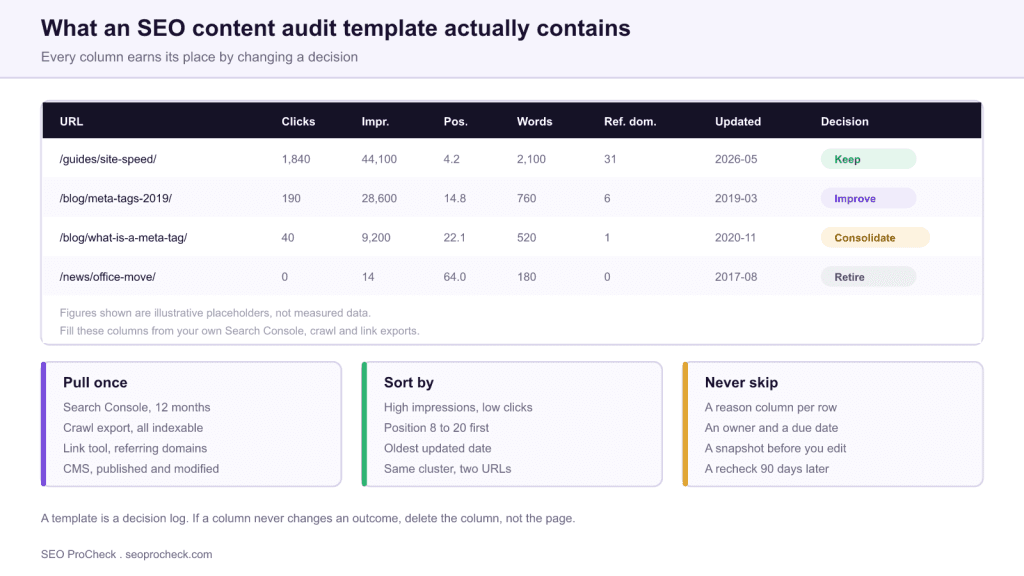
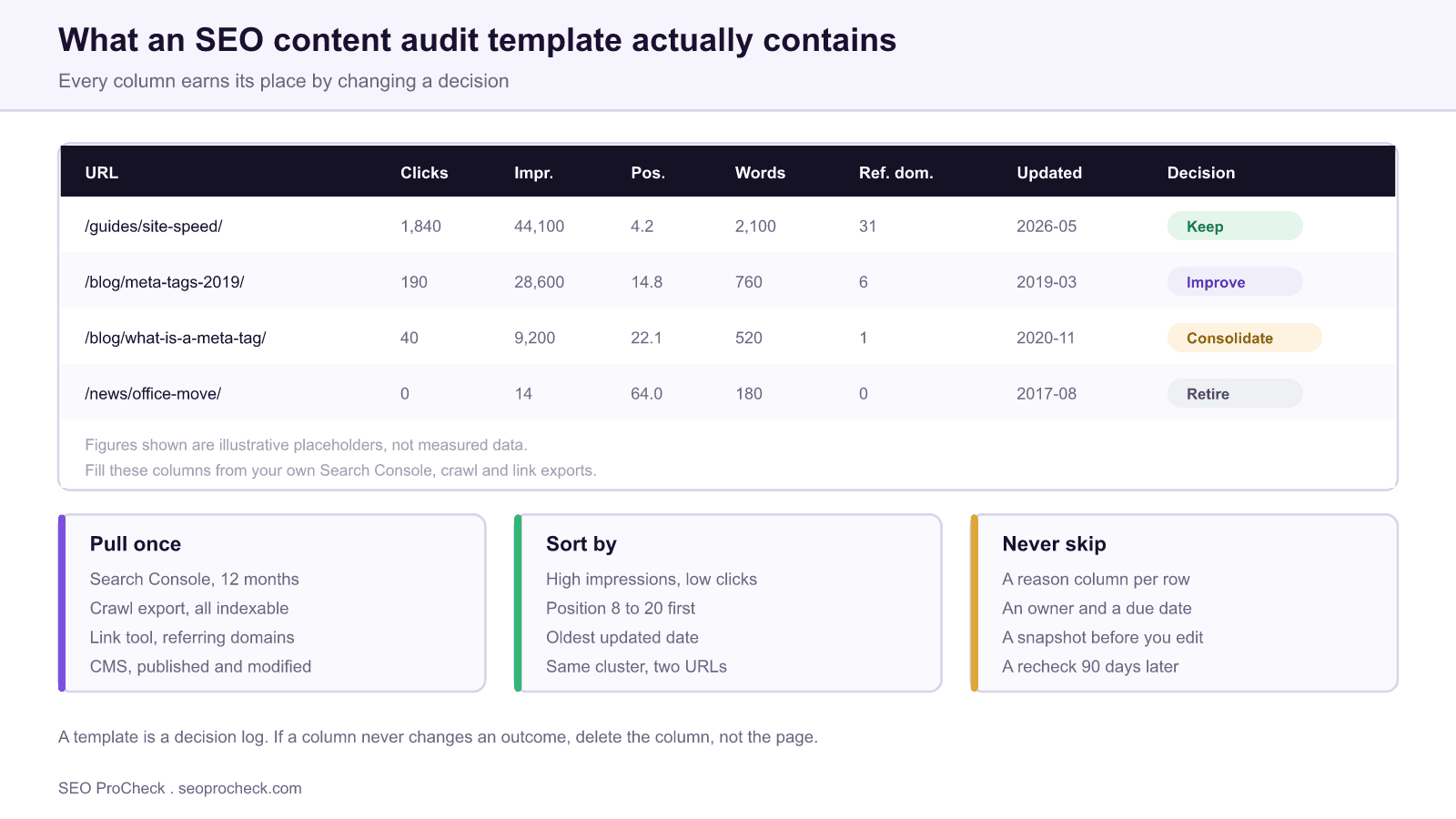
An SEO content audit template is a decision log, not an inventory. Its job is to take every content URL you own and route it into one of four outcomes, keep, improve, consolidate or retire, with a written reason attached to each row so the call can be reviewed later.
- Every column must be able to change a decision. If it never has, delete the column.
- Pull from four sources: a crawl export, Search Console, a link tool and your CMS, joined on one normalized URL key.
- Avoid single metric thresholds. Word count alone has retired more good pages than any other rule in SEO.
- Record the before state at audit time, plus an owner and a recheck date, or you cannot prove the work landed.
Most free content audit templates fail for the same reason: they are built as inventories. They list every URL with as many metrics as the author could export, and by row 400 the person reviewing has stopped thinking and started pattern matching on whichever column is furthest to the left. A template that works is organized around the decision, not around the data.
There are only four decisions available for any content URL. Keep it as it is. Improve it. Consolidate it into another page. Retire it. Every column in the sheet exists to move a row toward one of those four, and any column that has never changed an outcome is costing review time for nothing. This page covers what belongs in the template, how to fill it, and the thresholds worth arguing about. The broader method sits in the content audit process guide, and the terminology is defined in the content audit glossary entry.
The column dictionary
Build the sheet with these columns, in this order. The order matters because reviewers read left to right and you want identity, then reachability, then performance, then judgement.
| Column | Source | Why it changes a decision | Watch out for |
|---|---|---|---|
| URL, normalized | Crawl export | It is the join key for every other source | Case, trailing slash and tracking parameters must be normalized first |
| HTTP status | Crawl export | A non 200 row is a technical ticket, not a content decision | Soft 404s return 200 and will sit in the audit looking healthy |
| Indexable | Crawl export | A noindexed page cannot earn traffic, so performance columns are meaningless | Check the rendered value, not just the raw HTML |
| Clicks, 12 months | Search Console | Separates pages that work from pages that only exist | Seasonal pages need a full year or they look dead |
| Impressions, 12 months | Search Console | High impressions with low clicks is the clearest improve signal | Low volume queries are thresholded out of the export |
| Average position | Search Console | Position 8 to 20 is where effort pays back fastest | An average across many queries can hide a strong position on one |
| Word count | Crawl export | Only useful next to impressions and intent | Never use it alone as a retirement trigger |
| Referring domains | Link tool | A page with links is almost never a retire candidate | Redirect rather than delete when links exist |
| Internal links in | Crawl export | Distinguishes a weak page from a page nobody links to | Sitewide navigation links inflate this, count contextual links separately if you can |
| Last modified | CMS export | Freshness matters for dated topics and not at all for evergreen ones | Bulk edits reset this date and make stale pages look current |
| Decision | Human | The output of the whole exercise | Restrict it to four values, use data validation |
| Reason | Human | Makes the decision reviewable next quarter | One sentence, always filled |
| Owner and due date | Human | An unassigned decision does not happen | Blank owner means the row will not ship |
Crawlability Essentials
The crawl export defines the universe of the audit, so a badly configured crawl produces a confidently wrong sheet. Three configuration choices carry most of the risk.
Render JavaScript. If your templates inject body copy or internal links client side, a raw HTML crawl reports thin content and orphan pages that do not exist. Run the crawl with rendering enabled even though it is slower.
Import seed lists. A link crawl only reaches what is linked. Feed in your XML sitemaps, a Search Console URL export and an analytics landing page export as additional sources. The URLs that appear in those lists but not in the link crawl are your orphan set, and orphans are one of the highest value findings a content audit produces.
Record directives rather than obeying them. Configure the crawler to log robots directives as data instead of dropping excluded URLs. You specifically want noindexed pages in the sheet, because a noindexed page with fifteen referring domains is a finding worth acting on. If you need to check whether a directive is coming from the HTML or from the response header, the meta robots and X-Robots-Tag reference covers where each one lives.
Indexation Optimization
Index status belongs in the template as a first class column, because it changes how you read every performance number to its right. A page with zero clicks that Google has never indexed is not an underperformer, it is an indexing problem, and sending it to a writer wastes the writer's time.
Two columns are worth adding if your site has any history of duplication. The first is Google selected canonical, available per URL from the URL Inspection API. When it disagrees with your declared canonical, Google is already consolidating pages without your input, and that is a consolidation decision that has been made for you. The second is a simple content hash or a near duplicate cluster ID. Sites that grew through location pages, product variants or syndicated posts usually have duplication that no traffic metric will expose, and the duplicate content guide explains how to interpret what you find.
When you do consolidate, redirect rather than delete. A 301 from the retired URL to its replacement preserves whatever links and history the old page accumulated. Deleting outright throws that away permanently for no benefit.
Performance and Experience
Add one page experience column, keyed by template rather than by URL. Core Web Vitals field data is grouped into URL patterns anyway, and the template is the level at which anyone can actually fix the problem.
This single column prevents a specific and expensive mistake. The classic improve signal, strong impressions with weak click through, is usually read as a titles and content problem. If the template that renders those pages is failing its Largest Contentful Paint threshold on mobile, no amount of rewriting will move the numbers, and you will have spent a content budget on a delivery problem. Seeing the failure in the same row as the traffic data is what stops that at triage.
Keep it to one column. Content audits that try to carry a full technical audit inside them become unusable for both purposes.
Thresholds worth arguing about
Rules of thumb are useful for ordering the queue and dangerous as automatic actions. Use the table below to sort rows, then read them.
| Pattern in the row | Provisional bucket | Reasoning | Before you act |
|---|---|---|---|
| Clicks steady, position under 5, updated within a year | Keep | It is doing its job | Nothing, recheck next cycle |
| Impressions high, clicks low, position 8 to 20 | Improve | Demand is proven and you are close | Read the actual queries before rewriting anything |
| Two URLs sharing one query cluster | Consolidate | You are splitting your own signals | Confirm both are yours and not a paginated series |
| Zero clicks, zero impressions, zero links, no business purpose | Retire | It costs crawl and maintenance and returns nothing | Check for offline value: legal, support, seasonal, or campaign landing pages |
| Zero clicks but referring domains present | Consolidate, never retire | The links are an asset independent of traffic | Redirect to the closest relevant page |
| Zero clicks and not indexed | Investigate | This is an indexing issue wearing a content costume | Diagnose indexability before assigning any content work |
| Strong impressions, template failing Core Web Vitals | Improve, technical | The constraint is delivery, not copy | Route to engineering, not to a writer |
Governance: the part templates usually omit
A completed audit sheet is worth nothing on its own. Four additions turn it into something that produces change.
- Snapshot the before state. Store title, meta description, word count and a content hash at audit time. This is the only way to prove later whether a change helped, and it takes one extra column.
- Assign an owner per row. Rows without an owner do not ship. This is not a process preference, it is simply what happens.
- Set a recheck date 90 days out. Shorter than that and you are reading noise, because the page needs to be recrawled and reassessed first.
- Version the sheet. Keep each quarter's audit as its own file. Comparing this quarter's decisions with last quarter's is how you find out whether your thresholds were any good.
One closing warning about free templates generally, including this description of one. A template encodes the assumptions of whoever built it, usually about a site of a particular size in a particular market. Treat the column list as a starting point and delete what does not apply to you. A sheet with nine columns everyone reads beats a sheet with thirty that nobody finishes.
FAQ
At minimum: URL, index status, clicks, impressions, average position, word count, referring domains, last modified date, internal links in, decision, reason and owner. Anything beyond that should earn its place by changing at least one decision, otherwise it is decoration that slows the review down.
All indexable content URLs if the site is under roughly 10,000 pages. Above that, audit by template or by section rather than trying to review everything at once, because the fixes on a large site almost always live in a template rather than in individual pages.
There is not one, and building a template around word count thresholds is how good pages get deleted. Word count is a weak proxy that only becomes useful alongside impressions, links and business purpose. A 300 word page that answers a question completely and earns links is fine.
Yes, and it is the column people cut first. Without a written reason, a decision cannot be reviewed, argued with, or understood by whoever runs the audit next quarter. One short sentence per row is enough.
If two URLs draw impressions for the same query cluster, consolidate. If one URL draws impressions but sits outside the top few positions and nothing else competes with it, update it. Consolidation is about resolving internal competition, updating is about closing a quality or intent gap.
Give changes a full re-crawl and re-evaluation cycle before judging them, which realistically means measuring at 90 days rather than 30. Record the before state at audit time, because without a baseline you will not be able to attribute the change either way.
Source: https://www.mikeginley.com/blog/seo-content-audit/
Take this with you
The assistant links open with a question about this page already written.
Claude Vincent is a technical SEO consultant focused on crawlability, rendering, and AI-search visibility. He writes the field guides and case studies at SEO ProCheck, with a bias toward the durable, unglamorous work that decides whether search engines and AI answer engines can actually read and cite a site.
About SEO ProCheck
Technical SEO consulting and GEO strategy with 20 years of enterprise experience. Case studies, resources, and tools for search and AI visibility.
Work With Me
Technical SEO audits, GEO strategy, site migrations, and international SEO. Hourly consulting for teams who need hands-on support, not just reports.
Subscribe to our newsletter!








Recent Posts
- Google August 2026 Spam Update: Dates, Duration and How to Read Your Data November 2, 2026
- Google Algorithm Updates: The Dated List Since 2003, and What to Do After Each October 31, 2026
- AI Readiness: The Checklist, the Research and the Free Tools October 28, 2026