

AI Summary
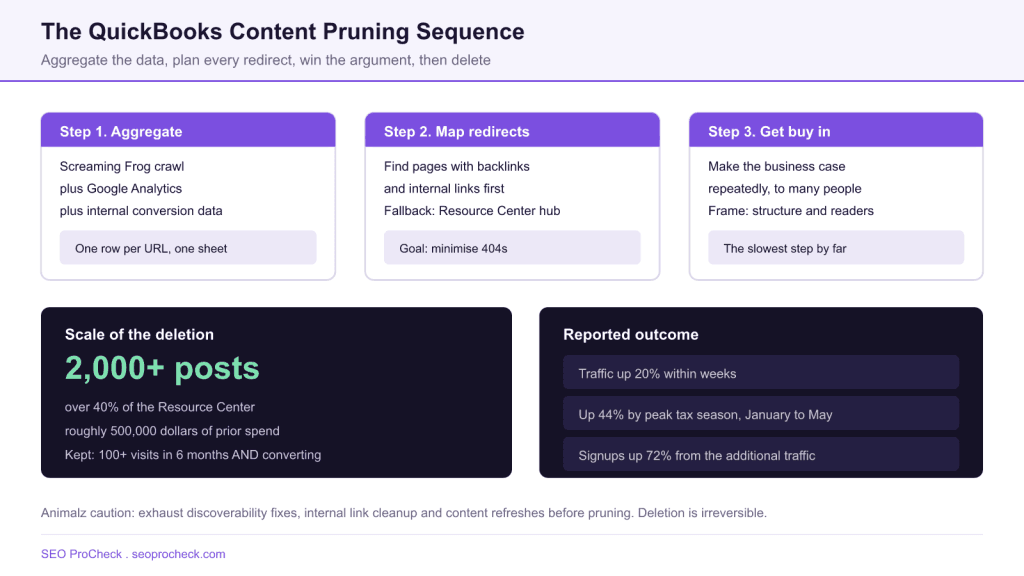
QuickBooks SEO lead Will Waggoner deleted over 2,000 blog posts, more than 40 percent of the Resource Center and roughly 500,000 dollars of prior content investment, keeping only pages with 100 plus visits in six months that also converted. Traffic rose 20 percent within weeks and 44 percent by peak tax season, with signups up 72 percent from the additional traffic.
- Three step process: aggregate crawl plus analytics plus conversion data, plan redirects, secure stakeholder buy in.
- Keep rule: 100 or more visits in six months AND a conversion. Recent posts excluded from the exercise.
- Pages with no natural redirect target were pointed at the Resource Center homepage to avoid 404s.
- Animalz caution: try discoverability fixes, internal link cleanup and content refreshes before deleting anything.
What actually happened
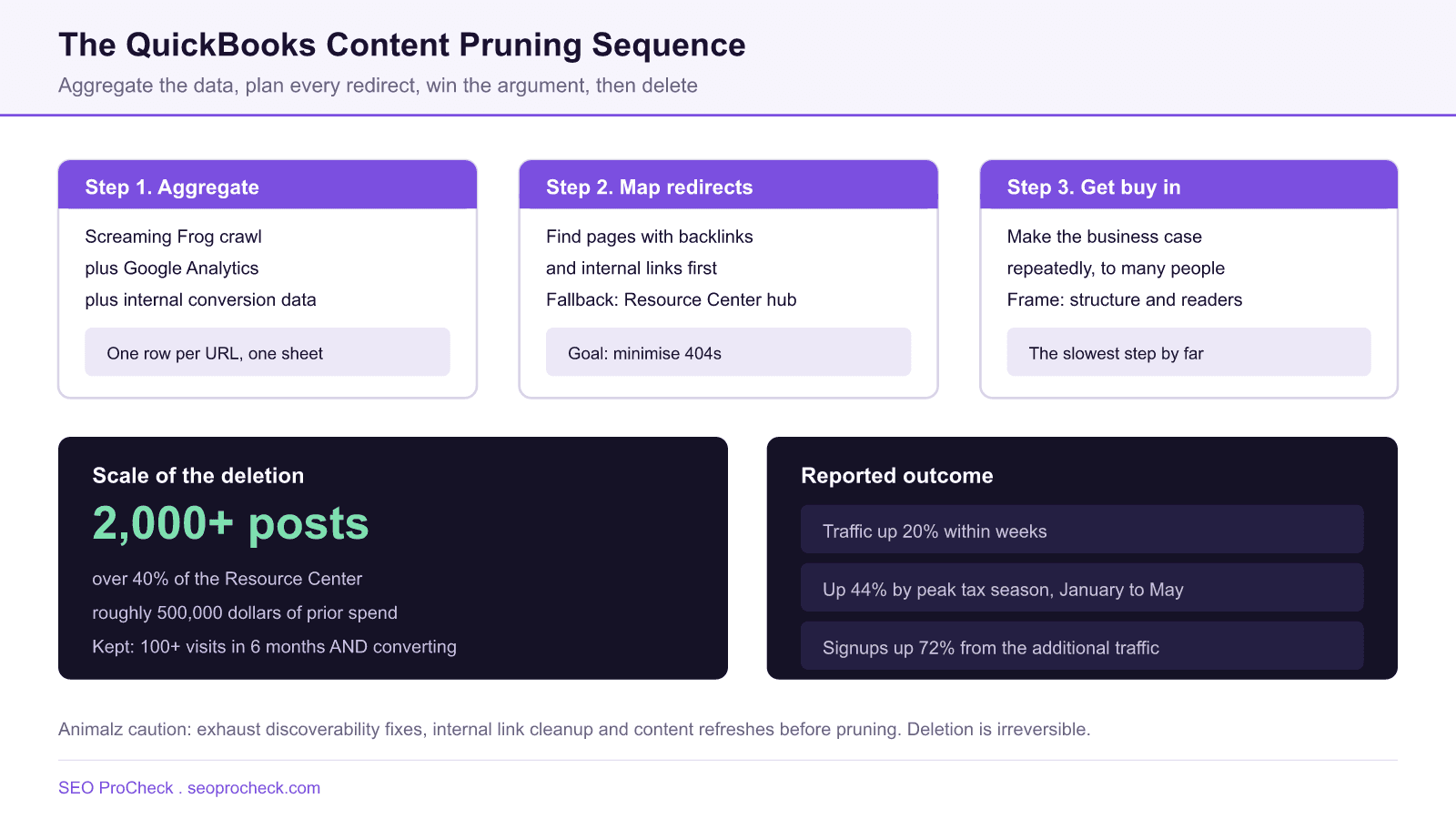
Will Waggoner, SEO lead at QuickBooks, removed more than 2,000 blog posts from the Intuit Resource Center. That was over 40 percent of the library and, by the account in the source, around 500,000 dollars of content that somebody had already paid for. Most of it was outdated, duplicative, or riddled with broken links inherited from an earlier blog merger. Traffic rose roughly 20 percent within weeks, reached 44 percent up by peak tax season between January and May, and signups attributed to the additional traffic rose 72 percent.
The headline is the deletion. The transferable part is the sequence, because two of the three steps have nothing to do with choosing which pages die.
Step 1: build one sheet with every signal on it
The team crawled the site with Screaming Frog, merged Google Analytics data, and layered on conversion figures from internal tooling. The output is a single spreadsheet with one row per URL. You cannot make a defensible prune decision from a crawl alone, because a crawl tells you what exists and nothing about what it earns.
Screaming Frog does the join for you if you connect the APIs before crawling, under Configuration > API Access. Connect Google Analytics 4, Search Console and Ahrefs or Majestic, then crawl. The internal HTML export then carries sessions, impressions and referring domains per URL.
# Screaming Frog: Configuration > API Access
#   Google Analytics 4   -> sessions, conversions, date range 6 months
#   Google Search Console -> clicks, impressions
#   Ahrefs / Majestic     -> referring domains, external links

# Export: Internal > HTML > Export
# File:   internal_html.csv

import pandas as pd
df = pd.read_csv('internal_html.csv')
df['keep'] = (df['GA4 Sessions'] >= 100) & (df['GA4 Conversions'] > 0)
df['has_links'] = df['Referring Domains'].fillna(0) > 0
df['action'] = 'delete'
df.loc[df['keep'], 'action'] = 'keep'
df.loc[~df['keep'] & df['has_links'], 'action'] = 'redirect_manual'
df.to_csv('prune_plan.csv', index=False)
Step 2: plan every redirect before anything is deleted
This is the step that separates a successful prune from a self inflicted traffic loss. QuickBooks identified pages carrying external backlinks and internal links first, then built redirect targets for them. Pages with no natural destination were pointed at the Resource Center homepage rather than left to 404.
The judgement call on each URL comes down to how much link value it holds and how close a topical match you can find.
| URL profile | Destination | Why |
|---|---|---|
| Has referring domains, close topical match exists | 301 to the specific matching page | Preserves both the link value and the user intent. Worth doing by hand. |
| Has referring domains, no close match | 301 to the parent hub or category | Keeps the equity in the right neighbourhood even if the page is gone. |
| Internal links only, close match exists | 301 to the match, then fix the internal links at source | The redirect is a safety net. Editing the source link is the actual fix. |
| No links, no traffic, no conversions | 301 to the hub, or 410 if you want it gone from the index fast | Either is defensible. A 410 removes it from the index quicker than a 404. |
| Published in the last 6 months | Leave alone | It has not had time to rank. Excluding recent content is part of the QuickBooks method. |
Redirect decision grid. Build this column in the spreadsheet before a single page is unpublished.
Step 3: the part that actually takes the time
The source is blunt about it: securing approval meant making the business case repeatedly. Deleting half a million dollars of existing work is a hard sell to the people who commissioned it. The framing that worked was improved site structure and a better reader experience rather than an SEO argument, which is worth copying. Nobody outside the SEO team is moved by crawl budget. Everybody understands that a resource centre where half the articles are wrong is worse than one where they are all right.
Practical protections to negotiate while you are securing that approval: keep a full export of every deleted page body, ship the redirects in the same release as the unpublish, and agree in advance on the review date and the metric you will both look at. That last one prevents the conversation where somebody points at a normal seasonal dip six weeks later.
The caution the source leads with
Animalz frames pruning as the last option, not the first. Their stated position is to make sure you have exhausted the less expensive, less risky, less irreversible options before you delete anything, and they name three.
Improve discoverability. Flatten the architecture with content hubs and better navigation. A page nobody can reach in three clicks is not necessarily a bad page.
Cut internal link bloat. Reduce articles from ten or fifteen scattered internal links down to two or three strategically chosen ones, so the links you keep actually mean something.
Refresh instead of remove. Update the on page SEO, expand the depth, refresh the statistics, or rewrite the piece entirely while preserving the URL. A rewrite keeps the backlinks and the URL history that a deletion throws away.
Those three are cheaper than a prune and they are reversible. Deletion is not, which is the whole reason it goes last.
Where this fits in your process
Run the classification inside a repeatable audit rather than as a one off cleanup: how to run a content audit that actually moves traffic covers the scoring model, and the content pruning definition covers terminology if you need to align a wider team. If the underlying problem is thousands of low value URLs generated by templates rather than by writers, index bloat is the more accurate diagnosis, and the crawl mechanics live in the Screaming Frog advanced usage guide.
FAQ
It can, but the deletion is rarely the cause on its own. In the QuickBooks case the team reported a 20 percent traffic increase within weeks and 44 percent by peak tax season, alongside a redirect plan that consolidated link equity and a much smaller, clearer site structure. Deleting pages without that redirect work usually just loses the traffic those pages had.
QuickBooks kept pages that met two conditions together: 100 or more visits in the preceding six months AND at least one conversion. Recently published pages were excluded from the exercise entirely because they had not had time to rank. Any threshold works so long as it is written down before you look at individual pages, so the rule decides rather than sentiment.
Redirect anything with external backlinks or meaningful internal links to the closest surviving equivalent. For pages with no links and no natural destination, QuickBooks pointed them at the Resource Center hub. A genuine 410 is acceptable for pages nobody links to and nobody visits, but a redirect to a relevant page is almost always the safer default.
Animalz argues for three cheaper options first: flatten the architecture so pages are actually discoverable, cut excessive internal linking down from ten or fifteen links per article to two or three targeted ones, and refresh the content while preserving the URL. Their line is to exhaust the less expensive, less risky, less irreversible options first.
The data work is days. The stakeholder work is months. In the QuickBooks account, securing approval to delete roughly 500,000 dollars of prior content investment required making the case repeatedly. Budget for the political timeline, not the technical one, and expect to be asked to justify the decision again after the fact.
Only if you drop them. Export the backlink profile before you touch anything, flag every URL with referring domains, and map each one to a redirect target manually. Bulk redirecting a linked page to the homepage wastes most of its value, so spend the time on the closest topical match instead.
Planning a large content prune?
An advanced audit builds the keep, redirect and delete plan with the link profile attached, so nothing valuable goes out with the rest.
Source: https://www.animalz.co/blog/content-pruning/
Take this with you
The assistant links open with a question about this page already written. Nothing is sent until you press enter.
Claude Vincent is a technical SEO consultant focused on crawlability, rendering, and AI-search visibility. He writes the field guides and case studies at SEO ProCheck, with a bias toward the durable, unglamorous work that decides whether search engines and AI answer engines can actually read and cite a site.
About SEO ProCheck
Technical SEO consulting and GEO strategy with 20 years of enterprise experience. Case studies, resources, and tools for search and AI visibility.
Work With Me
Technical SEO audits, GEO strategy, site migrations, and international SEO. Hourly consulting for teams who need hands-on support, not just reports.
Subscribe to our newsletter!








Recent Posts
- Most Top Sites Never Say Who They Are in Structured Data October 14, 2026
- Homepage Titles Are Mostly Too Short, Not Too Long October 8, 2026
- Who Actually Serves an llms.txt? 184 Top Sites Measured September 29, 2026