

AI Summary
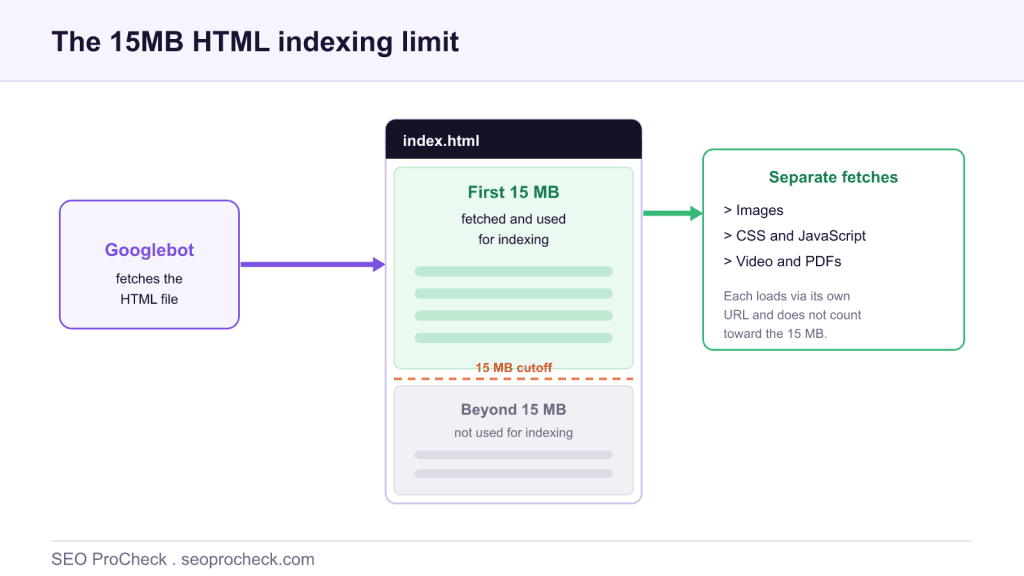
Google fetches and indexes the first 15MB of an HTML file; anything beyond that first 15MB is not used for indexing. The limit applies to the HTML itself, while images, CSS, JavaScript and video are fetched separately through their own URLs and do not count toward it.
- The limit is 15MB of HTML per document, confirmed in Google's crawling documentation.
- Referenced resources (images, CSS, JS, video) load separately and are not part of the 15MB.
- There is no penalty for exceeding it; Google just stops reading the HTML past 15MB.
- Normal pages are far under 15MB, so keep important content early and HTML lean.
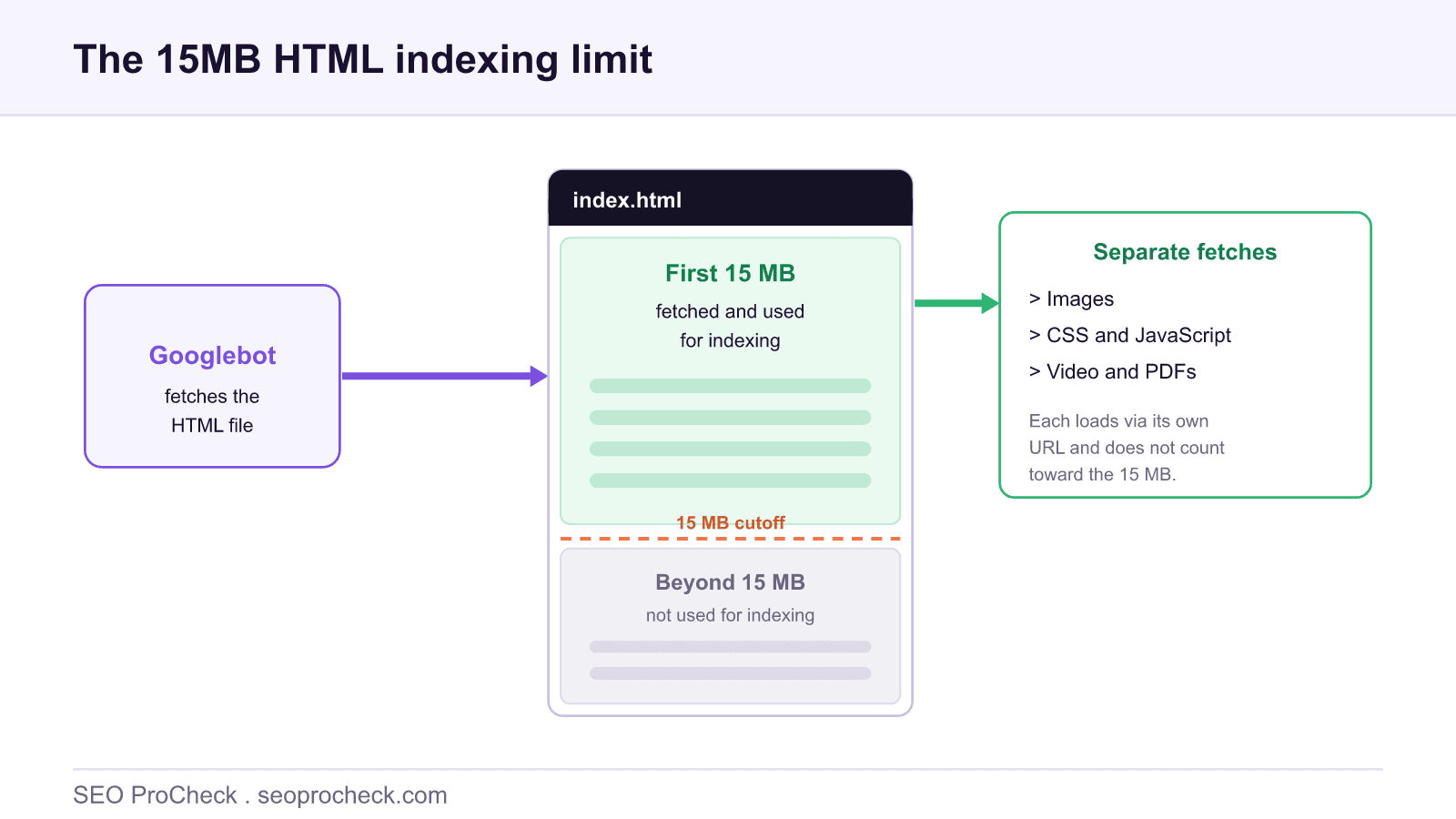
The question sounds like it should have a messy answer, but it is refreshingly precise: Google fetches the first 15MB of an HTML file and uses that for indexing. Anything after the 15MB mark in the HTML is not read for indexing. That is the whole rule, straight from Google's own crawling documentation, and the source linked at the foot of this page walks through it too. What trips people up is not the number but what it does and does not cover.
The short answer, and where it comes from
Google publicly documents that Googlebot can fetch the first 15MB of an HTML file or supported text-based file, and that content beyond this maximum is not used for indexing. The limit applies to the file the crawler retrieves at the URL, that is, the HTML document. It is a generous ceiling: a typical content page is measured in tens or low hundreds of kilobytes, orders of magnitude below 15MB.
What the 15MB does and does not include
This is the part worth getting right, because the intuition that a whole page must fit in 15MB is wrong. The limit is on the HTML document, not the rendered page and all its assets. Every resource the HTML references is retrieved separately, through its own URL, and is not charged against the 15MB.
| Element | Counts toward the 15MB HTML limit? | Notes |
|---|---|---|
| The HTML document | Yes | The first 15MB of the HTML is fetched and used for indexing |
| Inline CSS and inline JavaScript | Yes | Anything inside the HTML file counts as part of it |
| Base64 data URIs in the HTML | Yes | Embedded data lives in the HTML, so it consumes the budget |
| External images | No | Fetched via their own URLs, handled separately |
| External CSS and JavaScript files | No | Retrieved separately from the HTML document |
| Video and PDFs | No | Separate resources with their own handling |
The distinction the table draws is the crux of the topic: only bytes that live inside the HTML file count. That is why a media-heavy article is nowhere near the limit, its images are separate fetches, while a page that inlines large base64 images directly into the markup can bloat the HTML itself. If image handling is your concern, our image SEO complete guide covers sizing and delivery, none of which touches the HTML budget when images are referenced normally.
When could you ever hit it?
Realistically, only through unusual patterns. Enormous base64 images inlined into the HTML, gigantic inline scripts or data blobs, or an infinitely appended page that never stops adding markup are the usual suspects. If a page's HTML approaches 15MB, you almost certainly have a performance and maintainability problem well before you have an indexing one. Our companion check on HTML over 15MB is aimed at exactly these edge cases.
Practical guidance
You should almost never need to worry about the ceiling, but two habits keep you safely clear of it and help performance regardless:
1. Put important content early in the HTML. Since Google reads from the top, front-load the content that must be indexed. This is good practice even far below 15MB, and it protects you if a page ever grows unexpectedly.
2. Keep the HTML lean. Reference images and scripts by URL rather than inlining large blobs, and avoid dumping huge datasets straight into the markup. Lean HTML transfers and parses faster, which helps both crawl efficiency and crawl budget. To measure your own page, read the transferred size of the document in your browser's network panel, not the combined weight of every asset.
For context on how the crawler that enforces this behaves more broadly, see our glossary entry on Googlebot. The headline to remember is simple: 15MB of HTML, resources fetched separately, no penalty for going over, just content you would rather have indexed being ignored.
FAQ
Google fetches and uses the first 15MB of an HTML file (or a supported text-based document) for indexing. Content beyond that first 15MB is not used for indexing. In practice almost no normal HTML page comes close, so the limit rarely bites.
No. The 15MB applies to the HTML document itself. Referenced resources such as images, CSS, JavaScript and video are fetched separately through their own URLs and are not counted toward the 15MB HTML limit. Those files have their own handling and size considerations.
There is no penalty. Google simply stops reading the HTML after 15MB, so any content past that point is ignored for indexing. The risk is missed content, not a ranking punishment. Keeping important content early in the HTML avoids the issue entirely.
Very unlikely with normal pages. You would typically need enormous inlined data, such as large base64 images embedded directly in the HTML, huge inline scripts, or an endlessly appended page. If you approach 15MB of HTML, that itself is a performance problem worth fixing.
Look at the transferred size of the document (not the whole page) in your browser's network panel, or fetch the URL and measure the HTML response. Focus on the HTML byte size specifically, since that is what the 15MB limit measures, separate from images and other assets.
It can. Large HTML takes longer to transfer and parse, which raises response time and consumes more crawl capacity per page. Even well below 15MB, lean HTML helps both crawl efficiency and page performance, so trimming bloat is worthwhile regardless of the hard limit.
Not sure whether page weight is hurting your crawling or indexing?
An audit measures your real HTML and asset sizes, checks what Google is actually fetching and indexing, and flags the pages where bloat is costing you crawl efficiency.
Source: https://www.icg.agency/blog/whats-the-maximum-file-size-google-can-index
Claude Vincent is a technical SEO consultant focused on crawlability, rendering, and AI-search visibility. He writes the field guides and case studies at SEO ProCheck, with a bias toward the durable, unglamorous work that decides whether search engines and AI answer engines can actually read and cite a site.
About SEO ProCheck
Technical SEO consulting and GEO strategy with 20 years of enterprise experience. Case studies, resources, and tools for search and AI visibility.
Work With Me
Technical SEO audits, GEO strategy, site migrations, and international SEO. Hourly consulting for teams who need hands-on support, not just reports.
Subscribe to our newsletter!







Recent Posts
- Can AI Crawlers Actually Read Your Site? I Measured 400 of the Biggest September 5, 2026
- The Pre-Publish Quality Gate for AI-Assisted Content August 6, 2026
- AGENTS.md vs llms.txt vs llms-full.txt: Which Agent File Does What July 18, 2026