

The Importance of Internal Linking to Boost Site Performance and UX | Seer Interactive
- December 4, 2019
- Website Architecture
AI Summary
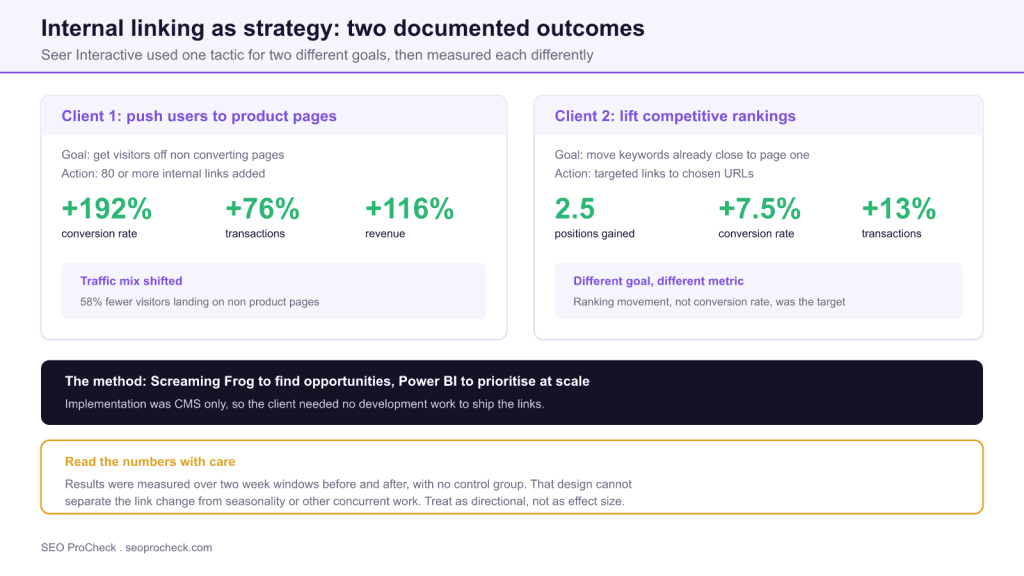
Seer Interactive documented two internal linking programmes: one that routed users to product pages and reported a 192% conversion rate increase, and one that targeted competitive keywords and gained an average of 2.5 ranking positions. Both were measured with two week before and after windows and no control group, so treat the figures as directional rather than as effect sizes.
- The conversion gain came with 58% fewer visitors landing on non product pages, which points to routing as the mechanism rather than better persuasion.
- Opportunity discovery used Screaming Frog joined to Search Console data, prioritised in Power BI, with CMS-only implementation and no development work.
- The highest value targets are pages with real impressions, positions 8 to 25, and very few internal inlinks.
- Use before and after studies to decide what to try, and controlled split tests to decide what to promise.
Internal linking gets treated as a cleanup task: fix the orphans, add a breadcrumb, move on. Seer
Interactive's argument is that it deserves to be treated as a strategy, with a stated goal, a
hypothesis, and a metric chosen to match. Their case study is useful less for the numbers than for the
demonstration that the same tactic aimed at two different goals produces two different kinds of
result.
Two programmes, two goals
| Client 1: routing to product pages | Client 2: competitive rankings | |
|---|---|---|
| Goal | Move visitors off non converting pages | Lift rankings on competitive terms |
| Action | 80 or more internal links added | Targeted links to selected URLs |
| Primary metric | Conversion rate and revenue | Average ranking position |
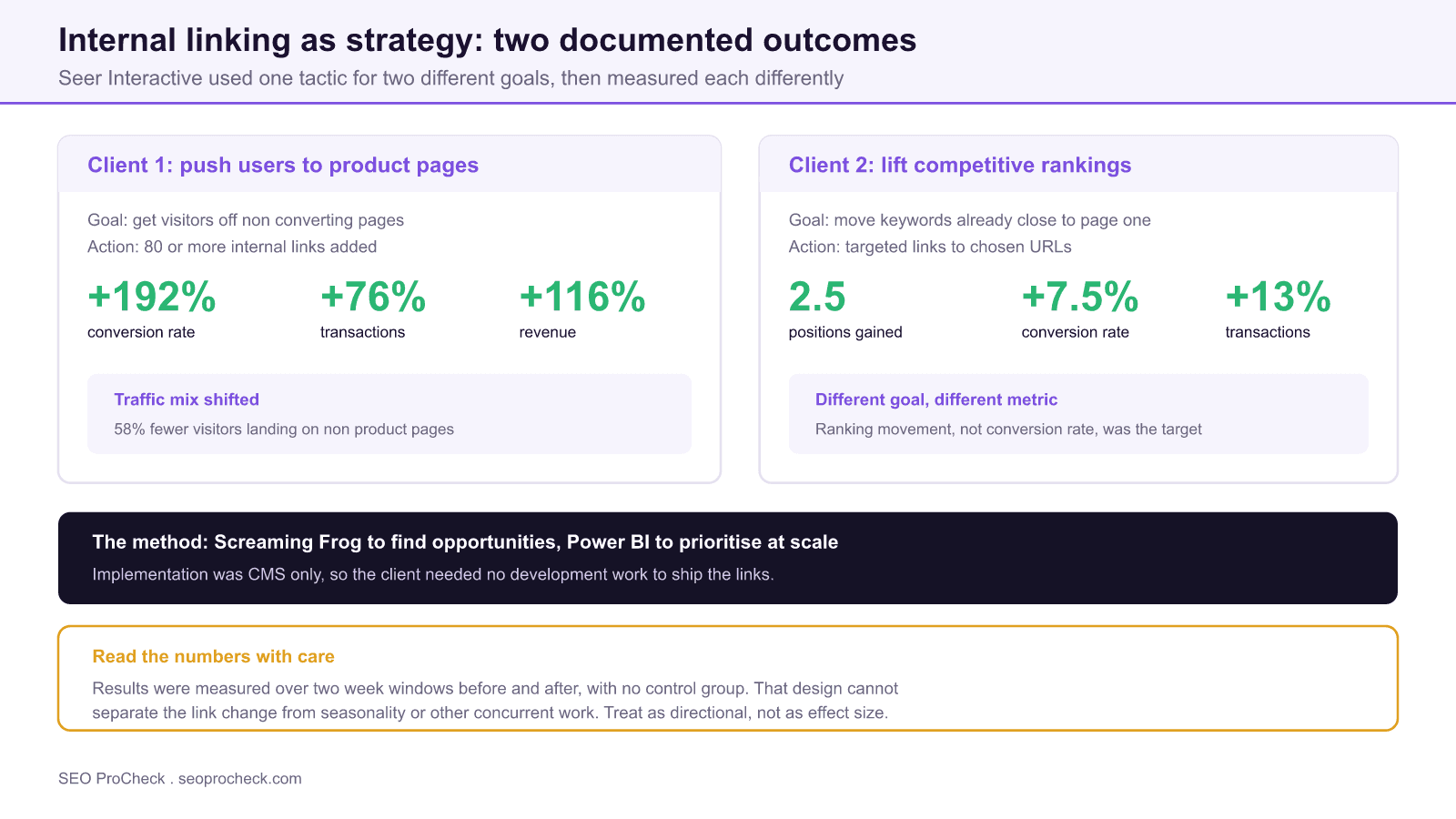
| Reported result | 192% conversion rate increase, 76% more transactions, 116% more revenue | 2.5 average positions gained |
| Secondary result | 58% fewer visitors landing on non product pages | 7.5% conversion rate increase, 13% more transactions |
| Measurement | Two week pre and post window, no control group | Two week pre and post window, no control group |
Results as reported by Seer Interactive. The measurement row is the one to read before quoting the others.
The contrast is the point. In the first engagement the objective was commercial routing: too many
visitors were landing on pages that could not convert them. Adding 80 or more internal links pushed
traffic toward product pages, and the reported outcome was a 192% increase in conversion rate, 76%
more transactions, and 116% more revenue, with 58% fewer visitors landing on non product pages.
That last figure is the most informative one in the whole case study. It tells you the
mechanism. Conversion rate did not improve because the product pages got better at
persuading; it improved because the mix of people arriving changed. Internal links redistributed
attention, and the conversion metric followed.
The second engagement aimed at rankings instead. Links were pointed at specific URLs targeting
competitive terms, and the average gain was 2.5 positions, with a 7.5% conversion rate increase and
13% more transactions on the affected pages. Smaller numbers, but a different objective and a
different metric.
Read the numbers with the method attached
Seer describe applying the scientific method: observation, hypothesis, tooling, implementation,
measurement. The measurement step used two week windows before and after the change, with no control
group.
This is worth stating plainly, because a 192% conversion rate increase is the kind of figure that
gets pulled into decks without its caveats. A before and after comparison over two weeks cannot
separate the internal linking change from anything else that happened in the same window: seasonality,
a promotion, a core update, other SEO work, a paid media shift. The result may well be real. The
design simply cannot tell you how much of it the links caused.
Compare this with the SearchPilot split tests covered elsewhere on this site. Their
nearby location links test
reported a 7% uplift, and their
related article links test
reported 16% on donor pages. Those figures are an order of magnitude smaller than 192%, and they are
also far more defensible, because half the pages acted as a live control absorbing exactly the same
seasonality and algorithm changes.
Both kinds of evidence are useful. They just support different claims.
| Evidence type | What it controls for | What you can claim | Effort |
|---|---|---|---|
| Before and after, single site | Almost nothing external | This is worth testing properly | Low |
| Before and after with a matched page group | Site wide seasonality and updates | The change plausibly caused the movement | Medium |
| SEO split test with live control | Seasonality, updates, concurrent releases | An effect size with a confidence level | High, needs a platform |
| Meta analysis across many sites | Site specific quirks | A general direction of effect | High |
A hierarchy for reading SEO case studies. Most published case studies, including the ones here, sit in the top row.
The practical rule: use before and after case studies to decide what to try, and use
controlled tests to decide what to promise. Presenting a 192% figure to a stakeholder as an
expected outcome is how SEO programmes acquire targets they cannot hit.
The part worth copying: opportunity discovery
Where the case study is genuinely instructive is the tooling. Seer built the opportunity list with
Screaming Frog for crawl data and Power BI to prioritise at scale, and implementation required only
CMS changes, so no engineering time was needed.
That last constraint shapes everything. A linking programme that needs a development sprint
competes with the product roadmap and loses. One that an editor can ship through the CMS gets done.
When you scope internal linking work, scope it to what the CMS can do.
The prioritisation logic is reproducible without Power BI. You need two data sets joined on URL:
# Step 1: crawl for existing internal inlink counts
Screaming Frog > Internal tab > filter: HTML
Bulk Export > Links > All Inlinks

# Step 2: join against Search Console query data
#   page | clicks | impressions | avg_position | inlink_count

# Step 3: the opportunity filter that matters
impressions > 500
AND avg_position BETWEEN 8 AND 25
AND inlink_count < 10

# These are pages Google already surfaces, ranks just off
# the money positions, and that the site barely links to.
That filter is the whole method in three conditions. Pages with real impressions are pages Google
already understands. Pages at positions 8 to 25 are close enough that a nudge changes traffic
materially, since moving from 12 to 8 is worth far more than moving from 60 to 45. Pages with few
inlinks are the ones where adding links actually changes their internal standing. Pages that satisfy
all three are where internal linking pays.
Our internal link analyzer
produces the inlink side of that join, and the
one followed internal link check
surfaces the extreme cases where a valuable page has essentially no internal support.
Finding where the links should go
Knowing which pages need links is half the job. The other half is finding pages that can
credibly link to them, which means pages already discussing the topic.
# Find pages that mention a target phrase but do not yet link to it
# (classic internal link opportunity discovery)

# In Screaming Frog: Configuration > Custom > Search
#   Filter 1: Contains     "running shoes"
#   Filter 2: Does Not Contain  "/category/running-shoes/"

# Any URL matching both is a page that discusses the topic
# but does not link to the page you want to promote.

# Quick command line version against a URL list:
while read u; do
  body=$(curl -s "$u")
  echo "$body" | grep -q "running shoes" \
    && ! echo "$body" | grep -q "/category/running-shoes/" \
    && echo "OPPORTUNITY: $u"
done < urls.txt
The output is a list of pages that mention your target topic and do not yet link to the page you
want to promote. Those are natural link placements, which matters for two reasons: the anchor text
writes itself from the surrounding sentence, and the link is genuinely useful to someone reading that
paragraph. Links inserted into content that has nothing to do with the target are the ones that read
as manipulation and tend not to survive editorial review anyway.
A workable process
- Pick one goal. Routing traffic to converting pages and lifting rankings on
competitive terms are different programmes with different target pages. Running both at once makes
the results uninterpretable. - Build the opportunity list from the crawl and Search Console join above, then cut
it to the twenty or thirty highest value targets. A list of 500 opportunities never gets worked. - Find contextual placements using the mention-without-link search, and prefer
linking pages that already receive traffic. - Write anchor text from the sentence, descriptive and varied, never the same exact
phrase 80 times. - Ship in batches and stagger them. Shipping everything at once means one
uninterpretable before and after. Staggering across weeks lets you see which batches moved. - Hold a comparison group if you possibly can. Even without a testing platform, you
can leave a matched set of similar pages untouched for the first month. That single step lifts your
evidence from the top row of the table to the second.
What internal linking cannot do
The routing result is a useful corrective to the idea that internal links are purely a ranking
lever. Much of the commercial value in the first case study came from users following links to better
pages, which is a UX outcome that happens to be measured in revenue.
But the same framing sets the limits. Internal links distribute authority and attention that
already exist. They do not create demand, they do not fix a product page that lacks the information a
buyer needs, and they do not rescue thin content. If the destination page cannot convert the traffic
it already gets, sending it more traffic converts nothing.
For the wider framework, our
complete internal linking guide
covers the mechanics, and
topic cluster architecture
covers how to decide which pages should support which before you start adding links at all.
FAQ
It can, when the links change where visitors land. In the Seer Interactive case the client saw a 192% conversion rate increase alongside 58% fewer visitors arriving on non product pages, which suggests the mechanism was routing rather than persuasion. Internal links move people toward pages that convert; they do not make a weak product page convert better.
Seer added 80 or more links in the conversion focused programme, but the count matters less than the placement. A handful of links from high traffic pages to a commercially important page will do more than dozens scattered across pages nobody visits. Prioritise by the traffic of the linking page, not by the total number of links.
Seer reported an average improvement of 2.5 positions on the targeted keywords. That size of move is meaningful for terms already sitting near page one and largely irrelevant for terms ranking in the fifties. Internal linking is a nudge, so aim it at keywords where a nudge changes the outcome.
Treat them as directional rather than as effect sizes. A two week pre and post comparison with no control group cannot separate the change being tested from seasonality, algorithm updates, or other work shipped in the same period. That does not mean the results are wrong, only that the true effect could be considerably larger or smaller.
A before and after study compares a site against its own past, so anything else that changed in that window is baked into the result. A split test runs the change on half the pages and holds the other half as a live control, so external factors hit both groups equally. Split testing gives you a defensible effect size; before and after gives you a hypothesis.
Crawl the site for existing inlink counts, pull query and impression data from Search Console, then join the two so you can see which commercially valuable pages are under linked. Seer used Screaming Frog with Power BI for exactly this. A spreadsheet works fine up to a few thousand URLs.
Source: https://www.seerinteractive.com/blog/the-value-of-internal-links/
Which of your pages are under linked and close to page one?
The join between crawl data and Search Console usually surfaces a short list of pages where internal links change the outcome. An audit builds it for you.
Take this with you
The assistant links open with a question about this page already written. Nothing is sent until you press enter.
Claude Vincent is a technical SEO consultant focused on crawlability, rendering, and AI-search visibility. He writes the field guides and case studies at SEO ProCheck, with a bias toward the durable, unglamorous work that decides whether search engines and AI answer engines can actually read and cite a site.
About SEO ProCheck
Technical SEO consulting and GEO strategy with 20 years of enterprise experience. Case studies, resources, and tools for search and AI visibility.
Work With Me
Technical SEO audits, GEO strategy, site migrations, and international SEO. Hourly consulting for teams who need hands-on support, not just reports.
Subscribe to our newsletter!







Recent Posts
- Finding a Competitor's Sitemap, and Turning It Into a Change Log September 15, 2026
- AI Crawler User Agents: The Current Names, and Which Ones Sites Actually Block September 9, 2026
- Can AI Crawlers Actually Read Your Site? I Measured 400 of the Biggest September 5, 2026