

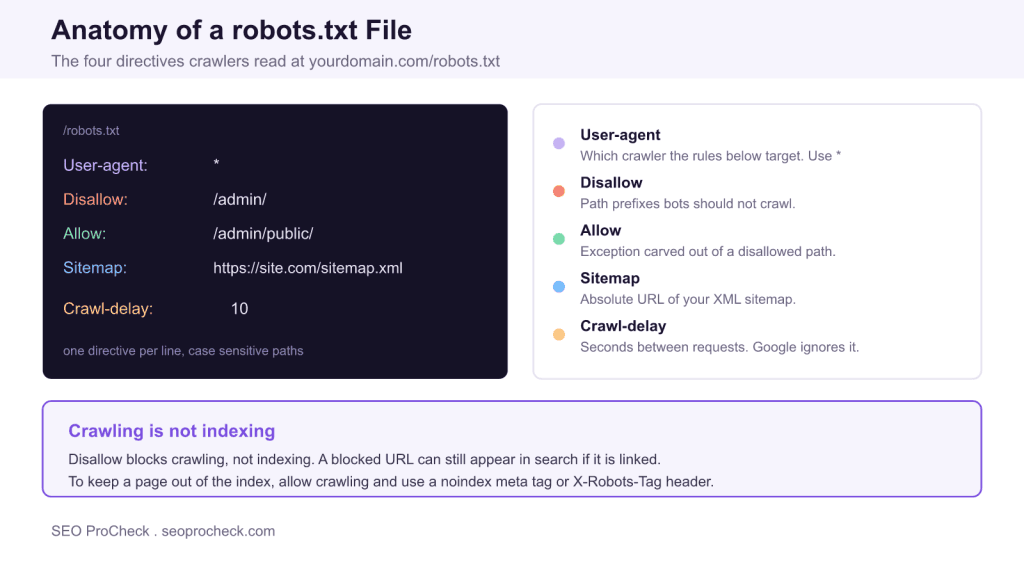
AI Summary
A robots.txt file is a plain text file at your domain root that tells search engine crawlers which URLs they may request. It controls crawling through the Robots Exclusion Protocol, but it does not control indexing: a blocked page that is linked elsewhere can still show up in search results.
- The file must live at the root, for example https://example.com/robots.txt, and return HTTP 200.
- The core directives are User-agent, Disallow, Allow, and Sitemap.
- Disallow blocks crawling, not indexing; use a noindex meta tag or X-Robots-Tag to keep a page out of the index.
- Robots.txt is public and offers no security; never rely on it to hide sensitive URLs.

Complete answers to every robots.txt question, from basic syntax to advanced crawler control. Each answer provides the essential information you need without fluff.
Table of Contents
- Robots.txt Basics
- Syntax and Directives
- Blocking and Allowing
- Specific Crawlers
- Testing and Validation
- Common Mistakes
Robots.txt Basics
What is a robots.txt file?
A text file placed at your domain root (example.com/robots.txt) that tells search engine crawlers which URLs they can access. It uses the Robots Exclusion Protocol. Important: it's a request, not enforcement. Good bots respect it; malicious bots ignore it.
Where should robots.txt be located?
Always at the domain root: https://example.com/robots.txt. Subdirectories don't work. Each subdomain needs its own file. The file must return HTTP 200 status code to be valid and readable by crawlers.
Is robots.txt required for SEO?
No, it's optional. Without one, crawlers assume full access. However, having one helps control crawl budget, block non-essential pages, and declare sitemap location. A missing file returns 404, which means "crawl everything."
Does robots.txt provide security?
No. The file is publicly readable at /robots.txt. Anyone can view what you're blocking. For actual security, use password protection or authentication. Never use robots.txt to hide sensitive content from bad actors.
Does robots.txt prevent indexing?
No. Blocking crawling differs from blocking indexing. Google may still index blocked URLs found via links, showing "No information available." Use noindex meta tag or X-Robots-Tag header to actually prevent indexing.
What's the difference between crawling and indexing?
Crawling means bots access and read your page. Indexing means search engines add pages to their database. Robots.txt controls crawling only. If you block crawling, bots can't see noindex tags on the page.
How do I create a robots.txt file?
Create a plain text file named exactly "robots.txt" (lowercase). Add your directives, one per line. Upload to your domain root via FTP or CMS. Verify by visiting yourdomain.com/robots.txt in a browser.
Syntax and Directives
What does User-agent mean?
User-agent specifies which crawler the rules apply to. "User-agent: *" targets all bots. "User-agent: Googlebot" targets only Google. You can have multiple User-agent blocks with different rules for each crawler.
What does Disallow mean?
Disallow tells crawlers not to access matching URLs. "Disallow: /admin/" blocks the admin directory. "Disallow: /" blocks everything. "Disallow:" with empty value allows everything. Paths are case-sensitive.
What does Allow mean?
Allow explicitly permits crawling of URLs otherwise blocked by Disallow. Useful for exceptions: block /private/ but Allow: /private/public-page.html. Googlebot and Bingbot support Allow; some crawlers don't.
What is the Sitemap directive?
Tells crawlers your XML sitemap location. Format: Sitemap: https://example.com/sitemap.xml. Place at file bottom. You can list multiple sitemaps. Helps discovery even without Search Console submission.
What is Crawl-delay?
Requests bots wait X seconds between requests. "Crawl-delay: 10" means 10-second gaps. Googlebot ignores this directive entirely; to slow it down, return 503 or 429 under load, or use Google's report form for Googlebot problems (the Search Console crawl rate limiter was retired on January 8, 2024). Bingbot respects it. Excessive delays hurt indexation.
Can I use wildcards in robots.txt?
Googlebot and Bingbot support * (matches any characters) and $ (matches URL end). Example: "Disallow: /*.pdf$" blocks all PDFs. "Disallow: /*?sort=" blocks sort parameters. Basic crawlers only understand literal paths.
Is robots.txt case-sensitive?
Directive names (User-agent, Disallow) are case-insensitive. URL paths are case-sensitive. "/Admin/" and "/admin/" are different. Always match your actual URL casing exactly when writing rules.
How do I add comments?
Use # for comments. Everything after # on a line is ignored. Example: "# Block admin section" before the rule. Comments document your rules for future reference and help team members understand intent.
Blocking and Allowing
How do I block a directory?
Use: Disallow: /directory-name/ with trailing slash. This blocks the directory and all contents. Without trailing slash, "/private" also blocks "/private-info.html" which you may not intend.
How do I block a single page?
Use the exact path: Disallow: /page-to-block.html. For dynamic URLs, include parameters: Disallow: /page?id=123. Be precise to avoid accidentally blocking other pages with similar paths.
How do I block URL parameters?
Use wildcards: "Disallow: /*?sort=" blocks URLs with sort parameter. "Disallow: /*&sessionid=" blocks session IDs. Alternatively, use canonical tags for complex cases.
How do I block specific file types?
Use wildcard with $: "Disallow: /*.pdf$" blocks PDFs. "Disallow: /*.doc$" blocks Word files. The $ ensures matching file extension at URL end, not just containing that string mid-path.
Should I block internal search results?
Generally yes. Internal search creates infinite URL variations, wastes crawl budget, provides little SEO value. Use "Disallow: /search" or "Disallow: /?s=" for WordPress. Consider noindex only to keep those pages out of the index: Google still fetches noindexed pages, so it does not save crawl budget.
How do I block a staging site?
On staging, use: User-agent: * and Disallow: /. This blocks all crawlers from all pages. Also add noindex meta tags as backup. Better approach: password-protect staging or restrict access by IP.
How do I allow one page in a blocked directory?
Combine Disallow and Allow. Example: Disallow: /members/ then Allow: /members/join.html. Googlebot uses the most specific match. The /members/join.html page remains accessible while directory is blocked.
Specific Crawlers
What is the Googlebot user-agent?
Googlebot is Google's main web crawler. Variations include Googlebot-Image, Googlebot-News, Googlebot-Video. Target all with "User-agent: Googlebot" or specify variants. Variant rules override general Googlebot rules.
What is Bingbot?
Microsoft's crawler for Bing search. Also powers Yahoo and DuckDuckGo partially. Target with "User-agent: Bingbot". Respects Crawl-delay unlike Googlebot. Important for AI visibility since some AI uses Bing's index.
How do I block AI crawlers?
Add separate User-agent blocks: GPTBot (OpenAI training), ChatGPT-User (browsing), OAI-SearchBot (SearchGPT), ClaudeBot (Anthropic), Google-Extended (a robots.txt token for Gemini training and grounding, not a crawler), PerplexityBot. Each needs its own Disallow: / rule.
What is GPTBot?
OpenAI's crawler for AI training data. Blocking GPTBot prevents use in future model training. Does NOT affect real-time ChatGPT browsing (that's ChatGPT-User). Block with: User-agent: GPTBot then Disallow: /.
What is Google-Extended?
A robots.txt product token, not a crawler, for Gemini Apps and Vertex AI training and grounding (Bard is now Gemini). Blocking prevents that use but does NOT affect Search rankings or AI Overviews. Those use regular Googlebot. Safe to block for Search, but it removes your pages from Gemini grounding as well as training.
Can I set different rules for different crawlers?
Yes. Create separate User-agent blocks. Allow Googlebot everywhere but block GPTBot entirely. Each crawler follows its own User-agent section rules, or falls back to User-agent: * if no specific match exists.
Common AI Crawler User-Agents
| Crawler | Company | Purpose |
|---|---|---|
| GPTBot | OpenAI | Model training |
| ChatGPT-User | OpenAI | Real-time browsing |
| OAI-SearchBot | OpenAI | SearchGPT index |
| ClaudeBot | Anthropic | Model training |
| Google-Extended | Gemini training and grounding (robots.txt token, no crawler of its own) | |
| PerplexityBot | Perplexity | Search index |
Testing and Validation
How do I test my robots.txt?
Use Google Search Console's robots.txt Tester under Settings. Enter URLs to check blocking status. Also test by visiting /robots.txt directly, use Screaming Frog's validator, or online robots.txt checkers.
How do I check if a URL is blocked?
In Search Console, use URL Inspection tool; it shows "Blocked by robots.txt" if applicable. The robots.txt Tester shows which specific rule blocks each URL. Screaming Frog flags blocked URLs during crawls.
Why isn't my robots.txt working?
Common causes: wrong file location, syntax errors, file returns error status, caching delays (crawlers cache 24+ hours), wrong user-agent name, case mismatch in paths, or expecting it to block indexing.
How often do crawlers refresh robots.txt?
Googlebot caches robots.txt for up to 24 hours, sometimes longer. Changes don't take effect immediately. No way to force refresh. For urgent changes, implement server-side blocks while waiting for cache.
What happens with syntax errors?
Crawlers may ignore malformed rules or the entire file. Common errors: spaces before directives, missing colons, typos in directive names. Always validate syntax using Search Console or validators before deploying.
Common Mistakes
Should I block CSS and JavaScript?
No. Google needs CSS/JS to render pages correctly. Blocking prevents proper rendering and hurts rankings. This outdated advice no longer applies. Allow Googlebot access to all resources needed for rendering.
Should I block images?
Generally no. Blocked images won't appear in Google Images and may affect page understanding. Only block for specific reasons like bandwidth or truly private images needing protection from all crawlers.
Can I put noindex in robots.txt?
No. Google deprecated the "Noindex:" directive in robots.txt in 2019. It's completely ignored now. Use noindex meta tag in HTML or X-Robots-Tag HTTP header instead for index control.
Can I block crawling AND use noindex?
Not together effectively. If crawling is blocked, bots never see the noindex tag. For blocked pages needing noindex, use X-Robots-Tag HTTP header instead, which works before page content loads.
Does the trailing slash matter?
Yes. "Disallow: /folder" blocks /folder, /folder/, and /folder-name.html. "Disallow: /folder/" only blocks /folder/ directory contents. Use trailing slash for directories to be precise about scope.
What if I accidentally block everything?
"Disallow: /" under "User-agent: *" blocks all crawlers from all pages. Your entire site disappears from search over time. Always test robots.txt after editing. Verify critical pages with URL Inspection.
Robots.txt Quick Reference
| Rule | Effect |
|---|---|
| Disallow: / | Block entire site |
| Disallow: | Allow entire site (empty value) |
| Disallow: /folder/ | Block directory and contents |
| Disallow: /*.pdf$ | Block all PDF files |
| Allow: /folder/page.html | Exception within blocked directory |
Advanced Usage
Can I list multiple sitemaps?
Yes. Add multiple Sitemap directives, each on its own line. Example: Sitemap: https://example.com/sitemap-posts.xml then Sitemap: https://example.com/sitemap-pages.xml. All will be discovered by crawlers.
What is the Host directive?
A Yandex-specific directive indicating preferred domain version. Example: Host: www.example.com. Google ignores it; use 301 redirects and canonical tags instead for preferred domain specification.
What is the Clean-param directive?
Yandex-specific directive for handling URL parameters. Tells Yandex which parameters don't affect page content. Google ignores it; use canonical tags instead (Search Console's URL Parameters tool was retired in 2022).
Do subdomains share robots.txt?
No. Each subdomain needs its own robots.txt file. blog.example.com/robots.txt is completely separate from example.com/robots.txt. Rules don't cascade or inherit across subdomains.
Do HTTP and HTTPS need separate files?
Technically yes, they're different protocols. However, you should redirect HTTP to HTTPS anyway. Maintain robots.txt on your canonical HTTPS version. The redirect handles HTTP requests.
Does my CDN need robots.txt?
If your CDN uses a different domain (cdn.example.com), it may need its own robots.txt. For same-domain CDN setups, your main robots.txt applies. Check if CDN assets are being crawled unexpectedly.
Is there a size limit?
Google limits processing to 500KB. Larger files are truncated. Most sites never approach this limit. If yours does, consolidate rules using wildcards or reconsider what truly needs blocking.
Can I use non-ASCII characters?
Robots.txt should use UTF-8 encoding for international characters in paths. Most crawlers handle UTF-8 correctly. Avoid special characters in directive names; those must be ASCII only.
Does rule order matter?
For Googlebot, specificity wins over order. More specific paths take precedence. For other crawlers, order may matter; place Allow before Disallow for safety. Test your specific use case.
How do I edit robots.txt in WordPress?
WordPress generates virtual robots.txt by default. Edit via Yoast SEO or Rank Math settings, or create a physical file in your root directory. Physical file overrides virtual generation.
How do I edit robots.txt in Shopify?
Shopify allows robots.txt customization through theme.liquid file using the robots.txt.liquid template. Access via Online Store > Themes > Edit Code. Shopify has default rules you can modify.
How do I verify bots are respecting robots.txt?
Check server log files for bot activity. Look for crawl attempts on blocked paths; compliant bots won't request them. Non-compliant or malicious bots may ignore rules and crawl anyway.
Robots.txt Directive Reference
These are the directives crawlers actually understand. Each goes on its own line, and paths are case sensitive.
| Directive | Purpose | Example | Notes |
|---|---|---|---|
User-agent | Names the crawler a rule block applies to | User-agent: * | Use * for all bots, or a name like Googlebot |
Disallow | Blocks crawling of matching paths | Disallow: /admin/ | An empty value allows everything |
Allow | Permits a path inside a disallowed area | Allow: /admin/public/ | The most specific match wins |
Sitemap | Points crawlers to your XML sitemap | Sitemap: https://example.com/sitemap.xml | Must be an absolute URL, can repeat |
Crawl-delay | Requests seconds between requests | Crawl-delay: 10 | Bing respects it, Google ignores it |
$ and * | Pattern matching in paths | Disallow: /*.pdf$ | * matches any sequence, $ anchors the end |
Related reading on SEO ProCheck: the full robots.txt complete reference, how to protect your crawl budget, how to avoid index bloat, and more answers in our technical SEO FAQ.
Frequently Asked Questions
Where does the robots.txt file have to be located?
It must sit at the root of the host, for example https://example.com/robots.txt, and return an HTTP 200 status. Crawlers do not look for it in subdirectories, and each subdomain needs its own robots.txt file.
Does robots.txt stop a page from being indexed?
No. Disallow blocks crawling, not indexing. If a disallowed URL is linked from elsewhere, Google can still index it and show it without a description. To keep a page out of the index, allow crawling and use a noindex meta tag or an X-Robots-Tag header.
What is the difference between Disallow and noindex?
Disallow in robots.txt tells crawlers not to fetch a URL, while noindex tells them not to keep it in the index. They are not interchangeable: if you disallow a URL, crawlers never see the noindex on it, so the two directives should not be combined on the same page.
Should I add my sitemap to robots.txt?
Yes. A Sitemap line with the absolute URL of your XML sitemap helps crawlers discover your important URLs. You can list more than one sitemap, and the directive works independently of any User-agent block.
Does Google honor the Crawl-delay directive?
No. Google ignores Crawl-delay and instead sets crawl rate automatically; the Search Console crawl rate limiter was retired on January 8, 2024. Bing and some other crawlers do respect Crawl-delay, so it is still worth setting if those bots overload your server.
Is robots.txt a security feature?
No. The file is publicly readable at yourdomain.com/robots.txt, so anyone can see exactly which paths you block. For real protection, use authentication or server side access controls; never rely on robots.txt to hide sensitive content.
Take this with you
The assistant links open with a question about this page already written. Nothing is sent until you press enter.
Claude Vincent is a technical SEO consultant focused on crawlability, rendering, and AI-search visibility. He writes the field guides and case studies at SEO ProCheck, with a bias toward the durable, unglamorous work that decides whether search engines and AI answer engines can actually read and cite a site.
About SEO ProCheck
Technical SEO consulting and GEO strategy with 20 years of enterprise experience. Case studies, resources, and tools for search and AI visibility.
Work With Me
Technical SEO audits, GEO strategy, site migrations, and international SEO. Hourly consulting for teams who need hands-on support, not just reports.
Subscribe to our newsletter!








Recent Posts
- Most Top Sites Never Say Who They Are in Structured Data October 14, 2026
- Homepage Titles Are Mostly Too Short, Not Too Long October 8, 2026
- Who Actually Serves an llms.txt? 184 Top Sites Measured September 29, 2026