

XML Sitemaps FAQ: Complete Guide to Sitemap Creation and Optimization
- July 27, 2024
- Technical SEO FAQ
AI Summary
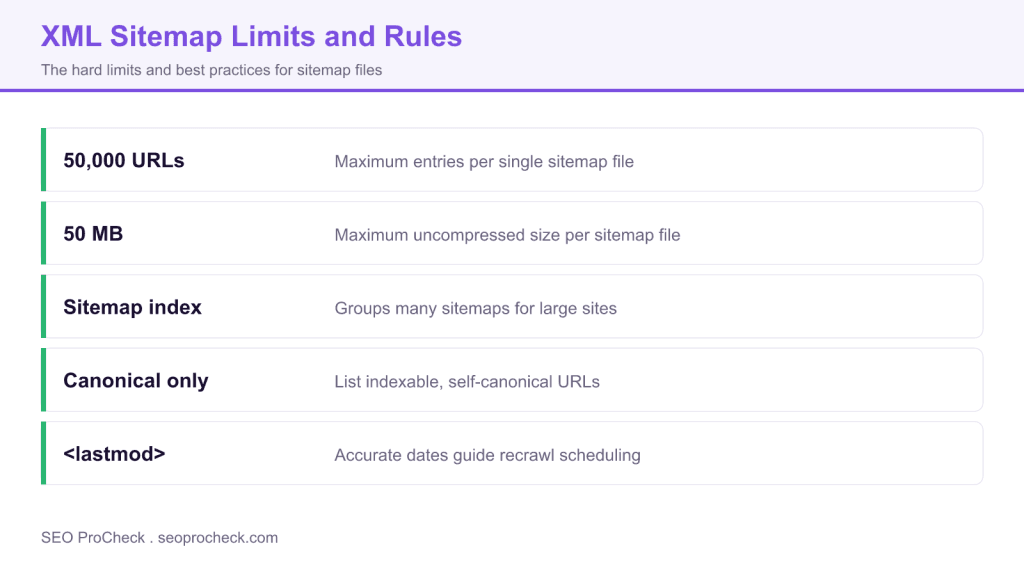
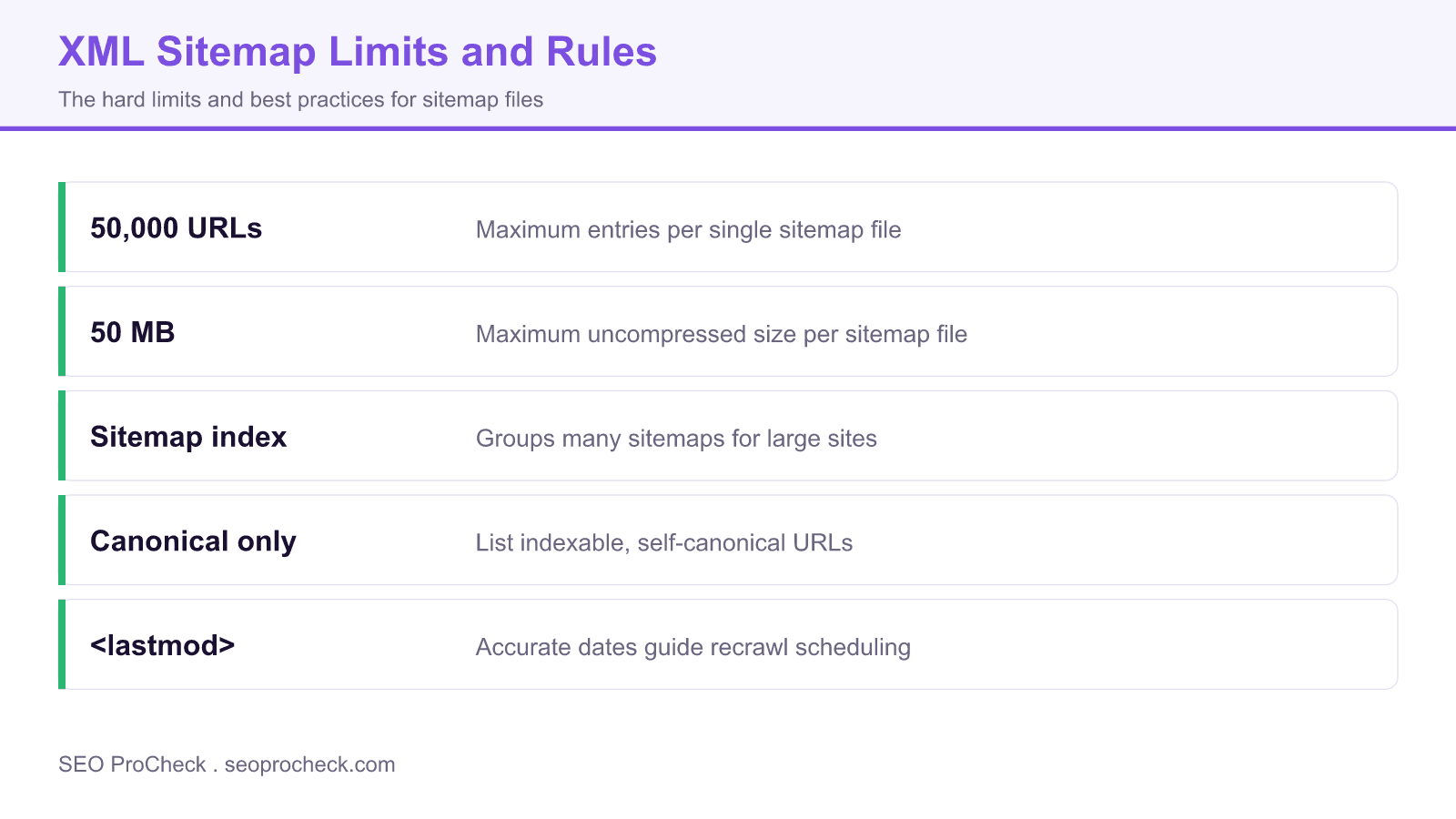
An XML sitemap lists the URLs you want search engines to crawl and index, which helps discovery on large or poorly linked sites. A single sitemap holds up to 50,000 URLs and 50MB uncompressed, larger sites split across files joined by a sitemap index, and only indexable self canonical URLs belong in it.
- List canonical, indexable URLs only, never redirects, noindex pages, or blocked paths.
- Split past 50,000 URLs or 50MB and reference the parts from a sitemap index file.
- Submit the sitemap in Search Console and Bing Webmaster Tools, and reference it in robots.txt.
- Keep
<lastmod>accurate, because false dates train crawlers to ignore it.
Everything you need to know about XML sitemaps for SEO. From creation to submission, troubleshooting to best practices. Direct answers optimized for quick understanding.
Table of Contents
- Sitemap Basics
- Creating Sitemaps
- Sitemap Types
- Submission and Discovery
- Optimization Best Practices
- Troubleshooting
Sitemap Basics
What is an XML sitemap?
An XML file listing URLs you want search engines to crawl and index. It provides metadata like last modification date, change frequency, and priority. Sitemaps help search engines discover pages, especially on large or complex sites.
Are sitemaps required for SEO?
Not required, but strongly recommended. Small sites with good internal linking may rank fine without one. Large sites, new sites, sites with orphan pages, or complex architectures benefit significantly from sitemaps.
Do sitemaps improve rankings?
Not directly. Sitemaps help discovery and crawling, not ranking. However, faster discovery of new or updated content indirectly helps SEO. Pages not crawled can't rank, so sitemaps ensure nothing is missed.
Where should sitemaps be located?
Traditionally at domain root: example.com/sitemap.xml. Can be placed elsewhere if referenced in robots.txt. Must be accessible via HTTP/HTTPS. Subdomain sitemaps should be at that subdomain's root.
What's the difference between XML and HTML sitemaps?
XML sitemaps are for search engines: machine-readable, contain metadata, not visible to users. HTML sitemaps are for users: human-readable navigation pages listing site sections. Both can exist; they serve different purposes.
What format should sitemaps use?
Standard XML format with UTF-8 encoding. Must include proper XML declaration and urlset namespace. Each URL wrapped in url tags containing loc (required), lastmod, changefreq, and priority elements (optional).
Creating Sitemaps
How do I create an XML sitemap?
Options include: CMS plugins (Yoast, Rank Math for WordPress), crawling tools (Screaming Frog exports sitemaps), online generators, or manual creation for small sites. Most CMSs generate sitemaps automatically.
What URLs should be in my sitemap?
Include only canonical, indexable URLs you want ranked. Exclude noindex pages, redirects, error pages, duplicate content, parameter variations, and paginated archives. Quality over quantity; include valuable pages only.
How many URLs can a sitemap contain?
Maximum 50,000 URLs per sitemap file. Maximum 50MB uncompressed file size. For larger sites, use sitemap index files to reference multiple sitemaps. Most sites never hit these limits.
What is a sitemap index file?
A master sitemap that references other sitemap files. Format: sitemapindex containing sitemap entries with loc pointing to individual sitemaps. Essential for large sites exceeding 50,000 URLs. Submit only the index to Search Console.
What does lastmod mean?
Last modification date of the URL content. Format: W3C datetime (YYYY-MM-DD or full ISO 8601). Only use if content actually changed; don't auto-update to current date. Inaccurate lastmod reduces crawl efficiency.
What does changefreq mean?
Hints how often content changes: always, hourly, daily, weekly, monthly, yearly, never. Google largely ignores this field. Focus on accurate lastmod instead. Many SEOs omit changefreq entirely now.
What does priority mean?
Relative importance of URLs within your site (0.0 to 1.0). Default is 0.5. Google has stated they ignore priority values. Focus on site architecture and internal linking to signal page importance instead.
Should sitemaps be static or dynamic?
Dynamic sitemaps update automatically as content changes. Static sitemaps require manual regeneration. Dynamic is better for active sites. Most CMS plugins generate dynamic sitemaps automatically.
Sitemap Types
What is an image sitemap?
Sitemap extension for images. Add image:image tags within url elements, specifying image:loc (URL). Helps Google Image Search discover images, especially those loaded via JavaScript or not in main content.
What is a video sitemap?
Sitemap extension for video content. Include video:video tags with title, description, thumbnail, content location, duration. Essential for video SEO and appearing in video search results. Complex but valuable.
What is a Google News sitemap?
Special sitemap for Google News publishers. Contains articles published within last 48 hours. Includes news:publication, news:publication_date, news:title. Only for approved Google News publishers.
Can sitemaps include hreflang?
Yes. Add xhtml:link elements with rel="alternate" hreflang="xx" for each language version. Useful for international sites. Alternative to HTML link elements or HTTP headers for hreflang implementation.
Do I need a separate mobile sitemap?
No. Google uses mobile-first indexing with one index. Your standard sitemap covers both. Mobile sitemaps (with mobile namespace) are deprecated. Ensure mobile URLs are in your main sitemap.
Should I have multiple sitemaps?
For organization, yes. Separate by content type: posts, pages, products, categories. Helps identify indexing issues by section. Use sitemap index to reference all. Easier troubleshooting and monitoring.
Sitemap Types Comparison
| Type | Purpose | Key Elements |
|---|---|---|
| Standard XML | Page discovery | loc, lastmod |
| Image | Image search | image:loc |
| Video | Video search | video:content_loc, video:thumbnail |
| News | Google News | news:publication_date, news:title |
| Sitemap Index | Reference other sitemaps | sitemap loc entries |
Submission and Discovery
How do I submit a sitemap to Google?
Primary method: Google Search Console > Sitemaps > Enter URL > Submit. Alternative: Add Sitemap directive to robots.txt. Google will also discover sitemaps linked from robots.txt automatically.
How do I submit a sitemap to Bing?
Bing Webmaster Tools > Sitemaps > Submit sitemap. Also supports IndexNow for instant URL submission. Bing reads robots.txt Sitemap directives too. Consider Bing for AI search visibility.
Should I add sitemap to robots.txt?
Yes. Add "Sitemap: https://example.com/sitemap.xml" at file end. This helps all search engines discover your sitemap, not just those where you've submitted manually. No downside to including it.
Do I need to resubmit after updates?
No. Search engines recrawl sitemaps periodically. They check lastmod dates for changes. Don't resubmit unless you've fixed errors or moved the sitemap. Ping endpoints exist but aren't necessary.
What is sitemap ping?
Notifying search engines of sitemap updates. Google deprecated their ping endpoint in 2023. Bing's IndexNow is the modern alternative for real-time notification. Regular submission works fine for most sites.
What is IndexNow?
Protocol for instant URL submission to Bing, Yandex, and partners. Submit URLs immediately when published or updated. Requires API key verification. Faster than waiting for crawl. Worth implementing.
Optimization Best Practices
Should sitemap URLs match canonicals?
Absolutely. Only include canonical versions in sitemaps. Submitting non-canonical URLs wastes crawl budget and sends mixed signals. Sitemap URLs should match your canonical tags exactly.
Should noindex pages be in sitemaps?
No. Including noindex pages creates conflicting signals: sitemap says "index this" while page says "don't index." Remove noindex URLs from sitemaps. Search Console will flag this as an issue.
Should redirecting URLs be in sitemaps?
No. Remove URLs that 301/302 redirect. Include only final destination URLs. Redirects in sitemaps waste crawl budget and show poor site maintenance. Update sitemaps after migrations.
Should I remove 404 pages from sitemaps?
Yes. 404 URLs in sitemaps indicate poor quality control. Search Console reports these as errors. Regularly audit sitemaps against actual live pages. Automated sitemaps should exclude deleted content.
How often should sitemaps update?
Whenever content changes. Dynamic sitemaps update automatically. For static sitemaps, regenerate at least weekly for active sites. Stale sitemaps with inaccurate lastmod dates reduce effectiveness.
Should I compress sitemaps?
Optional but recommended for large sitemaps. Use gzip compression (.xml.gz extension). Reduces bandwidth, faster for crawlers. Search engines decompress automatically. Keep under 50MB compressed.
How do I audit my sitemap?
Compare sitemap URLs against: Search Console indexed pages, crawl data, canonical tags, noindex status. Look for missing important pages, included error pages, non-canonical URLs. Tools like Screaming Frog help.
Troubleshooting
Why aren't my sitemap URLs getting indexed?
Common causes: low-quality content, noindex tags, canonical pointing elsewhere, crawl blocks in robots.txt, site quality issues, new site without authority. Sitemap helps discovery, not indexation guarantee.
What do Search Console sitemap errors mean?
"Couldn't fetch": accessibility issue, check URL and server. "Invalid": XML syntax errors. "URL blocked": robots.txt conflict. "URL is not allowed": URL outside declared domain. Fix the underlying issue.
How do I fix sitemap parsing errors?
Validate XML syntax online. Check for: proper XML declaration, correct namespace, escaped special characters (& becomes &), UTF-8 encoding, no invalid characters. Test with XML validator before submitting.
Should sitemap URLs be HTTP or HTTPS?
Match your canonical protocol. If site uses HTTPS (it should), all sitemap URLs should be HTTPS. Mixed protocols cause issues. Sitemap file itself should be served over HTTPS too.
Should URLs include www or not?
Match your canonical version exactly. If you use www.example.com, sitemap URLs must include www. Consistency matters. Google retired the Search Console preferred domain setting in 2019, so pick one host, enforce it with 301 redirects and canonical tags, and match it in your sitemap.
Do trailing slashes matter in sitemaps?
Yes. /page/ and /page are different URLs. Match exactly what your server returns and what canonical tags specify. Inconsistency causes duplicate content issues and wastes crawl budget.
What if Search Console shows 0 indexed from sitemap?
Possible causes: sitemap just submitted (wait 1-2 weeks), URLs already indexed via other means, indexing issues with page quality, new site building authority. Check individual URL inspection.
What if my sitemap is too large?
Split into multiple sitemaps under 50,000 URLs each. Create sitemap index referencing all parts. Consider organizing by content type or date. Submit only the index file to Search Console.
Common Sitemap Status Codes
| Status | Meaning | Action |
|---|---|---|
| Success | Sitemap processed | Monitor indexed count |
| Couldn't fetch | Access error | Check URL, robots.txt, server |
| Has errors | Some URLs problematic | Review error details |
| Pending | Not yet processed | Wait 24-48 hours |
Quick reference table
Different sitemap types solve different discovery problems. Reference the robots.txt Sitemap directive in our complete robots.txt reference, add hreflang annotations as covered in the hreflang and international SEO FAQ, and keep entries clean of the redirect chains explained in our redirects and HTTP status codes FAQ.
| Sitemap type | What it lists | When to use it |
|---|---|---|
| URL sitemap | Standard page URLs | Every site |
| Sitemap index | Links to child sitemaps | Sites over 50,000 URLs |
| Image sitemap | Image URLs and metadata | Image heavy sites and galleries |
| Video sitemap | Video location and metadata | Pages with hosted or embedded video |
| News sitemap | Articles from the last 48 hours | Approved Google News publishers |
Frequently Asked Questions
A single sitemap file can hold up to 50,000 URLs and must stay under 50MB uncompressed. When you exceed either limit, split the URLs across multiple sitemaps and list them all in a sitemap index file. You can gzip sitemaps to save bandwidth.
Only canonical, indexable pages that return a 200 status. Exclude redirected URLs, noindex pages, canonicalized duplicates, and anything blocked in robots.txt. A clean sitemap sends a clear signal about the pages you actually want indexed.
Submitting in Search Console is not strictly required, but it speeds discovery and gives you index coverage reporting. You should also reference the sitemap URL in robots.txt so every crawler can find it, and submit it in Bing Webmaster Tools.
No. A sitemap helps search engines discover URLs, but indexing still depends on content quality, crawl budget, and canonical signals. Treat it as a discovery aid, not a promise that every listed page will be indexed.
It tells crawlers when a URL last changed meaningfully, which can help them prioritize recrawls. Google only trusts it when it is accurate, so avoid updating every date on every publish. Consistently false dates cause the field to be ignored.
Not always, but they help when media loads through JavaScript or complex players that crawlers struggle to see. You can add image and video tags inside a normal sitemap or maintain dedicated files. They are most valuable for media heavy sites.
Take this with you
The assistant links open with a question about this page already written. Nothing is sent until you press enter.
Claude Vincent is a technical SEO consultant focused on crawlability, rendering, and AI-search visibility. He writes the field guides and case studies at SEO ProCheck, with a bias toward the durable, unglamorous work that decides whether search engines and AI answer engines can actually read and cite a site.
About SEO ProCheck
Technical SEO consulting and GEO strategy with 20 years of enterprise experience. Case studies, resources, and tools for search and AI visibility.
Work With Me
Technical SEO audits, GEO strategy, site migrations, and international SEO. Hourly consulting for teams who need hands-on support, not just reports.
Subscribe to our newsletter!








Recent Posts
- Most Top Sites Never Say Who They Are in Structured Data October 14, 2026
- Homepage Titles Are Mostly Too Short, Not Too Long October 8, 2026
- Who Actually Serves an llms.txt? 184 Top Sites Measured September 29, 2026