

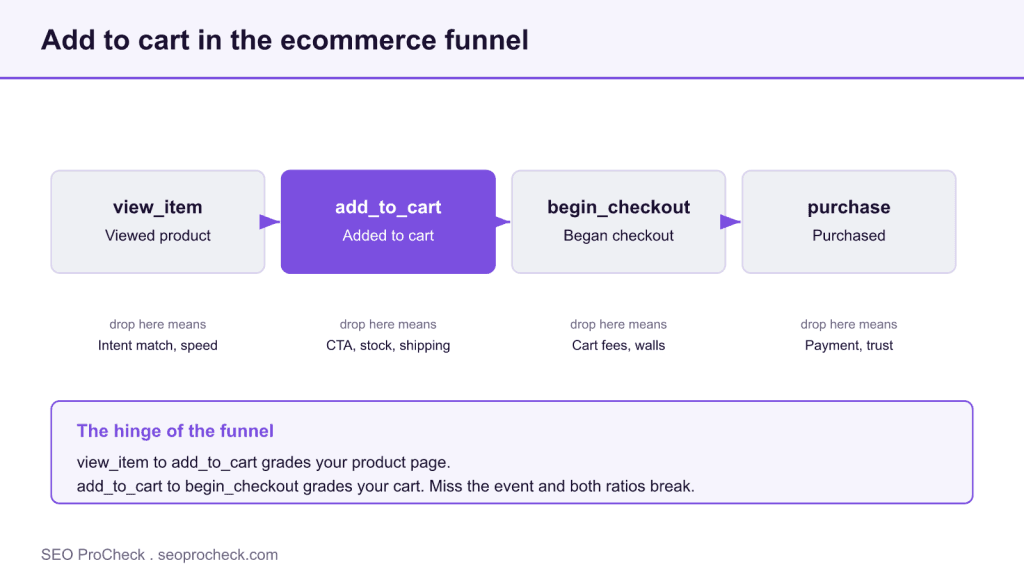
Add to cart tracking records the moment a shopper adds a product as a measurable event so you can see funnel drop off before checkout. In GA4 it is the recommended add_to_cart event, pushed to the dataLayer with a populated items array.
- The add_to_cart event carries an items array so GA4 reports revenue, product, and quantity, not just a raw count.
- Clear the previous ecommerce object before each push so product data does not leak between events.
- The view to cart ratio grades your product page and the cart to checkout ratio grades your cart.
- Verify in GA4 DebugView and GTM preview that the event fires exactly once per click with correct variant and quantity.
What is add-to-cart tracking?
Add-to-cart tracking is capturing the moment a shopper puts a product in their cart as a measurable event, so you can see how many visitors reach that step and where they drop before checkout. Without it you're flying blind between "landed on product page" and "bought", the exact stretch of the funnel where most revenue leaks.
Get this event firing cleanly and you can pinpoint whether your problem is traffic, the product page, the cart, or checkout. Get it wrong, double-firing, missing on variants, no product data, and every downstream conversion metric inherits the error.
How it works in GA4: the add_to_cart event
In GA4, add-to-cart is a recommended ecommerce event named add_to_cart. You push it to the dataLayer when the shopper clicks the button, and Google Tag Manager (or gtag) forwards it to GA4 with the product details attached. The details live in an items array so GA4 can report revenue, product, and quantity, not just a raw count.
A real dataLayer example
<!-- Fire on the add-to-cart button click -->
<script>
window.dataLayer = window.dataLayer || [];
dataLayer.push({ ecommerce: null });  // clear the previous ecommerce object
dataLayer.push({
  event: "add_to_cart",
  ecommerce: {
    currency: "USD",
    value: 89.00,
    items: [{
      item_id: "TH-30L-BLK",
      item_name: "Trailhead 30L Backpack",
      item_variant: "Black / 30L",
      item_category: "Backpacks",
      price: 89.00,
      quantity: 1
    }]
  }
});
</script>
Two details that trip people up: the dataLayer.push({ ecommerce: null }) line clears the previous ecommerce object so product data from one event doesn't bleed into the next, and value should equal price × quantity for the items added. In GTM you then create a Custom Event trigger on add_to_cart and a GA4 event tag that reads the items array.
Where add-to-cart sits in the funnel
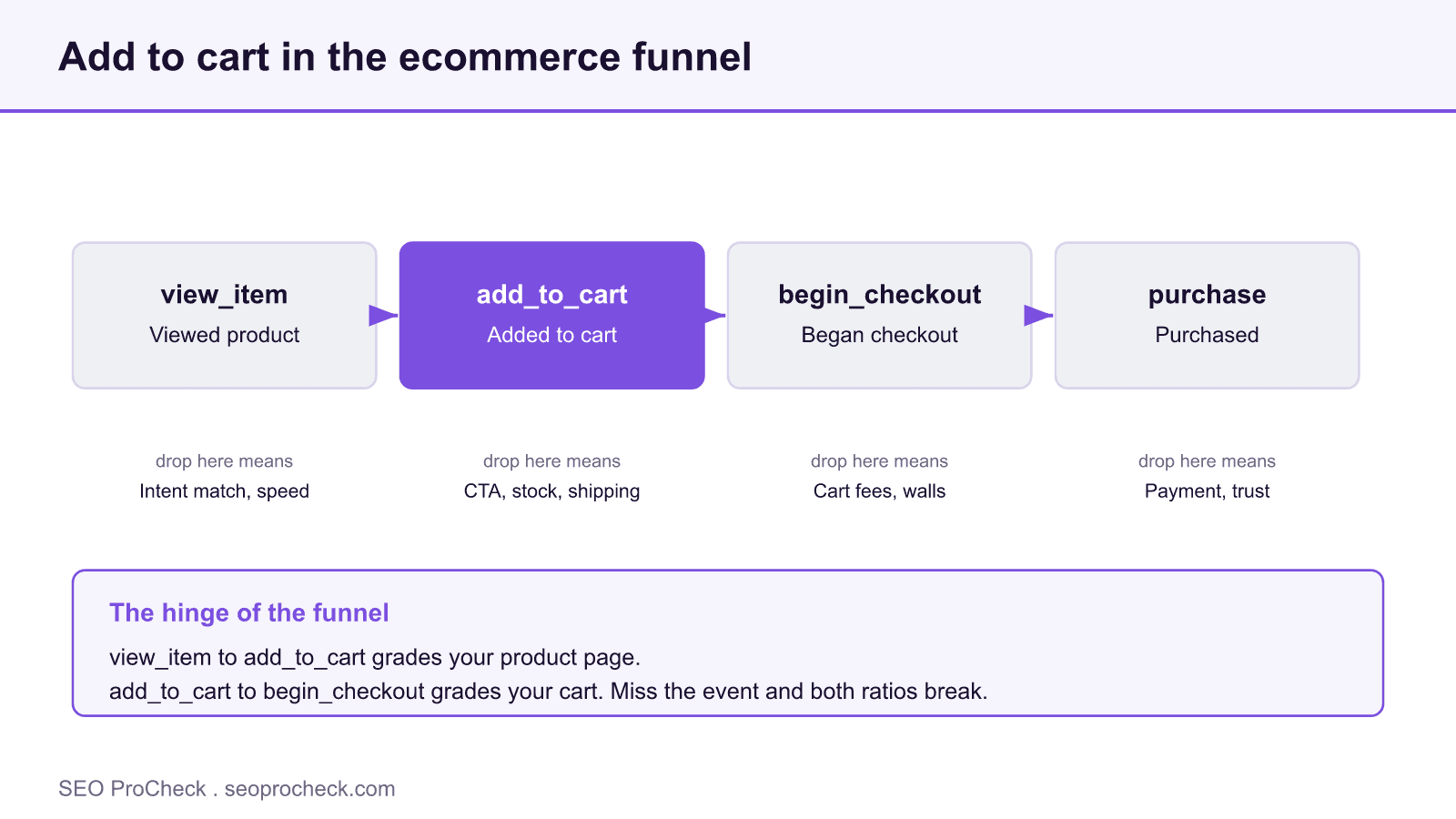
| Funnel step | GA4 event | What a drop here usually means | Where to look |
|---|---|---|---|
| Viewed product | view_item | Traffic arriving but not engaging | Intent match, page speed, price shown |
| Added to cart | add_to_cart | Interest but hesitation | CTA clarity, stock status, shipping cost surprise |
| Began checkout | begin_checkout | Cart friction or unexpected costs | Cart page, fees, account-required walls |
| Purchased | purchase | Checkout friction | Payment options, form length, trust signals |
Add-to-cart is the hinge. Compare add_to_cart to view_item and you measure product-page persuasion; compare it to begin_checkout and you measure cart friction. Miss the event and both ratios break.
How to check add-to-cart tracking on your own site
- Use GA4 DebugView. Enable debug mode (GA4 DebugView + the GTM/gtag debug flag), click add-to-cart on your live site, and watch the
add_to_cartevent arrive in real time with its item parameters. - Preview in GTM's Tag Assistant. Enter preview mode, trigger the button, and confirm the tag fires exactly once and reads the
itemsarray correctly. - Inspect the dataLayer in the console. Type
dataLayerin Chrome DevTools and confirm the push has the righteventname,value, and populateditems. - Check the GA4 realtime and events reports. Confirm
add_to_cartis registering and, if you want it as a key event, mark it as such so it shows in conversions. - Test variants and quantities. Add different sizes/colors and multiple quantities; confirm
item_variant,quantity, andvalueupdate correctly rather than logging the default.
Common mistakes and how to fix them
- Event fires twice. A GTM trigger and a native platform tag both firing inflates add-to-cart counts. Fix: pick one source of truth and remove the duplicate.
- No product data in the event. Firing a bare
add_to_cartwith noitemsarray gives you a count but no revenue or product breakdown. Fix: always populateitemswith id, name, price, and quantity. - Not clearing the ecommerce object. Skipping
dataLayer.push({ ecommerce: null })lets stale product data leak into the next event. Fix: clear before every ecommerce push. - Firing on page load instead of click. Some setups fire when the button renders, not when it's clicked, wildly overcounting. Fix: bind the event to the actual click.
- Variant and quantity ignored. Logging the base price when someone adds three of a premium variant undercounts value. Fix: read the selected variant and quantity at click time.
FAQ
What is the add_to_cart event in GA4?
It's a recommended ecommerce event that records when a shopper adds a product to their cart, along with product details in an items array. GA4 uses it to build funnel reports and measure the step between viewing a product and starting checkout.
Why is my add-to-cart count higher than reality?
Almost always double-firing, two tags or triggers logging the same click, or an event bound to page load instead of the button click. Debug in GTM preview and GA4 DebugView; you should see exactly one event per click.
Do I need Google Tag Manager for add-to-cart tracking?
No, but it's the cleanest path. You can push add_to_cart straight to gtag, but GTM gives you a trigger-and-tag setup that's easier to debug, version, and maintain, especially when variants and dynamic pricing are involved.
How does add-to-cart tracking help conversion optimization?
It splits the funnel at its most revealing point. The view-to-cart ratio grades your product page; the cart-to-checkout ratio grades your cart. Without the event you can't tell which one is leaking, so you can't target the fix. It's the raw material for conversion rate optimization.
Should add_to_cart be a key event (conversion)?
It can be, if adding to cart is a meaningful micro-conversion you want in your conversion reports. Just don't confuse it with a purchase, mark it as a key event for funnel analysis, but keep purchase as your revenue conversion.
Related terms
Related ecommerce terms: Conversion Rate Optimization (CRO), Shopping Intent, and Free Shipping Threshold for the cart-abandonment angle.
Take this with you
The assistant links open with a question about this page already written. Nothing is sent until you press enter.
Claude Vincent is a technical SEO consultant focused on crawlability, rendering, and AI-search visibility. He writes the field guides and case studies at SEO ProCheck, with a bias toward the durable, unglamorous work that decides whether search engines and AI answer engines can actually read and cite a site.
About SEO ProCheck
Technical SEO consulting and GEO strategy with 20 years of enterprise experience. Case studies, resources, and tools for search and AI visibility.
Work With Me
Technical SEO audits, GEO strategy, site migrations, and international SEO. Hourly consulting for teams who need hands-on support, not just reports.
Subscribe to our newsletter!








Recent Posts
- Most Top Sites Never Say Who They Are in Structured Data October 14, 2026
- Homepage Titles Are Mostly Too Short, Not Too Long October 8, 2026
- Who Actually Serves an llms.txt? 184 Top Sites Measured September 29, 2026