


AI Summary
A free shipping threshold is the cart total a shopper must reach before shipping becomes free, such as free shipping on orders over 50 dollars. Set moderately above your average order value, it lifts average order value by nudging one more item into the cart without torching margin.
- Anchor the threshold just above AOV so the gap closes with one added item.
- Set it too low and you give away shipping; set it too high and shoppers abandon.
- A live cart progress nudge is the single change that makes a threshold move behavior.
- Judge it on total revenue and margin, not on shipping cost alone.
What a free shipping threshold is
A free shipping threshold is the cart total a shopper has to hit before shipping becomes free, "free shipping on orders over $50." It is one lever that does two jobs at once: it nudges people to add more to the cart, and it removes the shipping-cost shock that kills conversions at checkout.
The stakes are real money. Set the threshold too low and you eat shipping cost on orders that would have converted anyway. Set it too high and shoppers abandon rather than stretch to reach it. The right number lifts average order value without torching your margin.
A real example: why the number matters
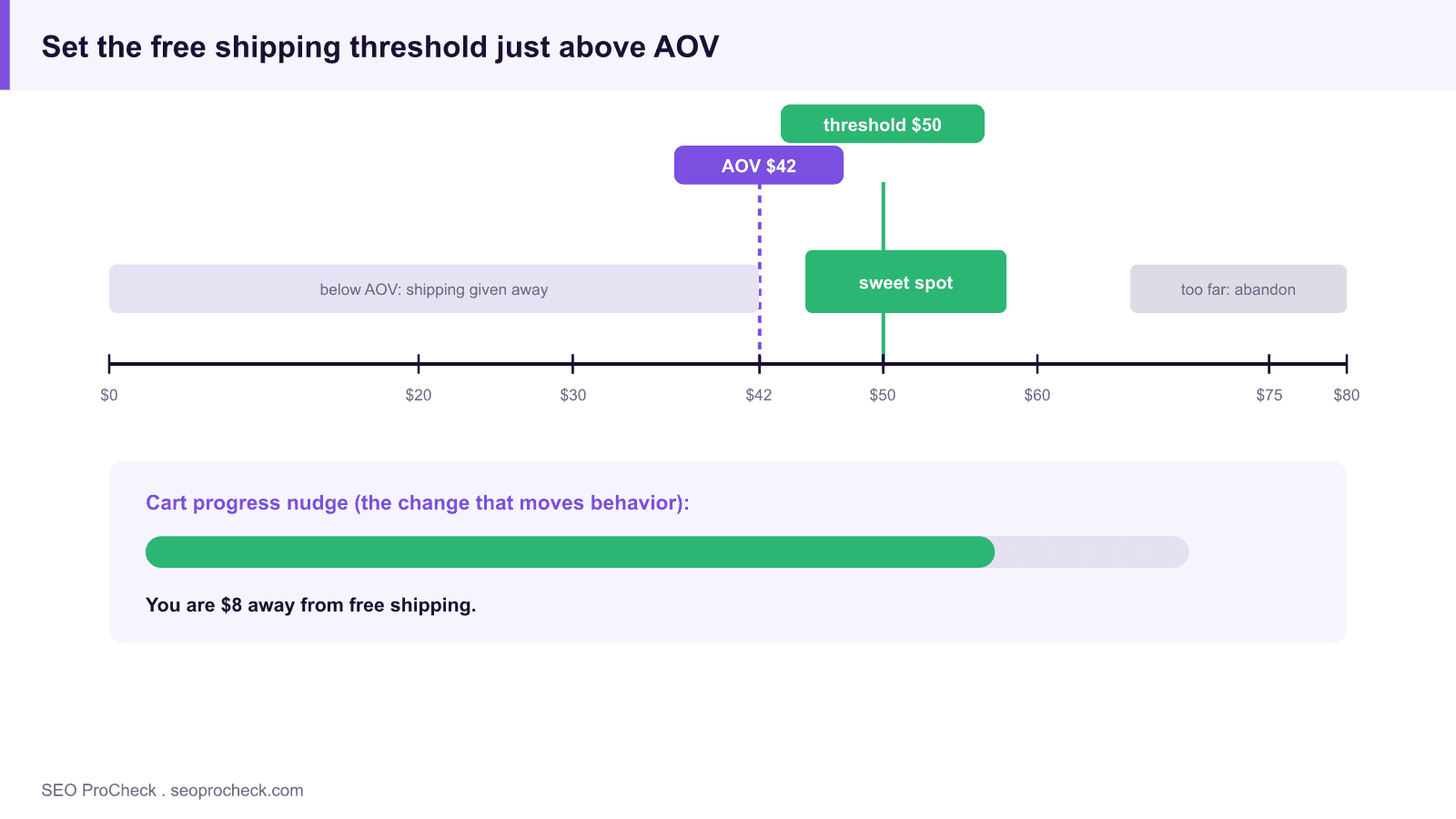
Say your average order value sits at $42 and shipping costs you about $6 per order. Drop a "free shipping over $50" banner in, and a chunk of those $42 carts will add one more item to clear $50. You just moved AOV up by roughly $8 on those orders and absorbed $6 of shipping, net positive, and the customer feels like they won.
Now set the threshold at $75 instead. The $42 shopper looks at a $33 gap, decides it is not worth it, and either abandons or pays shipping grudgingly. The classic rule of thumb is to set the threshold moderately above your current AOV, high enough to stretch the average cart, low enough that the stretch feels achievable. The threshold is not a shipping decision, it is a merchandising decision that happens to be about shipping.
Where the number should land
| Threshold vs. AOV | Example (AOV $42) | Shopper reaction | Business effect |
|---|---|---|---|
| Below AOV | Free over $30 | "Already there, no effort" | You give away shipping on orders that needed no nudge |
| Just above AOV | Free over $50 | "One more item and I'm there" | Lifts AOV; shipping cost usually covered by the extra margin |
| Well above AOV | Free over $75 | "Too far, not worth it" | Abandonment rises; threshold ignored |
| No threshold (free always) | Free on everything | "Nice, but expected" | Simple, but you eat all shipping and lose the upsell nudge |
| No free shipping | Always paid | "Sticker shock at checkout" | Higher cart abandonment, especially against free-shipping rivals |
How to figure out and check your own threshold
- Find your current AOV. In GA4, open Monetization → Overview for average purchase revenue, or pull it from Shopify or WooCommerce analytics. This is your baseline; the threshold gets set relative to it.
- Know your true shipping cost and margin. Get the real per-order shipping cost from your carrier or 3PL and your average product margin. The threshold only works if the extra items a shopper adds carry enough margin to cover the shipping you are giving away.
- Set the threshold above AOV and test it. Start moderately above your AOV, then run an A/B test in Google Optimize's successors, Shopify's native tests, or an app like Intelligems. Watch AOV, conversion rate, and shipping cost together, not in isolation.
- Add a cart progress nudge. Show "You're $8 away from free shipping." Most Shopify and WooCommerce themes or apps support a progress bar. It is the single change that makes a threshold actually move behavior.
- Watch cart abandonment. In GA4 or your checkout analytics, compare the add-to-cart to purchase rate before and after. A threshold that quietly raises abandonment is costing you more than the AOV it adds.
Common mistakes with free shipping thresholds
- Setting it far above AOV. Fix: anchor the threshold just above your average order, not at some aspirational number. The gap must feel closeable in one added item.
- Hiding the threshold until checkout. Fix: surface it site-wide, header banner, product pages, and a live cart progress bar. A threshold nobody sees until checkout changes nothing.
- Ignoring margin math. Fix: check that the incremental items shoppers add to reach the threshold actually carry enough margin to cover the free shipping. A threshold that lifts AOV but destroys margin is a loss dressed as a win.
- Never revisiting the number. Fix: AOV, product mix, and shipping rates drift. Re-check the threshold against current AOV each quarter rather than setting it once and forgetting it.
- Treating it as purely a shipping cost decision. Fix: it is a conversion and AOV lever. Judge it on total revenue and margin, not on how much shipping you paid.
Frequently asked questions
Where should I set my free shipping threshold?
Moderately above your current average order value, high enough that the average cart has to stretch, low enough that the gap closes with one more item. Then test it against conversion rate and margin before locking it in.
Does a free shipping threshold actually raise average order value?
Yes, when it sits just above AOV and is visible with a progress nudge. Shoppers routinely add an item to clear the bar. It stops working when the gap is too big to feel worth closing.
Should I just offer free shipping on everything instead?
You can, and it simplifies the funnel, but you give up the upsell nudge and eat all shipping cost. A threshold captures the conversion benefit of "free shipping" while still pushing carts higher.
How does a threshold affect cart abandonment?
A reachable threshold reduces abandonment by removing checkout shipping shock. An unreachable one raises it, because shoppers feel penalized for not hitting a bar they were never going to clear. Watch the add-to-cart-to-purchase rate to tell which you have.
What tools help me track the impact?
GA4 for AOV and funnel data, your platform's native analytics (Shopify, WooCommerce) for order values, and A/B testing tools to trial threshold levels. Pair the AOV number with conversion rate so you never optimize one at the expense of the other.
Related: Conversion Rate Optimization (CRO) · Add to Cart Tracking · Organic Traffic
Take this with you
The assistant links open with a question about this page already written. Nothing is sent until you press enter.
Claude Vincent is a technical SEO consultant focused on crawlability, rendering, and AI-search visibility. He writes the field guides and case studies at SEO ProCheck, with a bias toward the durable, unglamorous work that decides whether search engines and AI answer engines can actually read and cite a site.
About SEO ProCheck
Technical SEO consulting and GEO strategy with 20 years of enterprise experience. Case studies, resources, and tools for search and AI visibility.
Work With Me
Technical SEO audits, GEO strategy, site migrations, and international SEO. Hourly consulting for teams who need hands-on support, not just reports.
Subscribe to our newsletter!








Recent Posts
- Most Top Sites Never Say Who They Are in Structured Data October 14, 2026
- Homepage Titles Are Mostly Too Short, Not Too Long October 8, 2026
- Who Actually Serves an llms.txt? 184 Top Sites Measured September 29, 2026