

AI Summary
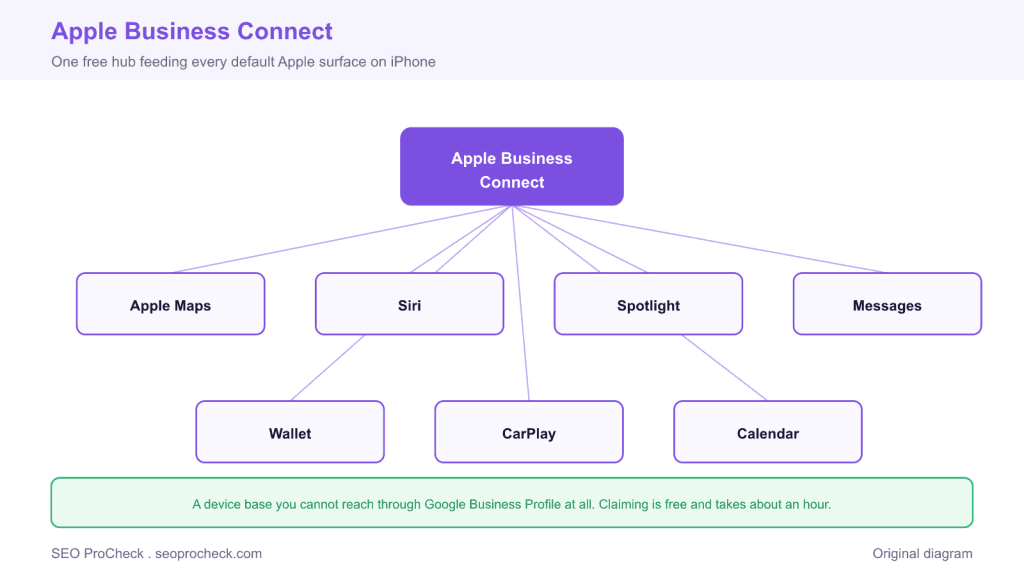
Apple Business Connect is Apple's free platform for controlling how your business appears across Apple Maps, Siri, Spotlight, Messages, Wallet, and CarPlay. It is the only direct line to the default maps app on every iPhone, a device base you cannot reach through Google Business Profile.
- Claiming replaces third party data, often from Yelp, with your own verified, instantly editable details.
- Showcases put banner style offers directly on your Apple Maps place card at no cost.
- Register with a company controlled Apple ID, not a personal one that leaves with an employee.
- Match your NAP to your Google Business Profile and re test with Siri and Spotlight.

Apple Business Connect is Apple's free platform for controlling how your business appears across Apple Maps, Siri, Spotlight, Messages, Wallet, and Calendar. Launched in January 2023 as the replacement for the bare-bones Apple Maps Connect, it's the only direct line you have to the default maps app on every iPhone, a device base you cannot reach through Google Business Profile at all.
Why an iPhone-shaped hole exists in most local strategies
Apple Maps ships as the default on iPhone, iPad, Apple Watch, and CarPlay. When an iPhone user asks Siri for "coffee near me," taps an address in Messages, or searches in Spotlight, the answer comes from Apple's place data, not Google's. Depending on your market, that can be half your potential customers, and most local businesses have never once looked at what Apple shows for them.
Before Business Connect, Apple populated listings from licensed data providers, Yelp most prominently, plus its own collection. That pipeline still fills the gaps for unclaimed businesses, which is exactly the problem: unclaimed means your Apple presence is whatever third-party data Apple last ingested. Claiming through Business Connect replaces guesswork with your own data, verified and instantly editable.
Concrete example of what claiming changes: a bakery claims its place card, uploads a logo and header photos, sets accurate holiday hours, and publishes a Showcase promoting its weekend croissant box. That Showcase appears directly on the place card in Apple Maps, a promotional surface Google doesn't offer in the same way, and it costs nothing.
Apple Business Connect vs. Google Business Profile
| Field / capability | Apple Business Connect | Google Business Profile |
|---|---|---|
| Cost | Free | Free |
| Surfaces | Apple Maps, Siri, Spotlight, Messages, Wallet, CarPlay | Google Search, Google Maps, Local Pack |
| Brand logo on listing | Yes, dedicated logo slot on the place card | Logo shown mainly for verified brand/category contexts |
| Promotions | "Showcases", banner-style offers on the place card | Google Posts (offers, events, updates) |
| Native reviews | No owned review system; ratings historically via Yelp/partners, plus Apple's thumbs ratings | Full native review system, owner responses |
| Q&A | No | Yes |
| Action buttons | Order, book, reserve via partner integrations (OpenTable etc.) | Booking/order links, partner integrations |
| Performance data | Insights: views, directions, website taps, call taps | Performance report: queries, views, actions |
| Categories | Apple's own taxonomy (smaller than Google's) | ~4,000 categories, primary + secondary |
| Multi-location support | Yes, location groups, API for large brands | Yes, organization accounts, bulk upload |
| Verification | Apple ID + business verification (often phone; can take days) | Video, phone, postcard, or instant for some |
How to claim and check your Apple presence
- Look yourself up first. Open Apple Maps (or maps.apple.com on desktop) and search your business name plus city. Note what's wrong: pin position, hours, phone, category, photos. This is what every iPhone user currently sees.
- Register at businessconnect.apple.com. Sign in with an Apple ID (create a company one, don't use a personal account you'll lose track of), find or add your place, and complete verification.
- Fix the fundamentals. Confirm the pin on your actual entrance, set the right category, load hours including holidays, and match your NAP exactly to your Google Business Profile and citations.
- Add the branded layer. Logo, cover photo, action links, and a Showcase if you have any current offer. Empty place cards get default treatment; branded ones visibly stand out in Maps results.
- Re-test with Siri and Spotlight. Ask Siri for your business by name and by category ("pizza near me" from near your location). Then check Insights monthly, Apple's numbers are thinner than Google's but they trend honestly.
Common mistakes and fixes
- Assuming Google coverage includes Apple. It doesn't, there is no feed from GBP to Apple Maps. Fix: claim Business Connect separately; it's an hour, once.
- Registering under an employee's personal Apple ID. Same failure mode as lost GBP logins. Fix: a company-controlled Apple ID with credentials documented somewhere that survives staff turnover.
- Ignoring the legacy data underneath. Stale Yelp-sourced ratings or an old address can persist around a claimed listing. Fix: keep your Yelp listing accurate too, and use the "Report an Issue" flow in Apple Maps for map-level errors like wrong roads or pin snapping.
- Set-and-forget Showcases. An expired "Valentine's special" in July signals neglect on your most premium Apple surface. Fix: calendar the expiry when you publish one.
- Skipping it because "our customers use Google." You don't know that. iPhone owners defaulting to Apple Maps via Siri and CarPlay never show up in your GBP stats, that's the point. The absence of evidence is the measurement gap.
FAQ
Is Apple Business Connect really free?
Yes, entirely, registration, Showcases, Insights, multi-location tools. Apple monetizes the ecosystem elsewhere; there is no paid tier for the listing itself.
Does Apple Business Connect affect my Google rankings?
Not directly. But it's a consistent, high-trust citation of your NAP, and citation consistency supports local prominence broadly. Treat it as coverage of a separate search engine, not a Google tactic.
How do reviews work on Apple Maps?
Apple doesn't run a Google-style review system you manage through Business Connect. Ratings historically came from partners like Yelp, and Apple has been building its own lightweight ratings and photos submitted by users. You can't respond to ratings the way you respond to Google reviews, another reason to keep partner-platform listings healthy.
Can agencies or multi-location brands manage listings at scale?
Yes. Business Connect supports location groups, user roles, and an API for large brands and third-party listing tools, the multi-location logic mirrors what you'd do in a multi-location SEO program on Google.
How does this compare to Bing's equivalent?
Same idea, different ecosystem: Bing Places covers Microsoft surfaces and can import from GBP, while Apple requires manual setup. Claim all three and you've covered effectively every default search and maps surface in the market.
Take this with you
The assistant links open with a question about this page already written. Nothing is sent until you press enter.
Claude Vincent is a technical SEO consultant focused on crawlability, rendering, and AI-search visibility. He writes the field guides and case studies at SEO ProCheck, with a bias toward the durable, unglamorous work that decides whether search engines and AI answer engines can actually read and cite a site.
About SEO ProCheck
Technical SEO consulting and GEO strategy with 20 years of enterprise experience. Case studies, resources, and tools for search and AI visibility.
Work With Me
Technical SEO audits, GEO strategy, site migrations, and international SEO. Hourly consulting for teams who need hands-on support, not just reports.
Subscribe to our newsletter!








Recent Posts
- Most Top Sites Never Say Who They Are in Structured Data October 14, 2026
- Homepage Titles Are Mostly Too Short, Not Too Long October 8, 2026
- Who Actually Serves an llms.txt? 184 Top Sites Measured September 29, 2026