

AI Summary
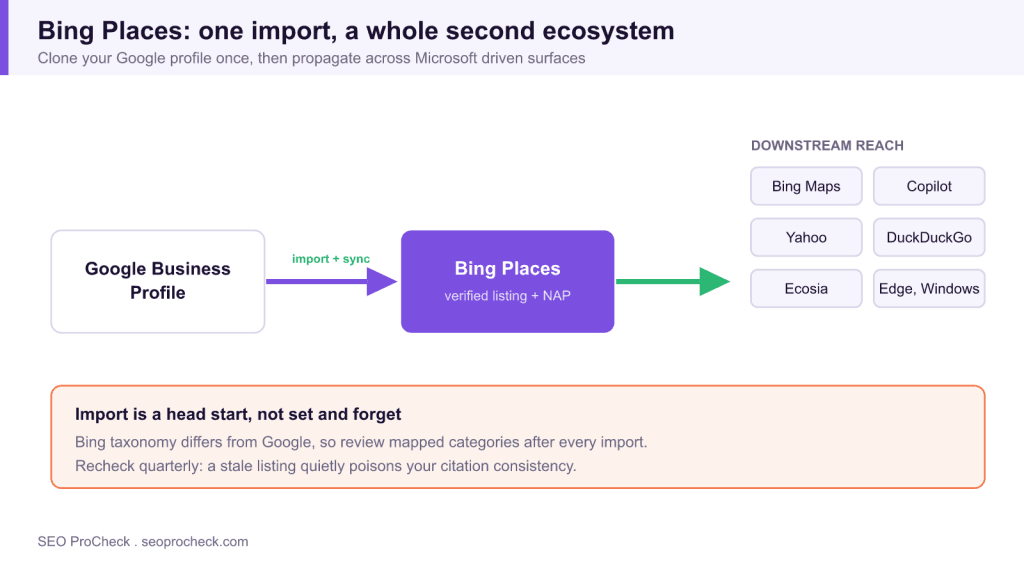
Bing Places for Business is Microsoft's free listing manager, the Bing ecosystem counterpart to Google Business Profile that controls how you appear across Bing search, Bing Maps, and Copilot. Its standout feature imports your entire Google profile in one sitting, giving the best effort to coverage ratio in local SEO.
- A verified Bing Places listing propagates to Bing Maps, Copilot, Yahoo, DuckDuckGo, Ecosia, Edge, and Windows search.
- The one click Google import clones locations, categories, photos, and hours, with optional periodic sync.
- Review mapped categories after import, because Bing taxonomy differs from Google and picks the nearest match.
- It counts as a citation too, a Microsoft owned property confirming your NAP for local search trust.
Bing Places for Business is Microsoft's free listing manager, the Bing-ecosystem counterpart to Google Business Profile, controlling how your business appears in Bing search, Bing Maps, and the surfaces Microsoft feeds. It's the cheapest coverage in local SEO: the import tool can clone your entire Google profile in one sitting, and hardly any of your competitors have bothered.
Why Bing still earns a spot on the checklist
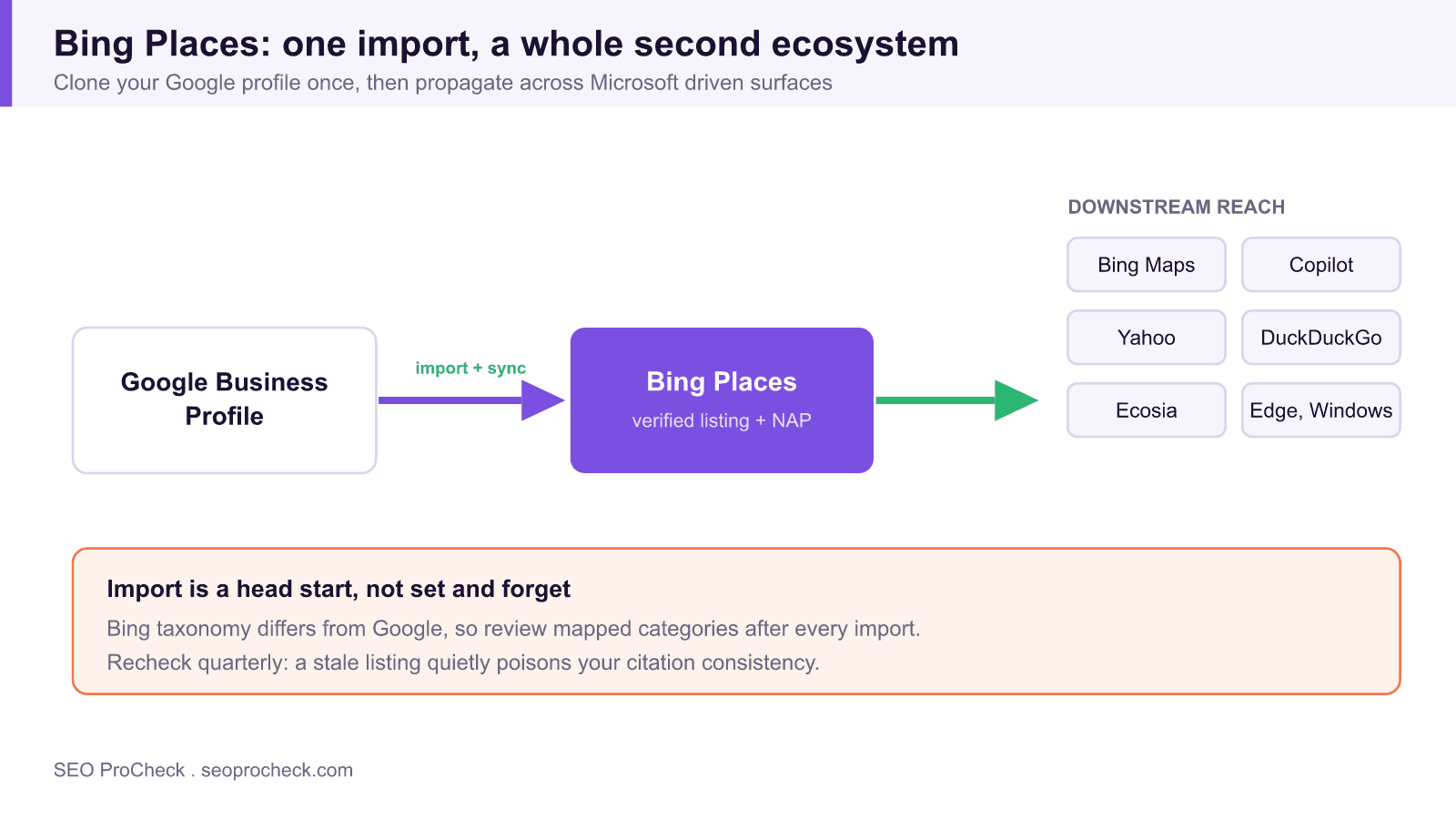
Bing's search share is a fraction of Google's, but counting only bing.com searches undersells where the data goes. Bing results power Windows search boxes, Microsoft Edge's default experience, Cortana's leftovers, and, most relevant since 2023, Microsoft Copilot, which answers local questions using Bing's index and Bing Places data. Yahoo, DuckDuckGo, and Ecosia also draw on Bing's index for much of their results. A verified Bing Places listing is one edit that propagates across all of it.
The audience skews too: desktop users, office workers on locked-down corporate Windows machines, and an older demographic that never changed defaults. For B2B services, insurance, healthcare, legal, categories where that demographic is the buyer, Bing traffic converts respectably even at low volume.
And it's a citation. A verified Microsoft-owned property confirming your NAP is exactly the kind of corroboration local search engines look for when deciding your business data is trustworthy.
The GBP import: the whole pitch in one feature
Bing Places' killer feature is honest about the market's pecking order: "Import from Google My Business." Sign in, authorize, and Bing pulls your locations, categories, photos, hours, and descriptions straight from your Google Business Profile, including multi-location sets, and offers ongoing periodic sync so future GBP edits flow through. A 20-location brand can stand up its entire Bing presence in under an hour.
Two caveats from the trenches. First, category mapping is approximate: Bing's taxonomy differs from Google's, and the importer picks the nearest match, which is sometimes not the one you'd choose. Always review categories after import. Second, sync is not instant or guaranteed field-by-field, treat it as a head start, not a set-and-forget pipe, and spot-check after any major GBP change.
Bing vs. Google: the local ecosystems side by side
| Ecosystem element | Bing / Microsoft | |
|---|---|---|
| Listing manager | Bing Places for Business | Google Business Profile |
| Map product | Bing Maps | Google Maps |
| Local results unit | Bing local pack / map listings | Local Pack, Maps results |
| AI answer layer | Copilot (uses Bing index and places data) | AI Overviews / Gemini (uses Google's index and GBP) |
| Reviews source | Aggregated from third parties (Yelp, Facebook, TripAdvisor) plus Bing's own | Native Google reviews, owner-managed |
| Setup shortcut | One-click import + sync from GBP | Manual (no import from Bing) |
| Downstream reach | Yahoo, DuckDuckGo, Ecosia, Windows, Edge, Copilot | Google properties, Android, Assistant |
| Verification | Phone, email, or postcard; GBP-verified import eases it | Video increasingly required for new/edited listings |
| Competition level | Low, most local businesses never claim | Saturated in most categories |
| Webmaster-side companion | Bing Webmaster Tools (separate product) | Google Search Console (separate product) |
How to set up and check your Bing presence
- Search yourself on Bing first. Query your business name plus city on bing.com and in Bing Maps. Screenshot what's there, unclaimed listings are often assembled from third-party data and get details wrong.
- Claim at bingplaces.com. Sign in with a Microsoft account and either run the GBP import or claim the existing listing manually. Complete verification.
- Audit after import. Check categories against your Google primaries, confirm the map pin, and make sure the website URL points to the right location page, not just the homepage.
- Test the AI layer. Ask Copilot in Edge for your category plus city ("best HVAC company in Mesa"). Note whether you appear and what data it cites, this surface rewards exactly the completeness Bing Places controls.
- Recheck quarterly. If you enabled GBP sync, verify a recent Google edit actually propagated. If not synced, diff hours, phone, and categories manually, a stale Bing listing quietly poisons your citation consistency.
Common mistakes and fixes
- Skipping Bing because "nobody uses it." Bing feeds Yahoo, DuckDuckGo, Copilot, and every default Edge install. Fix: an hour of setup for a whole second ecosystem is the best effort-to-coverage ratio in local search.
- Importing from GBP and never looking again. Category mismatches and failed syncs go unnoticed for years. Fix: quarterly spot-check, five minutes.
- Inconsistent NAP between Bing and everything else. An old suite number surviving on Bing undercuts the citation value everywhere. Fix: audit with a NAP consistency checker and correct at each source.
- Confusing Bing Places with Bing Webmaster Tools. Places manages the business listing; Webmaster Tools manages your website's crawling and indexing. You want both, and neither substitutes for the other.
- Ignoring the reviews Bing displays. Bing aggregates ratings from Yelp, Facebook, and others onto your listing. Fix: keep those platforms healthy, Yelp especially, since its data shows up on surfaces you'd never expect.
FAQ
Is Bing Places free?
Completely. Claiming, importing, multi-location management, and syncing all cost nothing. There's no paid tier to upsell you into.
Does a Bing Places listing help my Google rankings?
Only indirectly, as one more consistent citation. Its real value is direct: visibility in an ecosystem Google doesn't touch, for the price of an hour.
How does the Google import handle multiple locations?
It pulls your full location set from a GBP organization account in one operation and can keep syncing changes. Review each imported location's category and pin, bulk import means bulk errors if the source had any.
Can I manage reviews in Bing Places?
Mostly no. Bing aggregates third-party reviews rather than running its own owner-response system, so review management happens on the source platforms, and the results flow to Bing on their own.
What about Apple, same logic?
Same logic, more manual work: Apple Business Connect has no GBP import, but it covers the iPhone-default ecosystem the same way Bing Places covers Microsoft's. Claim both and stop leaving default-search users to chance.
Take this with you
The assistant links open with a question about this page already written. Nothing is sent until you press enter.
Claude Vincent is a technical SEO consultant focused on crawlability, rendering, and AI-search visibility. He writes the field guides and case studies at SEO ProCheck, with a bias toward the durable, unglamorous work that decides whether search engines and AI answer engines can actually read and cite a site.
About SEO ProCheck
Technical SEO consulting and GEO strategy with 20 years of enterprise experience. Case studies, resources, and tools for search and AI visibility.
Work With Me
Technical SEO audits, GEO strategy, site migrations, and international SEO. Hourly consulting for teams who need hands-on support, not just reports.
Subscribe to our newsletter!








Recent Posts
- Most Top Sites Never Say Who They Are in Structured Data October 14, 2026
- Homepage Titles Are Mostly Too Short, Not Too Long October 8, 2026
- Who Actually Serves an llms.txt? 184 Top Sites Measured September 29, 2026