

AI Summary
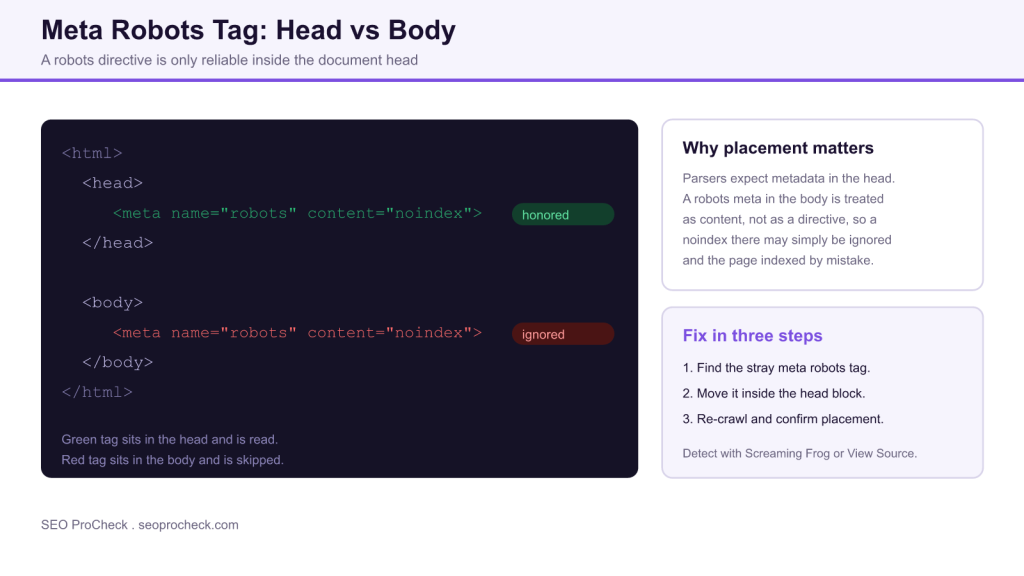
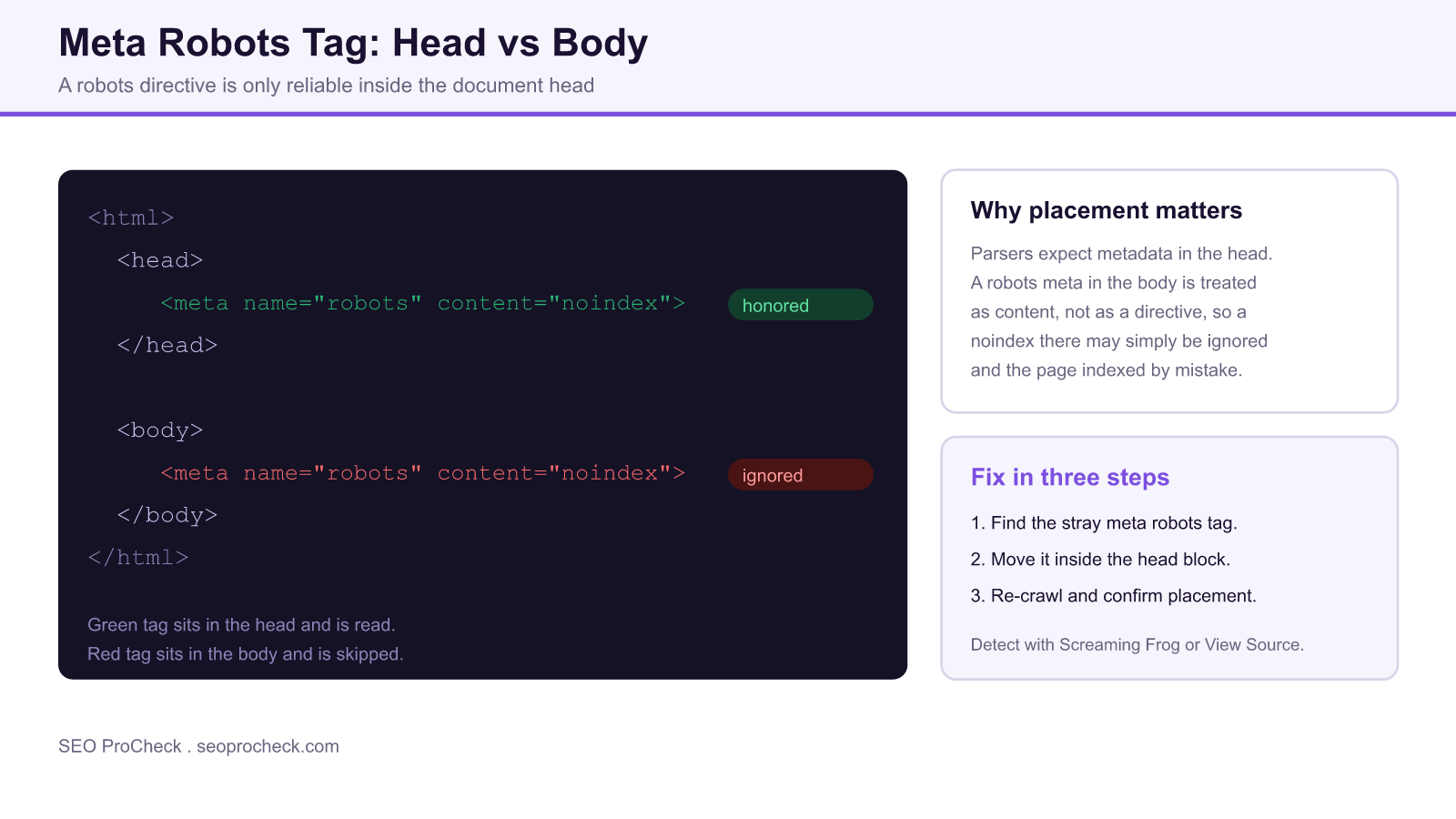
The robots meta tag must live inside the HTML <head>. When a crawler finds it in the <body>, it usually treats it as page content rather than a directive, so a noindex or nofollow placed there can be silently ignored. The fix is to move the tag back into the head and re-crawl to confirm.
- A robots meta tag in the body may be ignored, so an intended noindex can fail and the page stays indexed.
- The most common cause is a malformed or unclosed tag in the head that pushes later meta tags into the body.
- Page builders and scripts that inject tags after load can also drop a robots meta into the body.
- Detect with View Source or Screaming Frog, move the tag into the head, then re-crawl to verify.
Quick Reference
Element Code: HT-006
Issue: Meta robots tag is placed outside the head section
Impact: Meta robots directive may be ignored by search engines
Fix: Move meta robots tag into the head section
Detection: Screaming Frog, HTML validation, View Source
What Is This Issue?
Meta tags must be placed in the head section of HTML documents. A meta robots tag in the body may be ignored by search engines, causing your indexing directives to fail.
The robots meta tag tells crawlers what to do after they fetch a page: whether to index it, follow its links, show a snippet, and so on. The HTML specification defines the tag as document metadata, which belongs in <head>. When a parser encounters it inside <body>, it is out of place, and Google’s own documentation states that a robots meta tag is only recognized in the head. In practice a body-level directive is often dropped, so a page you meant to keep out of the index can quietly stay in it.
Why This Matters for Your Website
Robots directives control whether pages are indexed. If they are ignored due to incorrect placement, you may have pages indexed that should not be, or vice versa.
The failure mode is dangerous precisely because it is invisible. The tag is present, it looks correct, and a quick glance at the source suggests everything is fine. Only when you check where the tag actually sits, or notice a supposedly noindexed URL appearing in Search Console, does the problem surface. A staging page, a thank-you page, or a thin filter URL that should have been suppressed can leak into search results and dilute your site quality signals.
Common causes of a body-level robots tag
Understanding how the tag ends up in the body makes it far quicker to fix. The usual culprits:
- An unclosed or malformed tag in the head. A stray
</head>, an unterminated attribute, or an unescaped character can make the browser close the head early, so every meta tag after it lands in the body. - Page builders and plugins that inject their own tags into the content area rather than the document head.
- JavaScript that adds the tag after load, appending it to the body or a container element instead of the head.
- Content pasted into a WYSIWYG editor, where a copied meta tag becomes part of the post body.
How to Fix This Issue
- Locate the meta robots tag: Find it in your HTML source
- Move to head: Ensure it is between
<head>and</head> - Verify: Re-crawl and check placement
A correct implementation looks like this, with the directive sitting cleanly inside the head:
<head>
<meta charset="utf-8">
<meta name="robots" content="noindex, follow">
</head>
If the tag is being written by a plugin or theme, fix it at the source rather than patching the output: correct the SEO plugin setting, or update the template so the tag is printed inside wp_head() on WordPress. When a broken tag earlier in the head is closing it prematurely, repairing that tag is what actually moves the robots meta back into place.
Tools for Detection
- Screaming Frog: Shows meta robots location issues
- HTML Validator: Flags misplaced meta tags
In Screaming Frog, crawl the site and check the Directives tab, then use View Source or the browser Inspector on a suspect URL to confirm whether the tag renders inside the head or the body. The W3C validator will also flag metadata that appears outside the head, which often points straight at the malformed tag responsible.
Placement, behavior, and fix at a glance
| Where the tag sits | How crawlers treat it | Result | Action |
|---|---|---|---|
| Inside the head | Read as a directive | noindex or nofollow honored | Correct, no change needed |
| Inside the body | Treated as content | Directive may be ignored | Move into the head |
| Injected by JS after load | May be missed on render | Unreliable | Output server side in the head |
| After a broken head tag | Head closed early | Tag spills into body | Fix the malformed tag first |
TL;DR (The Simple Version)
Your meta robots tag is in the wrong place. It needs to be inside the head section, not in the body. Move it and re-check.
Frequently asked questions
Does a meta robots tag in the body still work?
Usually not. Google recognizes the robots meta tag only in the head, and parsers tend to treat a body-level tag as content rather than a directive. A noindex placed there can be silently ignored, so the page may stay indexed.
Why did my noindex tag end up in the body?
The most common reason is a malformed or unclosed tag earlier in the head, which makes the browser close the head early so later meta tags fall into the body. Plugins, page builders, and JavaScript that inject tags after load can also cause it.
How do I check where my robots tag is?
Open View Source or the browser Inspector on the page and look for the meta robots tag. Confirm it appears between the opening and closing head tags. Screaming Frog also reports directive placement across a whole crawl.
Will Google index a page whose noindex is in the body?
It can. Because the directive may be ignored, treat any body-level noindex as non-functional until you move it into the head. Verify in Search Console that the URL is actually excluded once fixed.
What is the correct place for the robots meta tag?
Inside the document head, alongside the other meta tags, for example between the opening head tag and the closing head tag. On WordPress it should be printed by the SEO plugin inside wp_head().
How do I confirm the fix worked?
Re-crawl the URL and check that the robots tag now renders inside the head, then use the URL Inspection tool in Search Console to confirm the directive is being read as intended.
Related reading on SEO ProCheck:
- Full meta robots and X-Robots-Tag reference
- More HTML structure SEO checks
- Browse all indexing and crawl guides
Take this with you
The assistant links open with a question about this page already written. Nothing is sent until you press enter.
Claude Vincent is a technical SEO consultant focused on crawlability, rendering, and AI-search visibility. He writes the field guides and case studies at SEO ProCheck, with a bias toward the durable, unglamorous work that decides whether search engines and AI answer engines can actually read and cite a site.
About SEO ProCheck
Technical SEO consulting and GEO strategy with 20 years of enterprise experience. Case studies, resources, and tools for search and AI visibility.
Work With Me
Technical SEO audits, GEO strategy, site migrations, and international SEO. Hourly consulting for teams who need hands-on support, not just reports.
Subscribe to our newsletter!







Recent Posts
- Finding a Competitor's Sitemap, and Turning It Into a Change Log September 15, 2026
- AI Crawler User Agents: The Current Names, and Which Ones Sites Actually Block September 9, 2026
- Can AI Crawlers Actually Read Your Site? I Measured 400 of the Biggest September 5, 2026